microsoft365
288 TopicsAdd action buttons per row in the document library / List to minimize clicks
We would like to add action buttons against each item in the SharePoint document library (e.g., Open, Edit, Share, Copy Link) to reduce the number of clicks for end users. This will improve usability, especially for users on different screen resolutions who may have difficulty locating the appropriate commands in the toolbar or context menu.Solved99Views0likes3Comments
How to create a template from a modern Sharepoint online communication site
Hi I thought I saw recently something indicating that Microsoft were going to make it easier to create your own tepmplate for a modern comms SharePoint online site. Did I imagine that? Was it wishful thinking or can someone point me to the article? Alternatively if someone knows how to do it without using powershell / sharepoint shell or jason files (or has a code guide that is more of an idiots guide to building blocks - just stick these bits together indicating where the colours can be changed) that would be truely awsome. Sharepoint sites got easier to make with drag the web parts about , but making a template has gone off the charts for me. Save as was good for me - I don't expect it to be that simple ever again but am I missing something, it can't be coders only, surely? Looking forward to your ideas of how to do it. Thank you HSolved117Views0likes2Comments
SharePoint Library Help Needed
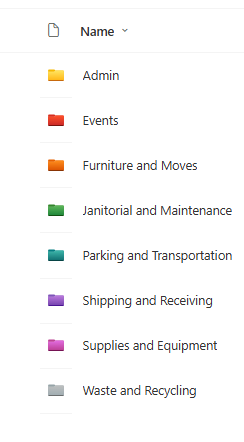
I have a SharePoint Library where I would like to implement these requirements below and would appreciate your advise: Folders were created at the library level, which looks like the image below. I do not want people to be able to create any folders or upload documents or folders at the library level, but rather only when they open the folders. I have disabled folder creation and created a PowerApps form, so that users can only upload document, edit documents, view details of the documents when they open any of the folders., but I cannot seem to find the Power Apps form when I open any of the folders and try to upload a document or view a document or edit the document details. 2. I have a choice column called Fiscal Year which has options as = FY22, FY 23, FY24, FY25, FY26. By March 2026, I would like to create an automate flow which will auto create FY27 and remove FY22 from the choice, so that the choice column is always limited to only 5 years.79Views0likes3Comments
OneDrive site locked NoAccess for 1 month - Ticket #2605040040008376 - No resolution
I have an open Microsoft support ticket for over 1 month with no resolution. Hoping the community or a Microsoft engineer can help. SITUATION: A departed user (deleted over a year ago) had a OneDrive site that was accessible to other users until recently. Since then the site is completely inaccessible to everyone including admins. Current Status: Active LockState: NoAccess WHAT WE TRIED: - Set-SPOSite -LockState Unlock → command succeeds but site stays blocked - Set-SPOUser -IsSiteCollectionAdmin $true → fails with "Access to this Web site has been blocked" - User does not exist in Entra ID, Deleted Users, or Deleted Sites ROOT CAUSE IDENTIFIED: Site was under a 5-year retention policy in Microsoft Purview. Policy showed error "SiteInReadonlyOrNotAccessible" for this OneDrive. We removed the OneDrive from the policy exceptions but the site remains locked. This appears to be a deadlock: - Site is locked so retention policy cannot detach - Retention policy prevents site from being unlocked No eDiscovery holds found on the site. Microsoft support has been unable to resolve this for 1 month. Does anyone know how to break this deadlock?Solved88Views0likes3Comments
SharePoint permission change notifications not working
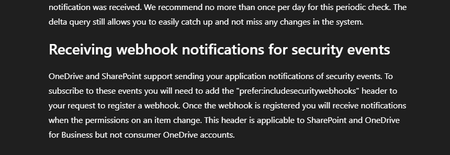
Problem: Trying to get Microsoft Graph change notifications when permissions change on SharePoint/OneDrive drive items (sharing, inheritance breaks, access grants/revocations). Using Prefer: includesecuritywebhooks on subscription creation as documented subscription creates successfully, but the header appears to be silently ignored (notificationQueryOptions is always null in response, Preference-Applied header is always empty). What works: Regular content change notifications fire fine. What doesn't: Zero security notifications on any permission change. Subscription request: POST https://graph.microsoft.com/v1.0/subscriptions Prefer: includesecuritywebhooks { "changeType": "updated", "notificationUrl": "https://...", "resource": "drives/{driveId}/root", "expirationDateTime": "2026-06-12T00:00:00Z" } Permissions (all with admin consent): Files.Read.All, Files.ReadWrite.All, Sites.Read.All, Sites.FullControl.All, Directory.Read.All Already tried: Both v1.0 and /beta endpoints same result Every relevant permission combination But the official document says it should work: Link to documentation: https://learn.microsoft.com/en-us/onedrive/developer/rest-api/concepts/scan-guidance?view=odsp-graph-online#receiving-webhook-notifications-for-security-events Any working example or confirmation of current status would be extremely helpful. Happy to share more details or test specific configurations.36Views0likes0Comments
SharePoint Template Gallery
Hey everyone, I'm running into an issue with the new SharePoint site page template gallery. Some of my templates are showing up consistently, while others appear intermittently — even though all the metadata is identical across them. I've been troubleshooting but can't pinpoint what's causing the inconsistency. For context: I have over 100 templates in the gallery. A template I just created is displaying fine, but one I made last week isn't showing up at all, so I don't think it's a template count issue. Any insights would be really appreciated!115Views1like2Comments
Modern Employee Directory
Hi Team I’ve built a Modern Employee Directory web part and would really appreciate your feedback and suggestions for new features. It’s an open-source project. Feel free to share your thoughts in the GitHub Discussions section. If anyone is interested in collaborating, you’re more than welcome to join and contribute. https://www.wrvishnu.com/modern-employee-directory-sharepoint/18Views0likes0CommentsHow to show folder path for documents in a flat SharePoint library view
I have a document library with a multi-level folder structure that is somewhat complex. I created a view that removes folders and displays all documents in a flat structure (no folders shown). How can I display or indicate the folder path (or location) for each document in this flat view, so users can understand where each file is stored within the original folder hierarchy?Solved163Views0likes2CommentsI don't want 100 different SharePoint sites. How to create private teams w/o a new site?
Guys. WTF. I've inherited a problem where a company of 50 people has 100 sharepoint sites - because users created different Teams for different projects, and Microsoft makes it incredibly opaque what this actually means. Now we have 100 SharePoint sites, many of which are unused, but all of which appear in the list of sites in 365AC. The structure we WANT is 1 Sharepoint site for our 1 org, but multiple locations within that site, and multiple groups for multiple projects. I THOUGHT what could work was converting the excess Teams into Private Channels. But I have now learned that private channels ALSO create SharePoint sites, because _______. Most confusingly, all of these sharepoint 'sites' DO exist within our main SharePoint website - they're just pages (but not 'pages') pretending to be a fresh sharepoint website. This confuses the **** out of people, the way they've redefined what a 'site' is, what a 'team' is, etc. This is genuinely hot garbage, and it's suddenly clear to me why people always push back on using SharePoint over OneDrive. Recommendations for... not having this disaster? Making a structure that is intuitive and doesn't redefine what a site and page are, and allows you to have private locations for management or projects, but DOESN'T create a 'site' within the main 'site', with it's OWN 'documents', and it's own 'Notebook' (which isn't a document) and it's own 'Conversations' (which are NOT conversations), and it's own 'pages'? I don't work with dumb people - these are very technical people. But even our main SharePoint guy is mystified by these interactions. Does it make more sense in another language? If anyone at Microsoft is reading - the english term 'site', comes from the word 'website', which generally refers to a distinct web service with a distinct domain name. These contained different webPAGES.. When websites started existing off a shared domain name, like company1.sharepoint.com and company2.sharepoint.com - this confused people, but they put up with it, because it was relatively easy to explain the tech behind this - having websites under a single site, that wasn't too hard to understand. But what SharePoint seems to do, is extend this practice into absolute hysteria, where a particular webPAGE of a webSITE is ALSO a site, but also is a TEAM, or COULD be a CHANNEL. OR it could be a PAGE - WHO knows? If it's a TEAM, that TEAM could have CONVERSATIONS, which aren't actually Team Conversations - they're EMAILS. But this is fine, because all CONVERSATIONS of a TEAM done in TEAMS are actually stored as EMAILS so really those, CONVERSATIONS should be CONVERSATIONS... So why aren't these conversations in Teams between a Team that are stored as Emails not showing in the Conversations which show emails within that Team? aefggaddadsfasd382Views4likes6Comments