microsoft 365 admin center
1059 TopicsDriving Trust Through Certification: New TAC Feature Updates for IT Admins
Managing app security and compliance in Microsoft Teams just got easier! With recent updates in Teams Admin Center (TAC), IT admins can now quickly identify trusted apps and enforce organizational standards with confidence. These enhancements not only simplify governance but also underscore the value of Microsoft 365 Certification as a key trust driver. What Existed in TAC? Before the recent trust‑based enhancements, Teams Admin Center already provided foundational visibility into app trust through the Security & compliance tab in the app details experience. This surfaced key signals such as publisher information, permission scopes, data access, and links to security and compliance documentation, helping admins perform due diligence during app reviews. While these signals required manual review and cross‑checking, they established an important baseline for evaluating risk and compliance, reinforcing the role of TAC as the central place for governing apps in Microsoft Teams. What’s New in TAC? Trust Visibility Enhancements The new “Apps to Consider Allowing” tile highlights certified apps, publisher-attested apps, and those providing compliance evidence. This feature enables IT admins to quickly filter and identify apps that meet organizational standards. Security & Compliance Column and filters Amins can now view compliance attributes—such as SOC 2, FedRAMP, and penetration testing—directly in TAC. This helps admins speed up app reviews with trust-based filters and make informed choices without leaving the dashboard. Trust-based filters enable IT Administrators using Teams admin center to view and easily filter apps and agents by specific industry standards, certifications and compliance attributes such as SOC 2, ISO 27001, HIPAA, GDPR, and more. This will help to streamline app evaluation workflows, enabling broader access to trusted apps across the organization. Dedicated Collections Curated lists of certified apps and agents for easier discovery. Saves time by grouping trusted solutions in one place. Why It Matters For IT Admins: Streamlined governance, reduced risk, and faster compliance checks. For ISVs: Certification boosts visibility and credibility, helping apps stand out in a competitive marketplace. Call to Action Get certified to boost visibility and trust. Learn more about Microsoft 365 Certification →245Views0likes0CommentsSharePoint/OneDrive Migrations
What's the strategy supposed to be for tenant to tenant SharePoint/OneDrive migrations now that Microsoft have retired Mover.io? I'm supposed to use Microsoft Migration Manager but this doesnt include tenant to tenant connectors like Mover did.1.1KViews0likes4CommentsA Method to track current and upcoming changes to M365 Products
Good evening (from Ireland at least), I've spent most of today traipsing down a variety of dead-ends and soon-to-be-discontinued features looking to create a useful location where I can find/send all new updates to products that I can peruse and ultimately highlight ones that may be of particular importance in my organisation. I've had a long chat with Copilot today and while I've made significant progress in some areas (had upwards of 30 great questions according to Copilot! ;P), when it comes to the final product, there's always some missing connector, or some RSS feed that is no longer supported. What I'm looking for here is any input on how you manage to stay ahead of changes and I'll share everything I'm doing and have learned as well, in the hope that the discussion is somewhat mutually beneficial. What I do: Message Centre: Manually check the Message Center (under Service Health in M365 Admin Center). You can sort by product here and by relevance which is quite handy. Link: https://admin.cloud.microsoft/?#/MessageCenter (Access to the M365 Admin Center on your tenant is required for this). Today I found out you can also send emails to yourself (and Teams channels) here so awaiting the next message to see if this has worked. Unfortunately, there doesn't seem to be a way of migrating past messages over so I'll have to go through these myself first. Road Maps: These have been the bane of my day. Currently, I actively check the road maps of the products I manage but going forward, I'd like to be able to track major changes to products used in my organisation so I can give users a heads up. I initially tried Power Automate to send updates to myself, however, it's not a feature widely used in our org yet and isn't well supported, so I wasn't too surprised when my efforts were blocked by existing policy. Not long after, I found RSS feeds, which seemed to be the answer to my problems. I created RSS Feeds for each of the Road Maps that I found useful, assured by Copilot that these would work. The assurance wasn't fell founded however as, true to form, once I showed Copilot by errors, they remembered that they were there all along! :') I'm yet to find a useful solution here beyond my current efforts so any assistance would be greatly appreciated. Community Blogs The final recommendation was these Community Blog posts which, to be fair, I've had immense success with to date. However, there is a slight issue with filtering. While I did finally get the RSS Feed to work on something (the Tech Comm M365 RSS Feed), it did then proceed to send me a mass of emails on every topic under the Sun & Moon. I've decided to return to the drawing board tomorrow with this, but I'm content in knowing that RSS isn't just a myth at least. I think what I'd like here is just to receive notifications when approved Blogs are posted (i.e., Monthly OneDrive Updates and the equivalent for other products). OneDrive Office Hours: This is a fansastic resource I do use every month as it gives you the opportunity to get in contact with the people who know the most about the product and the issues you're facing. I've spent weeks in a ticket before, only to raise it in one of these meetings and get a solution that took half an hour to set up. You'll get a yes or a no, but at least you'll have an answer. Copilot Chat: I don't have the full Copilot license because I haven't had a need for it yet. Everything I've wanted to do, I've been able to do in Copilot Chat. We haven't yet looked too much into Agents, and as a Public body, aren't going to rush into it until we know it's viable and can be supported. In the interim, I'm happy to test the waters with Copilot Chat asking it for Monthly Summaries on a variety of products, time frames, etc. It isn't perfect but it's faster than I am. It can find the sources for me and I can take it from there. As an organisation, we'll be pushing out all users on the most recent version (-1) on the Monthly Enterprise Channel. This means that they'll be supported whilst also being shielded from any brand new features. Our team will be on the most recent version and will be able to note any upcoming changes ahead of time. These are what I'm using so far but would be very grateful for any further input. Thanks in advance, Chris Martin68Views0likes2Comments
New Office365 SB licenses for an existing contract
I have an active ESD MS Office 365 Buisness license plan of 35. Now we need to buy additional 5 ESD MS Office 365 Buisness Standard licenses. There is an option to add licenses in the Panel, but will it increase my total from 35 licenses to 40? Will it just change to the 5 available licenses?79Views0likes1Comment
Regarding Microsoft Support for Partners
Hi Everyone, As per our review of Microsoft documentation for Advanced Support for Partners (ASfP) and Partner Support (PSfP), Microsoft has introduced changes to the support coverage. Going forward, partners can create a maximum of 20 support requests under ASfP and 30 support requests under PSfP. Additionally, there is no option to purchase additional support requests beyond these limits. Any Suggestion or thoughts on the same. Thanks37Views0likes0Comments
Migrating from Google Workspace with Multiple Domains
I am interested in switching from Google Workspace to Microsoft 365 for Business. For context, I just use this personally, but enjoy the custom email and control over my account. I want to switch over because the only product that I use is Gmail, and pay for an additional Microsoft 365 subscription. While I won't be saving any money, or the savings will be negligible, it would be nice to have everything in one ecosystem. I've looked over how to migrate just one domain, and that seems fairly straight forward. However, I am wondering how feasible it would be to transfer multiple domains, and to switch my primary domain. Below is the structure of my current Google Workspace domains: - domain1.com | This is used as my primary domain that I log into. Also serves as my primary email. - domain2.com | Used as an additional email alias for different purposes. Not used for logging in. - domain3.com | Used as an additional email alias for different purposes. Not used for logging in. If I wanted to keep domain1.com as my primary domain, I assume that I would do the standard migration and then add domain2.com and domain3.com as additional email aliases. However, I want to switch my primary domain in Microsoft 365 to domain2.com. Is there any way to migrate emails from Google Workspace that's on domain1.com --> domain2.com via Microsoft 365 and make domain2.com the primary domain? I know that this is a lot, so please ask for clarification if needed. Thanks!3.3KViews0likes4Comments
Case 2512040040001886 - Cannot Access Account
Since the 4th of December we have been patiently waiting on MS Tech support to assist on resolving our Case with no success endless calls and endless promises with no luck. How do you proceed in using Microsoft for a Business if they don't deliver on the support. My business is taking the brunt of it. I suppose another call holding for hours and another Support person promise a solution. No other methods to log complaints as you cannot log into your Account Portal.49Views0likes1CommentIn "Per-user multifactor authentication" I disabled MFA for one user; All got disabled
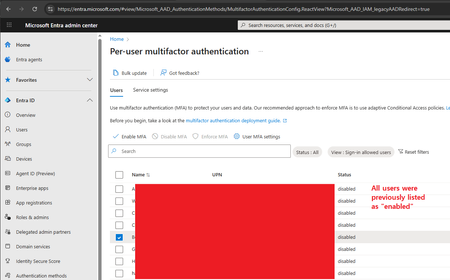
Hi, I'm the 365 admin for our org. Today I had a user that got a new phone and became stuck in a MS Authenticator app loop. (The app required MFA to login to the app, but they can't login to the app because they aren't logged into the app. This happened once before, and is a ridiculous Kafkaesque situation; but I digress.) To solve it, I went to disable MFA on their account, allowing them to login to the app. Then MFA could be re-enabled. Problem solved. And indeed that did work. However, on the admin side (per the screenshot) I checked off their user account (the user starting with the letter "B") and hit the "Disable MFA" link. A confirmation appeared asking me if I wanted to disable MFA for all selected users. Because I'm the careful sort, I could still see that only that one user was checked off as the popover div didn't cover that much of the screen. Hence I confirmed that I wanted to disable MFA for the selected users (i.e. that one user). I then refreshed the page, and all users are now shown as having MFA disabled. I'm 100% sure only that one user was selected, not everyone in my org. That would've been foolish. Trying to figure out what's wrong with this portion of the admin site.111Views0likes2Comments
No labs for MB-500 in skillable and xtreme labs (for all MB series)
Hi, From past few months, we are unable to find the labs for MB-500. It's causing us trouble to do the trainings. Skillable and Xtreme labs providers are saying there is a problem from Microsoft end only. Kindly advise us when can we get the labs available.40Views0likes1Comment