Getting Started
271 TopicsCopilot Chat vsus. Microsoft 365 Copilot What's the difference?
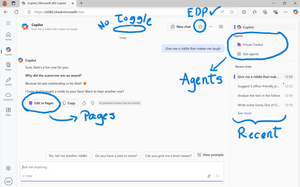
While their names sound similar at first glance - Microsoft 365 Copilot and Microsoft 365 Copilot Chat - they differ in several aspects. And more importantly, one can't be without another. What is Microsoft 365 Copilot Chat? First since first. Microsoft 365 Copilot Chat is also called Copilot Chat. Copilot Chat generates answers based on web content, while Microsoft 365 Copilot is also grounded on users' data, like emails, meetings, files, and more. Since January 15, Microsoft 365 Copilot Chat is available for everyone. Everyone in organizations. Also customers with a Microsoft 365 Business Basic subscriptions can enjoy using Copilot Chat securily. The screenshot below shows how Copilot Chat looks like and highlights its main capabilities. Note that EDP - Enterprise Data Protection is available. What is Microsoft 365 Copilot? Microsoft 365 Copilot is an add-on available for specific Microsoft 365 Subscriptions: Microsoft 365 E3, E5, A3, A5, and Business Standard & Premium. It includes Copilot Chat in addition to other Copilot features: Microsoft 365 Copilot also includes a chat grounded on users' meetings, emails, chats, and documents. It integrates into Microsoft 365 apps, like Outlook, Teams, Word, Excel, and more. It brings the capability to create agents and additional Copilot management features such as SharePoint Advanced Management and Copilot Dashboard. The screenshot below shows how the Copilot chat experience for those users who got the Microsoft 365 Copilot license. Note that EDP - Enterprise Data Protection is available here too. Copilot Chat can be pinned in MS Teams and MS Outlook as App. How can I access Microsoft 365 Copilot Chat? Copilot Chat is nowadays accessible via m365copilot.com using your Entra account. In contrast to Microsoft 365 Copilot licensed users, Microsoft 365 Copilot Chat users cannot see, by default, Copilot Chat pinned on the Microsoft 365 homepage. Microsoft 365 Copilot Administrators will have to pin the chat in the admin center so it is easy for Copilot Chat users to access it. What's the difference? There are some aspects, such as licensing requirements, subscription fees, data sources, or access to organization content, that determine the differences between Copilot Chat and Microsoft 365 Copilot. I have listed it in the screenshot below. 👇 Image showing a 3-column table: Aspect, Microsoft 365 Copilot Chat, and Microsoft 365 Copilot.Solved42KViews35likes39Comments
The quick way for users to understand O365: The Periodic Table of Office 365
I consider myself a SharePoint geek, but I play more and more in the larger Office 365 (O365) sphere these days. In doing so, I’ve noticed that O365 as a concept is difficult to explain… both to IT folks and the everyday workers who are expected to use it. So I put together a new infographic that (hopefully) provides a quick intro to O365, its apps, and how they're all related. Good for both the IT crowd and lines of business. Check out my https://www.linkedin.com/pulse/everyday-intro-office-365-matt-wade below. [http://periodictableofoffice365.azureedge.net/#/office365/en]Solved17KViews21likes13CommentsMy name shows up as null null, why is this and how do I fix it?
Applies To: All users where their name shows as "null null" Roles Required: Any Occasionally when users register with the Microsoft Tech Community, their First and last names will show up as null null. This typically happens for one of a handful of reasons: The first and last name fields of the identity provider have not been filled in. A recently created account in AAD sometimes has not yet fully propagated to the Microsoft Graph API. An error occurred during registration. How to fix it? For issue 1, the fix is to either go to your Microsoft Account page and enter the missing details or contact your Office 365 / Microsoft 365 admin and request they complete these details for you. Which of these options is appropriate for you will depend on if you're using a personal account or an account provided by your employer. Once these details have been updated then use this login link, it will force the system to try to refresh your profile data from the Microsoft Graph. For issue 2, the only option is to wait a minimum of 8 hours and then use this link to login. Finally for issue 3, try using this login link to force a refresh and if it still doesn't work - see below. Further help Ok, so you have tried all of the above and it is still not working? then you can email the Microsoft Tech Community Team and we will usually get back to you with in 1 business day*. When you do contact us please provide the following information: Name: e-mail address you are trying to register with: Link to your profile: Any additional details or comments: *The Microsoft Tech Community Team are not available during US Holidays.16KViews1like0Comments
MS Teams for Virtual classroom
Hi All, We are in phase 1 of Teams Only adoption/migration plan, and as we were looking at the different personas, we came across this specific need from the L&D team where they would like to leverage Teams as a Virtual Classroom tool. I have listed down the requirements of the classroom below. I am looking for ideas if someone has already used MS Teams in that capacity. Requirements Additional comments Availability in Teams Audio/visual capability (cameras and videos) Available Chat capability Available Raise Hand/Participant Status info It is essential to have this feature to avoid situations when people start to talk over each other. L&D team wants to create a comfortable environment where each attendee can speak without any interruption. Not Available Breakout Rooms Create small groups with 5 – 6 members and assign different topics to groups. Each group will join a separate breakout meeting to discuss the assigned topics. Not Available However, we can create different channels for each group/team and use the “Meet Now” capability as an alternative. Poll/Q&A capability Available only in Channel Meetings Whiteboard To brainstorm on ideas No Native app yet(https://microsoftteams.uservoice.com/forums/555103-public/suggestions/16938955-add-a-whiteboard) MS recommends using Freehand by Invision- 3rd party app Our main pain point is how to incorporate the "Hand Raise" capability in MS Teams Meeting.Solved10KViews3likes9CommentsHow to create video with AI using Microsoft Copilot
You have no more excuses not to create videos! There is a new AI feature that lets you create videos from a description in Microsoft 365. Users can type a Copilot prompt, and Clipchamp will generate a bespoke script, source high-quality stock footage, and assemble a video project complete with music, voiceover, text overlays, and transitions. You can edit the video in Clipchamp to update the script, replace the selected media or extend the video with new content. #Copilot #MicrosoftCopilot #Productivity #MPVbuzz #AI #Microsoft365 #VisualCreator10KViews1like0CommentsRegulatory and Compliance Headaches?
Are regulatory and compliance requirements a source of frustration, stress, or uncertainty in your organization? Did you know that Microsoft has a product called Microsoft Compliance Manager (MSCM) that can help alleviate the stress, uncertainty and most importantly risk to your organization? The wait is over! Be a part of the movement that is MSCM and help guide its evolution. Your direct input and feedback is valuable to our teams here at Microsoft. A simple 10-minute survey, click here, can get you started down the road to better regulatory and compliance preparedness! It’s free for 90 days to all E3 and E5 customers, so what are you waiting for! Should you have any questions please reach out to mipcompcxe@microsoft.com. Also don’t forget to tell your teams about the recently published Microsoft Compliance Manager Ninja Training and the free 90 day trial for all customers!9.5KViews3likes3Comments
Microsoft copilot stops while giving a response.
Why is this happening? Is there a solution for this? It just stops while giving response. And it has happened several times. And you can't even give prompt to continue from there. You should restart it. Does anyone have a solution for this? and I have restarted and reinstalled it 1000 times.9KViews1like17Comments[infographic] Where to start a conversation for teamwork in Office 365
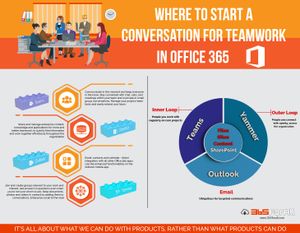
Teams, SharePoint, Outlook, Yammer - all places for teamwork in Office 365. GREAT apps for sure but HOW to start with your teamwork in Office 365 ? It's not about what the products can do (they can do a lot :-) ) but what you as team can do with the products. Microsoft is explaining this with the 'Inner Loop' and 'Outer Loop'. I created an infographic for this - take a look!7.9KViews4likes0Comments