developer
1878 TopicsHow do you respond to...
Hello my Excellers, I wish you all a happy new year full of great things. I have a question and I am not sure if this is a purely an Excel question or something else but maybe I start here and see how it goes: As you all may have noticed the AI craze is blooming like crazy. If you want to sell lettuce slap AI on its label and step back. I use Bing to search for VBA examples. For example I typed "excel vba code to find cells with formulas" and I get AI to find or "compose" a decent example that with minimal editing will work perfectly. But then at the end of the code and its explanation I sometimes find these kind of questions: "If you want to list the addresses of formula cells instead of highlighting them, I can give you a version that outputs them in the Immediate Window or a new sheet. Do you want me to provide that listing version as well?" How do you say YES I want that code that would list the addresses in a sheet? I see buttons like "Undo" rounded Left Arrow, or "Redo" rounded Right arrow, and a "Copy, "Export", and then "Tweak Content", "Rewrite" button, A "Testing Tools" dropdown with options like "Generate test data" and "Integrate test cases", and another dropdown called "More Actions" with options like "Perform code review", "Explain the code", "Add error handling", and "Make code compliable" and the last dropdown "Work Report" with its own options. But I do not see anything that would allow me to say YES I want that code that would list the addresses in a sheet? Thanks for any insight... GiGi39Views0likes1Comment
Moving a column of text data into 3 columns of data?
I have a column of text data cells 1,2,3,4,5,6,7,8,9 and longer. I want to create 3 column of data to graph and manipulate Cell in Columns. 1,2,3 3,4,5 5,6,7 8,9,10 and longer. So i need to create 3 columns of data from 1 column of data. I am using Mac Excel 16 and I can not make this happen. I have tried all sorts of solutions. Help? Thank you,144Views0likes3CommentsFormula/method to link the data/responses I get from my forms into a different table.
Hi everyone! I need help with a project that I'm creating. Im making use of Microsoft Forms in order to input certain information. I made use of branching since some answers depend on the previous choice. So moving on to my problem, I want my table2 to get the responses/data from the data table created by the forms. Table 2 Table of responses For reference for the spill error, here is the formula that I used. Any insights will help a lot. Thank you have a great day everyone.105Views0likes2CommentsExcel Tools for Network & Windows
Excel Tools for Network & Windows Some time ago I already shared an earlier version of this project. Since then, I have added several new features. These tools are based on functionalities that already exist in Windows and its associated software. I have consolidated them into a single Excel-based interface, allowing all tools to be executed directly from Excel. The files are free for private use. For business or enterprise environments, a more comprehensive toolbox can be developed, enabling direct support, repair, management, monitoring, and control of users and systems. Everything can be customized according to specific requirements — the scope depends solely on the desired functionality, time investment, and budget. I appreciate any positive feedback, suggestions, or constructive tips. If this project is not of interest to you, please feel free to ignore it. Thank you, and I wish everyone happy holidays.140Views2likes2CommentsName Manager using for create name which is contain atleast two name.
Hello. I creating somthing in excel with tables. These tables has thier own name, and can be dynamic or not. Any way. I using list in cell to select each data from a tables column. For that I created names with the content of a column. Unfortunatly i had to make a kind of name which is contain atleast 2 columns. These can grow dynamicly. So I think a plus helper tabel is not the right sollution for that. I think about 3 kind of solution. 1. =UNIQUE( VSTACK( INDEX(Tabla1[#Data];0;MATCH("Type_name";Tabla1[#Headers];0)); INDEX(Tabla2[#Data];0;MATCH("Column_name";Tabla2[#Headers];0)) ) output #name? 2. =UNIQUE(VSTACK(Lista_A; Lista_B)) lista_A as a name output #name? 3. created a helper table with the existing names. Created another name and use the table in it. output was the elements contained by the helper tabel, and the lista_A and lista_B tables each dedicated column. So How can i create list for a cell or cells from two column which are dynamicly growing, without a user needs to touch the core modell? Best Balázs129Views1like3CommentsPlease update Excel to handle more than 15 digit numbers!
I'm a professional database designer, and this limitation has caused me no end of headaches. The problem: numbers that are more than 15 digits long have all digits after the 15th converted into zeros. Microsoft provided workaround: format the the field as text. This workaround is only useful if you are doing data entry directly into an existing Excel spreadsheet that you are able to format the cells ahead of time. It's incredibly unhelpful when you are pushing and pulling data from different data sources. For example, if I need to push data out of a program like FileMaker to Excel, and the system I am pushing from has numeric fields (in particular ID fields), excel sees them as numbers and replaces the digits after the 15th. This jacks up formulas as well as any data synching possibilities. In situations like that, I end up having to export the data as .csv file, and then pull it in to an excel sheet and then do a bunch of conversion options on import (which does not always work, btw). But this is not a practical solution for every day users who are not tech savvy. I should be able to export the data directly to excel without the data being converted. This has been a big problem for every client I have that requires data being pushed to Excel. And this problem has existed for decades. Other spreadsheet programs (like google sheets) do not appear to have this issue. Can someone please explain why Excel continues to cling to this archaic standard? Are there any plans to update Excel to handle more than 15 digits? I know I am not the only one who has run into this problem. I've seen all kinds of posts about it. But trying to let Microsoft know how much of a problem this is has been a challenge. Their article on the subject had a link to give product feedback, and that link led me to this space. So here it is: product feedback for Excel. PLEASE FIX THIS! Thank you. Chris1.5KViews3likes8CommentsAdvanced Excel Formula discussion - Problem with dynamic range
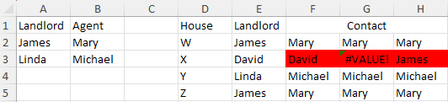
Let's assume I want to rent a house. For each house, if the landlord has an agent, I'll contact the agent; If not, I contact the landlord directly. As below: Landlord Agent House Landlord James Mary W James Linda Michael X David Y Linda Z James Column F: =IFERROR(XLOOKUP(E2:E5,A:A,B:B,E2:E5),E2:E5) This is correct Column G: =XLOOKUP(E2:E5,A:A,B:B,E2:E5) #VALUE! for X-David Column H: =XLOOKUP(E2:E5,A:A,B:B,CHOOSECOLS(E2:E5,1)) Wrong value for X-David, because it returned the first value in range of XLOOKUP([if_not_found]) field My question is: the only difference between G and H is CHOOSECOLS(). If I put =CHOOSECOLS(E2:E5,1) or =E2:E5 in a separate cell, it gives me same result. However, in XLOOKUP, they are recognized differently. What is the logic behind this? Thank you for spending time on reading this.Solved296Views0likes7Comments
(Apparently) Unpredictable crazy colors in Excel dark mode
Hi, At LAST, there is a so-called Dark Mode in Excel, thanks for our eyes! Unfortunately, if the developpers wanted to discourage us from using it, they probably wouln't have done it any other way! In short, I tend to use colors in my spreadsheets to highlight value, especially inconsistent or unwanted ones, obviously. Now, someone at Microsoft seems to have deemed it a decent idea to (apparently randomly) display a dirty brown when I ask for yellow, Except in the buttons backgrounds, which renders the text unreadable, to break the "automatic color" feature that should make the text readable whatever the background color, and not to provide any way to predict what will be the end color of a random pick. Is there any way to set Excel so the color I pick is the one that is displayed in Dark Mode? At worst, is there any way to get a formula that will tell me what values I need to enter so I get the color I really want in my cell? Thanks for any decent update to this really needed feature!62Views0likes2Comments