data loss prevention
417 TopicsWelcome to the Microsoft Security Community!
Protect it all with Microsoft Security Eliminate gaps and get the simplified, comprehensive protection, expertise, and AI-powered solutions you need to innovate and grow in a changing world. The Microsoft Security Community is your gateway to connect, learn, and collaborate with peers, experts, and product teams. Gain access to technical discussions, webinars, and help shape Microsoft’s security products. Get there fast To stay up to date on upcoming opportunities and the latest Microsoft Security Community news, make sure to subscribe to our email list. Find the latest skilling content and on-demand videos – subscribe to the Microsoft Security Community YouTube channel. Catch the latest announcements and connect with us on LinkedIn – Microsoft Security Community and Microsoft Entra Community. Index Community Calls: January 2026 | February 2026 Upcoming Community Calls January 2026 Jan. 15 | 8:00am | Microsoft Purview | Purview Data Security and Entra Global Secure Access Deep Dive Learn how Microsoft Global Secure Access (GSA) and Purview extend data loss prevention to the network, inspecting traffic to and from sanctioned and unsanctioned apps, including AI, and block sensitive data exfiltration in real time. The guidance in this session will provide actionable steps to security teams getting started with extending data security to the network layer to support compliance and zero trust strategies. Jan. 20 | 8:00am | Microsoft Defender for Cloud | What’s New in Microsoft Defender CSPM Cloud security posture management (CSPM) continues to evolve, and Microsoft Defender CSPM is leading the way with powerful enhancements introduced at Microsoft Ignite. This session will showcase the latest innovations designed to help security teams strengthen their posture and streamline operations. Jan. 21 | 8:00am | Microsoft Entra | Microsoft Agent Identity Platform Fundamentals In this session, we take a deep technical dive into the Microsoft Agent Identity Platform. You’ll learn how the platform’s core building blocks—Agent Identity Blueprints, Agent Identities, Agent Users, and the Agent Registry—work together to enable secure, scalable agent authentication and authorization. Jan. 22 | 8:00am | Azure Network Security | Advancing web application Protection with Azure WAF: Ruleset and Security Enhancements Explore the latest Azure WAF ruleset and security enhancements. Learn to fine-tune configurations, reduce false positives, gain threat visibility, and ensure consistent protection for web workloads—whether starting fresh or optimizing deployments. Jan. 22 | 8:00am | Security Copilot Skilling Series | Building Custom Agents: Unlocking Context, Automation, and Scale Microsoft Security Copilot already features a robust ecosystem of first-party and partner-built agents, but some scenarios require solutions tailored to your organization’s specific needs and context. In this session, you'll learn how the Security Copilot agent builder platform and MCP servers empower you to create tailored agents that provide context-aware reasoning and enterprise-scale solutions for your unique scenarios. RESCHEDULED for Jan. 27 | 9:00am | Microsoft Sentinel | AI-Powered Entity Analysis in Sentinel’s MCP Server Simplify entity risk assessment with Entity Analyzer. Eliminate complex playbooks; get unified, AI-driven analysis using Sentinel’s semantic understanding. Accelerate automation and enrich SOAR workflows with native Logic Apps integration. Jan. 28 | 8:00am | Security Copilot Skilling Series | Security Copilot in Purview Technical Deep Dive Discover how AI-powered alert triage agents for Data Loss Prevention (DLP) and Insider Risk Management (IRM) are transforming incident response and compliance workflows. Explore new Data Security Posture Management (DSPM) capabilities that deliver deeper insights and automation to strengthen your security posture. This session will showcase real-world scenarios and actionable strategies to help you protect sensitive data and simplify compliance. February 2026 Feb. 2 | 9:00am | Microsoft Sentinel | Accelerate your SIEM migration to Microsoft Sentinel Join us for an insightful webinar to discover how Microsoft Sentinel simplifies SIEM migration and enables true SOC transformation. Experience the new AI-powered SIEM migration tool that goes beyond syntax conversion—delivering advanced correlation, actionable insights, and accurate intent-based mapping for improved detection coverage and continuous optimization. Feb. 10 | 8:00am | Microsoft Security Store | From Alert to Resolution: Using Security Agents to Power Real‑World SOC Workflows In this webinar, we’ll show how SOC analysts can harness security agents from Microsoft Security Store to strengthen every stage of the incident lifecycle. Through realistic SOC workflows based on everyday analyst tasks, we will follow each scenario end to end, beginning with the initial alert and moving through triage, investigation, and remediation. Along the way, we’ll demonstrate how agents in Security Store streamline signal correlation, reduce manual investigation steps, and accelerate decision‑making when dealing with three of the most common incident types: phishing attacks, credential compromise, and business email compromise (BEC), helping analysts work faster and more confidently by automating key tasks, surfacing relevant insights, and improving consistency in response actions. Feb. 26 | 9:00am | Azure Network Security | Azure Firewall Integration with Microsoft Sentinel Learn how Azure Firewall integrates with Microsoft Sentinel to enhance threat visibility and streamline security investigations. This webinar will demonstrate how firewall logs and insights can be ingested into Sentinel to correlate network activity with broader security signals, enabling faster detection, deeper context, and more effective incident response. Looking for more? Join the Microsoft Customer Connection Program (MCCP)! As a MCCP member, you’ll gain early visibility into product roadmaps, participate in focus groups, and access private preview features before public release. You’ll have a direct channel to share feedback with engineering teams, influencing the direction of Microsoft Security products. The program also offers opportunities to collaborate and network with fellow security experts and Microsoft product teams. Join the MCCP that best fits your interests: www.aka.ms/joincommunity. Additional resources Microsoft Security Hub on Tech Community Virtual Ninja Training Courses Microsoft Security Documentation Azure Network Security GitHub Microsoft Defender for Cloud GitHub Microsoft Sentinel GitHub Microsoft Defender XDR GitHub Microsoft Defender for Cloud Apps GitHub Microsoft Defender for Identity GitHub Microsoft Purview GitHub15KViews4likes3Comments
Always‑on Diagnostics for Purview Endpoint DLP: Effortless, Zero‑Friction troubleshooting for admins
Historically, some security teams have struggled with the challenge of troubleshooting issues with endpoint DLP. Investigations can often slow down because reproducing issues, collecting traces, and aligning on context can be tedious. With always-on diagnostics in Purview endpoint data loss prevention (DLP), our goal has been simple: make troubleshooting seamless, and effortless—without ever disrupting the information worker. Today, we’re excited to share new enhancements to always-on diagnostics for Purview endpoint DLP. This is the next step in our journey to modernize supportability in Microsoft Purview and dramatically reduce admin friction during investigations. Where We Started: Introduction of continuous diagnostic collection Earlier this year, we introduced continuous diagnostic trace collection on Windows endpoints (support for macOS endpoints coming soon). This eliminated the single largest source of friction: the need to reproduce issues. With this capability: Logs are captured persistently for up to 90 days Information workers no longer need admin permissions to retrieve traces Admins can submit complete logs on the first attempt Support teams can diagnose transient or rare issues with high accuracy In just a few months, we saw resolution times drop dramatically. The message was clear: Always-on diagnostics is becoming a new troubleshooting standard. Our Newest Enhancements: Built for Admins. Designed for Zero Friction. The newest enhancements to always-on diagnostics unlock the most requested capability from our IT and security administrators: the ability to retrieve and upload always-on diagnostic traces directly from devices using the Purview portal — with no user interaction required. This means: Admins can now initiate trace uploads on demand No interruption to information workers and their productivity No issue reproduction sessions, minimizing unnecessary disruption and coordination Every investigation starts with complete context Because the traces are already captured on-device, these improvements now help complete the loop by giving admins a seamless, portal-integrated workflow to deliver logs to Microsoft when needed. This experience is now fully available for customers using endpoint DLP on Windows. Why This Matters As a product team, our success is measured not just by usage, but by how effectively we eliminate friction for customers. Always-on diagnostics minimizes the friction and frustration that has historically affected some customers. - No more asking your employee or information worker to "can you reproduce that?" and share logs - No more lost context - No more delays while logs are collected after the fact How it Works Local trace capture Devices continuously capture endpoint DLP diagnostic data in a compressed, proprietary format, and this data stays solely on the respective device based on the retention period and storage limits configured by the admin. Users no longer need to reproduce issues during retrieval—everything the investigation requires is already captured on the endpoint. Admin-triggered upload Admins can now request diagnostic uploads directly from the Purview portal, eliminating the need to disrupt users. Upload requests can be initiated from multiple entry points, including: Alerts (Data Loss Prevention → Alerts → Events) Activity Explorer (Data Loss Prevention → Explorers → Activity explorer) Device Policy Status Page (Settings → Device onboarding → Devices) From any of these locations, admins can simply choose Request device log, select the date range, add a brief description, and submit the request. Once processed, the device’s always-on diagnostic logs are securely uploaded to Microsoft telemetry as per customer-approved settings. Admins can include the upload request number in their ticket with Microsoft Support, and sharing this number removes the need for the support engineer to ask for logs again during the investigation. This workflow ensures investigations start with complete diagnostic context. Privacy & compliance considerations Data is only uploaded during admin-initiated investigations Data adheres to our published diagnostic data retention policies Logs are only accessible to the Microsoft support team, not any other parties We Want to Hear From You Are you using always-on diagnostics? We'd love to hear about your experience. Share your feedback, questions, or success stories in the Microsoft Tech Community, or reach out to our engineering team directly. Making troubleshooting effortless—so you can focus on what matters, not on chasing logs.
Test DLP Policy: On-Prem
We have DLP policies based on SIT and it is working well for various locations such as Sharepoint, Exchange and Endpoint devices. But the DLP policy for On-Prem Nas shares is not matching when used with Microsoft Information Protection Scanner. DLP Rule: Conditions Content contains any of these sensitive info types: Credit Card Number U.S. Bank Account Number U.S. Driver's License Number U.S. Individual Taxpayer Identification Number (ITIN) U.S. Social Security Number (SSN) The policy is visible to the Scanner and it is being logged as being executed MSIP.Lib MSIP.Scanner (30548) Executing policy: Data Discovery On-Prem, policyId: 85........................ and the MIP reports are listing files with these SITs The results Information Type Name - Credit Card Number U.S. Social Security Number (SSN) U.S. Bank Account Number Action - Classified Dlp Mode -- Test Dlp Status -- Skipped Dlp Comment -- No match There is no other information in logs. Why is the DLP policy not matching and how can I test the policy ? thanks65Views0likes1CommentArtificial Intelligence & Security
Understanding Artificial Intelligence Artificial intelligence (AI) is a computational system that perform human‑intelligence tasks, learning, reasoning, problem‑solving, perception, and language understanding by leveraging algorithmic and statistical methods to analyse data and make informed decisions. Artificial Intelligence (AI) can also be abbreviated as is the simulation of human intelligence through machines programmed to learn, reason, and act. It blends statistics, machine learning, and robotics to deliver following outcomes: Prediction: The application of statistical modelling and machine learning techniques to anticipate future outcomes, such as detecting fraudulent transactions. Automation: The utilisation of robotics and artificial intelligence to streamline and execute routine processes, exemplified by automated invoice processing. Augmentation: The enhancement of human decision-making and operational capabilities through AI-driven tools, for instance, AI-assisted sales enablement. Artificial Intelligence: Core Capabilities and Market Outlook Key capabilities of AI include: Data-driven decision-making: Analysing large datasets to generate actionable insights and optimise outcomes. Anomaly detection: Identifying irregular patterns or deviations in data for risk mitigation and quality assurance. Visual interpretation: Processing and understanding visual inputs such as images and videos for applications like computer vision. Natural language understanding: Comprehending and interpreting human language to enable accurate information extraction and contextual responses. Conversational engagement: Facilitating human-like interactions through chatbots, virtual assistants, and dialogue systems. With the exponential growth of data, ML learning models and computing power. AI is advancing much faster and as According to industry analyst reports breakthroughs in deep learning and neural network architectures have enabled highly sophisticated applications across diverse sectors, including healthcare, finance, manufacturing, and retail. The global AI market is on a trajectory of significant expansion, projected to increase nearly 5X by 2030, from $391 billion in 2025 to $1.81 trillion. This growth corresponds to a compound annual growth rate (CAGR) of 35.9% during the forecast period. These projections are estimates and subject to change as per rapid growth and advancement in the AI Era. AI and Cloud Synergy AI, and cloud computing form a powerful technological mixture. Digital assistants are offering scalable, cloud-powered intelligence. Cloud platforms such as Azure provide pre-trained models and services, enabling businesses to deploy AI solutions efficiently. Core AI Workloads Capabilities Machine Learning Machine learning (ML) underpins most AI systems by enabling models to learn from historical and real-time data to make predictions, classifications, and recommendations. These models adapt over time as they are exposed to new data, improving accuracy and robustness. Example use cases: Credit risk scoring in banking, demand forecasting in retail, and predictive maintenance in manufacturing. Anomaly Detection Anomaly detection techniques identify deviations from expected patterns in data, systems, or processes. This capability is critical for risk management and operational resilience, as it enables early detection of fraud, security breaches, or equipment failures. Example use cases: Fraud detection in financial transactions, network intrusion monitoring in cybersecurity, and quality control in industrial production. Natural Language Processing (NLP) NLP focuses on enabling machines to understand, interpret, and generate human language in both text and speech formats. This capability powers a wide range of applications that require contextual comprehension and semantic accuracy. Example use cases: Sentiment analysis for customer feedback, document summarisation for legal and compliance teams, and multilingual translation for global operations. Principles of Responsible AI To ensure ethical and trustworthy AI, organisations must embrace: Reliability & Safety Privacy & Security Inclusiveness Fairness Transparency Accountability These principles are embedded in frameworks like the Responsible-AI-Standard and reinforced by governance models such as Microsoft AI Governance Framework. Responsible AI Principles and Approach | Microsoft AI AI and Security AI introduces both opportunities and risks. A responsible approach to AI security involves three dimensions: Risk Mitigation: It Is addressing threats from immature or malicious AI applications. Security Applications: These are used to enhance AI security and public safety. Governance Systems: Establishing frameworks to manage AI risks and ensure safe development. Security Risks and Opportunities Due to AI Transformation AI’s transformative nature brings new challenges: Cybersecurity: This brings the opportunities and advancement to track, detect and act against Vulnerabilities in infrastructure and learning models. Data Security: This helps the tool and solutions such as Microsoft Purview to prevent data security by performing assessments, creating Data loss prevention policies applying sensitivity labels. Information Security: The biggest risk is securing the information and due to the AI era of transformation securing IS using various AI security frameworks. These concerns are echoed in The Crucial Role of Data Security Posture Management in the AI Era, which highlights insider threats, generative AI risks, and the need for robust data governance. AI in Security Applications AI’s capabilities in data analysis and decision-making enable innovative security solutions: Network Protection: applications include use of AI algorithms for intrusion detection, malware detection, security situational awareness, and threat early warning, etc. Data Management: applications refer to the use of AI technologies to achieve data protection objectives such as hierarchical classification, leak prevention, and leak traceability. Intelligent Security: applications refer to the use of AI technology to upgrade the security field from passive defence toward the intelligent direction, developing of active judgment and timely early warning. Financial Risk Control: applications use AI technology to improve the efficiency and accuracy of credit assessment, risk management, etc., and assisting governments in the regulation of financial transactions. AI Security Management Effective AI security requires: Regulations & Policies: Establish and safety management laws specifically designed to for governance by regulatory authorities and management policies for key application domains of AI and prominent security risks. Standards & Specifications: Industry-wide benchmarks, along with international and domestic standards can be used to support AI safety. Technological Methods: Early detection with Modern set of tools such as Defender for AI can be used to support to detect and mitigate and remediate AI threats. Security Assessments: Organization should use proper tools and platforms for evaluating AI risks and perform assessments regularly using automated tools approach Conclusion AI is transforming how organizations operate, innovate, and secure their environments. As AI capabilities evolve, integrating security and governance considerations from the outset remains critical. By combining responsible AI principles, effective governance, and appropriate security measures, organizations can work toward deploying AI technologies in a manner that supports both innovation and trust. Industry projections suggest continued growth in AI‑related security investments over the coming years, reflecting increased focus on managing AI risks alongside its benefits. These estimates are subject to change and should be interpreted in the context of evolving technologies and regulatory developments. Disclaimer References to Microsoft products and frameworks are for informational purposes only and do not imply endorsement, guarantee, or contractual commitment. Market projections referenced are based on publicly available industry analyses and are subject to change.
From “No” to “Now”: A 7-Layer Strategy for Enterprise AI Safety
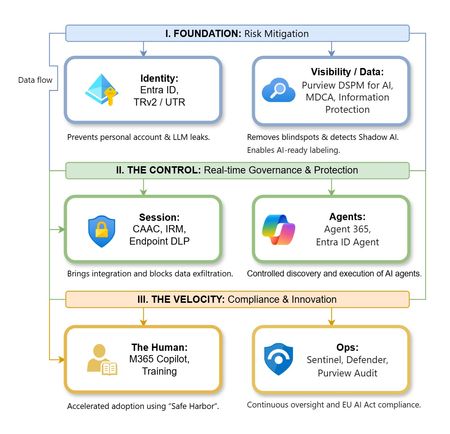
The “block” posture on Generative AI has failed. In a global enterprise, banning these tools doesn't stop usage; it simply pushes intellectual property into unmanaged channels and creates a massive visibility gap in corporate telemetry. The priority has now shifted from stopping AI to hardening the environment so that innovation can run at velocity without compromising data sovereignty. Traditional security perimeters are ineffective against the “slow bleed” of AI leakage - where data moves through prompts, clipboards, and autonomous agents rather than bulk file transfers. To secure this environment, a 7-layer defense-in-depth model is required to treat the conversation itself as the new perimeter. 1. Identity: The Only Verifiable Perimeter Identity is the primary control plane. Access to AI services must be treated with the same rigor as administrative access to core infrastructure. The strategy centers on enforcing device-bound Conditional Access, where access is strictly contingent on device health. To solve the "Account Leak" problem, the deployment of Tenant Restrictions v2 (TRv2) is essential to prevent users from signing into personal tenants using corporate-managed devices. For enhanced coverage, Universal Tenant Restrictions (UTR) via Global Secure Access (GSA) allows for consistent enforcement at the cloud edge. While TRv2 authentication-plane is GA, data-plane protection is GA for the Microsoft 365 admin center and remains in preview for other workloads such as SharePoint and Teams. 2. Eliminating the Visibility Gap (Shadow AI) You can’t secure what you can't see. Microsoft Defender for Cloud Apps (MDCA) serves to discover and govern the enterprise AI footprint, while Purview DSPM for AI (formerly AI Hub) monitors Copilot and third-party interactions. By categorizing tools using MDCA risk scores and compliance attributes, organizations can apply automated sanctioning decisions and enforce session controls for high-risk endpoints. 3. Data Hygiene: Hardening the “Work IQ” AI acts as a mirror of internal permissions. In a "flat" environment, AI acts like a search engine for your over-shared data. Hardening the foundation requires automated sensitivity labeling in Purview Information Protection. Identifying PII and proprietary code before assigning AI licenses ensures that labels travel with the data, preventing labeled content from being exfiltrated via prompts or unauthorized sharing. 4. Session Governance: Solving the “Clipboard Leak” The most common leak in 2025 is not a file upload; it’s a simple copy-paste action or a USB transfer. Deploying Conditional Access App Control (CAAC) via MDCA session policies allows sanctioned apps to function while specifically blocking cut/copy/paste. This is complemented by Endpoint DLP, which extends governance to the physical device level, preventing sensitive data from being moved to unmanaged USB storage or printers during an AI-assisted workflow. Purview Information Protection with IRM rounds this out by enforcing encryption and usage rights on the files themselves. When a user tries to print a "Do Not Print" document, Purview triggers an alert that flows into Microsoft Sentinel. This gives the SOC visibility into actual policy violations instead of them having to hunt through generic activity logs. 5. The “Agentic” Era: Agent 365 & Sharing Controls Now that we're moving from "Chat" to "Agents", Agent 365 and Entra Agent ID provide the necessary identity and control plane for autonomous entities. A quick tip: in large-scale tenants, default settings often present a governance risk. A critical first step is navigating to the Microsoft 365 admin center (Copilot > Agents) to disable the default “Anyone in organization” sharing option. Restricting agent creation and sharing to a validated security group is essential to prevent unvetted agent sprawl and ensure that only compliant agents are discoverable. 6. The Human Layer: “Safe Harbors” over Bans Security fails when it creates more friction than the risk it seeks to mitigate. Instead of an outright ban, investment in AI skilling-teaching users context minimization (redacting specifics before interacting with a model) - is the better path. Providing a sanctioned, enterprise-grade "Safe Harbor" like M365 Copilot offers a superior tool that naturally cuts down the use of Shadow AI. 7. Continuous Ops: Monitoring & Regulatory Audit Security is not a “set and forget” project, particularly with the EU AI Act on the horizon. Correlating AI interactions and DLP alerts in Microsoft Sentinel using Purview Audit (specifically the CopilotInteraction logs) data allows for real-time responses. Automated SOAR playbooks can then trigger protective actions - such as revoking an Agent ID - if an entity attempts to access sensitive HR or financial data. Final Thoughts Securing AI at scale is an architectural shift. By layering Identity, Session Governance, and Agentic Identity, AI moves from being a fragmented risk to a governed tool that actually works for the modern workplace.287Views0likes0CommentsHow to Report DLP Alerts
MC1169572 announces that administrators can add classifications to DLP alerts to help with reporting. But how do you report DLP alerts? As it turns out, it’s relatively easy to retrieve DLP alerts via the Microsoft Graph Security API, and using the Get-MgSecurityAlertV2 cmdlet from the Microsoft Graph PowerShell SDK makes it even easier to find and report the data. https://office365itpros.com/2025/12/29/dlp-alerts-report/21Views0likes0Comments
DLP USB Block
Currently we have DLP policies setup to block the use of USB devices and copying data to it. When checking the activity explorer I am still seeing user's able to copy data to USB devices and for the action item it says "Audit" when in the DLP policies we explicitly set it to block. Has anyone run into this issue or seen similar behavior?140Views0likes3Comments
Question behavior same malware
Two malware with the same detection name but on different PCs and files, do they behave differently or the same? Example: Two detections of Trojan:Win32/Wacatac.C!ml 1) It remains latent in standby mode, awaiting commands. 2) It modifies, deletes, or corrupts files.208Views0likes4CommentsDLP Policy not Working with OCR
Hello Community, i activated the OCR in Microsoft Purview, and scan works fine infact Purview find image that contains sensible data. I have created DLP Policy that not permit print and move to rdp file that containts "Italy Confidential Data" like "Passport Number, Drivers License ecc..." this policy works for xlsx or word that contains data, but if file word contains image with this data not apply the DLP Rule infact i'm able to print or move into rdp this file also only the jpeg file. Policy match correctly i see it into "Activity Explorer" Is this behavior correct? Regards, GuidoSolved60Views0likes1CommentSecurity as the core primitive - Securing AI agents and apps
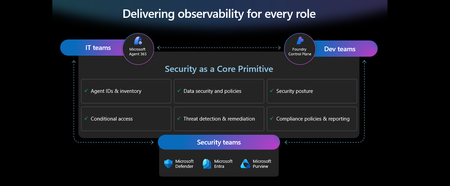
This week at Microsoft Ignite, we shared our vision for Microsoft security -- In the agentic era, security must be ambient and autonomous, like the AI it protects. It must be woven into and around everything we build—from silicon to OS, to agents, apps, data, platforms, and clouds—and throughout everything we do. In this blog, we are going to dive deeper into many of the new innovations we are introducing this week to secure AI agents and apps. As I spend time with our customers and partners, there are four consistent themes that have emerged as core security challenges to secure AI workloads. These are: preventing agent sprawl and access to resources, protecting against data oversharing and data leaks, defending against new AI threats and vulnerabilities, and adhering to evolving regulations. Addressing these challenges holistically requires a coordinated effort across IT, developers, and security leaders, not just within security teams and to enable this, we are introducing several new innovations: Microsoft Agent 365 for IT, Foundry Control Plane in Microsoft Foundry for developers, and the Security Dashboard for AI for security leaders. In addition, we are releasing several new purpose-built capabilities to protect and govern AI apps and agents across Microsoft Defender, Microsoft Entra, and Microsoft Purview. Observability at every layer of the stack To facilitate the organization-wide effort that it takes to secure and govern AI agents and apps – IT, developers, and security leaders need observability (security, management, and monitoring) at every level. IT teams need to enable the development and deployment of any agent in their environment. To ensure the responsible and secure deployment of agents into an organization, IT needs a unified agent registry, the ability to assign an identity to every agent, manage the agent’s access to data and resources, and manage the agent’s entire lifecycle. In addition, IT needs to be able to assign access to common productivity and collaboration tools, such as email and file storage, and be able to observe their entire agent estate for risks such as over-permissioned agents. Development teams need to build and test agents, apply security and compliance controls by default, and ensure AI models are evaluated for safety guardrails and security vulnerabilities. Post deployment, development teams must observe agents to ensure they are staying on task, accessing applications and data sources appropriately, and operating within their cost and performance expectations. Security & compliance teams must ensure overall security of their AI estate, including their AI infrastructure, platforms, data, apps, and agents. They need comprehensive visibility into all their security risks- including agent sprawl and resource access, data oversharing and leaks, AI threats and vulnerabilities, and complying with global regulations. They want to address these risks by extending their existing security investments that they are already invested in and familiar with, rather than using siloed or bolt-on tools. These teams can be most effective in delivering trustworthy AI to their organizations if security is natively integrated into the tools and platforms that they use every day, and if those tools and platforms share consistent security primitives such as agent identities from Entra; data security and compliance controls from Purview; and security posture, detections, and protections from Defender. With the new capabilities being released today, we are delivering observability at every layer of the AI stack, meeting IT, developers, and security teams where they are in the tools they already use to innovate with confidence. For IT Teams - Introducing Microsoft Agent 365, the control plane for agents, now in preview The best infrastructure for managing your agents is the one you already use to manage your users. With Agent 365, organizations can extend familiar tools and policies to confidently deploy and secure agents, without reinventing the wheel. By using the same trusted Microsoft 365 infrastructure, productivity apps, and protections, organizations can now apply consistent and familiar governance and security controls that are purpose-built to protect against agent-specific threats and risks. gement and governance of agents across organizations Microsoft Agent 365 delivers a unified agent Registry, Access Control, Visualization, Interoperability, and Security capabilities for your organization. These capabilities work together to help organizations manage agents and drive business value. The Registry powered by the Entra provides a complete and unified inventory of all the agents deployed and used in your organization including both Microsoft and third-party agents. Access Control allows you to limit the access privileges of your agents to only the resources that they need and protect their access to resources in real time. Visualization gives organizations the ability to see what matters most and gain insights through a unified dashboard, advanced analytics, and role-based reporting. Interop allows agents to access organizational data through Work IQ for added context, and to integrate with Microsoft 365 apps such as Outlook, Word, and Excel so they can create and collaborate alongside users. Security enables the proactive detection of vulnerabilities and misconfigurations, protects against common attacks such as prompt injections, prevents agents from processing or leaking sensitive data, and gives organizations the ability to audit agent interactions, assess compliance readiness and policy violations, and recommend controls for evolving regulatory requirements. Microsoft Agent 365 also includes the Agent 365 SDK, part of Microsoft Agent Framework, which empowers developers and ISVs to build agents on their own AI stack. The SDK enables agents to automatically inherit Microsoft's security and governance protections, such as identity controls, data security policies, and compliance capabilities, without the need for custom integration. For more details on Agent 365, read the blog here. For Developers - Introducing Microsoft Foundry Control Plane to observe, secure and manage agents, now in preview Developers are moving fast to bring agents into production, but operating them at scale introduces new challenges and responsibilities. Agents can access tools, take actions, and make decisions in real time, which means development teams must ensure that every agent behaves safely, securely, and consistently. Today, developers need to work across multiple disparate tools to get a holistic picture of the cybersecurity and safety risks that their agents may have. Once they understand the risk, they then need a unified and simplified way to monitor and manage their entire agent fleet and apply controls and guardrails as needed. Microsoft Foundry provides a unified platform for developers to build, evaluate and deploy AI apps and agents in a responsible way. Today we are excited to announce that Foundry Control Plane is available in preview. This enables developers to observe, secure, and manage their agent fleets with built-in security, and centralized governance controls. With this unified approach, developers can now identify risks and correlate disparate signals across their models, agents, and tools; enforce consistent policies and quality gates; and continuously monitor task adherence and runtime risks. Foundry Control Plane is deeply integrated with Microsoft’s security portfolio to provide a ‘secure by design’ foundation for developers. With Microsoft Entra, developers can ensure an agent identity (Agent ID) and access controls are built into every agent, mitigating the risk of unmanaged agents and over permissioned resources. With Microsoft Defender built in, developers gain contextualized alerts and posture recommendations for agents directly within the Foundry Control Plane. This integration proactively prevents configuration and access risks, while also defending agents from runtime threats in real time. Microsoft Purview’s native integration into Foundry Control Plane makes it easy to enable data security and compliance for every Foundry-built application or agent. This allows Purview to discover data security and compliance risks and apply policies to prevent user prompts and AI responses from safety and policy violations. In addition, agent interactions can be logged and searched for compliance and legal audits. This integration of the shared security capabilities, including identity and access, data security and compliance, and threat protection and posture ensures that security is not an afterthought; it’s embedded at every stage of the agent lifecycle, enabling you to start secure and stay secure. For more details, read the blog. For Security Teams - Introducing Security Dashboard for AI - unified risk visibility for CISOs and AI risk leaders, coming soon AI proliferation in the enterprise, combined with the emergence of AI governance committees and evolving AI regulations, leaves CISOs and AI risk leaders needing a clear view of their AI risks, such as data leaks, model vulnerabilities, misconfigurations, and unethical agent actions across their entire AI estate, spanning AI platforms, apps, and agents. 90% of security professionals, including CISOs, report that their responsibilities have expanded to include data governance and AI oversight within the past year. 1 At the same time, 86% of risk managers say disconnected data and systems lead to duplicated efforts and gaps in risk coverage. 2 To address these needs, we are excited to introduce the Security Dashboard for AI. This serves as a unified dashboard that aggregates posture and real-time risk signals from Microsoft Defender, Microsoft Entra, and Microsoft Purview. This unified dashboard allows CISOs and AI risk leaders to discover agents and AI apps, track AI posture and drift, and correlate risk signals to investigate and act across their entire AI ecosystem. For example, you can see your full AI inventory and get visibility into a quarantined agent, flagged for high data risk due to oversharing sensitive information in Purview. The dashboard then correlates that signal with identity insights from Entra and threat protection alerts from Defender to provide a complete picture of exposure. From there, you can delegate tasks to the appropriate teams to enforce policies and remediate issues quickly. With the Security Dashboard for AI, CISOs and risk leaders gain a clear, consolidated view of AI risks across agents, apps, and platforms—eliminating fragmented visibility, disconnected posture insights, and governance gaps as AI adoption scales. Best of all, there’s nothing new to buy. If you’re already using Microsoft security products to secure AI, you’re already a Security Dashboard for AI customer. Figure 5: Security Dashboard for AI provides CISOs and AI risk leaders with a unified view of their AI risk by bringing together their AI inventory, AI risk, and security recommendations to strengthen overall posture Together, these innovations deliver observability and security across IT, development, and security teams, powered by Microsoft’s shared security capabilities. With Microsoft Agent 365, IT teams can manage and secure agents alongside users. Foundry Control Plane gives developers unified governance and lifecycle controls for agent fleets. Security Dashboard for AI provides CISOs and AI risk leaders with a consolidated view of AI risks across platforms, apps, and agents. Added innovation to secure and govern your AI workloads In addition to the IT, developer, and security leader-focused innovations outlined above, we continue to accelerate our pace of innovation in Microsoft Entra, Microsoft Purview, and Microsoft Defender to address the most pressing needs for securing and governing your AI workloads. These needs are: Manage agent sprawl and resource access e.g. managing agent identity, access to resources, and permissions lifecycle at scale Prevent data oversharing and leaks e.g. protecting sensitive information shared in prompts, responses, and agent interactions Defend against shadow AI, new threats, and vulnerabilities e.g. managing unsanctioned applications, preventing prompt injection attacks, and detecting AI supply chain vulnerabilities Enable AI governance for regulatory compliance e.g. ensuring AI development, operations, and usage comply with evolving global regulations and frameworks Manage agent sprawl and resource access 76% of business leaders expect employees to manage agents within the next 2–3 years. 3 Widespread adoption of agents is driving the need for visibility and control, which includes the need for a unified registry, agent identities, lifecycle governance, and secure access to resources. Today, Microsoft Entra provides robust identity protection and secure access for applications and users. However, organizations lack a unified way to manage, govern, and protect agents in the same way they manage their users. Organizations need a purpose-built identity and access framework for agents. Introducing Microsoft Entra Agent ID, now in preview Microsoft Entra Agent ID offers enterprise-grade capabilities that enable organizations to prevent agent sprawl and protect agent identities and their access to resources. These new purpose-built capabilities enable organizations to: Register and manage agents: Get a complete inventory of the agent fleet and ensure all new agents are created with an identity built-in and are automatically protected by organization policies to accelerate adoption. Govern agent identities and lifecycle: Keep the agent fleet under control with lifecycle management and IT-defined guardrails for both agents and people who create and manage them. Protect agent access to resources: Reduce risk of breaches, block risky agents, and prevent agent access to malicious resources with conditional access and traffic inspection. Agents built in Microsoft Copilot Studio, Microsoft Foundry, and Security Copilot get an Entra Agent ID built-in at creation. Developers can also adopt Entra Agent ID for agents they build through Microsoft Agent Framework, Microsoft Agent 365 SDK, or Microsoft Entra Agent ID SDK. Read the Microsoft Entra blog to learn more. Prevent data oversharing and leaks Data security is more complex than ever. Information Security Media Group (ISMG) reports that 80% of leaders cite leakage of sensitive data as their top concern. 4 In addition to data security and compliance risks of generative AI (GenAI) apps, agents introduces new data risks such as unsupervised data access, highlighting the need to protect all types of corporate data, whether it is accessed by employees or agents. To mitigate these risks, we are introducing new Microsoft Purview data security and compliance capabilities for Microsoft 365 Copilot and for agents and AI apps built with Copilot Studio and Microsoft Foundry, providing unified protection, visibility, and control for users, AI Apps, and Agents. New Microsoft Purview controls safeguard Microsoft 365 Copilot with real-time protection and bulk remediation of oversharing risks Microsoft Purview and Microsoft 365 Copilot deliver a fully integrated solution for protecting sensitive data in AI workflows. Based on ongoing customer feedback, we’re introducing new capabilities to deliver real-time protection for sensitive data in M365 Copilot and accelerated remediation of oversharing risks: Data risk assessments: Previously, admins could monitor oversharing risks such as SharePoint sites with unprotected sensitive data. Now, they can perform item-level investigations and bulk remediation for overshared files in SharePoint and OneDrive to quickly reduce oversharing exposure. Data Loss Prevention (DLP) for M365 Copilot: DLP previously excluded files with sensitivity labels from Copilot processing. Now in preview, DLP also prevents prompts that include sensitive data from being processed in M365 Copilot, Copilot Chat, and Copilot agents, and prevents Copilot from using sensitive data in prompts for web grounding. Priority cleanup for M365 Copilot assets: Many organizations have org-wide policies to retain or delete data. Priority cleanup, now generally available, lets admins delete assets that are frequently processed by Copilot, such as meeting transcripts and recordings, on an independent schedule from the org-wide policies while maintaining regulatory compliance. On-demand classification for meeting transcripts: Purview can now detect sensitive information in meeting transcripts on-demand. This enables data security admins to apply DLP policies and enforce Priority cleanup based on the sensitive information detected. & bulk remediation Read the full Data Security blog to learn more. Introducing new Microsoft Purview data security capabilities for agents and apps built with Copilot Studio and Microsoft Foundry, now in preview Microsoft Purview now extends the same data security and compliance for users and Copilots to agents and apps. These new capabilities are: Enhanced Data Security Posture Management: A centralized DSPM dashboard that provides observability, risk assessment, and guided remediation across users, AI apps, and agents. Insider Risk Management (IRM) for Agents: Uniquely designed for agents, using dedicated behavioral analytics, Purview dynamically assigns risk levels to agents based on their risky handing of sensitive data and enables admins to apply conditional policies based on that risk level. Sensitive data protection with Azure AI Search: Azure AI Search enables fast, AI-driven retrieval across large document collections, essential for building AI Apps. When apps or agents use Azure AI Search to index or retrieve data, Purview sensitivity labels are preserved in the search index, ensuring that any sensitive information remains protected under the organization’s data security & compliance policies. For more information on preventing data oversharing and data leaks - Learn how Purview protects and governs agents in the Data Security and Compliance for Agents blog. Defend against shadow AI, new threats, and vulnerabilities AI workloads are subject to new AI-specific threats like prompt injections attacks, model poisoning, and data exfiltration of AI generated content. Although security admins and SOC analysts have similar tasks when securing agents, the attack methods and surfaces differ significantly. To help customers defend against these novel attacks, we are introducing new capabilities in Microsoft Defender that deliver end-to-end protection, from security posture management to runtime defense. Introducing Security Posture Management for agents, now in preview As organizations adopt AI agents to automate critical workflows, they become high-value targets and potential points of compromise, creating a critical need to ensure agents are hardened, compliant, and resilient by preventing misconfigurations and safeguarding against adversarial manipulation. Security Posture Management for agents in Microsoft Defender now provides an agent inventory for security teams across Microsoft Foundry and Copilot Studio agents. Here, analysts can assess the overall security posture of an agent, easily implement security recommendations, and identify vulnerabilities such as misconfigurations and excessive permissions, all aligned to the MITRE ATT&CK framework. Additionally, the new agent attack path analysis visualizes how an agent’s weak security posture can create broader organizational risk, so you can quickly limit exposure and prevent lateral movement. Introducing Threat Protection for agents, now in preview Attack techniques and attack surfaces for agents are fundamentally different from other assets in your environment. That’s why Defender is delivering purpose-built protections and detections to help defend against them. Defender is introducing runtime protection for Copilot Studio agents that automatically block prompt injection attacks in real time. In addition, we are announcing agent-specific threat detections for Copilot Studio and Microsoft Foundry agents coming soon. Defender automatically correlates these alerts with Microsoft’s industry-leading threat intelligence and cross-domain security signals to deliver richer, contextualized alerts and security incident views for the SOC analyst. Defender’s risk and threat signals are natively integrated into the new Microsoft Foundry Control Plane, giving development teams full observability and the ability to act directly from within their familiar environment. Finally, security analysts will be able to hunt across all agent telemetry in the Advanced Hunting experience in Defender, and the new Agent 365 SDK extends Defender’s visibility and hunting capabilities to third-party agents, starting with Genspark and Kasisto, giving security teams even more coverage across their AI landscape. To learn more about how you can harden the security posture of your agents and defend against threats, read the Microsoft Defender blog. Enable AI governance for regulatory compliance Global AI regulations like the EU AI Act and NIST AI RMF are evolving rapidly; yet, according to ISMG, 55% of leaders report lacking clarity on current and future AI regulatory requirements. 5 As enterprises adopt AI, they must ensure that their AI innovation aligns with global regulations and standards to avoid costly compliance gaps. Introducing new Microsoft Purview Compliance Manager capabilities to stay ahead of evolving AI regulations, now in preview Today, Purview Compliance Manager provides over 300 pre-built assessments for common industry, regional, and global standards and regulations. However, the pace of change for new AI regulations requires controls to be continuously re-evaluated and updated so that organizations can adapt to ongoing changes in regulations and stay compliant. To address this need, Compliance Manager now includes AI-powered regulatory templates. AI-powered regulatory templates enable real-time ingestion and analysis of global regulatory documents, allowing compliance teams to quickly adapt to changes as they happen. As regulations evolve, the updated regulatory documents can be uploaded to Compliance Manager, and the new requirements are automatically mapped to applicable recommended actions to implement controls across Microsoft Defender, Microsoft Entra, Microsoft Purview, Microsoft 365, and Microsoft Foundry. Automated actions by Compliance Manager further streamline governance, reduce manual workload, and strengthen regulatory accountability. Introducing expanded Microsoft Purview compliance capabilities for agents and AI apps now in preview Microsoft Purview now extends its compliance capabilities across agent-generated interactions, ensuring responsible use and regulatory alignment as AI becomes deeply embedded across business processes. New capabilities include expanded coverage for: Audit: Surface agent interactions, lifecycle events, and data usage with Purview Audit. Unified audit logs across user and agent activities, paired with traceability for every agent using an Entra Agent ID, support investigation, anomaly detection, and regulatory reporting. Communication Compliance: Detect prompts sent to agents and agent-generated responses containing inappropriate, unethical, or risky language, including attempts to manipulate agents into bypassing policies, generating risky content, or producing noncompliant outputs. When issues arise, data security admins get full context, including the prompt, the agent’s output, and relevant metadata, so they can investigate and take corrective action Data Lifecycle Management: Apply retention and deletion policies to agent-generated content and communication flows to automate lifecycle controls and reduce regulatory risk. Read about Microsoft Purview data security for agents to learn more. Finally, we are extending our data security, threat protection, and identity access capabilities to third-party apps and agents via the network. Advancing Microsoft Entra Internet Access Secure Web + AI Gateway - extend runtime protections to the network, now in preview Microsoft Entra Internet Access, part of the Microsoft Entra Suite, has new capabilities to secure access to and usage of GenAI at the network level, marking a transition from Secure Web Gateway to Secure Web and AI Gateway. Enterprises can accelerate GenAI adoption while maintaining compliance and reducing risk, empowering employees to experiment with new AI tools safely. The new capabilities include: Prompt injection protection which blocks malicious prompts in real time by extending Azure AI Prompt Shields to the network layer. Network file filtering which extends Microsoft Purview to inspect files in transit and prevents regulated or confidential data from being uploaded to unsanctioned AI services. Shadow AI Detection that provides visibility into unsanctioned AI applications through Cloud Application Analytics and Defender for Cloud Apps risk scoring, empowering security teams to monitor usage trends, apply Conditional Access, or block high-risk apps instantly. Unsanctioned MCP server blocking prevents access to MCP servers from unauthorized agents. With these controls, you can accelerate GenAI adoption while maintaining compliance and reducing risk, so employees can experiment with new AI tools safely. Read the Microsoft Entra blog to learn more. As AI transforms the enterprise, security must evolve to meet new challenges—spanning agent sprawl, data protection, emerging threats, and regulatory compliance. Our approach is to empower IT, developers, and security leaders with purpose-built innovations like Agent 365, Foundry Control Plane, and the Security Dashboard for AI. These solutions bring observability, governance, and protection to every layer of the AI stack, leveraging familiar tools and integrated controls across Microsoft Defender, Microsoft Entra, and Microsoft Purview. The future of security is ambient, autonomous, and deeply woven into the fabric of how we build, deploy, and govern AI systems. Explore additional resources Learn more about Security for AI solutions on our webpage Learn more about Microsoft Agent 365 Learn more about Microsoft Entra Agent ID Get started with Microsoft 365 Copilot Get started with Microsoft Copilot Studio Get started with Microsoft Foundry Get started with Microsoft Defender for Cloud Get started with Microsoft Entra Get started with Microsoft Purview Get started with Microsoft Purview Compliance Manager Sign up for a free Microsoft 365 E5 Security Trial and Microsoft Purview Trial 1 Bedrock Security, 2025 Data Security Confidence Index, published Mar 17, 2025. 2 AuditBoard & Ascend2, Connected Risk Report 2024; as cited by MIT Sloan Management Review, Spring 2025. 3 KPMG AI Quarterly Pulse Survey | Q3 2025. September 2025. n= 130 U.S.-based C-suite and business leaders representing organizations with annual revenue of $1 billion or more 4 First Annual Generative AI study: Business Rewards vs. Security Risks, , Q3 2023, ISMG, N=400 5 First Annual Generative AI study: Business Rewards vs. Security Risks, Q3 2023, ISMG, N=400