Copilot Chat
162 Topics
Copilot Notebooks chat and file creation
I recently have access to the Notebooks in Copilot after the recent update, including chat search!, when using chat within a created notebook, has anyone else seen an issue with Copilot making the document actually available for download? I've tried different ways and only get it telling me the file is ready to download in this location: "sandbox:/mnt/data/[filename is listed here]". My first thought was maybe it wa just putting this newly generated file into the References within the Notebook...but it was not. If I get out of the chat in a Notebook and just start a new web or work chat and ask for the same file to be created, it works as usual with a link to download.13KViews15likes30Comments
Copilot Chat page displays "Coming Soon" message
Over the past couple of days, I've had several people in my org report that they see a "Coming Soon" page when attempting to use Microsoft 365 Copilot Chat (see included image). The two people reporting the issue to me this week both have Microsoft 365 E3 licenses with standard Copilot Chat included, and they were not seeing this page last week. I tested with an account that has that same licensing as well as an account that has Microsoft 365 Copilot license, but I could not recreate the issue. For the people impacted, here is what I've noticed: It occurs in both Chrome and Edge. It occurs when the URLs in the address bar are m365.cloud.microsoft or copilot.cloud.microsoft The Edge sidebar app for Copilot seems to work, but when the popout button is used, it displays the "Coming Soon" message. If anyone has some insight on this or additional troubleshooting guidance, I'd greatly appreciate it! Thanks!Solved4.9KViews11likes15Comments
What's difference creating Agent from Copilot page vs from Copilot Studio -> Copilot for M365?
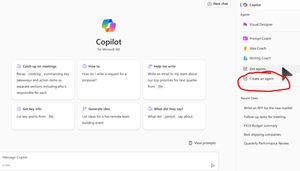
Hello, I am learning about Copilot and was very confused by these two different ways to do it. My understanding is both are "Declarative Agents" which lets the Microsoft 365 Copilot do the most heavy lifting. Method 1. First way is to go to Copilot page and clicking 'Create an Agent' w3 Method 2: Going to Copilot Studio -> Agents -> Copilot for Microsoft 365 -> New Agent (Couldn't find a screenshot) Q1. Anyway, first, I created an Agent using the first Method 1 above, and now I see it on the Copilot page under 'Agents' section. However, when I go to Copilot Studio -> Agents -> Copilot for Microsoft 365, I don't see that Agent there. Is this normal and intended? Q2. Is an Agent created using the Method 1 only available to people who have Copilot license? (as long as they are shared; I see options are only me, anyone in the organization, and specific users in the organization) Q3. Could you please confirm agents created using either way above are both "Declarative Agents"? Sorry for the newbie questions in advance... I took the course MS-4010 and reviewed several posts but still confusing...2.6KViews4likes8CommentsMicrosoft 365 Copilot Notebooks Explained: A Complete Guide (2025)
🚀 Discover the New Microsoft 365 Copilot Notebooks! In this video, I dive into the latest feature in the Microsoft 365 ecosystem — Copilot Notebooks. Whether you're a productivity enthusiast, IT admin, or business user, this deep dive will show you how Copilot Notebooks can help you analyze, automate, and work smarter. 🔍 What you'll learn: What are Copilot Notebooks? How to use them effectively in Microsoft 365 Real-world scenarios and productivity tips Integration with the new M365 dashboard My first impressions and use case examples 📌 Stay ahead in your Microsoft 365 journey and see how AI is reshaping productivity with tools like Copilot. 👇 Let me know in the comments how you plan to use Copilot Notebooks! 🔔 Don’t forget to subscribe for more Microsoft 365 insights: youtube.com/giulianodeluca #Microsoft365 #CopilotNotebooks #M365Copilot #MicrosoftCopilot #ProductivityAI #GiulianoDeLuca #TechNews #Microsoft365Tips #AIProductivity #Office365 #CopilotInAction2.5KViews2likes2Comments