bugs
52 TopicsThe New Activation Portal Is Partly Broken But It Is a MAJOR Inconvenience For Me & Others.
I Run Windows 7 Ultimate x64 And I need to Activate Windows, I am used to the new aka.ms/aoh replacing the phone line. But I Have Activated Windows XP & Vista Without Any Problems Multiple Times, I Tested It Too, Tried 7, Starter, Home, Pro, Ultimate, Even x32 & x64. Though, No matter what, everything BUT Windows 7 Works. This Is Clearly a Server Sided Issue And I've Had This problem for the past months maybe even about a year. (The Product Key I Am Using Is Not Public on The Internet So It's Not Blocked/Used Publicly By Everyone, it is the same product key that came with the CD) And I Can Say For Certain This is a Server Sided Issue. Please Help. And Thank You For Your Time.28Views0likes0Comments
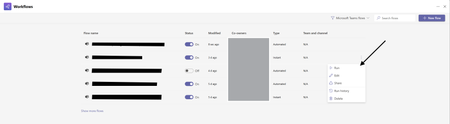
How Do I Run Workflows in New Workflows App V2 in Teams?
Hello All! I want to give feedback about issues workflow V2 experience in Teams. In the old version of Teams Workflows we could run workflows via this: But now in the New Version I have No Way to Run Workflows Am I Missing something Here? this has been a step back in functionality and ive trained users to use this as a way to run workflows and ive also used this at large in teams.88Views1like1Comment
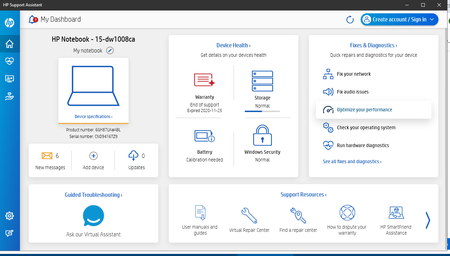
HP support assistant optimize your performance on windows laptop not working
I can run HP support assistant but when I click optimize your performance nothing happens. Laptop specifications HP Laptop 15-dw1xxx Device Name LAPTOP-4TSL8KPJ Processor Intel(R) Core(TM) i5-10210U CPU @ 1.60GHz 2.11 GHz Installed RAM 8.00 GB (7.81 GB usable) Graphics Card Intel(R) UHD Graphics (128 MB) Device ID 9EEE07E5-D485-4F8E-9B13-D46EF5B002D1 Product ID 00325-81517-08523-AAOEM System Type 64-bit operating system, x64-based processor86Views0likes2Commentscookie lost & no history & shortcut -- bug bug bug
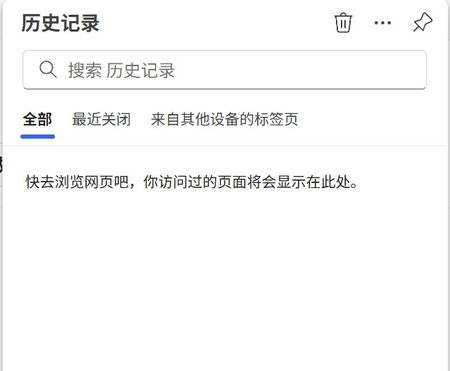
dont know since when edge started to delete ALL LOGIN COOKIE after update. i ve been seeing this for a couple of versions.so after update you will need to login every site that you always visit. and after this newest update edge no longer records your view history. no related history settings are set , since its an auto update. another issue that ppl been discussing , since a version edge canceled the function to setup shortcuts. this is very inconvenient, for almost all software with save functions today will use shift+ctrl+s as a SAVE shortcut, while edge eager to break this habit...(while this s+c+s is still a microsoft invention, sarcastically).so if no longer look highly on this button you can just delete the funcion. anyway i can move to chrome while edge being still a chrome core, why do i bother all these bugs that other equivalent dont have, when im still a chrome use in the end.161Views0likes1Comment
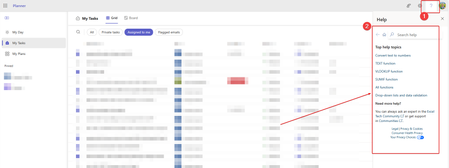
"You no longer have access to that data" error when creating a comment on a task card
All of our team members - including me - have begun to see the above error whenever we try to create a comment on a new or existing task card in Planner. We haven't made any changes on our end.249Views0likes2Comments
Critical Chat Bugs Remain Unfixed
Version 25094.310.3616.953 was just released and your still have EXTREMELY SERIOUS bugs that are still not fixed. This is disgraceful. Chat Bugs: Bug that makes Teams Chat Worthless: If you set Settings, General, "Open Application in Background" two things happen: First, When restarting Windows the tray icon does not appear. Second (makes Teams Worthless): If you receive a chat message, there is NO notification that it arrived. There is no tray icon and even if you pin Teams to the taskbar, that also does NOT show a notification of a missed chat message. This is makes teams WORTHLESS for chats. More Chat Bugs: Bug 1: Read Receipts do NOT work if you have Teams installed on more than one computer. This is a serous bug that never happened with Skype. Bug 2: The Tray icon does NOT show unread chats. This is a serous bug that never happened with Skype. Note: If your Right click on Teams and select "Pin To Taskbar", that icon will work (but not the tray icon). This assumes you do NOT select ""Open Application in Background"! Bug 3: When set to start up in background, the tray icon does not appear. Bug 4: Right clicking the tray icon causes Teams to crash and the tray icon to close. Bug 5: Teams status is unreliable and frequently shows "unknown". See Screenshot. Get your Act Together. The new Teams app is widely perceived as a buggy festering pile of crap by a significant portion of its user base, particularly among IT professionals tasked with supporting it. While a minority report improvements, the prevailing sentiment is negative, driven by technical problems, forced migration, and inadequate support responses. Many organizations are now seeking alternatives due to the ongoing issues.803Views2likes0CommentsIntroducing the new Microsoft Teams chat and channels experience
Our customers are our greatest source of inspiration, and over the years we have evolved Teams with the goal of helping them achieve more. Today we are taking the next big step in our journey with a new chat and channels experience designed to help you collaborate more efficiently and effectively in the hybrid AI-infused workplace. It is simple by default, enabling everyone to stay on top of what matters, and powerful on-demand, allowing you to organize information and communicate your way. 109KViews8likes121Comments
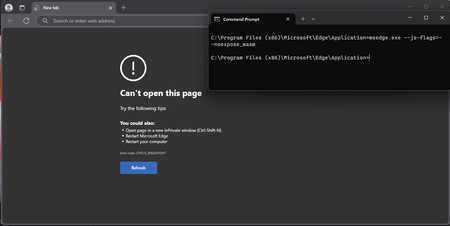
--js-flags=--noexpose_wasm launch flag causes STATUS_BREAKPOINT
Version 135.0.3179.73 (Official build) (64-bit), Windows 11 Education, also occurs on Windows 10 Education and Windows 10 Pro, been testing this since probably version 129 of Edge. --js-flags=--noexpose_wasm as a launch flag causes STATUS_BREAKPOINT, this is regardless of default configuration and with or without extensions. WASM can be used to discover privileged information about a machine, and this seems to be working in the past according to some users online, but no longer does now. Please can someone advise?214Views0likes1Comment