azure
58 TopicsAuthorization and Identity Governance Inside AI Agents
Designing Authorization‑Aware AI Agents Enforcing Microsoft Entra ID RBAC in Copilot Studio As AI agents move from experimentation to enterprise execution, authorization becomes the defining line between innovation and risk. AI agents are rapidly evolving from experimental assistants into enterprise operators—retrieving user data, triggering workflows, and invoking protected APIs. While many early implementations rely on prompt‑level instructions to control access, regulated enterprise environments require authorization to be enforced by identity systems, not language models. This article presents a production‑ready, identity‑first architecture for building authorization‑aware AI agents using Copilot Studio, Power Automate, Microsoft Entra ID, and Microsoft Graph, ensuring every agent action executes strictly within the requesting user’s permissions. Why Prompt‑Level Security Is Not Enough Large Language Models interpret intent—they do not enforce policy. Even the most carefully written prompts cannot: Validate Microsoft Entra ID group or role membership Reliably distinguish delegated user identity from application identity Enforce deterministic access decisions Produce auditable authorization outcomes Relying on prompts for authorization introduces silent security failures, over‑privileged access, and compliance gaps—particularly in Financial Services, Healthcare, and other regulated industries. Authorization is not a reasoning problem. It is an identity enforcement problem. Common Authorization Anti‑Patterns in AI Agents The following patterns frequently appear in early AI agent implementations and should be avoided in enterprise environments: Hard‑coded role or group checks embedded in prompts Trusting group names passed as plain‑text parameters Using application permissions for user‑initiated actions Skipping verification of the user’s Entra ID identity Lacking an auditable authorization decision point These approaches may work in demos, but they do not survive security reviews, compliance audits, or real‑world misuse scenarios. Authorization‑Aware Agent Architecture In an authorization‑aware design, the agent never decides access. Authorization is enforced externally, by identity‑aware workflows that sit outside the language model’s reasoning boundary. High‑Level Flow The Copilot Studio agent receives a user request The agent passes the User Principal Name (UPN) and intended action A Power Automate flow validates permissions using Microsoft Entra ID via Microsoft Graph Only authorized requests are allowed to proceed Unauthorized requests fail fast with a deterministic outcome Authorization‑aware Copilot Studio architecture enforces Entra ID RBAC before executing any business action. The agent orchestrates intent. Identity systems enforce access. Enforcing Entra ID RBAC with Microsoft Graph Power Automate acts as the authorization enforcement layer: Resolve user identity from the supplied UPN Retrieve group or role memberships using Microsoft Graph Normalize and compare memberships against approved RBAC groups Explicitly deny execution when authorization fails This keeps authorization logic: Centralized Deterministic Auditable Independent of the AI model Reference Implementation: Power Automate RBAC Enforcement Flow The following import‑ready Power Automate cloud flow demonstrates a secure RBAC enforcement pattern for Copilot Studio agents. It validates Microsoft Entra ID group membership before allowing any business action. Scenario Trigger: User‑initiated agent action Identity model: Delegated user identity Input: userUPN, requestedAction Outcome: Authorized or denied based on Entra ID RBAC { "$schema": "https://schema.management.azure.com/providers/Microsoft.Logic/schemas/2016-06-01/workflowdefinition.json#", "contentVersion": "1.0.0.0", "triggers": { "Copilot_Request": { "type": "Request", "kind": "Http", "inputs": { "schema": { "type": "object", "properties": { "userUPN": { "type": "string" }, "requestedAction": { "type": "string" } }, "required": [ "userUPN" ] } } } }, "actions": { "Get_User_Groups": { "type": "Http", "inputs": { "method": "GET", "uri": "https://graph.microsoft.com/v1.0/users/@{triggerBody()?['userUPN']}/memberOf?$select=displayName", "authentication": { "type": "ManagedServiceIdentity" } } }, "Normalize_Group_Names": { "type": "Select", "inputs": { "from": "@body('Get_User_Groups')?['value']", "select": { "groupName": "@toLower(item()?['displayName'])" } }, "runAfter": { "Get_User_Groups": [ "Succeeded" ] } }, "Check_Authorization": { "type": "Condition", "expression": "@contains(body('Normalize_Group_Names'), 'ai-authorized-users')", "runAfter": { "Normalize_Group_Names": [ "Succeeded" ] }, "actions": { "Authorized_Action": { "type": "Compose", "inputs": "User authorized via Entra ID RBAC" } }, "else": { "actions": { "Access_Denied": { "type": "Terminate", "inputs": { "status": "Failed", "message": "Access denied. User not authorized via Entra ID RBAC." } } } } } } } This pattern enforces authorization outside the agent, aligns with Zero Trust principles, and creates a clear audit boundary suitable for enterprise and regulated environments. Flow Diagram: Agent Integrated with RBAC Authorization Flow and Sample Prompt Execution: Delegated vs Application Permissions Scenario Recommended Permission Model User‑initiated agent actions Delegated permissions Background or system automation Application permissions Using delegated permissions ensures agent execution remains strictly within the requesting user’s identity boundary. Auditing and Compliance Benefits Deterministic and explainable authorization decisions Centralized enforcement aligned with identity governance Clear audit trails for security and compliance reviews Readiness for SOC, ISO, PCI, and FSI assessments Enterprise Security Takeaways Authorization belongs in Microsoft Entra ID, not prompts AI agents must respect enterprise identity boundaries Copilot Studio + Power Automate + Microsoft Graph enable secure‑by‑design AI agents By treating AI agents as first‑class enterprise actors and enforcing authorization at the identity layer, organizations can scale AI adoption with confidence, trust, and compliance.Security as the core primitive - Securing AI agents and apps
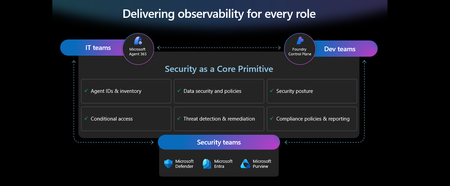
This week at Microsoft Ignite, we shared our vision for Microsoft security -- In the agentic era, security must be ambient and autonomous, like the AI it protects. It must be woven into and around everything we build—from silicon to OS, to agents, apps, data, platforms, and clouds—and throughout everything we do. In this blog, we are going to dive deeper into many of the new innovations we are introducing this week to secure AI agents and apps. As I spend time with our customers and partners, there are four consistent themes that have emerged as core security challenges to secure AI workloads. These are: preventing agent sprawl and access to resources, protecting against data oversharing and data leaks, defending against new AI threats and vulnerabilities, and adhering to evolving regulations. Addressing these challenges holistically requires a coordinated effort across IT, developers, and security leaders, not just within security teams and to enable this, we are introducing several new innovations: Microsoft Agent 365 for IT, Foundry Control Plane in Microsoft Foundry for developers, and the Security Dashboard for AI for security leaders. In addition, we are releasing several new purpose-built capabilities to protect and govern AI apps and agents across Microsoft Defender, Microsoft Entra, and Microsoft Purview. Observability at every layer of the stack To facilitate the organization-wide effort that it takes to secure and govern AI agents and apps – IT, developers, and security leaders need observability (security, management, and monitoring) at every level. IT teams need to enable the development and deployment of any agent in their environment. To ensure the responsible and secure deployment of agents into an organization, IT needs a unified agent registry, the ability to assign an identity to every agent, manage the agent’s access to data and resources, and manage the agent’s entire lifecycle. In addition, IT needs to be able to assign access to common productivity and collaboration tools, such as email and file storage, and be able to observe their entire agent estate for risks such as over-permissioned agents. Development teams need to build and test agents, apply security and compliance controls by default, and ensure AI models are evaluated for safety guardrails and security vulnerabilities. Post deployment, development teams must observe agents to ensure they are staying on task, accessing applications and data sources appropriately, and operating within their cost and performance expectations. Security & compliance teams must ensure overall security of their AI estate, including their AI infrastructure, platforms, data, apps, and agents. They need comprehensive visibility into all their security risks- including agent sprawl and resource access, data oversharing and leaks, AI threats and vulnerabilities, and complying with global regulations. They want to address these risks by extending their existing security investments that they are already invested in and familiar with, rather than using siloed or bolt-on tools. These teams can be most effective in delivering trustworthy AI to their organizations if security is natively integrated into the tools and platforms that they use every day, and if those tools and platforms share consistent security primitives such as agent identities from Entra; data security and compliance controls from Purview; and security posture, detections, and protections from Defender. With the new capabilities being released today, we are delivering observability at every layer of the AI stack, meeting IT, developers, and security teams where they are in the tools they already use to innovate with confidence. For IT Teams - Introducing Microsoft Agent 365, the control plane for agents, now in preview The best infrastructure for managing your agents is the one you already use to manage your users. With Agent 365, organizations can extend familiar tools and policies to confidently deploy and secure agents, without reinventing the wheel. By using the same trusted Microsoft 365 infrastructure, productivity apps, and protections, organizations can now apply consistent and familiar governance and security controls that are purpose-built to protect against agent-specific threats and risks. gement and governance of agents across organizations Microsoft Agent 365 delivers a unified agent Registry, Access Control, Visualization, Interoperability, and Security capabilities for your organization. These capabilities work together to help organizations manage agents and drive business value. The Registry powered by the Entra provides a complete and unified inventory of all the agents deployed and used in your organization including both Microsoft and third-party agents. Access Control allows you to limit the access privileges of your agents to only the resources that they need and protect their access to resources in real time. Visualization gives organizations the ability to see what matters most and gain insights through a unified dashboard, advanced analytics, and role-based reporting. Interop allows agents to access organizational data through Work IQ for added context, and to integrate with Microsoft 365 apps such as Outlook, Word, and Excel so they can create and collaborate alongside users. Security enables the proactive detection of vulnerabilities and misconfigurations, protects against common attacks such as prompt injections, prevents agents from processing or leaking sensitive data, and gives organizations the ability to audit agent interactions, assess compliance readiness and policy violations, and recommend controls for evolving regulatory requirements. Microsoft Agent 365 also includes the Agent 365 SDK, part of Microsoft Agent Framework, which empowers developers and ISVs to build agents on their own AI stack. The SDK enables agents to automatically inherit Microsoft's security and governance protections, such as identity controls, data security policies, and compliance capabilities, without the need for custom integration. For more details on Agent 365, read the blog here. For Developers - Introducing Microsoft Foundry Control Plane to observe, secure and manage agents, now in preview Developers are moving fast to bring agents into production, but operating them at scale introduces new challenges and responsibilities. Agents can access tools, take actions, and make decisions in real time, which means development teams must ensure that every agent behaves safely, securely, and consistently. Today, developers need to work across multiple disparate tools to get a holistic picture of the cybersecurity and safety risks that their agents may have. Once they understand the risk, they then need a unified and simplified way to monitor and manage their entire agent fleet and apply controls and guardrails as needed. Microsoft Foundry provides a unified platform for developers to build, evaluate and deploy AI apps and agents in a responsible way. Today we are excited to announce that Foundry Control Plane is available in preview. This enables developers to observe, secure, and manage their agent fleets with built-in security, and centralized governance controls. With this unified approach, developers can now identify risks and correlate disparate signals across their models, agents, and tools; enforce consistent policies and quality gates; and continuously monitor task adherence and runtime risks. Foundry Control Plane is deeply integrated with Microsoft’s security portfolio to provide a ‘secure by design’ foundation for developers. With Microsoft Entra, developers can ensure an agent identity (Agent ID) and access controls are built into every agent, mitigating the risk of unmanaged agents and over permissioned resources. With Microsoft Defender built in, developers gain contextualized alerts and posture recommendations for agents directly within the Foundry Control Plane. This integration proactively prevents configuration and access risks, while also defending agents from runtime threats in real time. Microsoft Purview’s native integration into Foundry Control Plane makes it easy to enable data security and compliance for every Foundry-built application or agent. This allows Purview to discover data security and compliance risks and apply policies to prevent user prompts and AI responses from safety and policy violations. In addition, agent interactions can be logged and searched for compliance and legal audits. This integration of the shared security capabilities, including identity and access, data security and compliance, and threat protection and posture ensures that security is not an afterthought; it’s embedded at every stage of the agent lifecycle, enabling you to start secure and stay secure. For more details, read the blog. For Security Teams - Introducing Security Dashboard for AI - unified risk visibility for CISOs and AI risk leaders, coming soon AI proliferation in the enterprise, combined with the emergence of AI governance committees and evolving AI regulations, leaves CISOs and AI risk leaders needing a clear view of their AI risks, such as data leaks, model vulnerabilities, misconfigurations, and unethical agent actions across their entire AI estate, spanning AI platforms, apps, and agents. 90% of security professionals, including CISOs, report that their responsibilities have expanded to include data governance and AI oversight within the past year. 1 At the same time, 86% of risk managers say disconnected data and systems lead to duplicated efforts and gaps in risk coverage. 2 To address these needs, we are excited to introduce the Security Dashboard for AI. This serves as a unified dashboard that aggregates posture and real-time risk signals from Microsoft Defender, Microsoft Entra, and Microsoft Purview. This unified dashboard allows CISOs and AI risk leaders to discover agents and AI apps, track AI posture and drift, and correlate risk signals to investigate and act across their entire AI ecosystem. For example, you can see your full AI inventory and get visibility into a quarantined agent, flagged for high data risk due to oversharing sensitive information in Purview. The dashboard then correlates that signal with identity insights from Entra and threat protection alerts from Defender to provide a complete picture of exposure. From there, you can delegate tasks to the appropriate teams to enforce policies and remediate issues quickly. With the Security Dashboard for AI, CISOs and risk leaders gain a clear, consolidated view of AI risks across agents, apps, and platforms—eliminating fragmented visibility, disconnected posture insights, and governance gaps as AI adoption scales. Best of all, there’s nothing new to buy. If you’re already using Microsoft security products to secure AI, you’re already a Security Dashboard for AI customer. Figure 5: Security Dashboard for AI provides CISOs and AI risk leaders with a unified view of their AI risk by bringing together their AI inventory, AI risk, and security recommendations to strengthen overall posture Together, these innovations deliver observability and security across IT, development, and security teams, powered by Microsoft’s shared security capabilities. With Microsoft Agent 365, IT teams can manage and secure agents alongside users. Foundry Control Plane gives developers unified governance and lifecycle controls for agent fleets. Security Dashboard for AI provides CISOs and AI risk leaders with a consolidated view of AI risks across platforms, apps, and agents. Added innovation to secure and govern your AI workloads In addition to the IT, developer, and security leader-focused innovations outlined above, we continue to accelerate our pace of innovation in Microsoft Entra, Microsoft Purview, and Microsoft Defender to address the most pressing needs for securing and governing your AI workloads. These needs are: Manage agent sprawl and resource access e.g. managing agent identity, access to resources, and permissions lifecycle at scale Prevent data oversharing and leaks e.g. protecting sensitive information shared in prompts, responses, and agent interactions Defend against shadow AI, new threats, and vulnerabilities e.g. managing unsanctioned applications, preventing prompt injection attacks, and detecting AI supply chain vulnerabilities Enable AI governance for regulatory compliance e.g. ensuring AI development, operations, and usage comply with evolving global regulations and frameworks Manage agent sprawl and resource access 76% of business leaders expect employees to manage agents within the next 2–3 years. 3 Widespread adoption of agents is driving the need for visibility and control, which includes the need for a unified registry, agent identities, lifecycle governance, and secure access to resources. Today, Microsoft Entra provides robust identity protection and secure access for applications and users. However, organizations lack a unified way to manage, govern, and protect agents in the same way they manage their users. Organizations need a purpose-built identity and access framework for agents. Introducing Microsoft Entra Agent ID, now in preview Microsoft Entra Agent ID offers enterprise-grade capabilities that enable organizations to prevent agent sprawl and protect agent identities and their access to resources. These new purpose-built capabilities enable organizations to: Register and manage agents: Get a complete inventory of the agent fleet and ensure all new agents are created with an identity built-in and are automatically protected by organization policies to accelerate adoption. Govern agent identities and lifecycle: Keep the agent fleet under control with lifecycle management and IT-defined guardrails for both agents and people who create and manage them. Protect agent access to resources: Reduce risk of breaches, block risky agents, and prevent agent access to malicious resources with conditional access and traffic inspection. Agents built in Microsoft Copilot Studio, Microsoft Foundry, and Security Copilot get an Entra Agent ID built-in at creation. Developers can also adopt Entra Agent ID for agents they build through Microsoft Agent Framework, Microsoft Agent 365 SDK, or Microsoft Entra Agent ID SDK. Read the Microsoft Entra blog to learn more. Prevent data oversharing and leaks Data security is more complex than ever. Information Security Media Group (ISMG) reports that 80% of leaders cite leakage of sensitive data as their top concern. 4 In addition to data security and compliance risks of generative AI (GenAI) apps, agents introduces new data risks such as unsupervised data access, highlighting the need to protect all types of corporate data, whether it is accessed by employees or agents. To mitigate these risks, we are introducing new Microsoft Purview data security and compliance capabilities for Microsoft 365 Copilot and for agents and AI apps built with Copilot Studio and Microsoft Foundry, providing unified protection, visibility, and control for users, AI Apps, and Agents. New Microsoft Purview controls safeguard Microsoft 365 Copilot with real-time protection and bulk remediation of oversharing risks Microsoft Purview and Microsoft 365 Copilot deliver a fully integrated solution for protecting sensitive data in AI workflows. Based on ongoing customer feedback, we’re introducing new capabilities to deliver real-time protection for sensitive data in M365 Copilot and accelerated remediation of oversharing risks: Data risk assessments: Previously, admins could monitor oversharing risks such as SharePoint sites with unprotected sensitive data. Now, they can perform item-level investigations and bulk remediation for overshared files in SharePoint and OneDrive to quickly reduce oversharing exposure. Data Loss Prevention (DLP) for M365 Copilot: DLP previously excluded files with sensitivity labels from Copilot processing. Now in preview, DLP also prevents prompts that include sensitive data from being processed in M365 Copilot, Copilot Chat, and Copilot agents, and prevents Copilot from using sensitive data in prompts for web grounding. Priority cleanup for M365 Copilot assets: Many organizations have org-wide policies to retain or delete data. Priority cleanup, now generally available, lets admins delete assets that are frequently processed by Copilot, such as meeting transcripts and recordings, on an independent schedule from the org-wide policies while maintaining regulatory compliance. On-demand classification for meeting transcripts: Purview can now detect sensitive information in meeting transcripts on-demand. This enables data security admins to apply DLP policies and enforce Priority cleanup based on the sensitive information detected. & bulk remediation Read the full Data Security blog to learn more. Introducing new Microsoft Purview data security capabilities for agents and apps built with Copilot Studio and Microsoft Foundry, now in preview Microsoft Purview now extends the same data security and compliance for users and Copilots to agents and apps. These new capabilities are: Enhanced Data Security Posture Management: A centralized DSPM dashboard that provides observability, risk assessment, and guided remediation across users, AI apps, and agents. Insider Risk Management (IRM) for Agents: Uniquely designed for agents, using dedicated behavioral analytics, Purview dynamically assigns risk levels to agents based on their risky handing of sensitive data and enables admins to apply conditional policies based on that risk level. Sensitive data protection with Azure AI Search: Azure AI Search enables fast, AI-driven retrieval across large document collections, essential for building AI Apps. When apps or agents use Azure AI Search to index or retrieve data, Purview sensitivity labels are preserved in the search index, ensuring that any sensitive information remains protected under the organization’s data security & compliance policies. For more information on preventing data oversharing and data leaks - Learn how Purview protects and governs agents in the Data Security and Compliance for Agents blog. Defend against shadow AI, new threats, and vulnerabilities AI workloads are subject to new AI-specific threats like prompt injections attacks, model poisoning, and data exfiltration of AI generated content. Although security admins and SOC analysts have similar tasks when securing agents, the attack methods and surfaces differ significantly. To help customers defend against these novel attacks, we are introducing new capabilities in Microsoft Defender that deliver end-to-end protection, from security posture management to runtime defense. Introducing Security Posture Management for agents, now in preview As organizations adopt AI agents to automate critical workflows, they become high-value targets and potential points of compromise, creating a critical need to ensure agents are hardened, compliant, and resilient by preventing misconfigurations and safeguarding against adversarial manipulation. Security Posture Management for agents in Microsoft Defender now provides an agent inventory for security teams across Microsoft Foundry and Copilot Studio agents. Here, analysts can assess the overall security posture of an agent, easily implement security recommendations, and identify vulnerabilities such as misconfigurations and excessive permissions, all aligned to the MITRE ATT&CK framework. Additionally, the new agent attack path analysis visualizes how an agent’s weak security posture can create broader organizational risk, so you can quickly limit exposure and prevent lateral movement. Introducing Threat Protection for agents, now in preview Attack techniques and attack surfaces for agents are fundamentally different from other assets in your environment. That’s why Defender is delivering purpose-built protections and detections to help defend against them. Defender is introducing runtime protection for Copilot Studio agents that automatically block prompt injection attacks in real time. In addition, we are announcing agent-specific threat detections for Copilot Studio and Microsoft Foundry agents coming soon. Defender automatically correlates these alerts with Microsoft’s industry-leading threat intelligence and cross-domain security signals to deliver richer, contextualized alerts and security incident views for the SOC analyst. Defender’s risk and threat signals are natively integrated into the new Microsoft Foundry Control Plane, giving development teams full observability and the ability to act directly from within their familiar environment. Finally, security analysts will be able to hunt across all agent telemetry in the Advanced Hunting experience in Defender, and the new Agent 365 SDK extends Defender’s visibility and hunting capabilities to third-party agents, starting with Genspark and Kasisto, giving security teams even more coverage across their AI landscape. To learn more about how you can harden the security posture of your agents and defend against threats, read the Microsoft Defender blog. Enable AI governance for regulatory compliance Global AI regulations like the EU AI Act and NIST AI RMF are evolving rapidly; yet, according to ISMG, 55% of leaders report lacking clarity on current and future AI regulatory requirements. 5 As enterprises adopt AI, they must ensure that their AI innovation aligns with global regulations and standards to avoid costly compliance gaps. Introducing new Microsoft Purview Compliance Manager capabilities to stay ahead of evolving AI regulations, now in preview Today, Purview Compliance Manager provides over 300 pre-built assessments for common industry, regional, and global standards and regulations. However, the pace of change for new AI regulations requires controls to be continuously re-evaluated and updated so that organizations can adapt to ongoing changes in regulations and stay compliant. To address this need, Compliance Manager now includes AI-powered regulatory templates. AI-powered regulatory templates enable real-time ingestion and analysis of global regulatory documents, allowing compliance teams to quickly adapt to changes as they happen. As regulations evolve, the updated regulatory documents can be uploaded to Compliance Manager, and the new requirements are automatically mapped to applicable recommended actions to implement controls across Microsoft Defender, Microsoft Entra, Microsoft Purview, Microsoft 365, and Microsoft Foundry. Automated actions by Compliance Manager further streamline governance, reduce manual workload, and strengthen regulatory accountability. Introducing expanded Microsoft Purview compliance capabilities for agents and AI apps now in preview Microsoft Purview now extends its compliance capabilities across agent-generated interactions, ensuring responsible use and regulatory alignment as AI becomes deeply embedded across business processes. New capabilities include expanded coverage for: Audit: Surface agent interactions, lifecycle events, and data usage with Purview Audit. Unified audit logs across user and agent activities, paired with traceability for every agent using an Entra Agent ID, support investigation, anomaly detection, and regulatory reporting. Communication Compliance: Detect prompts sent to agents and agent-generated responses containing inappropriate, unethical, or risky language, including attempts to manipulate agents into bypassing policies, generating risky content, or producing noncompliant outputs. When issues arise, data security admins get full context, including the prompt, the agent’s output, and relevant metadata, so they can investigate and take corrective action Data Lifecycle Management: Apply retention and deletion policies to agent-generated content and communication flows to automate lifecycle controls and reduce regulatory risk. Read about Microsoft Purview data security for agents to learn more. Finally, we are extending our data security, threat protection, and identity access capabilities to third-party apps and agents via the network. Advancing Microsoft Entra Internet Access Secure Web + AI Gateway - extend runtime protections to the network, now in preview Microsoft Entra Internet Access, part of the Microsoft Entra Suite, has new capabilities to secure access to and usage of GenAI at the network level, marking a transition from Secure Web Gateway to Secure Web and AI Gateway. Enterprises can accelerate GenAI adoption while maintaining compliance and reducing risk, empowering employees to experiment with new AI tools safely. The new capabilities include: Prompt injection protection which blocks malicious prompts in real time by extending Azure AI Prompt Shields to the network layer. Network file filtering which extends Microsoft Purview to inspect files in transit and prevents regulated or confidential data from being uploaded to unsanctioned AI services. Shadow AI Detection that provides visibility into unsanctioned AI applications through Cloud Application Analytics and Defender for Cloud Apps risk scoring, empowering security teams to monitor usage trends, apply Conditional Access, or block high-risk apps instantly. Unsanctioned MCP server blocking prevents access to MCP servers from unauthorized agents. With these controls, you can accelerate GenAI adoption while maintaining compliance and reducing risk, so employees can experiment with new AI tools safely. Read the Microsoft Entra blog to learn more. As AI transforms the enterprise, security must evolve to meet new challenges—spanning agent sprawl, data protection, emerging threats, and regulatory compliance. Our approach is to empower IT, developers, and security leaders with purpose-built innovations like Agent 365, Foundry Control Plane, and the Security Dashboard for AI. These solutions bring observability, governance, and protection to every layer of the AI stack, leveraging familiar tools and integrated controls across Microsoft Defender, Microsoft Entra, and Microsoft Purview. The future of security is ambient, autonomous, and deeply woven into the fabric of how we build, deploy, and govern AI systems. Explore additional resources Learn more about Security for AI solutions on our webpage Learn more about Microsoft Agent 365 Learn more about Microsoft Entra Agent ID Get started with Microsoft 365 Copilot Get started with Microsoft Copilot Studio Get started with Microsoft Foundry Get started with Microsoft Defender for Cloud Get started with Microsoft Entra Get started with Microsoft Purview Get started with Microsoft Purview Compliance Manager Sign up for a free Microsoft 365 E5 Security Trial and Microsoft Purview Trial 1 Bedrock Security, 2025 Data Security Confidence Index, published Mar 17, 2025. 2 AuditBoard & Ascend2, Connected Risk Report 2024; as cited by MIT Sloan Management Review, Spring 2025. 3 KPMG AI Quarterly Pulse Survey | Q3 2025. September 2025. n= 130 U.S.-based C-suite and business leaders representing organizations with annual revenue of $1 billion or more 4 First Annual Generative AI study: Business Rewards vs. Security Risks, , Q3 2023, ISMG, N=400 5 First Annual Generative AI study: Business Rewards vs. Security Risks, Q3 2023, ISMG, N=400
Simplifying Code Signing for Windows Apps: Artifact Signing (GA)
Trusted Signing is now Artifact Signing—and it’s officially Generally Available! Artifact Signing is a fully managed, end-to-end code signing service that makes it easier than ever for Windows application developers to sign their apps securely and efficiently. As Artifact Signing rebrands, customers will see changes over the next weeks. Please refer to our Learn docs for the most updated information. What is Artifact Signing? Code signing has traditionally been a complex and manual process. Managing certificates, securing keys, and integrating signing into build pipelines can slow teams down and introduce risk. Artifact Signing changes that by offering a fully managed, end-to-end solution that automates certificate management, enforces strong security controls, and integrates seamlessly with your existing developer tools. With zero-touch certificate management, verified identity, role-based access control, and support for multiple trust models, Artifact Signing makes it easier than ever to build and distribute secure Windows applications. Whether you're shipping consumer apps or internal tools, Artifact Signing helps you deliver software that’s secure. Security Made Simple Zero-Touch Certificate Management No more manual certificate handling. The service provides “zero-touch” certificate management, meaning it handles the creation, protection, and even automatic rotation of code signing certificates on your behalf. These certificates are short-lived and auto renewed behind the scenes, giving you tighter control, faster revocation when needed, and eliminating the risks associated with long-lived certs. Your signing reputation isn’t tied to a single certificate. Instead, it’s anchored to your verified identity in Azure, and every signature reflects that verified identity. Verified Identity Identity validation with Artifact Signing ensures your app’s digital signature displays accurate and verified publisher information. Once validated, your identity details, such as your individual or organization name, are included in the certificate. This means your signed apps will show a verified publisher name, not the dreaded “Unknown Publisher” warning. The entire validation process happens in the Azure portal. You simply submit your individual or organization details, and in some cases, upload supporting documents like business registration papers. Most validations are completed within a few business days, and once approved, you’re ready to start signing your apps immediately. organization validation page Secure and Controlled Signing (RBAC) Artifact Signing enforces Azure’s Role-Based Access Control (RBAC) to secure signing activities. You can assign specific Azure roles to accounts or CI agents that use your Artifact Signing resource, ensuring only authorized developers or build pipelines can initiate signing operations. This tight access control helps prevent unauthorized or rogue signatures. Full Telemetry and Audit Logs Every signing request is tracked. You can see what was signed, when, and by whom in the Azure portal. This logging not only helps with compliance and auditing needs but also enables fast remediation if an issue arises. For example, if you discover a particular signing certificate was used in error or compromised, you can quickly revoke it directly from the portal. The short-lived nature of certificates in Artifact Signing further limits the window of any potential misuse. Artifact Signing gives you enterprise-grade security controls out of the box: strong protection of keys, fine-grained access control, and visibility. For developers and companies concerned about supply chain security, this dramatically reduces risk compared to handling signing keys manually. Built for Developers Artifact Signing was built to slot directly into developers’ existing workflows. You don’t need to overhaul how you build or release software, just plug Artifact Signing into your toolchain: GitHub Actions & Azure DevOps: The service includes first-class support for modern CI/CD. An official GitHub Action is available for easy integration into your workflow YAML, and Azure DevOps has tasks for pipelines. With these tools, every Windows app build can automatically sign binaries or installers—no manual steps required. Since signing credentials are managed in Azure, you avoid storing secrets in your repository. Visual Studio & MSBuild: Use the Artifact Signing client with SignTool to integrate signing into publish profiles or post-build steps. Once the Artifact Signing client is installed, Visual Studio or MSBuild can invoke SignTool as usual, with signatures routed through the Artifact Signing service. SignTool / CLI: Developers using scripts or custom build systems can continue using the familiar signtool.exe command. After a one-time setup, your existing SignTool commands will sign via the cloud service. The actual file signing on your build machine uses a digest signing approach: SignTool computes a hash of your file and sends that to the Artifact Signing service, which returns a signature. The file itself isn’t uploaded, preserving confidentiality and speed. This way, integrating Artifact Signing can be as simple as adding a couple of lines to your build script to point SignTool at Azure. PowerShell & SDK: For advanced automation or custom scenarios, Artifact Signing supports PowerShell modules and an SDK. These tools allow you to script signing operations, bulk-sign files, or integrate signing into specialized build systems. The Right Trust for the Right Audience Artifact Signing has support for multiple trust models to suit different distribution scenarios. You can choose between Public Trust and Private Trust for your code signing, depending on your app’s audience: Public Trust: This is the standard model for software intended to go to consumers. When you use Public Trust signing, the certificates come from a Microsoft CA that’s part of the Microsoft Trusted Root Program. Apps signed under Public Trust are recognized by Windows as coming from a known publisher, enabling a smooth installation experience when security features such as Smart App Control and SmartScreen are enabled. Private Trust: This model is for internal or enterprise apps. These certificates aren’t publicly trusted but are instead meant to work with Windows Defender Application Control (App Control for Business) policies. This is ideal for line-of-business applications, internal tools, or scenarios where you want to tightly control who trusts the app. Artifact Signing ’s Private Trust model is the modern, expanded evolution of Microsoft’s older Device Guard Signing Service (DGSS) -- delivering the same ability to sign internal apps but with ease of access and expanded capabilities. Test Signing: Useful for development and testing. These certificates mimic real signatures but aren’t publicly trusted, allowing you to validate your signing setup in non-production environments before releasing your app. Note on Expanded Scenario Support: Artifact Signing supports additional certificate profiles, including those for VBS enclaves and Private Trust CI Policies. In addition, there is a new preview feature for signing container images using the Notary v2 standard from the CNCF Notary project. This enables developers to sign Docker/OCI container images stored in Azure Container Registry using tools like the notation CLI, backed by Artifact Signing. Having all trust models in one service means you can manage all your signing needs in one place. Whether your code is destined for the world or just your organization, Artifact Signing makes it easy to ensure it is signed with an appropriate level of trust. Misuse and Abuse Management Artifact Signing is engineered with robust safeguards to counter certificate misuse and abuse. The signing platform employs active threat intelligence monitoring to continuously detect suspicious signing activity in real time. The service also emphasizes prevention: certificates are short-lived (renewed daily and valid for only 72 hours), which means any certificate used maliciously can be swiftly revoked without impacting software signed outside its brief lifetime. When misuse is confirmed, Artifact Signing quickly revokes the certificate and suspends the subscriber’s account, removing trust from the malicious code’s signature and stopping further abuse. These measures adhere to strict industry standards for responsible certificate governance. By combining real-time threat detection, built-in preventive controls, and rapid response policies, Artifact Signing gives Windows app developers confidence that any attempt to abuse the platform will be quickly identified and contained, helping protect the broader software ecosystem from emerging threats. Availability and What’s Next Check out the upcoming “What’s New” section in the Artifact Signing Learn Docs for updates on supported file types, new region availability, and more. Microsoft will continue evolving the service to meet developer needs. Conclusion: Enhancing Trust and Security for All Windows Apps Artifact Signing empowers Windows developers to sign their applications with ease and confidence. It integrates effortlessly into your development tools, automates the heavy lifting of certificate management, and ensures every app carries a verified digital signature backed by Microsoft’s Certificate Authorities. For users, it means peace of mind. For developers and organizations, it means fewer headaches, stronger protection against supply chain threats, and complete control over who signs what and when. Now that Artifact Signing is generally available, it’s a must-have for building trustworthy Windows software. It reflects Microsoft’s commitment to a secure, inclusive ecosystem and brings modern security features like Smart App Control and App Control for Business within reach, simply by signing your code. Whether you're shipping consumer apps or internal tools, Artifact Signing helps you deliver software that’s both easy to install and tough to compromise.2.6KViews6likes2CommentsUnderstanding and mitigating security risks in MCP implementations
Introducing any new technology can introduce new security challenges or exacerbate existing security risks. In this blog post, we’re going to look at some of the security risks that could be introduced to your environment when using Model Context Protocol (MCP), and what controls you can put in place to mitigate them. MCP is a framework that enables seamless integration between LLM applications and various tools and data sources. MCP defines: A standardized way for AI models to request external actions through a consistent API Structured formats for how data should be passed to and from AI systems Protocols for how AI requests are processed, executed, and returned MCP allows different AI systems to use a common set of tools and patterns, ensuring consistent behavior when AI models interact with external systems. MCP architecture MCP follows a client-server architecture that allows AI models to interact with external tools efficiently. Here’s how it works: MCP Host – The AI model (e.g., Azure OpenAI GPT) requesting data or actions. MCP Client – An intermediary service that forwards the AI model's requests to MCP servers. MCP Server – Lightweight applications that expose specific capabilities (APIs, databases, files, etc.). Data Sources – Various backend systems, including local storage, cloud databases, and external APIs. MCP security controls Any system which has access to important resources has implied security challenges. Security challenges can generally be addressed through correct application of fundamental security controls and concepts. As MCP is only newly defined, the specification is changing very rapidly and as the protocol evolves. Eventually the security controls within it will mature, enabling a better integration with enterprise and established security architectures and best practices. Research published in the Microsoft Digital Defense Report states that 98% of reported breaches would be prevented by robust security hygiene and the best protection against any kind of breach is to get your baseline security hygiene, secure coding best practices and supply chain security right – those tried and tested practices that we already know about still make the most impact in reducing security risk. Let's look at some of the ways that you can start to address security risks when adopting MCP. MCP server authentication (if your MCP implementation was before 26th April 2025) Problem statement: The original MCP specification assumed that developers would write their own authentication server. This requires knowledge of OAuth and related security constraints. MCP servers acted as OAuth 2.0 Authorization Servers, managing the required user authentication directly rather than delegating it to an external service such as Microsoft Entra ID. As of 26 April 2025, an update to the MCP specification allows for MCP servers to delegate user authentication to an external service. Risks: Misconfigured authorization logic in the MCP server can lead to sensitive data exposure and incorrectly applied access controls. OAuth token theft on the local MCP server. If stolen, the token can then be used to impersonate the MCP server and access resources and data from the service that the OAuth token is for. Mitigating controls: Thoroughly review your MCP server authorization logic, here some posts discussing this in more detail - Azure API Management Your Auth Gateway For MCP Servers | Microsoft Community Hub and Using Microsoft Entra ID To Authenticate With MCP Servers Via Sessions · Den Delimarsky Implement best practices for token validation and lifetime Use secure token storage and encrypt tokens Excessive permissions for MCP servers Problem statement: MCP servers may have been granted excessive permissions to the service/resource they are accessing. For example, an MCP server that is part of an AI sales application connecting to an enterprise data store should have access scoped to the sales data and not allowed to access all the files in the store. Referencing back to the principle of least privilege (one of the oldest security principles), no resource should have permissions in excess of what is required for it to execute the tasks it was intended for. AI presents an increased challenge in this space because to enable it to be flexible, it can be challenging to define the exact permissions required. Risks: Granting excessive permissions can allow for exfiltration or amending data that the MCP server was not intended to be able to access. This could also be a privacy issue if the data is personally identifiable information (PII). Mitigating controls: Clearly define the permissions that the MCP server has to access the resource/service it connects to. These permissions should be the minimum required for the MCP server to access the tool or data it is connecting to. Indirect prompt injection attacks Problem statement: Researchers have shown that the Model Context Protocol (MCP) is vulnerable to a subset of Indirect Prompt Injection attacks known as Tool Poisoning Attacks. Tool poisoning is a scenario where an attacker embeds malicious instructions within the descriptions of MCP tools. These instructions are invisible to users but can be interpreted by the AI model and its underlying systems, leading to unintended actions that could ultimately lead to harmful outcomes. Risks: Unintended AI actions present a variety of security risks that include data exfiltration and privacy breaches. Mitigating controls: Implement AI prompt shields: in Azure AI Foundry, you can follow these steps to implement AI prompt shields. Implement robust supply chain security: you can read more about how Microsoft implements supply chain security internally here. Established security best practices that will uplift your MCP implementation’s security posture Any MCP implementation inherits the existing security posture of your organization's environment that it is built upon, so when considering the security of MCP as a component of your overall AI systems it is recommended that you look at uplifting your overall existing security posture. The following established security controls are especially pertinent: Secure coding best practices in your AI application - protect against the OWASP Top 10, the OWASP Top 10 for LLMs, use of secure vaults for secrets and tokens, implementing end-to-end secure communications between all application components, etc. Server hardening – use MFA where possible, keep patching up to date, integrate the server with a third party identity provider for access, etc. Keep devices, infrastructure and applications up to date with patches Security monitoring – implementing logging and monitoring of an AI application (including the MCP client/servers) and sending those logs to a central SIEM for detection of anomalous activities Zero trust architecture – isolating components via network and identity controls in a logical manner to minimize lateral movement if an AI application were compromised. Conclusion MCP is a promising development in the AI space that enables rich data and context access. As developers embrace this new approach to integrating their organization's APIs and connectors into LLMs, they need to be aware of security risks and how to implement controls to reduce those risks. There are mitigating security controls that can be put in place to reduce the risks inherent in the current specification, but as the protocol develops expect that some of the risks will reduce or disappear entirely. We encourage you to contribute to and suggest security related MCP RFCs to make this protocol even better! With thanks to OrinThomas, dasithwijes, dendeli and Peter Marcu for their inputs and collaboration on this post.AI Security in Azure with Microsoft Defender for Cloud: Learn the How, Join the Session
As organizations accelerate AI adoption, securing AI workloads has become a top priority. Unlike traditional cloud applications, AI systems introduce new risks—such as prompt injection, data leakage, and model misuse—that require a more integrated approach to security and governance. To help developers and security teams understand and address these challenges, we are hosting Azure Decoded: Kickstart AI Security with Microsoft Defender for Cloud, a live session on March 18 th at 12 PM PST focused on securing AI workloads built with Microsoft Foundry and Azure AI services. From AI Security Concepts to Platform Protections A strong foundation for this session starts with the Microsoft Learn module Understand how Microsoft Defender for Cloud supports AI security and governance in Azure. This training introduces how AI workloads are structured in Azure and why they require a different security model than traditional applications. In the module, learners explore: The layers that make up AI workloads in Azure Security risks unique to AI, including prompt injection, data leakage, and model misuse How Microsoft Foundry provides guardrails and observability for AI models How Microsoft Defender for Cloud works with Microsoft Purview and Microsoft Entra ID to deliver a unified, defense‑in‑depth security and governance strategy for AI Together, these services help organizations protect model inputs and outputs, maintain visibility, and enforce governance across AI workloads in Azure. Bringing AI Security Architecture to Life with Azure Decoded The Azure Decoded: Kickstart AI Security with Microsoft Defender for Cloud session on March 18 th builds on these concepts by connecting them to real‑world architecture and platform decisions. Attendees learn how Microsoft Defender for Cloud fits into a broader AI security strategy and how Microsoft Foundry helps apply guardrails, visibility, and governance across AI workloads. This session is designed for: Developers building AI applications and agents on Azure Security engineers responsible for protecting AI workloads Cloud architects designing enterprise‑ready AI solutions By combining conceptual understanding with platform‑level security discussions, the session helps teams design AI solutions that are not only innovative—but also secure, governed, and trustworthy. Be sure to register so you do not miss out. Start Your AI Security Journey AI security is evolving quickly, and it requires both architectural understanding and practical platform knowledge. Start by exploring how Microsoft Defender for Cloud supports AI security and governance in Azure, then join the Azure Decoded session to see how these principles come together in real‑world AI workloads.
Making AI Apps Enterprise-Ready with Microsoft Purview and Microsoft Foundry
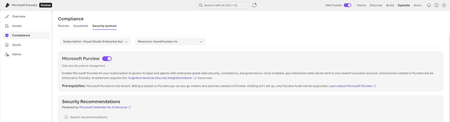
Building AI apps is easy. Shipping them to production is not. Microsoft Foundry lets developers bring powerful AI apps and agents to production in days. But managing safety, security, and compliance for each one quickly becomes the real bottleneck. Every enterprise AI project hits the same wall: security reviews, data classification, audit trails, DLP policies, retention requirements. Teams spend months building custom logging pipelines and governance systems that never quite keep up with the app itself. There is a faster way. Enable Purview & Ship Faster! Microsoft Foundry now includes native integration with Microsoft Purview. When you enable it, every AI interaction in your subscription flows into the same enterprise data governance infrastructure that already protects your Microsoft 365 and Azure data estate. No SDK changes. No custom middleware. No separate audit system to maintain. Here is what you get: Visibility within 24 hours. Data Security Posture Management (DSPM) shows you total interactions, sensitive data detected in prompts and responses, user activity across AI apps, and insider risk scoring. This dashboard exists the moment you flip the toggle. Automatic data classification. The same classification engine that scans your Microsoft 365 tenant now scans AI interactions. Credit card numbers, health information, SSNs, and your custom sensitive information types are all detected automatically. Audit logs you do not have to build. Every AI interaction is logged in the Purview unified audit log. Timestamps, user identity, the AI app involved, files accessed, sensitivity labels applied. When legal needs six months of AI interactions for an investigation, the data is already there. DLP policy enforcement. Configure policies that block prompts containing sensitive information before they reach the model. This uses the same DLP framework you already know. eDiscovery, retention, and communication compliance. Search AI interactions alongside email and Teams messages. Set retention policies by selecting "Enterprise AI apps" as the location. Detect harmful or unauthorized content in prompts. How to Enable Prerequisite: You need the “Azure AI Account Owner” role assigned by your Subscription Owner. Open the Microsoft Foundry portal (make sure you are in the new portal) Select Operate from the top navigation Select Compliance in the left pane Select the Security posture tab Select the Azure Subscription Enable the toggle next to Microsoft Purview Repeat the above steps for other subscriptions By enabling this toggle, data exchanged within Foundry apps and agents' starts flowing to Purview immediately. Purview reports populate within 24 hours. What shows up in Purview? Purview Data Security Admins: Go to the Microsoft Purview portal, open DSPM, and follow the recommendation to setup “Secure interactions from enterprise AI apps” . Navigate to DSPM > Discover > Apps and Agents to review and monitor the Foundry apps built in your organization Navigate to DSPM > Activity Explorer to review the activity on a given agent/application What About Cost? Enabling the integration is free. Audit Standard is included for Foundry apps. You will only be charged for data security policies you setup for governing Foundry data. A Real-World Scenario: The Internal HR Assistant Consider a healthcare company building an internal AI agent for HR questions. The Old Way: The developer team spends six weeks building a custom logging solution to strip PII/PHI from prompts to meet HIPAA requirements. They have to manually demonstrate these logs to compliance before launch. The Foundry Way: The team enables the Purview toggle. Detection: Purview automatically flags if an employee pastes a patient ID into the chat. Retention: The team selects "Enterprise AI Apps" in their retention policy, ensuring all chats are kept for the required legal period. Outcome: The app ships on schedule because Compliance trusts the controls are inherited, not bolted on. Takeaway Microsoft Purview DSPM is a gamechanger for organizations looking to adopt AI responsibly. By integrating with Microsoft Foundry, it provides a comprehensive framework to discover, protect, and govern AI interactions ensuring compliance, reducing risk, and enabling secure innovation. We built this integration because teams kept spending months on compliance controls that already exist in Microsoft's stack. The toggle is there. The capabilities are real. Your security team already trusts Purview. Your compliance team already knows the tools. Enable it. Ship your agent. Let the infrastructure do what infrastructure does best: work in the background while you focus on what your application does. Additional Resources Documentation: Use Microsoft Purview to manage data security & compliance for Microsoft Foundry | Microsoft LearnTrusted Signing Public Preview Update
Nearly a year ago we announced the Public Preview of Trusted Signing with availability for organizations with 3 years or more of verifiable history to onboard to the service to get a fully managed code signing experience to simplify the efforts for Windows app developers. Over the past year, we’ve announced new features including the Preview support for Individual Developers, and we highlighted how the service contributes to the Windows Security story at Microsoft BUILD 2024 in the Unleash Windows App Security & Reputation with Trusted Signing session. During the Public Preview, we have obtained valuable insights on the service features from our customers, and insights into the developer experience as well as experience for Windows users. As we incorporate this feedback and learning into our General Availability (GA) release, we are limiting new customer subscriptions as part of the public preview. This approach will allow us to focus on refining the service based on the feedback and data collected during the preview phase. The limit in new customer subscriptions for Trusted Signing will take effect Wednesday, April 2, 2025, and make the service only available to US and Canada-based organizations with 3 years or more of verifiable history. Onboarding for individual developers and all other organizations will not be directly available for the remainder of the preview, and we look forward to expanding the service availability as we approach GA. Note that this announcement does not impact any existing subscribers of Trusted Signing, and the service will continue to be available for these subscribers as it has been throughout the Public Preview. For additional information about Trusted Signing please refer to Trusted Signing documentation | Microsoft Learn and Trusted Signing FAQ | Microsoft Learn.6.8KViews7likes40CommentsUncover hidden security risks with Microsoft Sentinel graph
Earlier this fall, we launched Microsoft Sentinel graph – and today, we are pleased to announce that Sentinel graph is generally available starting December 1, 2025. Microsoft Sentinel graph maps the interconnections across activity, asset, and threat intelligence data. This enables comprehensive graph-based security and analysis across pre-and post-breach scenarios in both Microsoft Defender and Microsoft Purview. Customers are already seeing the impact of the graph-powered experiences that is providing insights beyond tabular queries. "The predefined scenarios in Sentinel graph are excellent... it definitely shows where I would need to look as an investigator to figure out what's happening in my environment, who has access to it, not only directly, but also indirectly, a couple of hops away. And that's something that you really can't get through a standard KQL query..." - Gary Bushey, Security Architect, Cyclotron, Inc. Building on this foundation, we are taking Sentinel graph to the next level and are excited to announce the public preview of the following new capabilities. Graph MCP Tools Building on the hunting graph and blast radius analysis capabilities in Microsoft Defender portal. We are excited to announce preview of purpose-built Sentinel graph MCP tools (Blast Radius, Path Discovery, and Exposure Perimeter) that make the graph-powered insights accessible to the AI agents. Using these purpose-built Sentinel graph MCP tools, you will be able to use and build AI agents to get insights from the graph in natural language (figure 1): “What is the blast radius from ‘Laura Hanak’?” “Is there a path from user Mark Gafarov to key vault wg-prod?” “Who can all get to wg-prod key vault?” You can sign up here for a free preview of Sentinel graph MCP tools, which will also roll out starting December 1, 2025. Custom Graphs The security operations teams, including Tier-3 analysts, threat intelligence specialists, and security researchers play a critical role in investigating sophisticated attacks and addressing systemic security issues. Their responsibilities range from uncovering design vulnerabilities and tracing historical exploitation, to analyzing types of abuse and recommending effective solutions. These experts strive to identify hidden patterns within organizational data and struggle with the right tools that can help them differentiate between normal vs. abnormal, keep-up with the changing attack patterns, and handle massive and complex datasets at scale. This requires a high level of flexibility and customization to rapidly iterate on the analysis. We’re taking Microsoft Sentinel graph to the next level and are thrilled to announce the public preview of custom graphs with two new powerful approaches designed specifically for security: ephemeral custom graphs and materialized custom graphs. These innovative approaches empower defenders to create and analyze graphs tailored and tuned to their unique security scenarios to find hidden risks and patterns in their security data available in the Sentinel data lake. Using their data in the lake, defenders will be able author notebooks (figure 2) to model, build, visualize, traverse, and run advanced graph analyses like Chokepoint/Centrality, Blast Radius/Reachability, Prioritized Path/Ranked, and K-hop. It’s a transformative leap in graph analytics, fundamentally changing how security teams understand and mitigate organizational risk by connecting the dots in their data. Figure 2: Custom graphs using Notebook in VS Code You can sign up here for a free preview of custom graph capability, which will also roll out starting December 1, 2025. Ephemeral Custom Graphs Ephemeral custom graphs are for one-time investigations requiring quick pattern examination and rapidly changing large scale data that doesn't justify materialization for reuse. For example, in a typical SOC investigation, brute-force attempts or privilege escalations appear as isolated incidents. But in reality, attackers move laterally through interconnected credentials and resources. Let’s assume, a service account (svc-backup) used by a legacy database is compromised. It holds group membership in “DataOps-Admins,” which shares access with “Engineering-All.” A developer reuses their personal access token across staging and production clusters. Individually, these facts seem harmless. Together, they form a multi-hop credential exposure chain that can only be detected through graph traversal. Sentinel graph helps you to build ad-hoc graphs for an investigation and discarded afterward (not kept in a database for reuse). You can pull the data from the Sentinel data lake and build a graph to explore relationships, run analytics, iterate on nodes/edges, and refine queries in an interactive loop. Here are some additional scenarios where ephemeral custom graphs can expose hidden patterns: Sign-in anomaly hunting: An analyst graphs user logins against source IPs and timestamps to identify unusual patterns (like a single IP connecting to many accounts). By iterating on the graph (filtering nodes, adding context like geolocation), they can spot suspicious login clusters or a credential theft scenario. TTP (Tactics, Techniques, Procedures) investigation: For a specific threat (e.g., a known APT’s techniques), the hunter might use a graph template to map related events. Microsoft Sentinel, for instance, can provide hunting notebook templates for scenarios like investigating lateral movement or scanning logs for leaked credentials, so analysts quickly construct a graph of relevant evidence. Audit log pattern discovery: By graphing Office 365 activity logs or admin audit logs, defenders can apply advanced graph algorithms (like betweenness centrality) to find outliers – e.g., an account that intermediates many rare files access relationships might indicate insider abuse. Materialized Custom Graphs Materialized custom graphs are graph datasets that are stored and maintained over time, often updated at intervals (e.g., daily or hourly). Instead of being thrown away each session, these graphs will be materialized in the graph database for running graph analytics and visualization. Materialized custom graphs will enable organizations to create their custom enterprise knowledge graphs for various use cases, such as every organization already has an identity graph — they just haven’t visualized it yet. Imagine a large enterprise where users, devices, service principals, and applications are constantly changing. New credentials are issued, groups evolve, and permissions shift by the hour. Over time, this churn creates a complex web of implicit trust and shared access that no static tool can capture. Organizations can now build their own identity graphs and materialize them. These materialized custom graphs can continuously map relationships across Azure AD Domain Services, Entra ID, AWS IAM, SaaS platforms, and custom applications, updating daily or hourly to reflect the organization’s true security topology. Organizations can query these graphs and run various advanced graph algorithms and understand the chokepoint, blast radius, attack paths, and so on. This helps detect the gradual buildup of privilege overlap — when identities that were once isolated begin to share access paths through evolving group memberships, role assignments, or inherited permissions. Over weeks or months, these subtle shifts expand the blast radius of any single compromise. Behind the scenes We are partnering with our friends in Microsoft Fabric to bring these new capabilities to market. Mapping a large digital estate into a graph requires new scale out approach and that is what graph in Microsoft Fabric enables. “Discovering modern security risks is a massive data challenge. It requires connecting the dots across an entire digital estate, which can only be achieved with a graph at hyperscale. This is why our Fabric team's partnership with the Sentinel graph team is so critical. We’ve collaborated to build a scale-out graph solution capable of processing billion nodes and edges, delivering the performance and scale our largest security customers need to stay ahead of threats.” - Yitzhak Kesselman, CVP, Fabric Real-Time Intelligence Getting started Check out this video to learn more. To get access to the preview capabilities, please sign-up here. Reference links Data lake blog MCP server blog3.2KViews0likes0CommentsStep-by-Step Guide: Integrating Microsoft Purview with Azure Databricks and Microsoft Fabric
Co-Authored By: aryananmol, laurenkirkwood and mmanley This article provides practical guidance on setup, cost considerations, and integration steps for Azure Databricks and Microsoft Fabric to help organizations plan for building a strong data governance framework. It outlines how Microsoft Purview can unify governance efforts across cloud platforms, enabling consistent policy enforcement, metadata management, and lineage tracking. The content is tailored for architects and data leaders seeking to execute governance in scalable, hybrid environments. Note: this article focuses mainly on Data Governance features for Microsoft Purview. Why Microsoft Purview Microsoft Purview enables organizations to discover, catalog, and manage data across environments with clarity and control. Automated scanning and classification build a unified view of your data estate enriched with metadata, lineage, and sensitivity labels, and the Unified Catalog gives business-friendly search and governance constructs like domains, data products, glossary terms, and data quality. Note: Microsoft Purview Unified Catalog is being rolled out globally, with availability across multiple Microsoft Entra tenant regions; this page lists supported regions, availability dates, and deployment plans for the Unified Catalog service: Unified Catalog Supported Regions. Understanding Data Governance Features Cost in Purview Under the classic model: Data Map (Classic), users pay for an “always-on” Data Map capacity and scanning compute. In the new model, those infrastructure costs are subsumed into the consumption meters – meaning there are no direct charges for metadata storage or scanning jobs when using the Unified Catalog (Enterprise tier). Essentially, Microsoft stopped billing separately for the underlying data map and scan vCore-hours once you opt into the new model or start fresh with it. You only incur charges when you govern assets or run data processing tasks. This makes costs more predictable and tied to governance value: you can scan as much as needed to populate the catalog without worrying about scan fees and then pay only for the assets you actively manage (“govern”) and any data quality processes you execute. In summary, Purview Enterprise’s pricing is usage-based and divided into two primary areas: (1) Governed Assets and (2) Data Processing (DGPUs). Plan for Governance Microsoft Purview’s data governance framework is built on two core components: Data Map and Unified Catalog. The Data Map acts as the technical foundation, storing metadata about assets discovered through scans across your data estate. It inventories sources and organizes them into collections and domains for technical administration. The Unified Catalog sits on top as the business-facing layer, leveraging the Data Map’s metadata to create a curated marketplace of data products, glossary terms, and governance domains for data consumers and stewards. Before onboarding sources, align Unified Catalog (business-facing) and Data Map (technical inventory) and define roles, domains, and collections so ownership and access boundaries are clear. Here is a documentation that covers roles and permissions in Purview: Permissions in the Microsoft Purview portal | Microsoft Learn. The imageabove helps understand therelationship between the primary data governance solutions, Unified Catalog and Data Map, and the permissions granted by the roles for each solution. Considerations and Steps for Setting up Purview Steps for Setting up Purview: Step 1: Create a Purview Account. In the Azure Portal, use the search bar at the top to navigate to Microsoft Purview Accounts. Once there, click “Create”. This will take you to the following screen: Step 2: Click Next: Configuration and follow the Wizard, completing the necessary fields, including information on Networking, Configurations, and Tags. Then click Review + Create to create your Purview account. Consideration: Private networking: Use Private Endpoints to secure Unified Catalog/Data Map access and scan traffic; follow the new platform private endpoints guidance in the Microsoft Purview portal or migrate classic endpoints. Once your Purview Account is created, you’ll want to set up and manage your organization’s governance strategy to ensure that your data is classified and managed according to the specific lifecycle guidelines you set. Note: Follow the steps in this guide to set up Microsoft Purview Data Lifecycle Management: Data retention policy, labeling, and records management. Data Map Best Practices Design your collections hierarchy to align with organizational strategy—such as by geography, business function, or data domain. Register each data source only once per Purview account to avoid conflicting access controls. If multiple teams consume the same source, register it at a parent collection and create scans under subcollections for visibility. The imageaboveillustrates a recommended approach for structuring your Purview DataMap. Why Collection Structure Matters A well-structured Data Map strategy, including a clearly defined hierarchy of collections and domains, is critical because the Data Map serves as the metadata backbone for Microsoft Purview. It underpins the Unified Catalog, enabling consistent governance, role-based access control, and discoverability across the enterprise. Designing this hierarchy thoughtfully ensures scalability, simplifies permissions management, and provides a solid foundation for implementing enterprise-wide data governance. Purview Integration with Azure Databricks Databricks Workspace Structure In Azure Databricks, each region supports a single Unity Catalog metastore, which is shared across all workspaces within that region. This centralized architecture enables consistent data governance, simplifies access control, and facilitates seamless data sharing across teams. As an administrator, you can scan one workspace in the region using Microsoft Purview to discover and classify data managed by Unity Catalog, since the metastore governs all associated workspaces in a region. If your organization operates across multiple regions and utilizes cross-region data sharing, please review the consideration and workaround outlined below to ensure proper configuration and governance. Follow pre-requisite requirements here, before you register your workspace: Prerequisites to Connect and manage Azure Databricks Unity Catalog in Microsoft Purview. Steps to Register Databricks Workspace Step 1: In the Microsoft Purview portal, navigate to the Data Map section from the left-hand menu. Select Data Sources. Click on Register to begin the process of adding your Databricks workspace. Step 2: Note: There are two Databricks data sources, please review documentation here to review differences in capability: Connect to and manage Azure Databricks Unity Catalog in Microsoft Purview | Microsoft Learn. You can choose either source based on your organization’s needs. Recommended is “Azure Databricks Unity Catalog”: Step 3: Register your workspace. Here are the steps to register your data source: Steps to Register an Azure Databricks workspace in Microsoft Purview. Step 4: Initiate scan for your workspace, follow steps here: Steps to scan Azure Databricks to automatically identify assets. Once you have entered the required information test your connection and click continue to set up scheduled scan trigger. Step 5: For Scan trigger, choose whether to set up a schedule or run the scan once according to your business needs. Step 6: From the left pane, select Data Map and select your data source for your workspace. You can view a list of existing scans on that data source under Recent scans, or you can view all scans on the Scans tab. Review further options here: Manage and Review your Scans. You can review your scanned data sources, history and details here: Navigate to scan run history for a given scan. Limitation: The “Azure Databricks Unity Catalog” data source in Microsoft Purview does not currently support connection via Managed Vnet. As a workaround, the product team recommends using the “Azure Databricks Unity Catalog” source in combination with a Self-hosted Integration Runtime (SHIR) to enable scanning and metadata ingestion. You can find setup guidance here: Create and manage SHIR in Microsoft Purview Choose the right integration runtime configuration Scoped scan support for Unity Catalog is expected to enter private preview soon. You can sign up here: https://aka.ms/dbxpreview. Considerations: If you have delta-shared Databricks-to-Databricks workspaces, you may have duplication in your data assets if you are scanning both Workspaces. The workaround for this scenario is as you add tables/data assets to a Data Product for Governance in Microsoft Purview, you can identify the duplicated tables/data assets using their Fully Qualified Name (FQN). To make identification easier: Look for the keyword “sharing” in the FQN, which indicates a Delta-Shared table. You can also apply tags to these tables for quicker filtering and selection. The screenshot highlights how the FQN appears in the interface, helping you confidently identify and manage your data assets. Purview Integration with Microsoft Fabric Understanding Fabric Integration: Connect Cross-Tenant: This refers to integrating Microsoft Fabric resources across different Microsoft Entra tenants. It enables organizations to share data, reports, and workloads securely between separate tenants, often used in multi-organization collaborations or partner ecosystems. Key considerations include authentication, data governance, and compliance with cross-tenant policies. Connect In-Same-Tenant: This involves connecting Fabric resources within the same Microsoft Entra tenant. It simplifies integration by leveraging shared identity and governance models, allowing seamless access to data, reports, and pipelines across different workspaces or departments under the same organizational umbrella. Requirements: An Azure account with an active subscription. Create an account for free. An active Microsoft Purview account. Authentication is supported via: Managed Identity. Delegated Authentication and Service Principal. Steps to Register Fabric Tenant Step 1: In the Microsoft Purview portal, navigate to the Data Map section from the left-hand menu. Select Data Sources. Click on Register to begin the process of adding your Fabric Tenant (which also includes PowerBI). Step 2: Add in Data Source Name, keep Tenant ID as default (auto-populated). Microsoft Fabric and Microsoft Purview should be in the same tenant. Step 3: Enter in Scan name, enable/disable scanning for personal workspaces. You will notice under Credentials automatically created identity for authenticating Purview account. Note: If your Purview is behind Private Network, follow the guidelines here: Connect to your Microsoft Fabric tenant in same tenant as Microsoft Purview. Step 4: From your Microsoft Fabric, open Settings, Click on Tenant Settings and enable “Service Principals can access read-only admin APIs”, “Enhanced admin API responses within detailed metadata” and “Enhance Admin API responses with DAX and Mashup Expressions” within Admin API Settings section. Step 5: You will need to create a group, add the Purviews' managed identity to the group and add the group under “Service Principals can access read-only admin APIs” section of your tenant settings inside Microsoft Fabric Step 6: Test your connection and setup scope for your scan. Select the required workspaces, click continue and automate a scan trigger. Step 7: From the left pane, select Data Map and select your data source for your workspace. You can view a list of existing scans on that data source under Recent scans, or you can view all scans on the Scans tab. Review further options here: Manage and Review your Scans. You can review your scanned data sources, history and details here: Navigate to scan run history for a given scan. Why Customers Love Purview Kern County unified its approach to securing and governing data with Microsoft Purview, ensuring consistent compliance and streamlined data management across departments. EY accelerated secure AI development by leveraging the Microsoft Purview SDK, enabling robust data governance and privacy controls for advanced analytics and AI initiatives. Prince William County Public Schools created a more cyber-safe classroom environment with Microsoft Purview, protecting sensitive student information while supporting digital learning. FSA (Food Standards Agency) helps keep the UK food supply safe using Microsoft Purview Records Management, ensuring regulatory compliance and safeguarding critical data assets. Conclusion Purview’s Unified Catalog centralizes governance across Discovery, Catalog Management, and Health Management. The Governance features in Purview allow organizations to confidently answer critical questions: What data do we have? Where did it come from? Who is responsible for it? Is it secure and compliant? Can we trust its quality? Microsoft Purview, when integrated with Azure Databricks and Microsoft Fabric, provides a unified approach to cataloging, classifying, and governing data across diverse environments. By leveraging Purview’s Unified Catalog, Data Map, and advanced governance features, organizations can achieve end-to-end visibility, enforce consistent policies, and improve data quality. You might ask, why does data quality matter? Well, in today’s world, data is the new gold. References Microsoft Purview | Microsoft Learn Pricing - Microsoft Purview | Microsoft Azure Use Microsoft Purview to Govern Microsoft Fabric Connect to and manage Azure Databricks Unity Catalog in Microsoft Purview2.3KViews4likes0CommentsGet Started with Git and GitHub: Why Every DevOps Professional Needs These Skills Now
Why Git and GitHub Are Non-Negotiable in DevOps In today’s fast-paced DevOps environments, mastering the basics of git and GitHub isn’t just a nice-to-have. It’s essential. Whether you’re a developer, operator, architect, or any other role in the software delivery pipeline, your ability to collaborate, track changes, and automate workflows depends on these tools. If you’re not using git and GitHub, you’re falling behind. Every piece of code—whether it’s application logic, Infrastructure as Code (IaC), CI/CD pipelines, or automation scripts—should live in a git repository. Why? Because version control is the backbone of modern software delivery. It enables teams to work together, experiment safely, and recover quickly from mistakes. Without it, collaboration breaks down, and innovation stalls. All code—including application logic, Infrastructure as Code (IaC), CI/CD pipelines, and automation scripts—should be stored in a git repository. Version control serves as the foundation of modern software delivery. It allows teams to collaborate efficiently, experiment with new ideas safely, and recover quickly from errors. Without version control, effective collaboration becomes difficult and innovation is hindered. The Basics: What Is Git? Git is a distributed version control system. It lets you track changes to files, collaborate with others, and maintain a history of your project. Here are the core concepts: Repository (repo): A collection of files and their history. You can create a repo locally or host it on a platform like GitHub. Branching: Create a separate line of development to work on features or fixes without affecting the main codebase. Merging: Combine changes from different branches. This is how teams bring their work together. Push and Pull: Push sends your changes to a remote repository (like GitHub). Pull fetches changes from the remote repo to your local machine. Why All Code Belongs in Git Traceability: Every change is tracked. You know who changed what and when. Collaboration: Multiple people can work on the same project without overwriting each other’s work. Automation: Tools like GitHub Actions automate testing, deployment, and more. Recovery: Mistakes happen. With git, you can roll back to a previous state. Experimentation: It’s trivial to create a branch to experiment with. Git and GitHub: The Power Duo While git manages your code locally, GitHub provides a cloud-based platform for hosting, sharing, and collaborating on git repositories. GitHub adds features like pull requests, issues, CI/CD, and integrated advanced security. Learn more about GitHub Microsoft Learn: Introduction to Git GitHub Advanced Security Git Workflow Components Working Directory Definition: The working directory is the local folder on your machine where you actively edit and modify files. Purpose: It reflects the current state of your project, including untracked, modified, or deleted files. Command Used: git add: Moves changes from the working directory to the staging area. git merge or git checkout: Applies changes from the local repository to the working directory. Staging Area (Index) Definition: A preparatory space where changes are listed before committing them to the repository. Purpose: Allows you to selectively group changes into coherent commits. Command Used: git commit: Records the staged changes into the local repository. Local Repository Definition: A hidden “. git” directory on your machine that stores the complete history of commits and branches. Purpose: Acts as your personal version control database, independent of any remote server. Commands Used: git push: Sends committed changes to the remote repository. git fetch or git pull: Retrieves updates from the remote repository. git merge or git checkout: Integrates or switches to changes from the local repository. Remote Repository Definition: A version of your repository hosted on a server (e.g., GitHub, GitLab, Bitbucket) for collaboration and backup. Purpose: Enables distributed development by allowing multiple users to share and synchronize code. Commands Used: git fetch: Downloads changes from the remote repository without merging. git pull: Combines git fetch and git merge to update your local repository. git push: Uploads your local commits to the remote repository. Summary of Git Commands in the Diagram Command Direction of Flow Function git add Working Directory → Staging Area Prepares changes for commit git commit Staging Area → Local Repository Saves changes to local history git push Local Repository → Remote Repository Shares changes with others git fetch/pull Remote Repository → Local Repository Retrieves updates from others git merge/checkout Local Repository → Working Directory Applies or switches to committed changes locally Git Cheat Sheet: Your Quick Start Guide Task Command Example/Notes Set up your identity git config --global user.name "Your Name" git config --global user.email "you@example.com" Sets your global name and email for commits. Create a new repository git init Initializes a new local repository. Clone an existing repository git clone [URL] Copies a remote repository to your machine.Replace [URL] with the repository address. Check status of your files git status Shows changed, staged, and untracked files. Add files to staging git add <filename> Stages a file for commit.Replace <filename> with your file name. Commit your changes git commit -m "Describe your change" Saves your staged changes with a message. Create a new branch git branch <branch-name>git checkout <branch-name> Creates and switches to a new branch.Replace <branch-name> with your branch name. Merge a branch into main git checkout maingit merge <branch-name> Switches to main branch and merges another branch into it. Push changes to remote git push origin <branch-name> Uploads your branch changes to the remote repository. Pull changes from remote git pull origin main Downloads and integrates changes from the remote main branch. Sample command-line usage: # Set up your identity git config --global user.name "Your Name" git config --global user.email "you@example.com" # Create a new repository git init # Clone an existing repository git clone https://github.com/owner/repo.git # Check status of your files git status # Add file(s) to staging git add <filename> # Commit your changes git commit -m "Describe your change" # Create a new branch git branch <branch-name> git checkout <branch-name> # Merge a branch into main git checkout main git merge <branch-name> # Push changes to remote git push origin <branch-name> # Pull changes from remote git pull origin main For a more detailed cheat sheet, check out: GitHub’s official guide. Call to Action: Level Up Your DevOps Game Don’t wait—start learning git and GitHub today. These skills will make you a better collaborator, a more effective problem solver, and a key contributor to any DevOps team. Explore more with these resources: Microsoft Learn: Introduction to Git GitHub Docs GitHub Learning Lab Act now! Your next project, your team, and your career will thank you. Now it’s your turn I would love to know in the comment what has been your experience with git. What have you found useful for your project? What challenges have you experienced? About the author Jean-François Bilodeau, or J-F, brings over 30 years of experience in the tech industry, starting as a developer for anti-virus companies before moving into game development and technical training. An award-winning game developer and trainer, he is now a Microsoft employee passionate about empowering every person and organization on the planet to achieve more. Fluent in French and English, J-F combines technical expertise in development, classroom training, and AI with a mission to share his passion for learning.