azure
7906 TopicsAnnouncing public preview of custom graphs in Microsoft Sentinel
Security attacks span identities, devices, resources, and activity, making it critical to understand how these elements connect to expose real risk. In November, we shared how Sentinel graph brings these signals together into a relationship-aware view to help uncover hidden security risks. We’re excited to announce the public preview of custom graphs in Sentinel, available starting April 1 st . Custom graphs let defenders model relationships that are unique to their organization, then run graph analytics to surface blast radius, attack paths, privilege chains, chokepoints, and anomalies that are difficult to spot in tables alone. In this post, we’ll cover what custom graphs are, how they work, and how to get started so the entire team can use them. Custom graphs Security data is inherently connected: a sign-in leads to a token, a token touches a workload, a workload accesses data, and data movement triggers new activity. Graphs represent these relationships as nodes (entities) and edges (relationships), helping you answer questions like: “Who received the phishing email, who clicked, and which clicks were allowed by the proxy?” or “Show me users who exported notebooks, staged files in storage, then uploaded data to personal cloud storage- the full, three‑phase exfiltration chain through one identity.” With custom graphs, security teams can build, query, and visualize tailored security graphs using data from the Sentinel data lake and non-Microsoft sources, powered by Fabric. By uncovering hidden patterns and attack paths, graphs provide the relationship context needed to surface real risk. This context strengthens AI‑powered agent experiences, speeds investigations, clarifies blast radius, and helps teams move from noisy, disconnected alerts to confident decisions. In the words of our preview customers: “We ingested our Databricks management-plane telemetry into the Sentinel data lake and built a custom security graph. Without writing a single detection rule, the graph surfaced unusual patterns of activity and overprivileged access that we escalated for investigation. We didn't know what we were looking for, the graph surfaced the risk for us by revealing anomalous activity patterns and unusual access combinations driven by relationships, not alerts.” – SVP, Security Solutions | Financial Services organization Use cases Sentinel graph offers embedded, Microsoft managed, security graphs in Defender and Microsoft Purview experiences to help you at every stage of defense, from pre-breach to post-breach and across assets, activities, and threat intelligence. See here for more details. The new custom graph capability gives you full control to create your own graphs combining data from Microsoft sources, non-Microsoft sources, and federated sources in the Sentinel data lake. With custom graphs you can: Understand blast radius – Trace phishing campaigns, malware spread, OAuth abuse, or privilege escalation paths across identities, devices, apps, and data, without stitching together dozens of tables. Reconstruct real attack chains – Model multi-step attacker behavior (MITRE techniques, lateral movement, before/after malware) as connected sequences so investigations are complete and explainable, not a set of partial pivots. Reconstruct these chains from historical data in the Sentinel data lake. Figure 2: Drill into which specific MITRE techniques each IP is executing and in which tactic category Spot hidden risks and anomalies – Detect structural outliers like users with unusually broad access, anomalous email exfiltration, or dangerous permission combinations that are invisible in flat logs. Figure 3: OAuth consent chain – a single compromised user consented four dangerous permissions Creating custom graph Using the Sentinel VS Code extension, you can generate graphs to validate hunting hypotheses, such as understanding attack paths and blast radius of a phishing campaign, reconstructing multi‑step attack chains, and identifying structurally unusual or high‑risk behavior, making it accessible to your team and AI agents. Once persisted via a schedule job, you can access these custom graphs from the ready-to-use section in the graphs section in the Defender portal. Figure 4: Use AI-assisted vibe coding in Visual Studio Code to create tailored security graphs powered by Sentinel data lake and Fabric Graphs experience in the Microsoft Defender portal After creating your custom graphs, you can access them in the Graphs section of the Microsoft Defender portal under Sentinel. From there, you can perform interactive, graph-based investigations, for example, using a graph built for phishing analysis to quickly evaluate the impact of a recent incident, profile the attacker, and trace paths across Microsoft telemetry and third-party data. The graph experience lets you run Graph Query Language (GQL) queries, view the graph schema, visualize results, see results in a table, and interactively traverse to the next hop with a single click. Figure 5: Query, visualize, and traverse custom graphs with the new graph experience in Sentinel Billing Custom graph API usage for creating graph and querying graph is billed according to the Sentinel graph meter. Get started To use custom graphs, you’ll need Microsoft Sentinel data lake enabled in your tenant, since the lake provides the scalable, open-format foundation that custom graphs build on. Use the Sentinel data lake onboarding flow to provision the data lake if it isn’t already enabled. Ensure the required connectors are configured to populate your data lake. See Manage data tiers and retention in Microsoft Sentinel | Microsoft Learn. Create and persist a custom graph. See Get started with custom graphs in Microsoft Sentinel (preview) | Microsoft Learn. Run adhoc graph queries and visualize graph results. See Visualize custom graphs in Microsoft Sentinel graph (preview) | Microsoft Learn. [Optional] Schedule jobs to write graph query results to the lake tier and analytics tier using notebooks. See Exploring and interacting with lake data using Jupyter Notebooks - Microsoft Security | Microsoft Learn. Learn more Earlier posts (Sentinel graph general availability) RSAC 2026 announcement roundup Custom graphs documentation Custom graph billingAnnouncing GA: Advanced Resource Sets in Microsoft Purview Unified Catalog
The Microsoft Purview product team is constantly listening to customer feedback about the data governance challenges that slow teams down. One of the most persistent pain points — understanding the true shape of large-scale data lakes where thousands of files represent a single logical dataset — has driven a highly requested capability. We are pleased to announce that Advanced Resource Sets are now generally available for all Microsoft Purview Unified Catalog customers. The Problem It Solves Anyone managing a modern data lake knows the clutter: a single partitioned dataset like a daily transaction log might manifest as hundreds or thousands of individual files in Azure Data Lake Storage or Amazon S3. Without intelligent grouping, each of those files appears as a separate asset in the catalog. The result is a flood of noise — a catalog that technically contains your data estate but makes it nearly impossible to reason about it at a logical level. Data stewards end up buried in meaningless entries. Analysts searching for "the transactions table" find thousands of file-level hits instead of one clean, actionable asset. Governance efforts stall because nobody can agree on what the estate looks like. Advanced Resource Sets directly address this by grouping those physically separate but logically related files into a single, representative catalog asset — giving your teams a clean, meaningful view of the data landscape. What Advanced Resource Sets Actually Do The standard resource set capability in Purview already groups files using naming pattern heuristics. Advanced Resource Sets go significantly further, and this is where it gets interesting. Custom pattern configuration allows data curators to define precisely how partitioned datasets should be grouped — whether that is by date partition, region, environment, or any other dimension embedded in your file naming conventions. You are no longer relying solely on out-of-the-box heuristics. Partition schema surfacing means Purview now extracts and displays the partition dimensions themselves as metadata on the resource set asset. Instead of knowing only that "a resource set called transactions exists," your teams can see "that resource set is partitioned by year, month, and region." That is the difference between a data inventory and a genuinely useful data catalog. Accurate asset counts ensure that your catalog's asset metrics reflect logical datasets rather than raw file counts — giving leadership and governance teams a truthful picture of the data estate's scale. Getting Started — Simpler Than You Might Expect Enabling Advanced Resource Sets requires no additional connectors or infrastructure changes. The feature is activated and configured directly within the Microsoft Purview Governance Portal. At a high level: Sign in with an account that has Data Curator role in the default domain. Open Account settings in Microsoft Purview. Use the toggle to enable or disable Advanced resource sets. Define custom pattern rules by going to Data Map -> Source Management -> Pattern Rules Trigger a rescan (or allow scheduled scans to run). Purview will re-evaluate existing assets and collapse file-level entries into properly grouped resource sets with partition schema metadata attached. What You Can Do With It Once configured, Advanced Resource Sets surface in the Unified Catalog alongside all other scanned assets — but now at the right level of abstraction for your data consumers and governance teams. Data discoverability improves immediately. Analysts searching the catalog find logical datasets, not file fragments. They can evaluate partition coverage, understand data freshness based on partition metadata, and make confident decisions about whether an asset meets their needs before requesting access. Governance accuracy follows naturally. Data owners can apply classifications, sensitivity labels, and glossary terms to a single representative asset rather than chasing down hundreds of file-level entries. Ready to enable Advanced Resource Sets in your environment? Head to the Microsoft Purview Portal, navigate to account settings. Full documentation is available at Microsoft Learn: Manage resource sets.
Recovering our Default Azure Directory
Hello, everyone, relative newcomer to Azure here. I'm dealing with an inherited situation and, to add to the fun, I've just discovered my organization only has a Basic support plan, so no access to Azure technical support. I'm hoping some knowledgeable souls on here are in a charitable mood and will point me in the right direction. We're having problems getting to our DNS subscription because it's locked away behind an Azure directory to which we don't seem to have access, and I'm not quite sure this is completely an Azure problem. I was able to get into this directory around a year ago but I so seldomly access it that I'm not sure when this changed. We have two Azure directories. One is our "regular" directory, named for our organization, and it's linked (not sure of the terminology here) to our domain. Let's call it This.Domain.com. There are no subscriptions in this directory. The other is named "Default Directory" and it's linked to an onmicrosoft domain -- let's call it OldAdminThisDomain.onmicrosoft.com. When I try to switch to this directory I'm prompted to log in, then I'm hit with the MFA prompt. This is normally not a problem but it's like the MFA was set up for a different account with the same email address. By contrast, I can log into both the regular Azure directory and the 365 admin page with no problem -- I type in my email address (let's call it email address removed for privacy reasons), MFA comes up, and I have several authentication methods to choose from: Microsoft's MFA app, SMS, email, YubiKey, phone, etc., and all these options work. When trying to log into the Azure Default Directory, however, the MFA acknowledges only either the Microsoft Authenticator app or Use a Verification Code (which also goes through the Microsoft Authenticator app), and neither option yields any prompt on my phone. I seem to recall I effectively had two different "accounts" that somehow used the same email address but had different MFA setups, but again this was around a year and 3 phones ago so I don't have a solid memory of what was happening. I am also aware that, while this should not be permittable, there have been several cases where multiple Microsoft accounts were somehow created using the same email address. So this is where I am. Ideally we could merge the two Azure directories so that we combine the accessibility of the "regular" directory with the subscription(s?) that are in the Default Directory. Barring that I would have to somehow get the (suspected) two Microsoft accounts based on the email address removed for privacy reasons email address corrected. Any help would be greatly appreciated. Thanks to all in advance12Views0likes1Comment
PowerShell 7 PnP.PowerShell Header Issue
I am trying to connect to the PnPOnline module using PS7. I am running PowerShell version 7.6.0 (Core), PnP.PowerShell PSEdition Core, and have my PnP PowerShell App registered in Azure I have my top level site as the $siteURL variable, my ClientID number as the $clientID variable and the ClientSecret value as the $clientSecret variable... When using the command Connect-PnPOnline -Url $siteUrl -ClientId $clientId -ClientSecret $clientSecret the following is returned: WARNING: Connecting with Client Secret uses legacy authentication and provides limited functionality. We can for instance not execute requests towards the Microsoft Graph, which limits cmdlets related to Microsoft Teams, Microsoft Planner, Microsoft Flow and Microsoft 365 Groups. You can hide this warning by using Connect-PnPOnline [your parameters] -WarningAction Ignore Connect-PnPOnline: The given header was not found. I have double checked my variables, and all components and still receiving this error. I know there is a certificate method for the App Registration, but what else need to happen to make my connection successful? Or should I go the certificate route for the App Registration?11Views0likes1Comment
Building Multi-Agent Orchestration Using Microsoft Semantic Kernel: A Complete Step-by-Step Guide
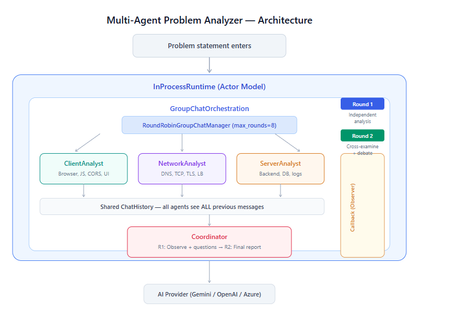
What You Will Build By the end of this guide, you will have a working multi-agent system where 4 specialist AI agents collaborate to diagnose production issues: ClientAnalyst — Analyzes browser, JavaScript, CORS, uploads, and UI symptoms NetworkAnalyst — Analyzes DNS, TCP/IP, TLS, load balancers, and firewalls ServerAnalyst — Analyzes backend logs, database, deployments, and resource limits Coordinator — Synthesizes all findings into a root cause report with a prioritized action plan These agents don't just run in sequence — they debate, cross-examine, and challenge each other's findings through a shared conversation, producing a diagnosis that's better than any single agent could achieve alone. Table of Contents Why Multi-Agent? The Problem with Single Agents Architecture Overview Understanding the Key SK Components The Actor Model — How InProcessRuntime Works Setting Up Your Development Environment Step-by-Step: Building the Multi-Agent Analyzer The Agent Interaction Flow — Round by Round Bugs I Found & Fixed — Lessons Learned Running with Different AI Providers What to Build Next 1. Why Multi-Agent? The Problem with Single Agents A single AI agent analyzing a production issue is like having one doctor diagnose everything — they'll catch issues in their specialty but miss cross-domain connections. Consider this problem: "Users report 504 Gateway Timeout errors when uploading files larger than 10MB. Started after Friday's deployment. Worse during peak hours." A single agent might say "it's a server timeout" and stop. But the real root cause often spans multiple layers: The client is sending chunked uploads with an incorrect Content-Length header (client-side bug) The load balancer has a 30-second timeout that's too short for large uploads (network config) The server recently deployed a new request body parser that's 3x slower (server-side regression) The combination only fails during peak hours because connection pool saturation amplifies the latency No single perspective catches this. You need specialists who analyze independently, then debate to find the cross-layer causal chain. That's what multi-agent orchestration gives you. The 5 Orchestration Patterns in SK Semantic Kernel provides 5 built-in patterns for agent collaboration: SEQUENTIAL: A → B → C → Done (pipeline — each builds on previous) CONCURRENT: ↗ A ↘ Task → B → Aggregate ↘ C ↗ (parallel — results merged) GROUP CHAT: A ↔ B ↔ C ↔ D ← We use this one (rounds, shared history, debate) HANDOFF: A → (stuck?) → B → (complex?) → Human (escalation with human-in-the-loop) MAGENTIC: LLM picks who speaks next dynamically (AI-driven speaker selection) We use GroupChatOrchestration with RoundRobinGroupChatManager because our problem requires agents to see each other's work, challenge assumptions, and build on each other's analysis across two rounds. 2. Architecture Overview Here's the complete architecture of what we're building: 3. Understanding the Key SK Components Before we write code, let's understand the 5 components we'll use and the design pattern each implements: ChatCompletionAgent — Strategy Pattern The agent definition. Each agent is a combination of: name — unique identifier (used in round-robin ordering) instructions — the persona and rules (this is the prompt engineering) service — which AI provider to call (Strategy Pattern — swap providers without changing agent logic) description — what other agents/tools understand about this agent agent = ChatCompletionAgent( name="ClientAnalyst", instructions="You are ONLY ClientAnalyst...", service=gemini_service, # ← Strategy: swap to OpenAI with zero changes description="Analyzes client-side issues", ) GroupChatOrchestration — Mediator Pattern The orchestration defines HOW agents interact. It's the Mediator — agents don't talk to each other directly. Instead, the orchestration manages a shared ChatHistory and routes messages through the Manager. RoundRobinGroupChatManager — Strategy Pattern The Manager decides WHO speaks next. RoundRobinGroupChatManager cycles through agents in a fixed order. SK also provides AutomaticGroupChatManager where the LLM decides who speaks next. max_rounds is the total number of messages per agent or cycle. With 4 agents and max_rounds=8, each agent speaks exactly twice. InProcessRuntime — Actor Model Abstraction The execution engine. Every agent becomes an "actor" with its own kind of mailbox (message queue). The runtime delivers messages between actors. Key properties: No shared state — agents communicate only through messages Sequential processing — each agent processes one message at a time Location transparency — same code works in-process today, distributed tomorrow agent_response_callback — Observer Pattern A function that fires after EVERY agent response. We use it to display each agent's output in real-time with emoji labels and round numbers. 4. The Actor Model — How InProcessRuntime Works The Actor Model is a concurrency pattern where each entity is an isolated "actor" with a private mailbox. Here's what happens inside InProcessRuntime when we run our demo: runtime.start() │ ├── Creates internal message loop (asyncio event loop) │ orchestration.invoke(task="504 timeout...", runtime=runtime) │ ├── Creates Actor[Orchestrator] → manages overall flow ├── Creates Actor[Manager] → RoundRobinGroupChatManager ├── Creates Actor[ClientAnalyst] → mailbox created, waiting ├── Creates Actor[NetworkAnalyst] → mailbox created, waiting ├── Creates Actor[ServerAnalyst] → mailbox created, waiting └── Creates Actor[Coordinator] → mailbox created, waiting Manager receives "start" message │ ├── Checks turn order: [Client, Network, Server, Coordinator] ├── Sends task to ClientAnalyst mailbox │ → ClientAnalyst processes: calls LLM → response │ → Response added to shared ChatHistory │ → callback fires (displayed in Notebook UI) │ → Sends "done" back to Manager │ ├── Manager updates: turn_index=1 ├── Sends to NetworkAnalyst mailbox │ → Same flow... │ ├── ... (ServerAnalyst, Coordinator for Round 1) │ ├── Manager checks: messages=4, max_rounds=8 → continue │ ├── Round 2: same cycle with cross-examination │ └── After message 8: Manager sends "complete" → OrchestrationResult resolves → result.get() returns final answer runtime.stop_when_idle() → All mailboxes empty → clean shutdown The Actor Model guarantees: No race conditions (each actor processes one message at a time) No deadlocks (no shared locks to contend for) No shared mutable state (agents communicate only via messages) 5. Setting Up Your Development Environment Prerequisites Python 3.11 or 3.12 (3.13+ may have compatibility issues with some SK connectors) Visual Studio Code with the Python and Jupyter extensions An API key from one of: Google AI Studio (free), OpenAI Step 1: Install Python Download from python.org. During installation, check "Add Python to PATH". Verify: python --version # Python 3.12.x Step 2: Install VS Code Extensions Open VS Code, go to Extensions (Ctrl+Shift+X), and install: Python (by Microsoft) — Python language support Jupyter (by Microsoft) — Notebook support Pylance (by Microsoft) — IntelliSense and type checking Step 3: Create Project Folder mkdir sk-multiagent-demo cd sk-multiagent-demo Open in VS Code: code . Step 4: Create Virtual Environment Open the VS Code terminal (Ctrl+`) and run: # Create virtual environment python -m venv sk-env # Activate it # Windows: sk-env\Scripts\activate # macOS/Linux: source sk-env/bin/activate You should see (sk-env) in your terminal prompt. Step 5: Install Semantic Kernel For Google Gemini (free tier — recommended for getting started): pip install semantic-kernel[google] python-dotenv ipykernel For OpenAI (paid API key): pip install semantic-kernel openai python-dotenv ipykernel For Azure AI Foundry (enterprise, Entra ID auth): pip install semantic-kernel azure-identity python-dotenv ipykernel Step 6: Register the Jupyter Kernel python -m ipykernel install --user --name=sk-env --display-name="Semantic Kernel (Python 3.12)" You can also select if this is already available from your environment from VSCode as below: Step 7: Get Your API Key Option A — Google Gemini (FREE, recommended for demo): Go to https://aistudio.google.com/apikey Click "Create API Key" Copy the key Free tier limits: 15 requests/minute, 1 million tokens/minute — more than enough for this demo. Option B — OpenAI: Go to https://platform.openai.com/api-keys Create a new key Copy the key Option C — Azure AI Foundry: Deploy a model in Azure AI Foundry portal Note the endpoint URL and deployment name If key-based auth is disabled, you'll need Entra ID with permissions Step 8: Create the .env File In your project root, create a file named .env: For Gemini: GOOGLE_AI_API_KEY=AIzaSy...your-key-here GOOGLE_AI_GEMINI_MODEL_ID=gemini-2.5-flash For OpenAI: OPENAI_API_KEY=sk-...your-key-here OPENAI_CHAT_MODEL_ID=gpt-4o For Azure AI Foundry: AZURE_OPENAI_ENDPOINT=https://your-resource.cognitiveservices.azure.com AZURE_OPENAI_CHAT_DEPLOYMENT_NAME=gpt-4o AZURE_OPENAI_API_KEY=your-key Step 9: Create the Notebook In VS Code: Click File > New File Save as multi_agent_analyzer.ipynb In the top-right of the notebook, click Select Kernel Choose Semantic Kernel (Python 3.12) (or your sk-env) Your environment is ready. Let's build. 6. Step-by-Step: Building the Multi-Agent Analyzer Cell 1: Verify Setup import semantic_kernel print(f"Semantic Kernel version: {semantic_kernel.__version__}") from semantic_kernel.agents import ( ChatCompletionAgent, GroupChatOrchestration, RoundRobinGroupChatManager, ) from semantic_kernel.agents.runtime import InProcessRuntime from semantic_kernel.contents import ChatMessageContent print("All imports successful") Cell 2: Load API Key and Create Service For Gemini: import os from dotenv import load_dotenv load_dotenv() from semantic_kernel.connectors.ai.google.google_ai import ( GoogleAIChatCompletion, GoogleAIChatPromptExecutionSettings, ) from semantic_kernel.contents import ChatHistory GEMINI_API_KEY = os.getenv("GOOGLE_AI_API_KEY") GEMINI_MODEL = os.getenv("GOOGLE_AI_GEMINI_MODEL_ID", "gemini-2.5-flash") service = GoogleAIChatCompletion( gemini_model_id=GEMINI_MODEL, api_key=GEMINI_API_KEY, ) print(f"Service created: Gemini {GEMINI_MODEL}") # Smoke test settings = GoogleAIChatPromptExecutionSettings() test_history = ChatHistory(system_message="You are a helpful assistant.") test_history.add_user_message("Say 'Connected!' and nothing else.") response = await service.get_chat_message_content( chat_history=test_history, settings=settings ) print(f"Model says: {response.content}") For OpenAI: import os from dotenv import load_dotenv load_dotenv() from semantic_kernel.connectors.ai.open_ai import ( OpenAIChatCompletion, OpenAIChatPromptExecutionSettings, ) from semantic_kernel.contents import ChatHistory service = OpenAIChatCompletion( ai_model_id=os.getenv("OPENAI_CHAT_MODEL_ID", "gpt-4o"), ) print(f"Service created: OpenAI {os.getenv('OPENAI_CHAT_MODEL_ID', 'gpt-4o')}") # Smoke test settings = OpenAIChatPromptExecutionSettings() test_history = ChatHistory(system_message="You are a helpful assistant.") test_history.add_user_message("Say 'Connected!' and nothing else.") response = await service.get_chat_message_content( chat_history=test_history, settings=settings ) print(f"Model says: {response.content}") Cell 3: Define All 4 Agents This is the most important cell — the prompt engineering that makes the demo work: from semantic_kernel.agents import ChatCompletionAgent # ═══════════════════════════════════════════════════ # AGENT 1: Client-Side Analyst # ═══════════════════════════════════════════════════ client_agent = ChatCompletionAgent( name="ClientAnalyst", description="Analyzes problems from the client-side: browser, JS, CORS, caching, UI symptoms", instructions="""You are ONLY **ClientAnalyst**. You must NEVER speak as NetworkAnalyst, ServerAnalyst, or Coordinator. Every word you write is from ClientAnalyst's perspective only. You are a senior front-end and client-side diagnostics expert. When given a problem statement, analyze it EXCLUSIVELY from the client side: 1. **Browser & Rendering**: DOM issues, JavaScript errors, CSS rendering, browser compatibility, memory leaks, console errors. 2. **Client-Side Caching**: Stale cache, service worker issues, local storage corruption. 3. **Network from Client View**: CORS errors, preflight failures, request timeouts, client-side retry storms, fetch/XHR configuration. 4. **Upload Handling**: File API usage, chunk upload implementation, progress tracking, FormData construction, content-type headers. 5. **UI/UX Symptoms**: What the user sees, error messages displayed, loading states. ROUND 1: Provide your independent analysis. Do NOT reference other agents. List your top 3 most likely causes with evidence. Every response MUST be at least 200 words. ROUND 2: You MUST: - Reference NetworkAnalyst and ServerAnalyst BY NAME - State specifically where you AGREE or DISAGREE with their findings - Answer the Coordinator's questions from your perspective - Add NEW cross-layer insights you see from the client perspective - Do NOT just say 'I agree' — provide substantive technical reasoning Be specific, evidence-based, and prioritize findings by likelihood.""", service=service, ) # ═══════════════════════════════════════════════════ # AGENT 2: Network Analyst # ═══════════════════════════════════════════════════ network_agent = ChatCompletionAgent( name="NetworkAnalyst", description="Analyzes problems from the network side: DNS, TCP, TLS, firewalls, load balancers, latency", instructions="""You are ONLY **NetworkAnalyst**. You must NEVER speak as ClientAnalyst, ServerAnalyst, or Coordinator. Every word you write is from NetworkAnalyst's perspective only. You are a senior network infrastructure diagnostics expert. When given a problem statement, analyze it EXCLUSIVELY from the network layer: 1. **DNS & Resolution**: DNS TTL, propagation delays, record misconfigurations. 2. **TCP/IP & Connections**: Connection pooling, keep-alive, TCP window scaling, connection resets, SYN floods. 3. **TLS/SSL**: Certificate issues, handshake failures, protocol version mismatches. 4. **Load Balancers & Proxies**: Sticky sessions, health checks, timeout configs, request body size limits, proxy buffering. 5. **Firewall & WAF**: Rule blocks, rate limiting, request inspection delays, geo-blocking, DDoS protection interference. ROUND 1: Provide your independent analysis. Do NOT reference other agents. List your top 3 most likely causes with evidence. Every response MUST be at least 200 words. ROUND 2: You MUST: - Reference ClientAnalyst and ServerAnalyst BY NAME - State specifically where you AGREE or DISAGREE with their findings - Answer the Coordinator's questions from your perspective - Add NEW cross-layer insights you see from the network perspective - Do NOT just say 'I am ready to proceed' — provide substantive technical analysis Be specific, evidence-based, and prioritize findings by likelihood.""", service=service, ) # ═══════════════════════════════════════════════════ # AGENT 3: Server-Side Analyst # ═══════════════════════════════════════════════════ server_agent = ChatCompletionAgent( name="ServerAnalyst", description="Analyzes problems from the server side: backend app, database, logs, resources, deployments", instructions="""You are ONLY **ServerAnalyst**. You must NEVER speak as ClientAnalyst, NetworkAnalyst, or Coordinator. Every word you write is from ServerAnalyst's perspective only. You are a senior backend and infrastructure diagnostics expert. When given a problem statement, analyze it EXCLUSIVELY from the server side: 1. **Application Server**: Error logs, exception traces, thread pool exhaustion, memory leaks, CPU spikes, garbage collection pauses. 2. **Database**: Slow queries, connection pool saturation, lock contention, deadlocks, replication lag, query plan changes. 3. **Deployment & Config**: Recent deployments, configuration changes, feature flags, environment variable mismatches, rollback candidates. 4. **Resource Limits**: File upload size limits, request body limits, disk space, temporary file cleanup, storage quotas. 5. **External Dependencies**: Upstream API timeouts, third-party service degradation, queue backlogs, cache (Redis/Memcached) issues. ROUND 1: Provide your independent analysis. Do NOT reference other agents. List your top 3 most likely causes with evidence. Every response MUST be at least 200 words. ROUND 2: You MUST: - Reference ClientAnalyst and NetworkAnalyst BY NAME - State specifically where you AGREE or DISAGREE with their findings - Answer the Coordinator's questions from your perspective - Add NEW cross-layer insights you see from the server perspective - Do NOT just say 'I agree' — provide substantive technical reasoning Be specific, evidence-based, and prioritize findings by likelihood.""", service=service, ) # ═══════════════════════════════════════════════════ # AGENT 4: Coordinator # ═══════════════════════════════════════════════════ coordinator_agent = ChatCompletionAgent( name="Coordinator", description="Synthesizes all specialist analyses into a final root cause report with prioritized action plan", instructions="""You are ONLY **Coordinator**. You must NEVER speak as ClientAnalyst, NetworkAnalyst, or ServerAnalyst. You synthesize — you do NOT do domain-specific analysis. You are the lead engineer who synthesizes the team's findings. ═══ ROUND 1 BEHAVIOR (your first turn, message 4) ═══ Keep this SHORT — maximum 300 words. - Note 2-3 KEY PATTERNS across the three analyses - Identify where specialists AGREE (high-confidence) - Identify where they CONTRADICT (needs resolution) - Ask 2-3 SPECIFIC QUESTIONS for Round 2 Round 1 MUST NOT: assign tasks, create action plans, write reports, or tell agents what to take lead on. Observation + questions ONLY. ═══ ROUND 2 BEHAVIOR (your final turn, message 8) ═══ Keep this FOCUSED — maximum 800 words. Produce a structured report: 1. **Root Cause** (1 paragraph): The #1 most likely cause with causal chain across layers. Reference specific findings from each specialist. 2. **Confidence** (short list): - HIGH: Areas where all 3 agreed - MEDIUM: Areas where 2 of 3 agreed - LOW: Disagreements needing investigation 3. **Action Plan** (numbered, max 6 items): For each: - What to do (specific) - Owner (Client/Network/Server team) - Time estimate 4. **Quick Wins vs Long-term** (2 short lists) Do NOT repeat what specialists already said verbatim. Synthesize, don't echo.""", service=service, ) # ═══════════════════════════════════════════════════ # All 4 agents — order = RoundRobin order # ═══════════════════════════════════════════════════ agents = [client_agent, network_agent, server_agent, coordinator_agent] print(f"{len(agents)} agents created:") for i, a in enumerate(agents, 1): print(f" {i}. {a.name}: {a.description[:60]}...") print(f"\nRoundRobin order: {' → '.join(a.name for a in agents)}") Cell 4: Run the Analysis from semantic_kernel.agents import GroupChatOrchestration, RoundRobinGroupChatManager from semantic_kernel.agents.runtime import InProcessRuntime from semantic_kernel.contents import ChatMessageContent from IPython.display import display, Markdown # ╔══════════════════════════════════════════════════════════╗ # ║ EDIT YOUR PROBLEM STATEMENT HERE ║ # ╚══════════════════════════════════════════════════════════╝ PROBLEM = """ Users are reporting intermittent 504 Gateway Timeout errors when trying to upload files larger than 10MB through our web application. The issue started after last Friday's deployment and seems worse during peak hours (2-5 PM EST). Some users also report that smaller file uploads work fine but the progress bar freezes at 85% for large files before timing out. """ # ════════════════════════════════════════════════════════════ agent_responses = [] def agent_response_callback(message: ChatMessageContent) -> None: name = message.name or "Unknown" content = message.content or "" agent_responses.append({"agent": name, "content": content}) emoji = { "ClientAnalyst": "🖥️", "NetworkAnalyst": "🌐", "ServerAnalyst": "⚙️", "Coordinator": "🎯" }.get(name, "🔹") round_num = (len(agent_responses) - 1) // len(agents) + 1 display(Markdown( f"---\n### {emoji} {name} (Message {len(agent_responses)}, Round {round_num})\n\n{content}" )) MAX_ROUNDS = 8 # 4 agents × 2 rounds = 8 messages exactly task = f"""## Problem Statement {PROBLEM.strip()} ## Discussion Rules You are in a GROUP DISCUSSION with 4 members. You can see ALL previous messages. There are exactly 2 rounds. ### ROUND 1 (Messages 1-4): Independent Analysis - ClientAnalyst, NetworkAnalyst, ServerAnalyst: Analyze from YOUR domain only. Give your top 3 most likely causes with evidence and reasoning. - Coordinator: Note patterns across the 3 analyses. Ask 2-3 specific questions. Do NOT assign tasks yet. ### ROUND 2 (Messages 5-8): Cross-Examination & Final Report - ClientAnalyst, NetworkAnalyst, ServerAnalyst: You MUST reference the OTHER specialists BY NAME. State where you agree, disagree, or have new insights. Answer the Coordinator's questions. Provide SUBSTANTIVE analysis. - Coordinator: Produce the FINAL structured report: root cause, confidence levels, prioritized action plan with owners and time estimates. IMPORTANT: Each agent speaks as THEMSELVES only. Never impersonate another agent.""" display(Markdown(f"## Problem Statement\n\n{PROBLEM.strip()}")) display(Markdown(f"---\n## Discussion Starting — {len(agents)} agents, {MAX_ROUNDS} rounds\n")) # Build and run orchestration = GroupChatOrchestration( members=agents, manager=RoundRobinGroupChatManager(max_rounds=MAX_ROUNDS), agent_response_callback=agent_response_callback, ) runtime = InProcessRuntime() runtime.start() result = await orchestration.invoke(task=task, runtime=runtime) final_result = await result.get(timeout=300) await runtime.stop_when_idle() display(Markdown(f"---\n## FINAL CONCLUSION\n\n{final_result}")) Cell 5: Statistics and Validation print("═" * 55) print(" ANALYSIS STATISTICS") print("═" * 55) emojis = {"ClientAnalyst": "🖥️", "NetworkAnalyst": "🌐", "ServerAnalyst": "⚙️", "Coordinator": "🎯"} agent_counts = {} agent_chars = {} for r in agent_responses: agent_counts[r["agent"]] = agent_counts.get(r["agent"], 0) + 1 agent_chars[r["agent"]] = agent_chars.get(r["agent"], 0) + len(r["content"]) for agent, count in agent_counts.items(): em = emojis.get(agent, "🔹") chars = agent_chars.get(agent, 0) avg = chars // count if count else 0 print(f" {em} {agent}: {count} msg(s), ~{chars:,} chars (avg {avg:,}/msg)") print(f"\n Total messages: {len(agent_responses)}") total_chars = sum(len(r['content']) for r in agent_responses) print(f" Total analysis: ~{total_chars:,} characters") # Validation print(f"\n Validation:") import re identity_issues = [] for r in agent_responses: other_agents = [a.name for a in agents if a.name != r["agent"]] for other in other_agents: pattern = rf'(?i)as {re.escape(other)}[,:]?\s+I\b' if re.search(pattern, r["content"][:300]): identity_issues.append(f"{r['agent']} impersonated {other}") if identity_issues: print(f" Identity confusion: {identity_issues}") else: print(f" No identity confusion detected") thin = [r for r in agent_responses if len(r["content"].strip()) < 100] if thin: for t in thin: print(f" Thin response from {t['agent']}") else: print(f" All responses are substantive") Cell 6: Save Report from datetime import datetime timestamp = datetime.now().strftime("%Y%m%d_%H%M%S") filename = f"analysis_report_{timestamp}.md" with open(filename, "w", encoding="utf-8") as f: f.write(f"# Problem Analysis Report\n\n") f.write(f"**Generated:** {datetime.now().strftime('%Y-%m-%d %H:%M:%S')}\n") f.write(f"**Agents:** {', '.join(a.name for a in agents)}\n") f.write(f"**Rounds:** {MAX_ROUNDS}\n\n---\n\n") f.write(f"## Problem Statement\n\n{PROBLEM.strip()}\n\n---\n\n") for i, r in enumerate(agent_responses, 1): em = emojis.get(r['agent'], '🔹') round_num = (i - 1) // len(agents) + 1 f.write(f"### {em} {r['agent']} (Message {i}, Round {round_num})\n\n") f.write(f"{r['content']}\n\n---\n\n") f.write(f"## Final Conclusion\n\n{final_result}\n") print(f"Report saved to: {filename}") 7. The Agent Interaction Flow — Round by Round Here's what actually happens during the 8-message orchestration: Round 1: Independent Analysis (Messages 1-4) Msg Agent What They See What They Do 1 ClientAnalyst Problem statement only Analyzes from client perspective: upload chunking, progress bar freezing at 85%, CORS, content-type headers 2 NetworkAnalyst Problem + ClientAnalyst's analysis Gives INDEPENDENT analysis despite seeing msg 1: load balancer timeouts, proxy body size limits, TCP window scaling 3 ServerAnalyst Problem + msgs 1-2 Gives INDEPENDENT analysis: recent deployment regression, request body parser, thread pool exhaustion, disk space 4 Coordinator Problem + msgs 1-3 Observes patterns: "All three mention timeout configuration. ClientAnalyst and NetworkAnalyst both point to body size. Question: Was the deployment a backend-only change or did it include infra?" Round 2: Cross-Examination (Messages 5-8) Msg Agent What They Do 5 ClientAnalyst "I agree with NetworkAnalyst that the load balancer timeout is likely a factor — the 85% freeze point matches the 30-second LB timeout for a 10MB upload on our average upload speed. However, I disagree with ServerAnalyst about thread pool exhaustion because the UI shows a clean 504, not a connection reset." 6 NetworkAnalyst "ServerAnalyst's point about the recent deployment is critical — if the new request parser is 3x slower, that would push uploads past the LB timeout. I can confirm the LB has a 30s idle timeout. The fix is both: increase LB timeout AND optimize the parser." 7 ServerAnalyst "Responding to Coordinator's question: The deployment was backend-only — a new multipart parser using streaming instead of buffered reads. ClientAnalyst is correct that the 504 is from the LB, not the app. The app itself returns 200 after 45 seconds, but the LB kills the connection at 30." 8 Coordinator Produces final structured report with root cause: "The backend deployment introduced a slower multipart parser (45s vs 15s for 10MB). The load balancer's 30s timeout kills the connection at ~85% progress. Fix: immediate — increase LB timeout to 120s. Short-term — optimize parser. Long-term — implement chunked uploads with progress resumption." Notice: The Round 2 analysis is dramatically better than Round 1. Agents reference each other by name, build on each other's findings, and the Coordinator can synthesize a cross-layer causal chain that no single agent could have produced. I made a small adjustment to the issue with Azure Web Apps. Please find the details below from testing carried out using Google Gemini: 8. Bugs I Found & Fixed — Lessons Learned Building this demo taught me several important lessons about multi-agent systems: Bug 1: Agents Speaking Only Once Symptom: Only 4 messages instead of 8. Root cause: The agents list was missing the Coordinator. It was defined in a separate cell and wasn't included in the members list. Fix: All 4 agents must be in the same list passed to GroupChatOrchestration. Bug 2: NetworkAnalyst Says "I'm Ready to Proceed" Symptom: NetworkAnalyst's Round 2 response was just "I'm ready to proceed with the analysis" — no actual content. Root cause: The Coordinator's Round 1 message was assigning tasks ("NetworkAnalyst, please check the load balancer config"), and the agent was acknowledging the assignment instead of analyzing. Fix: Added explicit constraint to Coordinator: "Round 1 MUST NOT assign tasks — observation + questions ONLY." Bug 3: ServerAnalyst Says "As NetworkAnalyst, I..." Symptom: ServerAnalyst's response started with "As NetworkAnalyst, I believe..." Root cause: LLM identity bleeding. When agents share ChatHistory, the LLM sometimes loses track of which agent it's currently playing. This is especially common with Gemini. Fix: Identity anchoring at the very top of every agent's instructions: "You are ONLY ServerAnalyst. You must NEVER speak as ClientAnalyst, NetworkAnalyst, or Coordinator." Bug 4: Gemini Gives Thin/Empty Responses Symptom: Some agents responded with just one sentence or "I concur." Root cause: Gemini 2.5 Flash is more concise than GPT-4o by default. Without explicit length requirements, it takes shortcuts. Fix: Added "Every response MUST be at least 200 words" and "Answer the Coordinator's questions" to every specialist's instructions. Bug 5: Coordinator's Report is 18K Characters Symptom: The Coordinator's Round 2 response was absurdly long — repeating everything every specialist said. Fix: Added word limits: "Round 1 max 300 words, Round 2 max 800 words" and "Synthesize, don't echo." Bug 6: MAX_ROUNDS Math Symptom: With MAX_ROUNDS=9, ClientAnalyst spoke a 3rd time after the Coordinator's final report — breaking the clean 2-round structure. Fix: MAX_ROUNDS must equal (number of agents × number of rounds). For 4 agents × 2 rounds = 8. 9. Running with Different AI Providers The beauty of SK's Strategy Pattern is that you change ONE LINE to switch providers. Everything else — agents, orchestration, callbacks, validation — stays identical. Gemini setup: from semantic_kernel.connectors.ai.google.google_ai import GoogleAIChatCompletion service = GoogleAIChatCompletion( gemini_model_id="gemini-2.5-flash", api_key=os.getenv("GOOGLE_AI_API_KEY"), ) OpenAI Setup from semantic_kernel.connectors.ai.open_ai import OpenAIChatCompletion service = OpenAIChatCompletion( ai_model_id="gpt-4o", api_key=os.getenv("OPEN_AI_API_KEY"), ) 10. What to Build Next Add Plugins to Agents Give agents real tools — not just LLM reasoning - looks exciting right ;) class NetworkDiagnosticPlugin: (description="Pings a host and returns latency") def ping(self, host: str) -> str: result = subprocess.run(["ping", "-c", "3", host], capture_output=True, text=True) return result.stdout class LogSearchPlugin: (description="Searches server logs for error patterns") def search_logs(self, pattern: str, hours: int = 1) -> str: # Query your log aggregator (Splunk, ELK, Azure Monitor) return query_logs(pattern, hours) Add Filters for Governance Intercept every agent call for PII redaction and audit logging: .filter(filter_type=FilterTypes.FUNCTION_INVOCATION) async def audit_filter(context, next): print(f"[AUDIT] {context.function.name} called by agent") await next(context) print(f"[AUDIT] {context.function.name} returned") Try Different Orchestration Patterns Replace GroupChat with Sequential for a pipeline approach: # Instead of debate, each agent builds on the previous orchestration = SequentialOrchestration( members=[client_agent, network_agent, server_agent, coordinator_agent] ) Or Concurrent for parallel analysis: # All specialists analyze simultaneously, Coordinator aggregates orchestration = ConcurrentOrchestration( members=[client_agent, network_agent, server_agent] ) Deploy to Azure Move from InProcessRuntime to Azure Container Apps for production scaling. The agent code doesn't change — only the runtime. Summary The key insight from building this demo: multi-agent systems produce better results than single agents not because each agent is smarter, but because the debate structure forces cross-domain thinking that a single prompt can never achieve. The Coordinator's final report consistently identifies causal chains that span client, network, and server layers — exactly the kind of insight that production incident response teams need. Semantic Kernel makes this possible with clean separation of concerns: agents define WHAT to analyze, orchestration defines HOW they interact, the manager defines WHO speaks when, the runtime handles WHERE it executes, and callbacks let you OBSERVE everything. Each piece is independently swappable — that's the power of SK from Microsoft. Resources: GitHub: github.com/microsoft/semantic-kernel Docs: learn.microsoft.com/semantic-kernel Orchestration Patterns: learn.microsoft.com/semantic-kernel/frameworks/agent/agent-orchestration Discord: aka.ms/sk/discord Disclaimer: The sample scripts provided in this article are provided AS IS without warranty of any kind. The author is not responsible for any issues, damages, or problems that may arise from using these scripts. Users should thoroughly test any implementation in their environment before deploying to production. Azure services and APIs may change over time, which could affect the functionality of the provided scripts. Always refer to the latest Azure documentation for the most up-to-date information. Thanks for reading this blog! I hope you found it helpful and informative for building AI agents with SK (Semantic Kernel) 😀65Views3likes0CommentsAgents League: Meet the Winners
Agents League brought together developers from around the world to build AI agents using Microsoft's developer tools. With 100+ submissions across three tracks, choosing winners was genuinely difficult. Today, we're proud to announce the category champions. 🎨 Creative Apps Winner: CodeSonify View project CodeSonify turns source code into music. As a genuinely thoughtful system, its functions become ascending melodies, loops create rhythmic patterns, conditionals trigger chord changes, and bugs produce dissonant sounds. It supports 7 programming languages and 5 musical styles, with each language mapped to its own key signature and code complexity directly driving the tempo. What makes CodeSonify stand out is the depth of execution. CodeSonify team delivered three integrated experiences: a web app with real-time visualization and one-click MIDI export, an MCP server exposing 5 tools inside GitHub Copilot in VS Code Agent Mode, and a diff sonification engine that lets you hear a code review. A clean refactor sounds harmonious. A messy one sounds chaotic. The team even built the MIDI generator from scratch in pure TypeScript with zero external dependencies. Built entirely with GitHub Copilot assistance, this is one of those projects that makes you think about code differently. 🧠 Reasoning Agents Winner: CertPrep Multi-Agent System View project CertPrep Multi-Agent System team built a production-grade 8-agent system for personalized Microsoft certification exam preparation, supporting 9 exam families including AI-102, AZ-204, AZ-305, and more. Each agent has a distinct responsibility: profiling the learner, generating a week-by-week study schedule, curating learning paths, tracking readiness, running mock assessments, and issuing a GO / CONDITIONAL GO / NOT YET booking recommendation. The engineering behind the scene here is impressive. A 3-tier LLM fallback chain ensures the system runs reliably even without Azure credentials, with the full pipeline completing in under 1 second in mock mode. A 17-rule guardrail pipeline validates every agent boundary. Study time allocation uses the Largest Remainder algorithm to guarantee no domain is silently zeroed out. 342 automated tests back it all up. This is what thoughtful multi-agent architecture looks like in practice. 💼 Enterprise Agents Winner: Whatever AI Assistant (WAIA) View project WAIA is a production-ready multi-agent system for Microsoft 365 Copilot Chat and Microsoft Teams. A workflow agent routes queries to specialized HR, IT, or Fallback agents, transparently to the user, handling both RAG-pattern Q&A and action automation — including IT ticket submission via a SharePoint list. Technically, it's a showcase of what serious enterprise agent development looks like: a custom MCP server secured with OAuth Identity Passthrough, streaming responses via the OpenAI Responses API, Adaptive Cards for human-in-the-loop approval flows, a debug mode accessible directly from Teams or Copilot, and full OpenTelemetry integration visible in the Foundry portal. Franck also shipped end-to-end automated Bicep deployment so the solution can land in any Azure environment. It's polished, thoroughly documented, and built to be replicated. Thank you To every developer who submitted and shipped projects during Agents League: thank you 💜 Your creativity and innovation brought Agents League to life! 👉 Browse all submissions on GitHubAuthorization and Identity Governance Inside AI Agents
Designing Authorization‑Aware AI Agents Enforcing Microsoft Entra ID RBAC in Copilot Studio As AI agents move from experimentation to enterprise execution, authorization becomes the defining line between innovation and risk. AI agents are rapidly evolving from experimental assistants into enterprise operators—retrieving user data, triggering workflows, and invoking protected APIs. While many early implementations rely on prompt‑level instructions to control access, regulated enterprise environments require authorization to be enforced by identity systems, not language models. This article presents a production‑ready, identity‑first architecture for building authorization‑aware AI agents using Copilot Studio, Power Automate, Microsoft Entra ID, and Microsoft Graph, ensuring every agent action executes strictly within the requesting user’s permissions. Why Prompt‑Level Security Is Not Enough Large Language Models interpret intent—they do not enforce policy. Even the most carefully written prompts cannot: Validate Microsoft Entra ID group or role membership Reliably distinguish delegated user identity from application identity Enforce deterministic access decisions Produce auditable authorization outcomes Relying on prompts for authorization introduces silent security failures, over‑privileged access, and compliance gaps—particularly in Financial Services, Healthcare, and other regulated industries. Authorization is not a reasoning problem. It is an identity enforcement problem. Common Authorization Anti‑Patterns in AI Agents The following patterns frequently appear in early AI agent implementations and should be avoided in enterprise environments: Hard‑coded role or group checks embedded in prompts Trusting group names passed as plain‑text parameters Using application permissions for user‑initiated actions Skipping verification of the user’s Entra ID identity Lacking an auditable authorization decision point These approaches may work in demos, but they do not survive security reviews, compliance audits, or real‑world misuse scenarios. Authorization‑Aware Agent Architecture In an authorization‑aware design, the agent never decides access. Authorization is enforced externally, by identity‑aware workflows that sit outside the language model’s reasoning boundary. High‑Level Flow The Copilot Studio agent receives a user request The agent passes the User Principal Name (UPN) and intended action A Power Automate flow validates permissions using Microsoft Entra ID via Microsoft Graph Only authorized requests are allowed to proceed Unauthorized requests fail fast with a deterministic outcome Authorization‑aware Copilot Studio architecture enforces Entra ID RBAC before executing any business action. The agent orchestrates intent. Identity systems enforce access. Enforcing Entra ID RBAC with Microsoft Graph Power Automate acts as the authorization enforcement layer: Resolve user identity from the supplied UPN Retrieve group or role memberships using Microsoft Graph Normalize and compare memberships against approved RBAC groups Explicitly deny execution when authorization fails This keeps authorization logic: Centralized Deterministic Auditable Independent of the AI model Reference Implementation: Power Automate RBAC Enforcement Flow The following import‑ready Power Automate cloud flow demonstrates a secure RBAC enforcement pattern for Copilot Studio agents. It validates Microsoft Entra ID group membership before allowing any business action. Scenario Trigger: User‑initiated agent action Identity model: Delegated user identity Input: userUPN, requestedAction Outcome: Authorized or denied based on Entra ID RBAC { "$schema": "https://schema.management.azure.com/providers/Microsoft.Logic/schemas/2016-06-01/workflowdefinition.json#", "contentVersion": "1.0.0.0", "triggers": { "Copilot_Request": { "type": "Request", "kind": "Http", "inputs": { "schema": { "type": "object", "properties": { "userUPN": { "type": "string" }, "requestedAction": { "type": "string" } }, "required": [ "userUPN" ] } } } }, "actions": { "Get_User_Groups": { "type": "Http", "inputs": { "method": "GET", "uri": "https://graph.microsoft.com/v1.0/users/@{triggerBody()?['userUPN']}/memberOf?$select=displayName", "authentication": { "type": "ManagedServiceIdentity" } } }, "Normalize_Group_Names": { "type": "Select", "inputs": { "from": "@body('Get_User_Groups')?['value']", "select": { "groupName": "@toLower(item()?['displayName'])" } }, "runAfter": { "Get_User_Groups": [ "Succeeded" ] } }, "Check_Authorization": { "type": "Condition", "expression": "@contains(body('Normalize_Group_Names'), 'ai-authorized-users')", "runAfter": { "Normalize_Group_Names": [ "Succeeded" ] }, "actions": { "Authorized_Action": { "type": "Compose", "inputs": "User authorized via Entra ID RBAC" } }, "else": { "actions": { "Access_Denied": { "type": "Terminate", "inputs": { "status": "Failed", "message": "Access denied. User not authorized via Entra ID RBAC." } } } } } } } This pattern enforces authorization outside the agent, aligns with Zero Trust principles, and creates a clear audit boundary suitable for enterprise and regulated environments. Flow Diagram: Agent Integrated with RBAC Authorization Flow and Sample Prompt Execution: Delegated vs Application Permissions Scenario Recommended Permission Model User‑initiated agent actions Delegated permissions Background or system automation Application permissions Using delegated permissions ensures agent execution remains strictly within the requesting user’s identity boundary. Auditing and Compliance Benefits Deterministic and explainable authorization decisions Centralized enforcement aligned with identity governance Clear audit trails for security and compliance reviews Readiness for SOC, ISO, PCI, and FSI assessments Enterprise Security Takeaways Authorization belongs in Microsoft Entra ID, not prompts AI agents must respect enterprise identity boundaries Copilot Studio + Power Automate + Microsoft Graph enable secure‑by‑design AI agents By treating AI agents as first‑class enterprise actors and enforcing authorization at the identity layer, organizations can scale AI adoption with confidence, trust, and compliance.Why to include Azure in your multi-cloud strategy
For software companies building on AWS, adding Azure isn’t just a technical decision—it’s a growth strategy. In this Marketplace blog, learn how replicating your solution to Azure can unlock access to Microsoft’s global seller network, enterprise customers, and commercial marketplace incentives that can reduce procurement friction and accelerate deal velocity. The article breaks down the business case, the role of Marketplace and co-sell, and the financial incentives available to partners—plus practical guidance on when and how to get started. Read the full article to understand why expanding to Azure is increasingly a go-to-market decision, not just an infrastructure one. Replicating solutions to Azure: The business case, the incentives, and how to get there fast | Microsoft Community Hub Learn more and join the April 2nd webinar for live Q&A Why Azure belongs in your multicloud strategy - Microsoft Marketplace CommunityReplicating solutions to Azure: The business case, the incentives, and how to get there fast
Johan Aussenac is CEO at WeTransact a Microsoft Certified Software company specializing in Microsoft Marketplace listing, co-sell activation, and cloud GTM strategy for software companies. ________________________________________________________________________________________________________________________________________________________________ When should Azure be part of your cloud strategy and what does Microsoft offer to help you get there? Most software development companies building on AWS did so for the right reasons. AWS is mature, well-documented, and has been the default for cloud-native companies for over a decade. This article is not an argument for abandoning that. It is an argument for asking a more strategic question: at what point does adding Azure to your infrastructure also open a fundamentally different commercial channel and what does it cost to get there? For a growing number of software companies the answer is clear. Azure is not just an alternative cloud. It is an entry point into Microsoft's commercial ecosystem: its seller network, its enterprise relationships, and a marketplace transacting billions of dollars of software annually. Understanding when and how to replicate your solution to Azure and add it to your strategy is increasingly a GTM decision, not just an infrastructure one. The business case: Why Azure belongs in a multi-cloud strategy Microsoft as a distribution channel When a software company lists in Microsoft Marketplace and enrolls in co-sell, Microsoft's own field sellers more than 25,000 globally, are incentivized to include that software company’s product in their customer conversations. This is not passive discoverability. It is an active sales motion, driven by a specific commercial mechanism. The mechanism is the Microsoft Azure Consumption Commitment (MACC). Large enterprises increasingly sign pre-committed cloud spend agreements with Microsoft. Software transacted through Microsoft Marketplace counts toward these commitments, which means enterprise procurement teams actively prefer Marketplace-listed solutions they help burn down an existing budget obligation. For software companies, this translates to reduced procurement friction and shorter sales cycles inside accounts that already have a Microsoft relationship. By comparison, neither AWS nor Google Cloud offers this at an equivalent scale. Microsoft's footprint spanning Office 365, Teams, Dynamics 365, Azure, and now Copilot touches more business units and more decision-makers across an enterprise than any other vendor. Adding Azure to your stack means plugging into that network. Technical differentiators worth knowing Beyond the commercial case, Azure offers capabilities that are genuinely differentiated for certain software company profiles: Azure OpenAI Service. Microsoft holds an exclusive enterprise partnership with OpenAI. For software companies that need GPT-4o or o1 with private endpoints, data residency, and enterprise compliance certifications, this is only available on Azure. Microsoft 365 and Copilot extensibility. Software companies can embed products directly into Teams, Outlook, and Word via Copilot plugins and agents, which is a distribution surface with no direct equivalent on other clouds. Microsoft Entra ID. Most enterprise identity infrastructure runs on Entra ID (formerly Active Directory). Native SSO and RBAC integration is cleaner when you build on Azure. The .NET and Windows ecosystem. For teams and customers already in the Microsoft developer stack, Azure is simply where the tooling is best optimized. Microsoft's funding and incentives for software companies One of the most underutilized advantages of moving to Azure is the range of Microsoft programs designed to offset the cost and complexity of doing so. Both of the following are free to join and available to most software companies. Microsoft for Startups (Founders Hub). Provides up to $150,000 in Azure credits in the first year, plus access to technical advisory, developer tooling, and go-to-market support. Enroll before you begin any replication. These credits cover compute and storage costs during your build and test phases. ISV Success. Microsoft's program for software companies building on Azure. It includes technical architecture guidance, co-sell readiness support, and dedicated Microsoft contacts. ISV Success enrolment is also the prerequisite for co-sell eligibility, the commercial mechanism that unlocks Microsoft's seller network on your behalf. Both programs include access to Microsoft technical advisors at no charge. This is worth emphasizing: before spending on a replication partner or committing engineering time, software companies can get a scoped assessment of their replication from Microsoft itself, tailored to their specific stack and target architecture. How to get there: Partner-led or self-service There are two realistic paths to adding Azure. The right one depends on your engineering bandwidth, your timeline, and how much of the replication you want to own internally. The partner-led path (recommended for most software companies) For founders and CTOs, the real cost of replication is not tooling, it is engineering time diverted from product. Every sprint spent on infrastructure is a sprint not spent on customer value. A partner-led approach solves this directly. Enroll in a Microsoft program. Start with Microsoft for Startups or ISV Success (or both). This secures your credits, establishes your Microsoft relationship, and is the prerequisite for co-sell access. It is free and should be done before anything else. Book a free technical consultation. Use the technical advisory included in your program to scope your replication with Microsoft. Explain your stack, your target architecture, and your timeline. This session produces a documented brief which becomes your handoff document for step three. Engage a specialist partner. Take that brief to an Azure Expert MSP, Microsoft's highest-tier replication partners, certified for complex replications and incentivized by Microsoft to keep costs manageable, often including access to replication credits that offset engagement fees. Alternatively, Microsoft Certified Software companies (such as WeTransact) can handle both the replication and the parallel Marketplace listing and co-sell activation, so you arrive on Azure already set up to sell, not just to run. The self-service path For software companies with available engineering capacity and simpler workloads, a self-directed replication is viable. The tooling has improved significantly. The key tools are: Azure Migrate Microsoft's free hub for discovery, assessment, and replication. Maps AWS services to Azure equivalents, flags compatibility issues, and estimates costs. Start here for any self-service replication. Azure Storage Mover Built specifically for moving data from AWS S3 to Azure Blob Storage. Supports parallel transfers, preserves file metadata, and integrates with Azure Monitor for progress tracking. Azure Database Migration Service (DMS) Migrates SQL Server, MySQL, PostgreSQL, MongoDB and others from AWS RDS or on-premises to Azure managed database services. AWS DataSync Useful for transferring large datasets between AWS and Azure storage during a phased replication. Azure Data Factory For complex ETL workloads: extracting, transforming, and loading data across clouds with scheduling and conflict resolution. Azure Well-Architected Framework Run this assessment against your current architecture before replicating it. It evaluates reliability, security, cost, performance, and operations. The goal is to land in a better architectural state, not simply replicate what existed on AWS. Whichever path you take, one step is non-negotiable: establishing a proper Azure landing zone before any workload moves. This means setting up your subscription structure, networking, identity, governance, and monitoring upfront. Microsoft publishes a software company-specific landing zone guide and a portal-based accelerator (no infrastructure-as-code expertise required) to make this straightforward. Skipping creates security and compliance debt that is significantly harder to fix retroactively. The bottom line Adding Azure to your cloud strategy is not primarily an infrastructure decision. It is a go-to-market decision. The question is whether your company benefits from access to Microsoft's seller network, its enterprise customer base, and Marketplace mechanics that reduce procurement friction for your buyers. For many software companies, the answer is yes and Microsoft's programs make the cost of getting there lower than most assume. The partner ecosystem exists to take the technical burden off your engineering team. The self-service tools are capable enough for simpler replications. The commercial opportunity on the other side, co-sell, MACC alignment, Marketplace distribution is real and growing. To learn more join us on April 2, 2026, at 8:30 AM PDT for Why Azure belongs in your multicloud strategy - Microsoft Marketplace Community and live Q&A. If you miss the session, you will be able to watch it on demand through the same link. Where to start → Microsoft for Startups → ISV Success → Azure Expert MSP directory: partner.microsoft.com → Software company-specific Azure landing zone guide: Independent software vendor (ISV) considerations for Azure landing zones - Cloud Adoption Framework | Microsoft Learn This article was produced in partnership with WeTransact, a Microsoft Certified Software company specializing in Microsoft Marketplace listing, co-sell activation, and cloud GTM strategy for software companies.74Views0likes0Comments