authenticator app
56 Topics
How do I get support so I don't loose my account?
I have a business 365 account but changed address and so my credit card payments stopped. However, I can't log in to my account because I also have an authentication problem (my authentication app on iPhone is still working but the entry for this account has gone and there is a new one called "Microsoft Entra ID" but when I go to get the authentication code this "Entra ID" authenticator does not produce it). To get help from Microsoft it always asks for authentication. I would like to keep this account and start paying again but I can't find a way to get help to fix the authentication problem because raising a ticket or talking to an agent requires authentication. I got my final warning email today saying Warning—your online services will be deprovisioned and your data deleted in seven days There must be some way to get a call from Microsoft so I don't loose my account and all my data?Solved62Views0likes3Comments
Microsoft Authenticator führt Wiederherstellung nicht aus
Ich möchte die App auf meinem neuen Handy weiter nutzen und habe dafür auf dem alten Gerät eine Sicherung erstellt. Wenn ich nun die App auf dem neuen Handy einrichten möchte, bekomme ich eine Fehlermeldung, daß es angeblich keine Sicherung gibt. Ich benötige die App dringend für die MFA. Kann jemand helfen?30Views0likes0Comments
Can't access Microsoft Authenticator for business accounts
Hello. I am the tech support for a small church, where I am the admin for our MS 365 accounts, which are set up as "business accounts". I have been using Microsoft Authenticator for MFA for years. Recently I switched to a new phone and installed Microsoft Authenticator. All of my personal Authenticator accounts transferred over just fine, but all of the church's business accounts say "Scan the QR Code provided by your organization to finish recovering this account". The thing is, I am the "organization" and I don't know how to generate any QR code to recover the accounts. It was suggested that I could do something about this by logging into my Microsoft 365 administrator account, but when I try to log into my admin account, the only MFA option is "enter the code from Microsoft Authenticator". It's not offering a text or alternate email, only Microsoft Authenticator, which is what I'm locked out of. So I'm stuck in a loop. I opened a ticket with Microsoft Support nine days ago. I have received one phone call since then. The support person insisted that they needed to talk to the account's "alternate administrator", which I set up as my pastor, who is pretty computer savvy but not a deep IT person. They tried to call him one time, but he was not available to answer right then. There has been no communication since then. I'm hoping someone in this group can help me figure this out.279Views2likes3Comments
Help! Locked out due to Authenticator App Issues
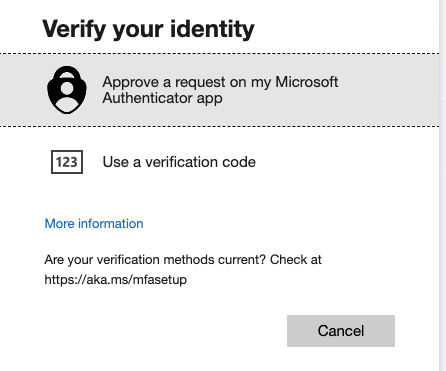
I'm really hoping someone can help - In transferring over my authenticator app to a new phone something went wrong and now the only way to 2-step authenticate is through the app - which I can't access. When i select additional verification methods this is what I get: When I reset my password however, it can verify this with my phone number. But still, I get stuck at the 2nd authentication step above... On my phone authenticator app this is what I can see. i dont get any alerts with codes: and yet again, to set these methods up, I need to confirm on my app. Sometimes i am asked to scan a QR code, but not sure where i can find this as i cant sign in... I am going in circles and so frustrated. I've called the help line and asked the chat suport with no help and so really hoping someone can help me as I'm locked out of my work account, which is my small business. it is an office 365 small business account I purchased through Microsoft. Really would value any advice or solutions! 🙏24Views0likes1CommentAuthenticator
I need your help. I broke my Iphone and after replacing it I cannot log into my Microsoft admin account since the authentication app is not working. I am the administrator of my own small business account. I have gone through all the account recovery help but neither the send text to my number or call my number works. All online support depends on having an the code from the Authenticator app I am completely lost here ☹ hope someone can help Dadi Johannesson1.4KViews0likes2Comments
Config Question: Microsoft 365, Microsoft Authenticator, Mac Mail Users
Hello All, We are currently using Microsoft 365 which is "hosted" or "federated" through GoDaddy. I want to pilot Microsoft Authenticator, so that we can have either MFA, SSO, or a combo of both. I'm running into a possible issue when I enable MFA for myself, as an enduser. We run TEAMS, and I only get asked to re-login into Teams to authenticate, which does work. However, if Mac Mail running as a client on the endpoint machine, should I assume that MFA will not work, since it is always communicating to the "hosted/federated" backend? That it never disconnects the connection? If there is something I should do differently with the config, I'd appreciate the guidance here.91Views0likes1CommentLogin Catch-22: locked out of Work account due to MFA mismatch.
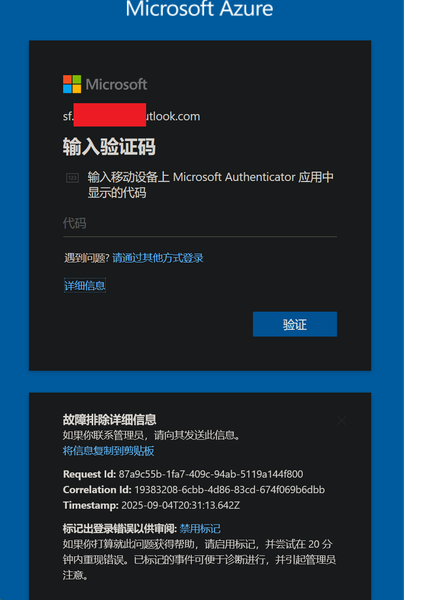
"I am the owner of the domain mydomain.be, registered at one.com. I have a Microsoft 365 Business Premium subscription. I am locked out of my work/school tenant admin account (mailto:email address removed for privacy reasons) due to an MFA issue — the Microsoft Authenticator is configured but not delivering push notifications, and the TOTP code length does not match what the login screen expects. I cannot access the admin center. I need to recover Global Admin access to my flavo.be tenant so I can manage users and licenses. I can prove domain ownership via DNS if required.86Views0likes1CommentMy Azure login is stuck at MFA and cannot proceed
In August, I was still able to log in to Azure, and by logging in through GitHub I could bypass 2FA. But now, no matter how I try, logging in via GitHub always requires 2FA. I can’t access my Azure account anymore—nothing works. The system prompts me to use Microsoft Authenticator to confirm a two-digit code in real time. My Microsoft Authenticator on my iPhone is logged into the same Microsoft account, but I’m not receiving any verification requests for Azure login. No matter how much I refresh, nothing shows up. I’ve already updated the Microsoft Authenticator app to the latest version from the App Store. However, my personal Microsoft account works fine and can log in without any issues.267Views0likes2CommentsAccount Hacked
Hello Community, My account has been hacked, copied and/or duplicated with some other account as I was originally Sids1 with this email for more than 6 months now and this has changed somehow. It's very concerning to me since I also found some other person named Siddhartha when I was logging into my account. I reported that to the Microsoft Account Team but have not received any replies yet. Please suggest anything that can be done to catch this hacker who is stealing my identity to and fro. Best Regards Siddhartha SharmaSolved1.2KViews1like4Comments
In "Per-user multifactor authentication" I disabled MFA for one user; All got disabled
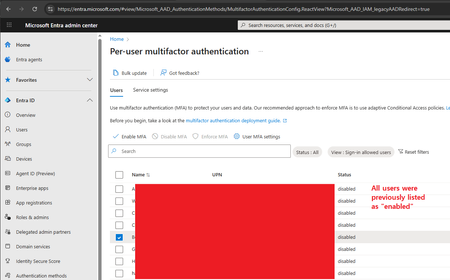
Hi, I'm the 365 admin for our org. Today I had a user that got a new phone and became stuck in a MS Authenticator app loop. (The app required MFA to login to the app, but they can't login to the app because they aren't logged into the app. This happened once before, and is a ridiculous Kafkaesque situation; but I digress.) To solve it, I went to disable MFA on their account, allowing them to login to the app. Then MFA could be re-enabled. Problem solved. And indeed that did work. However, on the admin side (per the screenshot) I checked off their user account (the user starting with the letter "B") and hit the "Disable MFA" link. A confirmation appeared asking me if I wanted to disable MFA for all selected users. Because I'm the careful sort, I could still see that only that one user was checked off as the popover div didn't cover that much of the screen. Hence I confirmed that I wanted to disable MFA for the selected users (i.e. that one user). I then refreshed the page, and all users are now shown as having MFA disabled. I'm 100% sure only that one user was selected, not everyone in my org. That would've been foolish. Trying to figure out what's wrong with this portion of the admin site.396Views0likes2Comments