authentication
354 Topics
MFA Enabled> conditional MFA policy setup > not prompting users to authenticate
I pulled a report in Entra that shows users with no MFA authentication methods setup, but we have a conditional mfa policy setup that should enforce MFA. I have worked with a user showing on the report. Their PC is joined in entra and managed Intune. I have revoked the user session reset his MFA still the user is able to sign in to his pc with his windows hello pin or his 0365 credentials without being prompted for MFA registration authentication setup...any help2.1KViews1like3CommentsExcel authentication token reuse for access to Log Analytics
I have noticed that Excel is not able to reuse the authentication token when accessing Log Analytics workspaces if an expired token was renewed for a single sheet in a workbook. Scenario: 1 workbook with 1+ worksheets Each worksheet is a different query to LA (KQL query displayed in Excel for ease and consolidation) Access to LA is protected by the usual access controls (Conditional Access; Security Reader role + Session control) After a period of time, session and token expire and require renewal User receives a prompt stating the token has expired and needs to be renew User clicks on "Sign-in" and successfully completes the prompts (u/n+pwd+MFA) Expected result: The new token will be reused for subsequent connections to LA within the same workbook Actual result: User is prompted to re-authenticate for each and every connection in the workbook resulting in as many auth requests as there are connections Workaround: After successfully completing the first auth request, close Excel and re-open it and run "Refresh all" This successfully completes refresh of all data without any additional re-auth requests Is this behaviour by design or due to a configuration? Is there a way to address this so that the first token is re-used by all other connections without having to close and reopen the workbook?Solved107Views0likes2Comments
Microsoft Feedback Portal account is not working
I changed my Microsoft password a year ago, and it updated everywhere other than the Feedback Portal. As a result, I get an error when I try to login, or do anything on the page. Microsoft account support's suggestion was to login to the Feedback Portal which is insane given I'm having issues accessing it. How can I get this issue resolved? I've got three separate support tickets now and they keep asking me to wait 24 hours to get the issue resolved. Can someone from the Feedback Portal team please contact me to resolve this?" This is what Microsoft Support have said: "understand your frustration, and yes—this is an account‑related issue because the Feedback Portal is still tied to your old alias, which causes login conflicts and forces you out. Your Microsoft account itself signs in correctly, but the Feedback Portal is pulling outdated identity data that you cannot update on your own. Since you cannot access the Portal to submit feedback, directing you back there is not a workable solution. What you need is for Support to escalate this to the internal Identity/Feedback Platform engineering team so they can manually correct the outdated alias mapping on the backend. In this situation, the Feedback Portal and Tech Community teams are the ones who manage and maintain that specific platform. Because the issue appears on the Feedback Portal side—even though your Microsoft account is working normally—only their dedicated team can make the necessary corrections on their end. That’s why we are guiding you to connect with them through the links provided: https://techcommunity.microsoft.com/ or https://feedbackportal.microsoft.com/feedback. They will be able to review the portal‑specific account data and assist you further. I understand why this is frustrating. Since you’re unable to stay signed in to the Feedback Portal, I completely see why posting there isn’t possible for you. However, I do need to be transparent: I’m not able to escalate this issue directly to the Feedback Portal team, as they don’t provide internal escalation channels for us and only accept requests through their own platform. "46Views0likes1Comment
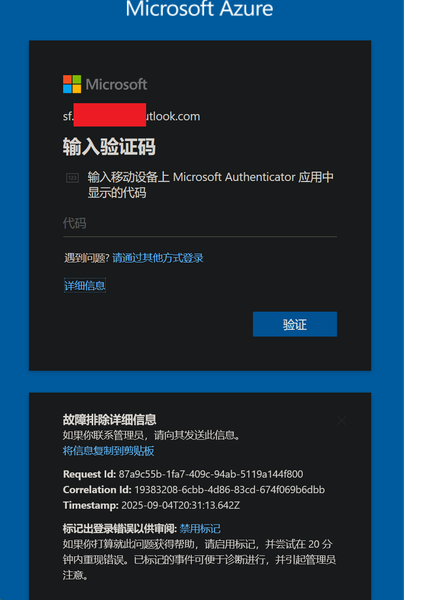
My Azure login is stuck at MFA and cannot proceed
In August, I was still able to log in to Azure, and by logging in through GitHub I could bypass 2FA. But now, no matter how I try, logging in via GitHub always requires 2FA. I can’t access my Azure account anymore—nothing works. The system prompts me to use Microsoft Authenticator to confirm a two-digit code in real time. My Microsoft Authenticator on my iPhone is logged into the same Microsoft account, but I’m not receiving any verification requests for Azure login. No matter how much I refresh, nothing shows up. I’ve already updated the Microsoft Authenticator app to the latest version from the App Store. However, my personal Microsoft account works fine and can log in without any issues.226Views0likes2CommentsHow Do I Target the Azure VPN Client in a Conditional Access Policy?
I am using the Azure VPN Client to connect users to an Azure VPN Gateway using their Entra ID credentials to authenticate. I want to target this application with a CA policy that requires MFA every time it connects. The problem is that I don't see the applications in my Enterprise Apps and all of my searching says that it won't appear because it was "pre-certified" by Microsoft. In the Gateway setup I used the Audience GUID of c632b3df-fb67-4d84-bdcf-b95ad541b5c8. And this is working as expected. The only solution that I have found for targeting the Azure VPN Client app is to create a Service Principal using that Audience GUID. This seems like a bit of a hack, so I am posting here to see if there are any other methods that I am missing to target this app when it doesn't appear in my Enterprise Apps list.253Views0likes3CommentsAccount Hacked
Hello Community, My account has been hacked, copied and/or duplicated with some other account as I was originally Sids1 with this email for more than 6 months now and this has changed somehow. It's very concerning to me since I also found some other person named Siddhartha when I was logging into my account. I reported that to the Microsoft Account Team but have not received any replies yet. Please suggest anything that can be done to catch this hacker who is stealing my identity to and fro. Best Regards Siddhartha SharmaSolved1.1KViews1like4CommentsHybrid Identity Admin Questions
Hi All I hope you are well. Anyway, we are migrating our Entra Connect Sync server to it's own dedicated server. With regards to the Hybrid Identity admin role, do we: Include MFA on this account Configure as Eligible or Permanent in PIM Info appreciated Stuart135Views0likes2Comments
Hacked Live account
Hello, On of our customers accounts was hacked. This is a Live account linked to his own emailadres (not hotmail) from his Internet Provider. A few weeks ago someone gained access to this account. They changed the recovery email address and the phone number. The customer has a paid Office 36 family account, which is paid for with his MasterCard and he can provide the invoice from the last years.. We tried the account recovery Form multiple times, opened a case with CDOC Case Management. We simply got the reply that they could not do anything but to suspend the account. I Think this is crazy, is there no solution to this ? Thanks,137Views0likes2Comments
Case 2512040040001886 - Cannot Access Account
Since the 4th of December we have been patiently waiting on MS Tech support to assist on resolving our Case with no success endless calls and endless promises with no luck. How do you proceed in using Microsoft for a Business if they don't deliver on the support. My business is taking the brunt of it. I suppose another call holding for hours and another Support person promise a solution. No other methods to log complaints as you cannot log into your Account Portal.76Views0likes1Comment
Android Teams login fails during ADFS federation with SSL error
Hello Android mobile users cannot sign in to Microsoft Teams The login fails during the ADFS federation step due to an SSL error Environment Android OS versions 10 to 14 Microsoft Teams mobile app Entra ID federated with on premises ADFS ADFS service URL is masked Public certificate issued by Sectigo Issue description After entering the account in Teams the sign in process redirects to ADFS The page does not load correctly and shows infinite loading or a blank screen The same account works normally on PC browser PC Teams and Outlook Web The issue occurs only on Android mobile apps that use WebView Android log summary OAuth2 WebView client received SSL error Primary error SSL untrusted Wildcard certificate for masked domain Certificate issued by Sectigo Public Server Authentication CA Troubleshooting performed Device date and time verified Teams app cache cleared and app reinstalled Issue reproduced on multiple Android versions and devices PC authentication works with the same certificate Questions Can Android WebView or Microsoft mobile authentication fail with SSL untrusted when the ADFS server does not provide a complete certificate chain Is full chain certificate configuration required on ADFS IIS for mobile authentication Can SSL inspection or proxy interception cause this issue only on Android apps while PC browsers work normally Are there official Microsoft recommendations for certificate configuration when using ADFS federation with Android mobile apps Additional information The same behavior occurs in other Microsoft mobile apps The suspected causes are incomplete certificate chain or network SSL inspection Thank youSolved461Views0likes1Comment