administrator
2880 Topics
Best External Access configuration
I’m looking for guidance on the best Microsoft Teams configuration for the following goal: Objective Prevent random external domains from: Looking up users in Teams Sending 1:1 chats Making direct audio/video calls At the same time: External users invited to Teams meetings should not appear as Anonymous41Views0likes1Comment
Teams duplicates contacts until it maxed out at 15000
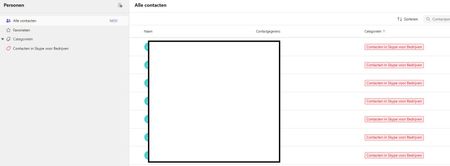
Hi, I have a weird issue with some users, Teams seems to be duplicating old Skype for Business contacts until it maxes out at 15000 contacts. I have been digging into it a bit and found out the location of the folder through Exchange powershell but I can't clear or delete it. Skype for Business is phased out and disabled in my tenant for a long time now so I couldn't do much there, I can't login to it through powershell. We've had Teams since like 2017 so I suspect this is a niche legacy issue popping up recently somehow. Manual deleting is possible through the browser environment but that is such a hassle because it keeps glitching if you delete per 100 and skipping pages and stuff, need to refresh constantly. Just a pain, it would take days. And no guarentee its not coming back either. See screenshots. Does anyone know why this is happening and how to fix this? Thanks for reading, cheers!59Views0likes3Comments
Group email addresses for Teams sometimes contain “+” or “/” characters
We are using Microsoft Teams in our organization. When creating multiple Teams with exactly the same team name, using ASCII alphanumeric characters only, we occasionally see that the automatically generated group email address contains unexpected characters such as “+” or “/”. I would like to know whether this behavior is expected or if it is specific to our environment. This issue seems to have been occurring since around August 2025. We manually create Teams using the Windows Teams client. For example, if we create several Teams with a simple name such as “example2026”, the corresponding group email addresses are generated in the following format: email address removed for privacy reasons However, in some cases, the XXXXXX portion includes characters like “+” or “/”. When creating around 50 Teams, this issue appears in a few of them. This causes two problems for us: A “+” character interferes with plus-addressing behavior. When a “/” is included, we cannot create events inside the Team. Has anyone else encountered this issue or knows why this happens? Any insights would be appreciated.34Views0likes2CommentsAllow only specific external domains
When External Access is set to “Allow only specific external domains” Scenario 1 If Microsoft Teams External Access is set to “Allow only specific external domains”, and a user from a domain not on the allowed list joins a meeting while signed into their work Teams account, Will they still appear with their actual name and organization, rather than as Anonymous? Is this correct? Scenario 2 If a user from a non-allowed domain joins the meeting link through a browser and selects “Join as guest”, Will they appear under the name they manually enter, instead of showing as Anonymous? Is this correct? Scenario 3 If a user joins without authenticating and meeting policy allows anonymous access, Will they appear as Anonymous only in that situation, and not because of the External Access restriction? Is this correct?79Views0likes3CommentsExternal Accessbto “Allow only specific domains” How does this affect meeting participant identity?
Hi everyone, We have recently changed our Microsoft Teams External Access setting from: “Block only specific external domains” to “Allow only specific external domains.” This means only explicitly approved domains are allowed for 1:1 chat, calling, and federation. I would like clarification regarding how this impacts Teams meetings. Scenario: If a user from a domain that is not on the allowed list is invited to a Teams meeting: If they join the meeting while signed into their work/school Teams account, will they still appear with their authenticated name (e.g., Name (External))? Or will they appear as Anonymous because their domain is not permitted under External Access? My understanding is that External Access (federation) controls chat and calling, but meeting identity is governed separately by meeting policies and authentication status. Can someone confirm if this is correct? Thank you in advance for your guidance.37Views0likes0Comments
All Teams Bots Not Working At All
This morning all of a sudden all our Teams bots stopped working. These are bots built using bot framework running on Azure Bot Teams Channel. Is this related to the current Teams API issue we talking about? All of a sudden all our client and test bots stopped working. But the Web Channel is working as expected. Only the teams channel. We even checked with ngrok and its not even hitting the service. We checked the app registrations and their credentials as well to ensure not issues there too. Completely lost whats happening. Help?161Views0likes2CommentsAdd Teams Chat Member API call inexplicably Failing
I have tried every possible permutation of this API call that I can imagine. Nothing works. I already started a thread on this, but now it appears to be glitched and I can no longer reply to message sin that thread for some reason. What can I do to contact Microsoft Support and speak directly to their API team? The responses I have gotten all appear to be AI generated and NONE ARE CORRECT. I really need help, from a human, that actually might understand what's going on here. Please help. "#microsoft.graph.aadUserConversationMember' for 'odata.type' is not valid for this operation." <- I am receiving this error despite the fact that we already have several users in this channel with that same type. This API call is intended to invite a user to an existing group chat. This should really be a very simple thing. 1. ALL users in the group chat already have type = '#microsoft.graph.aadUserConversationMember' so the error message doesn't even make sense. 2. This IS a Group chat. NOT a channel. NOT a one on one chat. 3. The Inviter has permission to invite users to this groupchat through the frontend. (and in fact can do so using the frontend.) Why is this API call failing? I have tried scrubbing the API call of special characters, I have tried using the beta endpoint, I have tried several different formats for the input. ERROR: {"error":{"code":"BadRequest","message":"The provided '#microsoft.graph.aadUserConversationMember' for 'odata.type' is not valid for this operation.","innerError":{"date":"2026-02-10T19:11:28","request-id":"XXXXX","client-request-id":"XXXXXX"}}} POST URL: https://graph.microsoft.com/v1.0/chats/IDHERE/members BODY: { "chatType": "group", "\u0040odata.type": "#microsoft.graph.aadUserConversationMember", "user\u0040odata.bind": "https://graph.microsoft.com/v1.0/users/IDHERE", "roles": [] }185Views1like4CommentsIssue with Teams 'Add a User to Group Chat' API call?
I am getting a very strange error when trying to add a new user to an existing group chat using a GraphQL call. I have looked through the documentation, asked AI, and even contacted Microsoft support and no one can seem to explain why this API call is failing. Below is the API call that I am making. I can find no reason that I should be receiving the error message '#microsoft.graph.aadUserConversationMember' To get the basic questions out of the way.... Yes, the account making the API call DOES have permission to add users to the channel (and can do so using the frontend as normal.) Yes, the thread in question is a group chat, so adding members to that chat should be a valid command. Yes, ALL members in the group chat currently have the type '#microsoft.graph.aadUserConversationMember', so it is definitely a valid type for users in this channel. Yes, I have tried both the beta and stable channel; each gives the same error message. Yes, the invited user is internal to our organization, and is a valid target for the invite (invites work through frontend as well.) No, I cannot use the 'add member to channel' endpoint, because the chat is a group chat, not a channel. I can only assume, at this point, that the error message is a red herring and there's something else wrong with my API call?Why am I receiving this error message when trying to add a member to a pre-existing group chat? Thanks in advance for any assistance. POST to URL: https://graph.microsoft.com/beta/chats/[[THREAD_ID]]@thread.v2/members BODY: { "@odXXX.type": "#microsoft.graph.aadUserConversationMember", "roles": [], "email address removed for privacy reasons": "https://graph.microsoft.com/v1.0/users/[[USER_ID]]" } ERROR MESSAGE: {"error":{"code":"BadRequest","message":"The provided '#microsoft.graph.aadUserConversationMember' for 'odXXX.type' is not valid for this operation.","innerError":{"date":"2026-01-29T18:10:32","request-id":"<PII:moderator removed>","client-request-id":"<PII:moderator removed>"}}}262Views0likes8CommentsMicrosoft Teams PowerShell Module 7.6.0 is broken
Dear Community I have a few Script with Microsoft Teams PowerShell, witch authenticate via Access Token. Everything works fine until latest Microsoft Teams PowerShell Module Update 7.6.0. I got following Error with the Script. Connect-MicrosoftTeams : Could not load file or assembly 'Microsoft.IdentityModel.JsonWebTokens, Version=8.3.0.0, Culture=neutral, PublicKeyToken=31bf3856ad364e35' or one of its dependencies. The system cannot find the file specified. If I downgrade my environment from Version 7.6.0 to Version 7.5.0 and rerun my script, the authentication is working as expected. What is wrong here with latest PowerShell Module 7.6.0 and how can I resolve the issue Many thanks for sharing any hint or tip ANDY246Views2likes2Comments
AADSTS50105 error message is unreadable for end users — UX improvement suggestion
1. What’s wrong with the current error message a. It’s written for administrators, not users The message exposes: Internal system names (AADSTS50105) GUIDs (aaaabbbb-cccc-dddd-eeee-ffff01234567) Identity provider jargon (“direct member of a group with access”) None of this helps the person who sees the error decide what to do next. b. The actual problem is buried in a wall of text The real issue is simply: You don’t have permission to access this app. Instead, the message forces users to: Read a long paragraph Decode domain-specific language Guess which part matters Cognitively, this is high effort for low payoff. c. “Contact your administrator” is vague and unhelpful Users ask: Which administrator? IT? Security? App owner? Their manager? What should they say? Without context, users either: Ignore the error Forward screenshots randomly Open the wrong support ticket d. Error codes without guidance increase support load AADSTS50105 may be meaningful internally, but: Users don’t know whether to Google it Support teams receive unclear tickets (“it doesn’t work”) This paradoxically raises support cost instead of lowering it. 2. What a better error message should do A good error message answers four questions in order: What happened? Why did it happen (in plain language)? What can the user do next? Who specifically can help? And it does so in under 30 seconds of reading time. 3. Example of a much better error message You don’t have access to [APPLICATION] Your account (email address removed for privacy reasons) isn’t currently authorized to use [APPLICATION]. This usually means: You haven’t been added to the required security group, or Access hasn’t been requested or approved yet. What to do next If you believe you should have access, contact IT Service Desk or your [APPLICATION] owner and request access. Helpful details to include in your request Application name: [APPLICATION] Your email: email address removed for privacy reasons Error reference: Access not assigned (Error ID: AADSTS50105 — for IT use) 4. Optional but high-impact improvement: Add a “Request Access” button or link One-click takes users to: ServiceNow / Jira / internal form Auto-populates app name and user email Administrators configure support link when configuring the application41Views0likes0Comments