2013
958 Topics
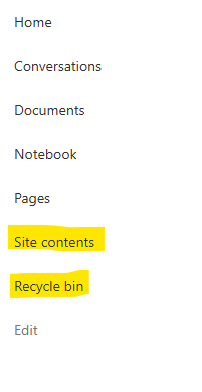
Recycle Bin and Site Content Hidden for Site Members and Site Visitors
I posted this before but made a mistake with my write up, so I am reposting. I have a requirement that the Recycle bin and Site Contents should be be hidden from the Site Members and Site Visitors. Please how can I achieve this because the Server Infrastructure activation is not working for me. Any workarounds? Please help603Views0likes1CommentDynamic Mandatory Fields
In a SharePoint library, I have folders which are = a. Admin b. Events c. Furniture and Moves d. Janitorial and Maintenance e. Parking and Transportation f. Shipping and Receiving g. Supplies and Equipment h. Waste and Recycling I have Meta data across the library whose data type are all choices and are: a. Document Type = Contract, Financial, planning b. Building = Gym, Garage, Heating c. Asset Category = Office, Playground d. Fiscal Year = FY23, FY24, FY25, FY26, FY27 e. Vendor = Maple Leaf, Canadian Tire, Home Depot f. Status = Active, Pending, Not Active g. Retention Label = 3 years, 5 years h. Service Type = Admin, Events, Furniture and Moves, Janitorial and Maintenance, Parking and Transportation, Shipping and Receiving, Supplies and Equipment, Waste and Recycling Service Type and Retention Label are mandatory fields, with the Rule below for all the files in the various folders: IF Folder Name = Admin, then Service Type = Admin and Retention Label = 5 years; the mandatory fields should be Document Type, Status and Fiscal Year IF Folder Name = Events, then Service Type = Events and Retention Label = 3 years; the mandatory fields should be Document Type, Status and Fiscal Year, Building and Vendor IF Folder Name = Furniture and Moves, then Service Type = Furniture and Moves and Retention Label = 3 years; the mandatory fields should be Document Type, Status and Building IF Folder Name = Janitorial and Maintenance, then Service Type = Janitorial and Maintenance and Retention Label = 3 years; the mandatory fields should be Document Type, Status and Fiscal Year IF Folder Name = Parking and Transportation, then Service Type = Parking and Transportation and Retention Label = 3 years; the mandatory fields should be Document Type, Status and Fiscal Year IF Folder Name = Shipping and Receiving, then Service Type = Shipping and Receiving and Retention Label = 3 years; the mandatory fields should be Document Type, Status IF Folder Name = Supplies and Equipment, then Service Type = Supplies and Equipment and Retention Label = 3 years; the mandatory fields should be Document Type, Status and Fiscal Year IF Folder Name = Waste and Recycling, then Service Type = Waste and Recycling and Retention Label = 3 years; the mandatory fields should be Document Type, Status and Vendor I have used Column Default Value Settings for SharePoint to display Auto-Display the Service Type and Retention Label, but I cannot seem to perform the conditional mandatory fields using Validations setting for the other requirements. Please help583Views0likes1Comment
FIX - Outlook 2013,2016,2019 fails open mailbox Exchange 2019 on-prem in offline LAN
Exchange 2019 on-prem + Outlook 2013/2016/2019 in offline LAN Symptoms: - OWA works - ECP works - Autodiscover works - Test-MAPIConnectivity is successful - Outlook profile can be created - Outlook fails to open the mailbox / “Cannot start Microsoft Outlook” / “The set of folders cannot be opened” / “The attempt to log on to Microsoft Exchange has failed” - Environment has no internet connection Root cause: The Windows client had a default gateway configured, but the gateway IP did not respond to ping. In our case the client received 192.168.1.1 as default gateway, but this IP was unreachable in the offline network. Fix: Set the client default gateway to an existing reachable IP address, for example the Exchange/DC server IP 192.168.1.5. Internet access is not required, but the default gateway must be reachable/responding. After changing: Default gateway: 192.168.1.5 DNS: 192.168.1.5 mail/autodiscover DNS or hosts pointing to Exchange 2019 Result: Outlook 2013, Outlook 2016 and Outlook 2019 connected to Exchange 2019 successfully.273Views0likes1Comment
Container tree - PnP Modern Search
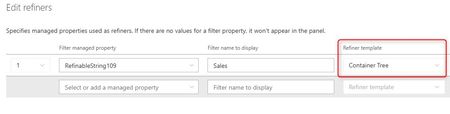
Hello everyone, I am trying to create a page on one of my SP sites dedicated to search. Specifically, I want to use tags/labels as filters. So far, I have managed to do this using the PnP Modern Search filter tool on one level (I create a column, map the crawled properties with a RefinableString, and configure the filter). Now I would like to do the same thing, but this time on multiple levels with a tree structure. I've created a TermSet and in the filter configuration, I saw this “Container tree” option, but nothing works, and I can't find any help or documentation on the subject. Does anyone have any information? Or a way to use this option and have tree view on the filter? Thank you in advance, any help will be greatly appreciated. Kind regards490Views0likes5Comments
404 error downloading file versions via CSOM (SharePoint 2013 On-Prem)
I need to download historical versions of a document from a SharePoint 2013 On Premises document library using a C# console application, so I can migrate them chronologically to SharePoint Online along with their column properties. While downloading the current latest version works perfectly, downloading older historical versions always fails. Standard CSOM methods fail because ListItem.Versions does not exist in the SharePoint 2013 v15 SDK. Reverting to direct HTTP endpoints consistently throws an error. Here is the exact exception message I receive: System.Net.Http.HttpRequestException: Response status code does not indicate success: 404 (Not Found). Below is the minimal reproducible code example demonstrating how the connection is initialized, how properties are loaded, and where the download fails on historical versions: using System; using System.IO; using System.Net.Http; using Microsoft.SharePoint.Client; using SP = Microsoft.SharePoint.Client; class Program { static void Main() { string siteUrl = "https://example.com"; using (ClientContext sourceCtx = new ClientContext(siteUrl)) { sourceCtx.Credentials = System.Net.CredentialCache.DefaultCredentials; List sourceList = sourceCtx.Web.Lists.GetByTitle("MyLibrary"); CamlQuery query = CamlQuery.CreateAllItemsQuery(); ListItemCollection items = sourceList.GetItems(query); sourceCtx.Load(items, ic => ic.Include( item => item.Id, item => item.File, item => item.File.Versions, item => item.File.ServerRelativeUrl )); sourceCtx.ExecuteQuery(); foreach (ListItem item in items) { if (item.File == null || !item.File.Exists) continue; foreach (FileVersion ver in item.File.Versions) { string absoluteVersionUrl = siteUrl.TrimEnd('/') + "/" + ver.Url.TrimStart('/'); using (var handler = new HttpClientHandler { Credentials = sourceCtx.Credentials }) using (var client = new HttpClient(handler)) { client.DefaultRequestHeaders.Add("X-FORMS_BASED_AUTH_ACCEPTED", "f"); client.DefaultRequestHeaders.Add("User-Agent", "Mozilla/5.0"); // CRITICAL FAILURE HERE: Always throws 404 Not Found HttpResponseMessage response = client.GetAsync(absoluteVersionUrl).Result; response.EnsureSuccessStatusCode(); using (Stream fileStream = response.Content.ReadAsStreamAsync().Result) { // Upload logic to SPO goes here } } } } } } The version URL returned inside the property matches the following virtual folder layout format: _vti_history/512/Folder/Doc.docx My specific environment queries are: Why does navigating to the absolute history folder URL over an authenticated HttpClient trigger a 404 Not Found error in SharePoint 2013 on premises, even though the path token is extracted directly from the version url metadata property? Is there an alternative legacy REST endpoint routing structure or an alternative file stream extraction method available in the SharePoint 2013 (v15) SDK that allows an external client application to fetch older version binaries successfully?107Views0likes0CommentsHow to hide the Modify this view and Create View as per users available in groups
Hi All, I have classic view of SharePoint in list/libraries. I have group(for Managers). I just want want to show and hide the Create View/Modify View/Modify this view depends on users available in group. If user available in group(for Managers) then they can do anything like Create View/Modify View/Modify this view but if user is not a part of the group(for Managers) then they can not modify any Public views but the can create Personal view. Is there any way how I can achieve this functionality?314Views0likes1CommentExchange Hybrid Configuration Wizard - Error 1603 - Connector registration failed
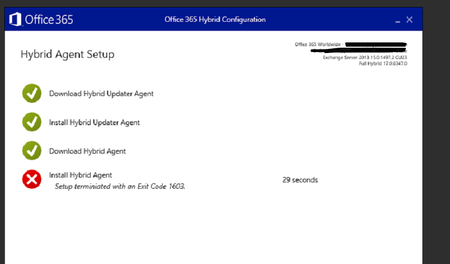
Did any of you encounter this error while installing hcw on an exchange server? Here is the event viewer error details: Connector registration failed: Make sure you are a Global Administrator of your Active Directory to register the Connector. Error: '"The registration request was denied. "'Solved63KViews2likes27Comments
Automating SharePoint Site Status Reporting with PowerShell
Introduction Migrating Microsoft 365 workloads is a critical step during organizational transitions such as mergers or de‑mergers. SharePoint site collections often contain business‑critical data, and ensuring visibility into their readiness is essential for a smooth migration. To address this, I developed a PowerShell script that automatically generates a SharePoint Site Status Report, categorizing sites into Active, Read‑Only, and Offline. This report provides administrators and migration engineers with actionable insights to plan and execute migrations confidently. Why This Matters Visibility: Quickly assess site readiness across all web applications. Governance: Ensure compliance and proper access controls. Efficiency: Automate reporting to reduce manual effort. Risk Mitigation: Identify offline or read‑only sites before migration. How It Works The script leverages the SharePoint Management Shell and runs under the Farm Account with elevated permissions. It performs the following steps: Loads SharePoint cmdlets. Iterates through all web applications. Categorizes sites into Active, Read‑Only, and Offline. Compiles results into a structured CSV/Excel/HTML report. Sends the report via email to stakeholders. Key PowerShell Cmdlets Add-PSSnapin Microsoft.SharePoint.PowerShell Get-SPWebApplication Get-SPSite -WebApplication -Limit All $site.ReadOnly / $site.Status Export-Csv Send-MailMessage Parameters to Replace Before running the script, update these placeholders: SMTP Server → mail.company.com → replace with your mail server Sender Address ($from) → email address removed for privacy reasons → replace with reporting account Recipient Address ($to) → email address removed for privacy reasons → replace with stakeholder distribution list Email Subject ($subject) → "SharePoint Site Status Report" → customize for clarity Report File Path ($csvPath) → C:\Reports\SharePoint_SiteStatusReport.csv → replace with desired location Web Application URLs → ensure correct farm references Execution Context → must run under Farm Account Conclusion This automated reporting solution provides clarity, governance, and efficiency during SharePoint migrations. By categorizing sites and delivering structured reports, administrators can prioritize tasks, mitigate risks, and ensure a seamless transition to Microsoft 365. Code: #Adding Snapin for SharePoint #Add-PSSnapin Microsoft.SharePoint.Powershell -ErrorAction SilentlyContinue $TodayDate =Get-Date Write-Host $TodayDate $FileName = "C:\Results_Active_WebSites.txt" if (Test-Path $FileName) { Remove-Item $FileName } $FileName = "C:\Results_NoAccess_WebSites.txt" if (Test-Path $FileName) { Remove-Item $FileName } $FileName = "C:\Results_Readonly_WebSites.txt" if (Test-Path $FileName) { Remove-Item $FileName } $FileName = "C:\Results_Active_WebSites.txt" if (Test-Path $FileName) { Remove-Item $FileName } $FileName = "C:\Results_Readonly_WebSites.txt" if (Test-Path $FileName) { Remove-Item $FileName } $FileName = "C:\Results_NoAccess_WebSites.txt" if (Test-Path $FileName) { Remove-Item $FileName } $FileName = "C:\Results_Active_WebSites.txt" if (Test-Path $FileName) { Remove-Item $FileName } $FileName = "C:\Results_Readonly_WebSites.txt" if (Test-Path $FileName) { Remove-Item $FileName } $FileName = "C:\Results_NoAccess_WebSites.txt" if (Test-Path $FileName) { Remove-Item $FileName } $FileName = "C:\Results_Active_WebSites.txt" if (Test-Path $FileName) { Remove-Item $FileName } $FileName = "C:\Results_Readonly_WebSites.txt" if (Test-Path $FileName) { Remove-Item $FileName } $FileName = "C:\Results_NoAccess_WebSites.txt" if (Test-Path $FileName) { Remove-Item $FileName } ##My Connect # $FileName = "C:\Results_Active_WebSites.txt" if (Test-Path $FileName) { Remove-Item $FileName } # $FileName = "C:\Results_Readonly_WebSites.txt" if (Test-Path $FileName) { Remove-Item $FileName } # $FileName = "C:\Results_NoAccess_WebSites.txt" if (Test-Path $FileName) { Remove-Item $FileName } # # WebSites $FileName = "C:\Results_Active_WebSites.txt" if (Test-Path $FileName) { Remove-Item $FileName } # $FileName = "C:\Results_Readonly_WebSites.txt" if (Test-Path $FileName) { Remove-Item $FileName } # $FileName = "C:\Results_NoAccess_WebSites.txt" if (Test-Path $FileName) { Remove-Item $FileName } # ##Websites # $FileName = "C:\Results_Active_WebSites.txt" if (Test-Path $FileName) { Remove-Item $FileName } # $FileName = "C:\Results_Readonly_WebSites.txt" if (Test-Path $FileName) { Remove-Item $FileName } # $FileName = "C:\Results_NoAccess_WebSites.txt" if (Test-Path $FileName) { Remove-Item $FileName } # ## Websites # $FileName = "C:\Results_Active_WebSites.txt" if (Test-Path $FileName) { Remove-Item $FileName } # $FileName = "C:\Results_Readonly_WebSites.txt" if (Test-Path $FileName) { Remove-Item $FileName } # $FileName = "C:\Results_NoAccess_WebSites.txt" if (Test-Path $FileName) { Remove-Item $FileName } # ##FGC-SalesShareWebSites # $FileName = "C:\Results_Active_WebSites.txt" if (Test-Path $FileName) { Remove-Item $FileName } # $FileName = "C:\Results_Readonly_WebSites.txt" if (Test-Path $FileName) { Remove-Item $FileName } # $FileName = "C:\Results_NoAccess_WebSites.txt" if (Test-Path $FileName) { Remove-Item $FileName } ##WebSites # $FileName = "C:\Results_Active_WebSites.txt" if (Test-Path $FileName) { Remove-Item $FileName } # $FileName = "C:\Results_Readonly_WebSites.txt" if (Test-Path $FileName) { Remove-Item $FileName } # $FileName = "C:\Results_NoAccess_WebSites.txt" if (Test-Path $FileName) { Remove-Item $FileName } ##WebSites # $FileName = "C:\Results_Active_WebSites.txt" if (Test-Path $FileName) { Remove-Item $FileName } # $FileName = "C:\Results_Readonly_WebSites.txt" if (Test-Path $FileName) { Remove-Item $FileName } # $FileName = "C:\Results_NoAccess_WebSites.txt" if (Test-Path $FileName) { Remove-Item $FileName } ##WebSites # $FileName = "C:\Results_Active_WebSites.txt" if (Test-Path $FileName) { Remove-Item $FileName } # $FileName = "C:\Results_Readonly_WebSites.txt" if (Test-Path $FileName) { Remove-Item $FileName } # $FileName = "C:\Results_NoAccess_WebSites.txt" if (Test-Path $FileName) { Remove-Item $FileName } Add-PSSnapin Microsoft.SharePoint.Powershell [string[]]$WebapplicationList = "" Foreach($Webapp in $WebapplicationList) { Write-Host $Webapp $displaywebappname=Get-SPWebApplication $webapp $webappname=$displaywebappname.name Write-Host $webappname $Sites = Get-SPWebApplication $webapp | Get-SPSite -limit all | foreach { if ($_.ReadOnly -eq $false -and $_.ReadLocked -eq $false -and $_.WriteLocked -eq $false) { $Result =”Site is Active” $save2= "Results_Active_${webappname}.txt" #Write-Host $save2 $saveCSVactive="Results_Active_${webappname}.csv" $_.RootWeb.Title +”`t” + $_.URL + “`t” + $Result | Out-File $save2 -append #$_.RootWeb.Title +”`t” + $_.URL + “`t” + $Result | Out-File $saveCSVactive -Append } elseif ($_.ReadOnly -eq $true -and $_.ReadLocked -eq $false -and $_.WriteLocked -eq $true) { $Result = “Site is Read-Only” $save1= "Results_Readonly_${webappname}.txt" $_.RootWeb.Title +”`t” + $_.URL + “`t” + $Result | Out-File $save1 -Append } elseif ($_.ReadOnly -eq $null -and $_.ReadLocked -eq $null -and $_.WriteLocked -eq $null) { $Result=”Site status is No Access” $save3= "Results_NoAccess_${webappname}.txt" #$_.RootWeb.Title +”`t” + $_.URL + “`t” + $Result | Out-File $save3 -Append $_.URL +”`t” + $_.RootWeb.Title + “`t” + $Result | Out-File $save3 -Append } } } $TodayDate =Get-Date Write-Host $TodayDate sleep -Seconds 100 #Active Sites WebSites $ActiveSites_Websites= Get-Content -Path "C:\Results_Active_WebSites.txt" | Measure-Object Write-Host "Websites Active sites" $ActiveSites_Websites.count $Websites_ActiveSitescount = $ActiveSites_Websites.count #Read-only Sites WebSites $ReadonlySites_Websites=Get-Content -Path "C:\Results_Readonly_WebSites.txt" | Measure-Object Write-Host "Websites Read-only Sites" $ReadonlySites_Websites.count $Websites_Readonlysitescount=$ReadonlySites_Websites.count #No-Access Sites WebSites $NoaccessSies_Websites= Get-Content -Path "C:\Results_NoAccess_WebSites.txt" | Measure-Object Write-Host "Websites No-Access Sites" $NoaccessSies_Websites.count $Websites_NoAccessSitesCount=$NoaccessSies_Websites.count #Active Sites WebSites $ActiveSites_WebSites= Get-Content -Path "C:\Results_Active_WebSites.txt" | Measure-Object Write-Host "WebSites Active sites" $ActiveSites_WebSites.count $WebSites_ActiveSitescount = $ActiveSites_WebSites.count #Read-only Sites WebSites #$Readonlysite_WebSites =Get-Content -Path C:\Results_Readonly_Websites.txt | Measure-Object #If($Readonlysite_WebSites -eq $null) #{ #$WebSites_Readonlysitecount ="0" #} #else{ $Readonlysite_WebSites =Get-Content -Path "C:\Results_Readonly_WebSites.txt" | Measure-Object Write-Host "WebSites Readonly Sites" $Readonlysite_WebSites.count $WebSites_ReadonlySitesCount= $Readonlysite_WebSites.count # Write-Host $WebSites_ReadonlySitesCount #} #WebSites - No Access Sites #$NoAccessSites_WebSites= Get-Content -Path "C:\Results_NoAccess_Websites.txt" $NoAccessSites_WebSites= Get-Content -Path "C:\Results_NoAccess_WebSites.txt" | Measure-Object Write-Host "WebSites NoAccess Sites" $NoAccessSites_WebSites.count # #Write-Host "Site Count $($NoAccessSites_WebSites.Count)" $WebSites_NoAccessSitesCount= $NoAccessSites_WebSites.count ################################################################## # #Active Sites Websites $ActiveSites_WebSites= Get-Content -Path "C:\Results_Active_Websites.txt" | Measure-Object Write-Host "WebSites Active sites" $ActiveSites_WebSites.count $WebSites_ActiveSitescount = $ActiveSites_WebSites.count # # #Read-only Sites WebSites $ReadonlySites_WebSites=Get-Content -Path "C:\Results_Readonly_Websites.txt" | Measure-Object Write-Host "WebSites Read-only Sites" $ReadonlySites_WebSites.count $WebSites_Readonlysitescount=$ReadonlySites_WebSites.count # # #No-Access Sites WebSites $NoaccessSies_WebSites= Get-Content -Path "C:\Results_NoAccess_Websites.txt" | Measure-Object Write-Host "WebSites No-Access Sites" $NoaccessSies_WebSites.count $WebSites_NoAccessSitesCount=$NoaccessSies_WebSites.count # # #Active Sites Websites $ActiveSites_WebSites= Get-Content -Path "C:\Results_Active_Websites.txt" | Measure-Object Write-Host "WebSites Active sites" $ActiveSites_WebSites.count $WebSites_ActiveSitescount = $ActiveSites_WebSites.count # # #Read-only Sites WebSites $ReadonlySites_WebSites=Get-Content -Path "C:\Results_Readonly_Websites.txt" | Measure-Object Write-Host "WebSites Read-only Sites" $ReadonlySites_WebSites.count $WebSites_Readonlysitescount=$ReadonlySites_WebSites.count # # #No-Access Sites WebSites $NoaccessSies_WebSites= Get-Content -Path "C:\Prod\Results_NoAccess_Websites.txt" | Measure-Object Write-Host "WebSites No-Access Sites" $NoaccessSies_WebSites.count $WebSites_NoAccessSitesCount=$NoaccessSies_WebSites.count # # #WebSites # # #Active Sites WebSites ##$ActiveSites_WebSites= Get-Content -Path "C:\Results_Active_WebSites.txt" | Measure-Object ##Write-Host "WebSites Active sites" $ActiveSites_WebSites.count ##$WebSites_ActiveSitescount = $ActiveSites_WebSites.count # # #Read-only Sites WebSites ##$ReadonlySites_WebSites=Get-Content -Path "C:\Results_Readonly_WebSites.txt" | Measure-Object ##Write-Host "WebSites Read-only Sites" $ReadonlySites_WebSites.count ##$WebSites_Readonlysitescount=$ReadonlySites_WebSites.count # # #No-Access Sites WebSites ##$NoaccessSies_WebSites= Get-Content -Path "C:\Results_NoAccess_WebSites" | Measure-Object ##Write-Host "WebSites No-Access Sites" $NoaccessSies_WebSites.count ##$WebSites_NoAccessSitesCount=$NoaccessSies_WebSites.count # # #WebSites # # #Active Sites WebSites ##$ActiveSites_WebSites= Get-Content -Path "C:\Results_Active_WebSites.txt" | Measure-Object ##Write-Host "WebSites Active sites" $ActiveSites_WebSites.count ##$WebSites_ActiveSitescount = $ActiveSites_WebSites.count # # #Read-only Sites WebSites ##$ReadonlySites_WebSites=Get-Content -Path "C:\Results_Readonly_WebSites.txt" | Measure-Object ##Write-Host "WebSites Web Read-only Sites" $ReadonlySites_WebSites.count ##$WebSites_Readonlysitescount=$ReadonlySites_WebSites.count # # #No-Access Sites WebSites ##$NoaccessSies_WebSites= Get-Content -Path "C:\Results_NoAccess_WebSites.txt" | Measure-Object ##Write-Host "WebSites Web No-Access Sites" $NoaccessSies_WebSites.count ##$WebSites_NoAccessSitesCount=$NoaccessSies_WebSites.count # # #Websites # # #Active Sites Websites ##$ActiveSites_Websites= Get-Content -Path "C:\Results_Active_WebSites.txt" | Measure-Object ##Write-Host "Websites Active sites" $ActiveSites_Websites.count ##$Websites_ActiveSitescount = $ActiveSites_Websites.count # # #Read-only Sites Websites ##$ReadonlySites_Websites=Get-Content -Path "C:\Results_Readonly_WebSites.txt" | Measure-Object ##Write-Host "Websites Read-only Sites" $ReadonlySites_Websites.count ##$Websites_Readonlysitescount=$ReadonlySites_Websites.count # # #No-Access Sites Websites ##$NoaccessSies_Websites= Get-Content -Path "C:\Results_NoAccess_WebSites.txt" | Measure-Object ##Write-Host "Websites No-Access Sites" $NoaccessSies_Websites.count ##$Websites_NoAccessSitesCount=$NoaccessSies_Websites.count # # #Websites # # #Active Sites Websites ##$ActiveSites_Websites= Get-Content -Path "C:\Results_Active_WebSites.txt" | Measure-Object ##Write-Host "Websites Active sites" $ActiveSites_Websites.count ##$Websites_ActiveSitescount = $ActiveSites_Websites.count # # #Read-only Sites Websites ##$ReadonlySites_Websites=Get-Content -Path "C:\Results_Readonly_WebSites.txt" | Measure-Object ##Write-Host "Websites Read-only Sites" $ReadonlySites_Websites.count ##$Websites_Readonlysitescount= $ReadonlySites_Websites.count # # #No-Access Sites Websites ##$NoaccessSies_Websites= Get-Content -Path "C:\Results_NoAccess_WebSites.txt" | Measure-Object ##Write-Host "Websites No-Access Sites" $$NoaccessSies_Websites.count ##$Websites_NoAccessSitesCount=$NoaccessSies_Websites.count # # #Websites # # #Active Sites Websites ##$ActiveSites_Websites= Get-Content -Path "C:\Results_Active_WebSites.txt" | Measure-Object ##Write-Host "Websites Active sites" $ActiveSites_Websites.count ##$Websites_ActiveSitescount = $ActiveSites_Websites.count # # #Read-only Sites Websites ##$ReadonlySites_Websites=Get-Content -Path "C:\Results_Readonly_WebSites.txt" | Measure-Object ##Write-Host "Websites Read-only Sites" $ReadonlySites_Websites.count ##$Websites_Readonlysitescount=$ReadonlySites_Websites.count # # #No-Access Sites Websites ##$NoaccessSies_Websites= Get-Content -Path "C:\Results_NoAccess_WebSites.txt" | Measure-Object ##Write-Host "Websites No-Access Sites" $NoaccessSies_Websites.count ##$Websites_NoAccessSitesCount=$NoaccessSies_Websites.count # #WebSites # # #Active Sites Websites ##$ActiveSites_Websites= Get-Content -Path "C:\Results_Active_WebSites.txt" | Measure-Object ##Write-Host "Websites Active sites" $ActiveSites_Websites.count ##$Websites_ActiveSitescount = $ActiveSites_Websites.count # # #Read-only Sites Websites ##$ReadonlySites_Websites= Get-Content -Path "C:\Results_Readonly_WebSites.txt" | Measure-Object ##Write-Host "Websites Read-only Sites" $ReadonlySites_Websites.count ##$Websites_Readonlysitescount=$ReadonlySites_Websites.count # # #No-Access Sites Websites ##$NoaccessSies_Websites= Get-Content -Path "C:\Results_NoAccess_WebSites.txt" | Measure-Object ##Write-Host "Websites No-Access Sites" $NoaccessSies_Websites.count ##$Websites_NoAccessSitesCount=$NoaccessSies_Websites.count # #WebSites # # #Active Sites Websites ##$ActiveSites_Websites= Get-Content -Path "C:\Results_Active_WebSites.txt" | Measure-Object ##Write-Host "Websites Active sites" $ActiveSites_Websites.count ##$Websites_ActiveSitescount = $ActiveSites_Websites.count # # #Read-only Sites Websites ##$ReadonlySites_Websites= Get-Content -Path "C:\Results_Readonly_WebSites.txt" | Measure-Object ##Write-Host "Websites Read-only Sites" $ReadonlySites_Websites.count ##$Websites_Readonlysitescount=$ReadonlySites_Websites.count # # #No-Access Sites Websites ##$NoaccessSies_Websites= Get-Content -Path "C:\Results_NoAccess_WebSites.txt" | Measure-Object ##Write-Host "Websites No-Access Sites" $NoaccessSies_Websites.count ##$Websites_NoAccessSitesCount=$NoaccessSies_Websites.count # #WebSites # # #Active Sites Websites ##$ActiveSites_Websites= Get-Content -Path "C:\Results_Active_WebSites.txt" | Measure-Object ## Write-Host "Websites Active sites" $ActiveSites_Websites.count ##$Websites_ActiveSitescount = $ActiveSites_Websites.count # # #Read-only Sites Websites ## $ReadonlySites_Websites= Get-Content -Path "C:\Results_Readonly_WebSites.txt" | Measure-Object ##Write-Host "Websites Read-only Sites" $ReadonlySites_Websites.count ##$Websites_Readonlysitescount=$ReadonlySites_Websites.count # # #No-Access Sites Websites ##$NoaccessSies_Websites= Get-Content -Path "C:\Results_NoAccess_WebSites.txt" | Measure-Object ##Write-Host "Websites No-Access Sites" $NoaccessSies_Websites.count ##$Websites_NoAccessSitesCount=$NoaccessSies_Websites.count $TotalActiveSite = ($Websites_ActiveSitescount + $WebSites_ActiveSitescount + $WebSites_ActiveSitescount + $WebSites_ActiveSitescount + $WebSites_ActiveSitescount + $WebSites_ActiveSitescount + $Websites_ActiveSitescount + $CTLQwest_ActiveSitescount + $RecordsCenter_ActiveSitescount + $Websites_ActiveSitescount + $Websites_ActiveSitescount + $Websites_ActiveSitescount + $Websites_ActiveSitescount + $Websites_ActiveSitescount) $TotalReadonlySites = ($Websites_Readonlysitescount + $WebSites_ReadonlySitesCount + $WebSites_Readonlysitescount + $WebSites_Readonlysitescount + $WebSites_Readonlysitescount + $WebSites_Readonlysitescount + $Websites_Readonlysitescount + $Websites_Readonlysitescount + $Websites_Readonlysitescount + $Websites_Readonlysitescount + $Websites_Readonlysitescount + $Websites_Readonlysitescount) $TotalNoAccessSite = ($Websites_NoAccessSitesCount + $WebSites_NoAccessSitesCount + $WebSites_NoAccessSitesCount + $WebSites_NoAccessSitesCount + $WebSites_NoAccessSitesCount + $WebSites_NoAccessSitesCount + $Websites_NoAccessSitesCount + $Websites_NoAccessSitesCount + $Websites_NoAccessSitesCount + $Websites_NoAccessSitesCount + $Websites_NoAccessSitesCount + $Websites_NoAccessSitesCount) #Total Sites $TotalWebSites = ($WebSites_ActiveSitescount + $WebSites_Readonlysitescount + $WebSites_NoAccessSitesCount) $TotalWebSites = ($WebSites_ActiveSitescount + $WebSites_ReadonlySitesCount + $WebSites_NoAccessSitesCount) $TotalWebSites = ($WebSites_ActiveSitescount + $WebSites_Readonlysitescount + $WebSites_NoAccessSitesCount) $TotalWebSites = ($WebSites_ActiveSitescount + $WebSites_Readonlysitescount + $WebSites_NoAccessSitesCount) $TotalWebSites = ($WebSites_ActiveSitescount + $WebSites_Readonlysitescount + $WebSites_NoAccessSitesCount) $TotalWebSites = ($WebSites_ActiveSitescount + $WebSites_Readonlysitescount + $WebSites_NoAccessSitesCount) $TotalWebSites = ($Websites_ActiveSitescount + $Websites_Readonlysitescount + $Websites_NoAccessSitesCount) $TotalWebSites = ($Websites_ActiveSitescount + $Websites_Readonlysitescount + $Websites_NoAccessSitesCount) $TotalWebSites =($Websites_ActiveSitescount + $Websites_Readonlysitescount + $Websites_NoAccessSitesCount) $TotalWebSites = ($Websites_ActiveSitescount + $Websites_Readonlysitescount + $Websites_NoAccessSitesCount) $TotalWebSites = ($Websites_ActiveSitescount + $Websites_Readonlysitescount + $Websites_NoAccessSitesCount) $TotalWebSites = ($Websites_ActiveSitescount + $Websites_Readonlysitescount + $Websites_NoAccessSitesCount) #====== All Sites Count $TotalSites =($TotalWebSites + $TotalWebSites + $TotalWebSites + $TotalWebSites + $TotalWebSites + $TotalWebSites + $TotalWebSites + $TotalWebSites + $TotalWebSites + $TotalWebSites + $TotalWebSites + $TotalWebSites) #Sending Email #================ #[string[]]$recipients = "" $recipients11 = @("") #[string[]]$recipients = "" # "" $smtp = "smtp" #$to = $recipients11 $from = "" #$from = "" $subject = "SharePoint Sites Current Status" $body = " <b> <font color=Navy> Date -$todaydate </b> </font> <br>" #$attachment11="C:\Results_Active_Web.txt","C:\Results_Active_Web.txt" #$body = " <b><font color=red> SP-Apps Read-only Sites Count - $Readonlysitecount </b></font> <br>" #$body += " <b><font color=red> SP-Apps Active Sites Count - $ActiveSitescount </b></font> <br>" #$body += " <b><font color=red> SP-Apps No-Access Sites Count - $NoAccessSiteCount </b></font> <br>" #$body += "Click <a href=http://www.google.com>here</a> to open google <br>" #### Now send the email using \> Send-MailMessage #========= $report = "<html> <style> {font-family: Arial; font-size: 15pt;color: #F70707; } {color:#F70707;} TABLE{border: 1px solid black; border-collapse: collapse; font-size:15pt;} #TH{border: 1px solid black; background: #F4D03F; padding: 5px; color: #000000;} TR{color: #2E86C1;text-align: center;background: #13B5ED; padding: 5px; color: #0F0F0F;} TR{color: #2E86C1;text-align: center;background: #13B5ED; padding: 5px; color: #0F0F0F;} TH{border: 1px solid black; background: #F4D03F; padding: 5px; color: #F70707;} TD{border: 1px solid black; padding: 5px; } H2{color: #F70707;} H1{Color: #0C0B0A;} </style> <h1> SharePoint Sites Current Status</h1> <table> <tr> <td> <b> Web Application </b> </td> <td> <b> Active Sites </b> </td> <td> <b> Read-Only Sites </b> </td> <td> <b> No-Access (Locked) Sites </b></td> <td> <b> Total Sites </b> </td> <tr> <tr> <td> <b> Web Application </b> </td> <td> $Web_ActiveSitescount </td> <td> $Web_Readonlysitescount</td> <td> $Web_NoAccessSitesCount </td> <td> <b> $TotalWebSites </b> </td> </tr> <tr> <td> <b> Web Application </b> </td> <td> $Web_ActiveSitescount </td> <td> $Web_ReadonlySitesCount</td> <td> $Web_NoAccessSitesCount </td> <td> <b> $TotalWebSites </b> </td> </tr> <tr> <td> <b> Web Application </b> </td> <td> $Web_ActiveSitescount </td> <td> $Web_Readonlysitescount </td> <td> $Web_NoAccessSitesCount </td> <td> <b> $TotalWebSites </b> </td> </tr> <tr> <td> <b> Web Application </b> </td> <td> $Web_ActiveSitescount </td> <td> $Web_Readonlysitescount </td> <td> $Web_NoAccessSitesCount </td> <td> <b> $TotalWebSites </b> </td> </tr> </tr> </table> " $report1 = "<html> <style> {font-family: Arial; font-size: 12pt;color: #0F0F0F; } {color:#F70707;} TABLE{border: 1px solid black; border-collapse: collapse; font-size:15pt;} #TH{border: 1px solid black; background: #F4D03F; padding: 5px; color: #000000;} TR{color: #F70707;text-align: center;background: #13B5ED; padding: 5px; color: #0F0F0F;} TR{color: #F70707;text-align: center;background: #13B5ED; padding: 5px; color: #0F0F0F;} TH{border: 1px solid black; background: #F4D03F; padding: 5px; color: #F70707;} TD{border: 1px solid black; padding: 5px; } H2{color: #F70707;} H1{Color: #0C0B0A;} </style> <table> <tr> <td> <b>Total Active Sites Count </b> </td> <td> <b> Total Read-Only Sites Count </b> </td> <td> <b> Total NoAccess Sites Count </b> </td> <td> <b> Total Sites </b> </td> </tr> <tr> <td> <b> $TotalActiveSite </b> </td> <td> <b> $TotalReadonlySites </b> </td> <td> <b> $TotalNoAccessSite </b> </td> <td> <b> $TotalSites </b> </td> </tr> </table> " #========== $body += " <br> $report< </br>" $body += " <br> $report1 </br>" $attachment12="C:\Results_Active_Web.txt" toadd="" #$toadd= "" #$toadd="" #send-MailMessage -SmtpServer $smtp -To $to -From $from -Subject $subject -Body $body -BodyAsHtml -Attachments $attachment11 -Priority Low #Send-MailMessage -SmtpServer "smtp" -To $toadd -From "email address removed for privacy reasons" -Subject $subject -Body $body -BodyAsHtml #Send-MailMessage -SmtpServer "smtp" -To $toadd -From "email address removed for privacy reasons" -Subject $subject -Body $body -BodyAsHtml -Attachments $attachment12 -Priority Low Send-MailMessage -SmtpServer "smtp" -To $toadd -From "email address removed for privacy reasons" -Subject $subject -Body $body -BodyAsHtml -Priority Low #Send-MailMessage -SmtpServer "smtp" -To $toadd -From "email address removed for privacy reasons" -Subject $body -168Views0likes0Comments
"File not found" error (Error 53) when opening Access database
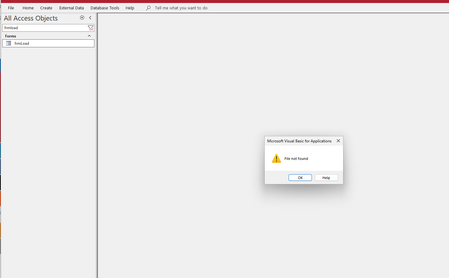
I'm getting a "File not found" (Error 53) error when trying to open an Access database (.accdb file). The error appears during the database startup process and points to a VBA subroutine declaration line: The error message mentions "The file was not found where specified" which suggests VBA is looking for a file during project compilation, but I can't identify what file it's looking for. Has anyone encountered this issue where the same Access file works with some SQL Server backends but fails to even open with others?346Views0likes2Comments