Forum Widgets
Latest Discussions

Cannot Connect to VMs in Windows Admin Center
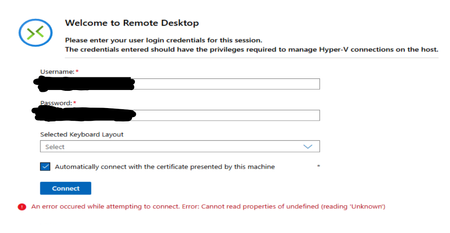
Hi all, I have 1 Server Cluster made up of 3 Server 2022 Hosts on which there is a large number of VMs running on Hyper-V. The typical process for accessing the VMs has been through Windows Admin Center, which is hosted on one of the VMs in the cluster. Around 1 week ago, it was no longer possible to connect to the VMs through Windows Admin Center as an infinite loading screen was presented. Sometimes, the following error shows up in VMConnect: The cluster and servers are still connected to WAC and all the VMs that are expected are present on WAC. Since then, the following things have been attempted: - Restart all servers - Rebuild WAC on Current VM - Build WAC on Fresh VM with the same and different network configuration, using current (2606) and previous (2511) versions of WAC - Build WAC on one of the hosts All these attempts result in the same error as seen before. Has anyone experienced this issue before? Or does anyone have any advice? Thank you in advance!29Views0likes0Comments
Certificate Error Connecting to only to some of the Cluster's resources
Latest version of WAC, winrm configured to connect over HTTPS. No issues connecting to the servers that are members of the cluster, or clients and other servers in our AD. No issues connecting to the cluster Dashboard (I can see health, CPU usage, etc.) and some of the resources (such as Drives, Volumes, Servers). Configuration -> Settings or Security works fine. It's only when I go to some resources, such as virtual switches, GPU's or a handful of others that I get errors connecting to member servers; Specifically, the error will state that for each server: Connecting to remote server servername.local failed with the following error message : The server certificate on the destination computer (servername.local:5986) has the following errors: The SSL certificate contains a common name (CN) that does not match the hostname. The one oddity I see is that .local is being added to the end of the server name. Also, servername will not contain the domain extension, just the name. Here's what I've checked so far: DNS is correct for the member servers and the cluster, both with Host (A) and PTR entries, can be pinged and resolved. As far as I can tell the certificates are setup correctly, no issues connecting to the member servers individually, or the cluster at first. The AD entry for the cluster is in place with the correct permissions for the cluster's service account I've read that .local is appended if the server/cluster is not part of AD, but that's not the case. We have two additional clusters and this issue does not appear on them. I also have not been able to identify any obvious differences between the setup of the two fully functioning clusters and this one. In the Event Viewer on the WAC server, under Applications and Service Logs _> WindowsAdminCenter, I can see Error Entries ID 304 for each member server with a similar message as above: Unable to create PowerShell session on node, status: 400, error code:PSRemotingTransportException, error message:Connecting to remote server server.local failed with the following error message : The server certificate on the destination computer (server.local:5986) has the following errors: The SSL certificate contains a common name (CN) that does not match the hostname. For more information, see the about_Remote_Troubleshooting Help topic.. As a side note, opening a remote Powershell session to each member server via WAC works fine and by contrast, in the WAC Event viewer there will be corresponding Information entries list the server's FQDN. Here's an example Category: Microsoft.AspNetCore.Hosting.Diagnostics EventId: 2 SpanId: 50d2635d1f6eb737 TraceId: b8c8e1de80ac2f84f1230c5ec3305b38 ParentId: 3e0619ce2c5decca ConnectionId: 0HNMB39BE0AS7 RequestId: 0HNMB39BE0AS7:0000009F RequestPath: /api/PowerShell/nodes/serverFQDN/invokeCommand Request finished HTTP/2 POST https://WACserverFQDN:6601/api/PowerShell/nodes/serverFQDN/invokeCommand - 200 - application/json;+charset=utf-8 230.3283ms It seems that when it comes to accessing only some of the cluster's resources WAC no longer has the member servers FQDNs, and I'm not sure where to look for changing that. Anyway, any guidance would be appreciated.Asea2022Jul 11, 2026Copper Contributor61Views0likes1Comment
WAC vMode fails validating SMB
Hi Reviewing vMode and try add a Hyper-V 2025 (non hyperconverged) cluster with a FC SAN. Fails on Validating "SMB port accessibility". Have gone through firewall settings and opened all neccesary ports that i can find mentioned. Even tried without FW turned off without any success so hit the wall now. WAC vMode is installed on a vm running Win2025std and in same domain as the cluster (and hosts) i try to add. Probably some obvious thing i have missed so any suggestions?OJsvkJul 09, 2026Copper Contributor39Views0likes1CommentStorage migration service operational log is empty
Hi I can not find logs for operational but only for debug and admin for Storagemigrationservice and storagemigrationservice-proxy. I justy disable and re-enable operational log from the gui and also from powershell but nothing change. There is some trick in the registry? I find the registration in C:\ProgramData\Microsoft\StorageMigrationService but there is a edb and their relative logs that are not txt format. I need to trace the duration of the past process because I need to sync the migration in scheduled manner26Views0likes1Comment
Static IP Issue with Windows Server 2022
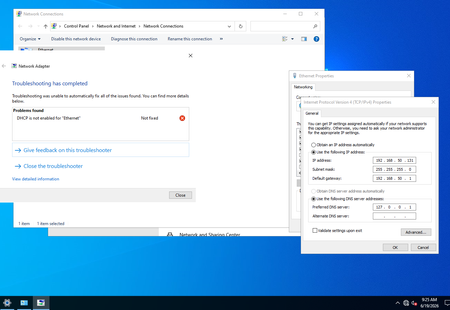
Hi Community, I installed my first Windows server to learn about the server and Active Directory. I installed Windows Server 2022. I configured a static IP and disabled IPv6. Then I installed Active Directory/DNS. After the reboot, the system is up, and I can access the internet and ping hosts. However, there is a world icon (No internet access) instead of a computer icon (internet access). In the static IP config, it replaced the DNS with 127.0.0.1, I know it'll use the local host as DNS. When I click on Network & Internet settings and Troubleshoot, I see an error 'DHCP is not enabled for "Ethernet"'. The only way it goes away is if I change the static to automatic. How can I fix this issue? Thanks, Also, I added forwarders such as 1.1.1.3 and 1.1.1.2 to DNS.shaam_Jun 25, 2026Copper Contributor136Views0likes2CommentsShared Connections not deleting
Hi there - I have Windows Admin Center v1.5.2306.14001 installed and have 1142 shared connections. When I attempt to delete all shared connections, WAC looks like it goes through deleting them - but then gets to a specific number and just stops. If I then refresh the browser, it returns 1142 shared connections again - so, it looks like no shared connections have actually been deleted. If I try to delete just one shared connection, I get the same outcome. I've also tried re-importing some connections again with the below PowerShell command in the hope it'll remove any connections not specified in the csv, but it's still the same outcome. Import-Connection <WAC URL> -fileName WAC.csv -prune FYI - the above is being done with my user account, which has gateway administrator permissions in WAC. Has anyone else experienced this issue? ThanksWaddo2023Jun 03, 2026Copper Contributor836Views0likes4Comments
Modernized Gateway Extension Support via WAC SDK
Hello, I would like to build a gateway plugin for the latest WAC v2511 but according to this documentation, the latest SDK package does not support the latest modernized gateway extensions. Is there a way to workaround this without downgrading WAC version? https://learn.microsoft.com/en-us/windows-server/manage/windows-admin-center/extend/develop-gateway-plugin “The Windows Admin Center SDK and developer tools have not yet been updated to support development of gateway plug-ins compatible with the Windows Admin Center modernized gateway. Following this guide will not result in a .NET 8 extension compatible with the modernized gateway.robcoMay 29, 2026Copper Contributor99Views0likes1Comment
Windows Admin Center 2.4: No computers can be added using the GUI
On version 2.4.0, the Add buttons in the All connections interface as well as in Settings, Shared connections are missing. I am a Gateway Administrator. I can install extensions, register WAC with Azure and anything else.721Views0likes9Comments

Tags
- Windows Admin Center41 Topics
- WAC35 Topics
- Storage Migration Service12 Topics
- windows server9 Topics
- Active Directory8 Topics
- Admin Center8 Topics
- Error6 Topics
- Group Policy5 Topics
- azure4 Topics
- general3 Topics