Forum Discussion

This build of os will expire soon
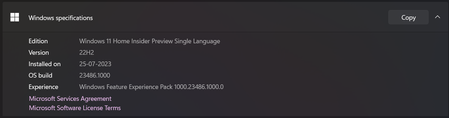

Deleted
I switched to dev channel and tried to switch back to beta channel but I can't able to switch back... The beta channel is not available
 AnonymousSep 06, 2023I don't think its a good idea to use your data to download it.. do you have wifi?
It shouldnt' take that long though there is no ISO you could use to in-place upgrade it exept you want to go to Canary Channel which is unrecommend.- Vasanth_24Sep 06, 2023Copper Contributor
Deleted It consumed more than 4GB of my data but the download progress is still in 0 percentage...... Is there any problem????
- Vasanth_24Sep 06, 2023Copper Contributor
Deleted Deleted Thanks for taking your valuable time to solve my issue 🙏😉
- AnonymousSep 06, 2023
Deleted
Yes, preferably - remove those answers - which are confusing.
Best regards
- AnonymousSep 06, 2023
HI Vasanth, that is correct, you were not in the Beta Channel in the first place, you are in the dev channel as that is a dev build.
There is no way to go to Beta as Beta is a lower build, apologies for the earlier confusion.
Except you do a clean install!
There should be no issues with the Dev Update and you should go the Windows Update way as that is the most latest update!
https://blogs.windows.com/windows-insider/2023/08/31/announcing-windows-11-insider-preview-build-23536-dev-channel/
Shawn - AnonymousSep 06, 2023
Yes, but do not rush, restart the computer and check for updates normally, because the switch was on Beta - this update could not download and install, I think everything will be fine:)
- Vasanth_24Sep 06, 2023Copper ContributorIt means that I am now in dev channel..... So I don't need to worry about switching to beta channel right??? And now i got an windows insider update of version 23536...... There will be no problem if I install it right???
- AnonymousSep 06, 2023
You can download ISO (23526) and perform an update in place, of course about the beta version - forget it!
https://learn.microsoft.com/en-us/windows-insider/flight-hub/?source=recommendations
- Vasanth_24Sep 06, 2023Copper Contributor
Deleted
I am not sure of it..... Can you please tell me currently I am in which build and channel????
- AnonymousSep 06, 2023Open notepad and paste:
Windows Registry Editor Version 5.00
[HKEY_LOCAL_MACHINE\SOFTWARE\Microsoft\WindowsSelfHost\Applicability]
"BranchName"="Beta"
"ContentType"="Mainline"
"Ring"="External"
[HKEY_LOCAL_MACHINE\SOFTWARE\Microsoft\WindowsSelfHost\UI\Selection]
"UIBranch"="Beta"
"UIContentType"="Mainline"
"UIRing"="External"
Then save it as "Switch_to_Beta_Channel.reg" then run the file, click yes and restart the computer. - AnonymousSep 06, 2023What build are you on right now?