User Profile

NikkiChapple_
Iron Contributor
Joined Feb 01, 2021


User Widgets
Recent Discussions
Re: Open files by default in Desktop or Browser or Teams
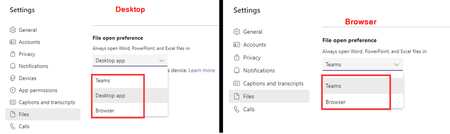
Gustav_S If you are using the desktop client you should see the choice of the Desktop app in addition to Teams and Browser. However if you are accessing Teams via the browser you only you see the option for Teams and Browser.28KViews0likes23CommentsRe: Add SharePoint site as a App to the Teams
mahendra89 you can create a custom app to do this. Then then Teams admin can a add the app to the left hand nav bar for all users. here is a quick overview of the steps. Go to the Developer Portal https://dev.teams.microsoft.com/home + New App Add details Add Personal App In Content URL paste in the Form URL Publish App too Your org In Team Admin center - Managae Apps make sure app is approved and allowed In Team Admin – Set up policies Add app to Nav bar for all users This can take several hours to publish app to the nav bar in Teams. Go to the Developer Portal https://dev.teams.microsoft.com/home + New App Add details Add Personal App In Content URL paste in the SharePoint site URL Publish App to Your org In Team Admin center - Manage Apps make sure app is approved and allowed In Team Admin – Set up policies Add app to Nav bar for all users This can take several hours to publish app to the nav bar in Teams.52KViews1like5CommentsTeams meeting recordings
I have noticed that many of my Teams meeting records have a problem when i am recoridn using PowerPoint Live. The introduction page appears correctly at the beginning of the recording. Then rather than the PowerPoint slides showing I get a message 'Loading'...' However the audio of the meeting starts. The Loading message appears for about 10 to 15 second before the PowerPoint slides appear. This occurs even when I start recording and wait until I get the notification your recording has started before starting to talk. I need to count to about 15 before I should start to ensure the beginning of the presentation is captured. This is very frustrating when trying to create videos that you want to share with internal or external stakeholders. Has anyone else experienced this? This is my own meeting and I start recording1.9KViews0likes2CommentsRe: Microsoft to Introduce Auto-Expiration for Teams Meeting Recordings
It is worth remembering that this is part of the Teams meeting policy so you can create custom policies with a longer expiration period if some users within your organization need to keep recordings for longer e.g. internal comms or L&D. This is much simpler than trying to get users to remember to change the expiration or add an retention label to each recording.30KViews0likes0CommentsRe: teams and bulk adding of members
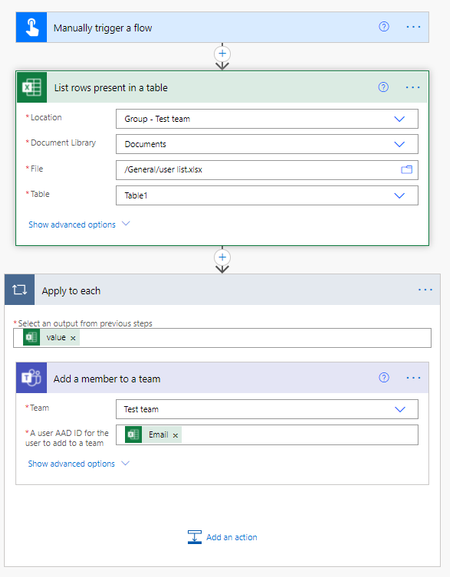
ericxlin have you thought about using Power Automate. Create a table in a Excel sheet with your list of email addresses to be added to the team Create flow as described below Get the list of rows from the excel sheet and table Add member to a Team and select your team (this will automatically add the Apply to each step. This will repeat 1 to N times for each row of the Excel sheet and add member to Team) Then run flow and the users in the list are added to the team353KViews15likes14CommentsRe: How to get my own meeting history
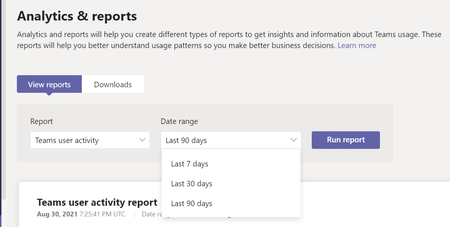
alex11585 The Teams user activity report can go back 90 days. This will give you a count of the number of meeting for a user for the following meeting types Meetings organized scheduled onetime Meetings organized scheduled recurring Adhoc meetings organized Meetings participated scheduled onetime Meetings participated scheduled recurring Adhoc meetings participated Total meetings participated The data can be downloaded into Excel and searched. Please note is the Admin has decided to anonymise the reports them you wont be able to search for a specific user this way49KViews1like0CommentsRe: archived teams visible in my teams list
Tom_Peeters StevenC365 As a Team owner when you archive a Team from the Team client then the archived Team is automatically moved under your hidden teams. I would expect the same behaviour using graph API but I have not tested that.2.1KViews0likes1CommentRe: Teams Mobile App with Conditional Access and App Protection Policy
Looks like this will be available on 31 July 2021. See copy of Message center post. Microsoft Teams: Require app protection policy conditional access grant MC266463 · Published 2 Jul 2021 Message Summary This release of app protection policy based Conditional Access in Microsoft Teams will help protect your organizational data on devices your employees use by ensuring that only users with Intune app protection policy can access Microsoft 365 services from Teams. This message is associated with Microsoft 365 Roadmap ID 87773 When this will happen: Teams support for app protection policy based Conditional Access will be available as of July 31, 2021This is rolling out default off and this change will not impact your organization if you do not enable require app protection policy grant in your Conditional Access policies. If you enable require app protection policy grant, access to Teams will be restricted to only users who have app protection policies applied on their account. What you need to do to prepare: Please familiarize yourself with the App protection policy based Conditional Access. Learn more: Grant controls in Conditional Access policy - Azure Active Directory | Microsoft Docs App-based Conditional Access with Intune - Microsoft Intune | Microsoft Docs App protection policies with Conditional Access - Azure Active Directory | Microsoft Docs5.6KViews1like0CommentsTeam attendance dashboard
I am trying to get clarity of a statement in the support article for downloading the meeting attendance report https://support.microsoft.com/en-gb/office/view-and-download-meeting-attendance-reports-in-teams-ae7cf170-530c-47d3-84c1-3aedac74d310?ui=en-us&rs=en-gb&ad=gb It states in the 'During a Meeting' section that 'Note: For large meetings, the report will include only a partial list of attendees'. I am assuming that after the meeting you would get the full list of users. Any idea what the limitations are as I have had a couple of queries from clients on mismatched data being obtained from the meeting reports and I am assuming this is the reason.1.9KViews0likes1CommenteDiscovery search for Teams chat for on premises user now on by default
Microsoft has confirmed to me that they have now enabled by default the creation of the shadow Exchange online mailboxes to store the Teams 1:1 and 1:N compliance records. Previously this had to be a request to Microsoft to enable this feature. Therefore with this feature on by default. How does that impact users that do not have Exchange hybrid deployment, and they have NOT synchronized their on-premises Exchange schema to Azure Active Directory. In the Microsoft documents article https://docs.microsoft.com/en-gb/microsoft-365/compliance/search-cloud-based-mailboxes-for-on-premises-users?view=o365-worldwide it states If your organization doesn't have an Exchange hybrid deployment, you must synchronize your on-premises Exchange schema to Azure Active Directory. If you don't do this, you might risk creating duplicate cloud-based mailboxes in Exchange Online for users that have a mailbox in your on-premises Exchange organization. Are they at risk of creating duplicate cloud mailboxes? If so what can be done to identify if duplicate mailboxes have been created and is there any way to mitigate this?919Views0likes0CommentsRe: Preview exited, now GA: PowerPoint Presenter View in Teams
I used be able to zoom into an area in a slide if I was sharing the PowerPoint application in sharing mode using the control key and scroll wheel . This was useful if there was detail on the page that may be hard to read. This does not seem possible with PowerPoint sharing. Is there an option to do this? I would also welcome the laser pointer

Groups

Mentorship Community
The new home for the Humans of IT Mentorship ProgramRecent Blog Articles
No content to show