User Profile

F0RCE
Copper Contributor
Joined Dec 17, 2020


User Widgets
Recent Discussions
Re: Sharepoint Server 2019 double validation (minimum amount of characters or certain character in field
ganeshsanap This question is a single line of text. When I am using , it shows syntax error. When I am using ; it shows that I am reffering to the different column. I check many times, I even renamed field question to 1 and it still showed that I am reffering to different column. Maybe for my Sharepoint version I also need to refer column in a different way - since I cannot use , maybe I should not use [ ]... I do not know. trying to see syntax changes between different language versions but cannot find anything1.9KViews0likes3CommentsRe: Sharepoint Server 2019 double validation (minimum amount of characters or certain character in field
ganeshsanap It shows that I cannot refer to different column but I am reffering to the same. Column name is (a survey question): "II. Programming for IT Business" Column name in URL at edit page: "II_x002e__x0020_Programming_x0" I am using it like that: =OR([II_x002e__x0020_Programming_x0] = "-";LEN([II_x002e__x0020_Programming_x0])>=6) =OR([II. Programming for IT Business] = "-";LEN([II. Programming for IT Business])>=6) Am I doing something wrong? When I try to do this from validation menu (not in a question but general menu) it shows that I refer to not existent column....2KViews0likes6CommentsSharepoint survey matrix question or repeat question
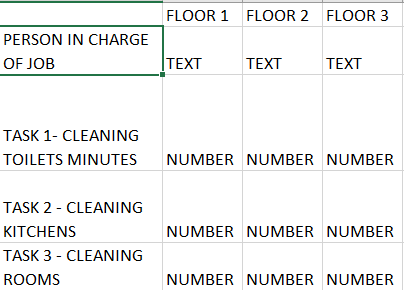
Hello, Is it possible to add somehow matrix question that does not revolve around 1-20 numbers. I have a survey that manager should fill: Let's have we have 10 managers each with 7-10 employees under them, and they all report to him by mail/phone about time that they need to do certain task. Sometimes he just look at the card on a each floor and save information. He then create survey and try to sum up all of their tasks. It is easy in Excel but impossible to do in Sharepoint Server 2019 survey for me. Matrix/likerta provided by default only work for 1-20 numbers, and I need custom numbers + text to be included. Can it be somehow done? For now I worked it out like that: but it is statik and each manager have different amount of supervised people - you can never know how many of them to add. Also he form will not look tidy. If matrix is not possible, maybe adding repeat question is possible (I fill it for person 1 and i can click more people and it will load another same question in survey - it is possible but manually and not elastic i need to manually set amount of answers it takes time and does not look tidy at all) Any solutions?1.1KViews0likes1CommentSharepoint Server 2019 double validation (minimum amount of characters or certain character in field
Hello, I am using validation in my Sharepoint Server 2019 survey: =LEN([Field1])>=6 It force a single line text field to have at least 6 digits But I need to add OR statement. I need to allow this field to have either 6 digits or value "-" to pass. Logic behind this is that people can either write a text in this field or leave it blank. But I need them to write "-" by themselves cause otherwise they will make a lot mistakes by leaving blank fields. I need fail proof solution. I tried multiple OR solutions but it all failed 😞 Thank you!2.3KViews0likes9CommentsCannot change -LockState
Cannot change -LockState I have a problem with my Sharepoint Online instance. To prevent sharing files in Microsoft Teams I have locked all personal sites for my previous tenant domain. It works flawlessly, as people cannot use OneDrive anymore. We then used AD Connect to migrate all users from local AD. We took away right to create personal site with storage for everyone, so when user try to log in OneDrive he gets an error. It works - personal sites are not created. But before we took away create personal site right - we manually transfered two accounts. Now they are synchronized too. They had mysite tho I so blocked it toghether with the rest. The problem is that I cannot unlock this mysite anymore... Set-SPOSite -Identity "https://xxx-my.sharepoint.com/personal/xxx" -LockState "Unlock" Does not work. It does not print any errors... I use this to check status: Foreach($Site in $Sites){ Write-Host $Site.Url Write-Host $Site.LockState } It shows name of the site and status So I change correct name but the script shows that nothing changes... Any ideas? This is a weird situation cause I can lock/unlock all sites from online tenant no problem. I have problems with new sites from local AD... I contacted Microsoft but theirs support didn't help me - they told me to execute this query and go back with results: Set-SPOSite -Identity "https://xxx-my.sharepoint.com/personal/xxx" -LockState "Unlock" When I already did that and showed this query in my initial request for help. I am lost 😞757Views0likes0CommentsRe: Cannot change -LockState
Please help 😞 I am stuck and I tried everything I could. Microsoft support didn't help me - they told me to execute this query and go back with results: Set-SPOSite -Identity "https://xxx-my.sharepoint.com/personal/xxx" -LockState "Unlock" When I already did that and showed this query in my initial request for help. I am lost 😞1.2KViews0likes0CommentsCannot change -LockState
I have a problem with my Sharepoint Online instance. To prevent sharing files in Microsoft Teams I have locked all personal sites for my previous tenant domain. It works flawlessly, as people cannot use OneDrive anymore. We then used AD Connect to migrate all users from local AD. We took away right to create personal site with storage for everyone, so when user try to log in OneDrive he gets an error. It works - personal sites are not created. But before we took away create personal site right - we manually transfered two accounts. Now they are synchronized too. They had mysite tho I so blocked it toghether with the rest. The problem is that I cannot unlock this mysite anymore... Set-SPOSite -Identity "https://xxx-my.sharepoint.com/personal/xxx" -LockState "Unlock" Does not work. It does not print any errors... I use this to check status: Foreach($Site in $Sites){ Write-Host $Site.Url Write-Host $Site.LockState } It shows name of the site and status So I change correct name but the script shows that nothing changes... Any ideas? This is a weird situation cause I can lock/unlock all sites from online tenant no problem. I have problems with new sites from local AD...1.3KViews0likes1CommentBlock all personal sites in Sharepoint (Microsoft cannot help)
Hello, Is there a way to lock all personal sites. I found a script to block one site Connect-SPOService -Url https://xxx-admin.sharepoint.com $siteUrl = "https://xxx-my.sharepoint.com/personal/adelev_xxx_onmicrosoft_com" $site = Get-SPOSite $siteUrl -Detailed Set-SPOSite $site -LockState NoAccess It works, but I have hundreds of sites to block. First I would need to list all sites and then one by one block them. Is there a way to automate it and BLOCK all sites? I want to lock sites temporarily. This lock prevent users that has a personal site to use them (new ppl are blocked by MySite setting). I contacted Microsoft directly and they provided me with some data - they told me that I should use ForEach, but I have no idea how to use it, and they won't help me any further cause it is against some policy.Solved1.4KViews0likes4CommentsBlock all personal sites (Sharepoint/OneDrive) - microsoft can't help directly
Hello, Is there a way to lock all personal sites. I found a script to block one site Connect-SPOService -Url https://xxx-admin.sharepoint.com $siteUrl = "https://xxx-my.sharepoint.com/personal/adelev_xxx_onmicrosoft_com" $site = Get-SPOSite $siteUrl -Detailed Set-SPOSite $site -LockState NoAccess It works, but I have hundreds of sites to block. First I would need to list all sites and then one by one block them. Is there a way to automate it and BLOCK all sites? I want to lock sites temporarily. This lock prevent users that has a personal site to use them (new ppl are blocked by MySite setting). I contacted Microsoft directly and they provided me with some data - they told me that I should use ForEach, but I have no idea how to use it, and they won't help me any further cause it is against some policy.448Views0likes0CommentsLockState NoAccess for all
Is it possible to put all site collections in LockState NoAccess? If yes could you please provide a PowerShell code or a GUI place where I can do that? I want to kill my Sharepoint temporarily - taking away licenses didn't work, and when I took away site collection rights it helped, but I have 1000 users I do not want to change permissions manually. Please help me. Thank you!Solved1.6KViews0likes1CommentPowerShell script to delete all site collection admins and make one collection admin
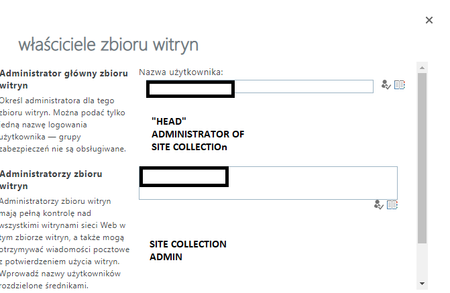
Hello, I am currently trying to disable a OneDrive for my organisation. It works pretty well for new users, but old ones got access. I worked out one solution - when I take away collection admin rights user cannot use OneDrive anymore. But I have 1000 users, and I will die changing permissions by hand, therefore is there any script to set all site collection admins to one person? I mean those settings:669Views0likes0CommentsBlock OneDrive mysite (with data storage) - change administrator of site
Hello, My organisation decided to block OneDrive for Business in Office 365 E1. We managed to change this setting in sharepoint admin panel (block MySite creation), and it works for new users that does not have a mysite, but all users that previously had a site can access OneDrive based on theirs permission. Workaround that we found was to take away theirs permission as Site Collection Administrator. But we have 1000+ profiles to change, and it needs to be changed one by one. Is there a way to make it globally with few clicks or maybe SPO shell? Or maybe my apprach is bad, and I should change other settings? I just noticed that taking away those permissions solve all problems.1KViews0likes1Comment
Recent Blog Articles
No content to show