User Profile

tonyr1129
 Microsoft
Joined Aug 06, 2020


User Widgets
Recent Discussions
Re: What is this invisible data format?
SergeiBaklan Thank you for your suggestion. So that I understand correctly, let's say my formula is: =VLOOKUP([@[Current PartnerONE ID]],FY20MPLoffboard!$A$2:$C$510,3,FALSE) (and let's also assume FY20MPLoffboard is the sheet that contains this trouble-some columns) Is your suggestion then to rewrite the formula as below? =VLOOKUP([@[Current PartnerONE ID]],--FY20MPLoffboard!$A$2:$C$510,3,FALSE) Can you please confirm? That'd be a real time-saver if double-dash can work through this type of issues!1.7KViews0likes3CommentsWhat is this invisible data format?
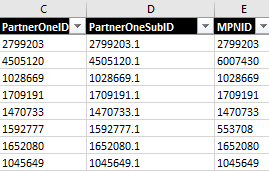
Hello, I have received a data file where columns C,D,E (see image 1) have numbers in them. The data format shows as "General". However, when I do a lookup (vlookup/xlookup), it can't find a single match on the C column for example. My formula was correct. Then I double-clicked on a cell of col C, and after Enter, it immediately right-aligned itself (see image 2, where you can see the first 2 cells are right-aligned after double-clicking on each, or simply Enter when it's selected in the formula bar)! The lookup functions work perfectly on those. So, what's hiding in those cells? And how can I a) Identify this problem 2) and quickly reformat them instead of manually double-clicking on each cell? (I've tried Clear Formatting, changing to numbers, accounting, used CLEAN() but nothing worked to fix it other manually double-clicking). I've seen this before, but any help on how to identify and resolve it efficiently is greatly appreciated. This is for a Microsoft project. Thank you. image 1 (original): image 2 (after double-clickliSolved1.8KViews0likes7Comments
Recent Blog Articles
No content to show