Forum Discussion

 Microsoft
What is this invisible data format?
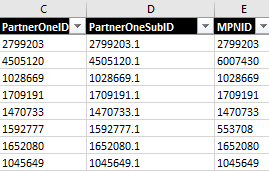
- Aug 06, 2020
Not exactly, that's like
=VLOOKUP([@[Current PartnerONE ID]],--FY20MPLoffboard!$A$2:$C$510,3,FALSE)alternatively
=VLOOKUP([@[Current PartnerONE ID]],VALUE(FY20MPLoffboard!$A$2:$C$510),3,FALSE)
or
=VLOOKUP([@[Current PartnerONE ID]],1*FY20MPLoffboard!$A$2:$C$510,3,FALSE)
or like

Or don't care about formats and convert directly in formula adding double dash in front of lookup array reference.
 Microsoft
SergeiBaklan Thank you for your suggestion. So that I understand correctly, let's say my formula is: =VLOOKUP([@[Current PartnerONE ID]],FY20MPLoffboard!$A$2:$C$510,3,FALSE)
(and let's also assume FY20MPLoffboard is the sheet that contains this trouble-some columns)
Is your suggestion then to rewrite the formula as below?
=VLOOKUP([@[Current PartnerONE ID]],--FY20MPLoffboard!$A$2:$C$510,3,FALSE)
Can you please confirm? That'd be a real time-saver if double-dash can work through this type of issues!
- SergeiBaklanAug 06, 2020Diamond Contributor
Not exactly, that's like
=VLOOKUP([@[Current PartnerONE ID]],--FY20MPLoffboard!$A$2:$C$510,3,FALSE)alternatively
=VLOOKUP([@[Current PartnerONE ID]],VALUE(FY20MPLoffboard!$A$2:$C$510),3,FALSE) or =VLOOKUP([@[Current PartnerONE ID]],1*FY20MPLoffboard!$A$2:$C$510,3,FALSE) or like- tonyr1129Aug 06, 2020
SergeiBaklan These are really great examples. Thank you! The first suggestion that I edited also seems to work.
- SergeiBaklanAug 07, 2020Diamond Contributor
tonyr1129 , you are welcome