Forum Discussion

tonyr1129 Microsoft
Aug 06, 2020MicrosoftWhat is this invisible data format?
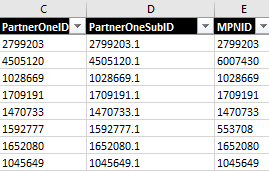
Hello, I have received a data file where columns C,D,E (see image 1) have numbers in them. The data format shows as "General". However, when I do a lookup (vlookup/xlookup), it can't find a single ma...
- Aug 06, 2020
Not exactly, that's like
=VLOOKUP([@[Current PartnerONE ID]],--FY20MPLoffboard!$A$2:$C$510,3,FALSE)alternatively
=VLOOKUP([@[Current PartnerONE ID]],VALUE(FY20MPLoffboard!$A$2:$C$510),3,FALSE)
or
=VLOOKUP([@[Current PartnerONE ID]],1*FY20MPLoffboard!$A$2:$C$510,3,FALSE)
or like


HansVogelaar
Aug 06, 2020MVP
This often happens when data are imported from another source (for example a web page) into an Excel worksheet. Although the data look like numbers, Excel sees them as text.
A simple way to convert them to 'real' numbers in one go:
- Select an empty cell.
- Copy it to the clipboard.
- Select columns C, D and E.
- Right-click anywhere in the selection.
- Select Paste Special... from the context menu.
- Select Add.
- Click OK.

tonyr1129Microsoft
Aug 06, 2020MicrosoftHansVogelaar Thank you for your suggestion! I thought about it, now I know that's actually used by others as a workaround too.