User Profile

MartinLaplante
Iron Contributor
Joined Aug 19, 2017


User Widgets
Recent Discussions
Re: Different languages in different sites
As my friend Dave Mehr says, the most foolproof way to ensure that everyone sees the site in one language is to deactivate the other languages of the site. If you want a less foolproof way to do it just for yourself, but more reliable than changing your account language, you can change your profile language, which is different from the account language. This used to be done in Delve, but this is the more current procedure. This changes the user interface language. If the site is using the multilingual page publishing feature and it is the language of the content, not the language of the interface, that is in the wrong language, it is because you once used the small content language toggle, and it remembers on that site for a while. It forgets it when you close all the browser windows and reopen, or if you toggle it back again.22Views0likes0CommentsRe: Language defaults audit for everything M365
I did a video about how to change the major SharePoint language settings a year ago. If it's not one of those, you can message me I could try to help diagnose the issue. For Teams meetings, it's a bit more complicated. The notification depends on the language of the M365 group, which depends on the settings of the user who created it. You can override that with Set-CsTeamsMeetingPolicy -Identity "Global" -MeetingInviteLanguages "sv-SE"171Views1like0CommentsRe: Event Listeners Not Working After Translating SharePoint Page with SPFx Extension
Hi Varsha, I'm sorry to rain on your parade, but when our company first developed our PointFire page translation app, we found that this approach causes this problem and several others. Some issues are specific to some languages, and some will affect one page and not a seemingly identical page. Fundamentally, changing the DOM on a page as it is being rendered is a dangerous technique which should be avoided. SharePoint has a lot of html that translation engines don't like and that will break SharePoint if you change it.50Views0likes0CommentsRe: Change of notification language
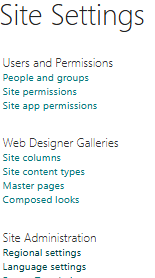
It sounds like the solution, and if Microsoft had programmed the "Automate" notifications correctly that might have worked. But it didn't and the site regional settings is the only way to change it. The regional settings of a subsite are not necessarily the same as top-level site. You would have had to change it in the Teams site before creating the channel. It's a private Teams channel. That complicates things. Those sites are created crippled and are harder to change. I once wrote this post https://blog.icefire.ca/blogs/post/trick-to-uncripple-teams-private-channel-sites That might work, it works for some of the crippled aspects, I'm not sure. I tried it in an uncrippled private channel site and I can see the regional settings. You can also add "_layouts/15/regionalsetng.aspx" to the site URL and go to the site regional settings directly360Views0likes2CommentsRe: Change of notification language
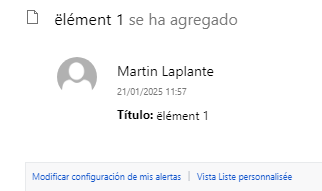
I recognize that notification format you are using. It's the "Automate" rule, and its language setting was done incorrectly by Microsoft. Long story short, it uses the "Locale" in the regional setting of the site, not the "Language" in the language settings, and it ignores the setting that tells it to let the user's locale override the site's locale. That is going against the definition of what regional settings and locales mean in all other Microsoft products, where the regional settings only affect only the formatting of dates and numbers, and language is determined by, you guessed it, the language settings. You set that by going to regional settings in Site settings and selecting a locale for the site.90Views0likes0CommentsRe: Change of notification language
For list notifications that come from the "Alert me" button dialog, the notification will be in the base language of the site, whatever the language of the user who requested it. There was a time when the notification was in the language of the user at the time, but now only the list name in the notification is in the user's language. However, your notification looks different from the one I get with the "Alert me" button dialog. How did you set up this notification?272Views0likes1CommentRe: Change of notification language
This is something that you cannot change yourself, but that Microsoft can do for you. You will have to be very clear what notifications you want to change and other behaviour you want to change, like the default language for Teams sites and for new groups, because there are different language parameters including Core language and Preferred language, some of which require drastic action and some do not. And it used to be pretty drastic. It used to be they had to delete every single site in the tenant and restore them from backup. These days they seem to only delete and re-create the root site. I hope you post a follow-up and tell us how it went.312Views0likes1CommentRe: Default proofing language
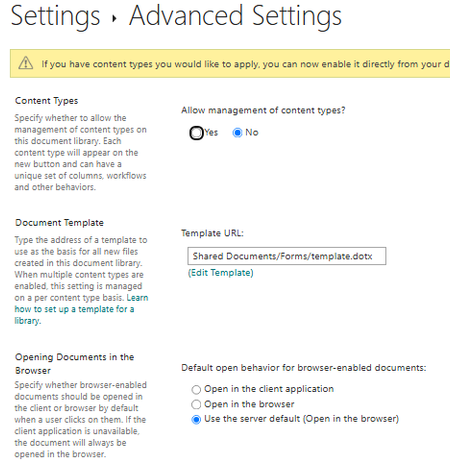
OK, different problem. I don't know the right way of doing this, but I'll tell you how I do it. In library settings under Advanced settings, find "Document template" You can edit the template online, but I tend to edit the template.dotx file on my workstation, change the default proofing language and upload it to the right place on the site.94Views0likes0CommentsRe: SharePoint Regional and Language settings for all sites.
There are several things here, but first the bad news: there is no way to change the site language setting after the site has been created, and en-gb is not a supported language. You can choose that setting, but you'll still get en-US. On to better news. The site's base language and the site region setting are only defaults, they are used when the user doesn't have a setting. The user's language setting is in their M365 profile. If that is not set it will use the browser language. Provided that the site supports the users language setting, and most sites have at least basic support for all 50 languages unless you remove them, the user will see the site's UI in that language. Region settings are a bit different. Region only affects date and numeric format. En(GB and en-US differ only in date format. Again, the user profile can override the site default setting, but only if you check the override setting. What can you do as an admin? If you don't want anyone to see the site UI in any language other than English (en-US) then you can delete all the other languages in the site's language settings in the advanced settings. If you want users to have a choice, then you can provide their initial settings in their profile using AAD, which syncs with their profile.675Views0likes1CommentRe: Default proofing language
I wrote about this when it first came out. https://blog.icefire.ca/blogs/post/multilingual-proofing-of-sharepoint-pages There is nothing the site admin can do. Users can change their preferred languages (more: language not region or locale) in their M365 profile, that doesn't always work for me. Changing their browser language preferences works, as does installing the full Microsoft Editor browser extension, which is very configurable.201Views0likes3CommentsRe: Trying (and failing) to change language settings
aforsher SharePoint has a lot of different language settings, and lots for different caching mechanisms for UI elements that are not good at realizing that your language are changed. Some caching mechanisms are in the browser in local or session storage, some in IndexedDB, even some on the server and for lists and now libraries it's an actual tSQL table on your hard drive. What exactly is not changing language? I can tell you where it's cached and which language parameter controls it. For the multitude of language settings in SharePoint alone, I recorded a couple of video, this one for the most impactful language change in your SharePoint profile and this one for other SharePoint language parameters.244Views0likes0CommentsRe: Looking for Early Update Notifications or Beta Groups for Microsoft Teams and Graph API
Monitor the M365 roadmap and the Message Center. Have a tenant or a user set for "targeted release", most changes are rolled out there before being generally available. Many Microsoft products have a TAP. Program. It's covered by NDA so I won't volunteer any more than those 3 letters. If one of your employees is an MVP they'll get early info about a lot of upcoming changes. They can't share it until the changes are announced, but they will be ready sooner. Also follow conferences, there are some in Singapore and KL not sure about Jakarta,and sign up for Ignite, and watch the blogs because they tell you as soon as something is announced. Good luck!229Views0likes0CommentsRe: File sharing email language
slvedva In my experience, the message is sent in the current UI language of the user who shares at the time that they are sharing. This is determined by the Display language setting in the user's profile, as long as it is one of the alternate languages of the site or the base language, or if no display language is selected in the browser language. The UI language is not based on their country, it is based on either their profile or their browser display language settings and the site alternate languages.789Views0likes0CommentsRe: Apps not available in Private Channels
gkjarhead It applies to a single site, the one that you connect to in the Connect-PnPOnline command. Some report that it works, others report that it doesn't. I don't know why. It works for me. I am not aware of any recent change. It was still working in September when I last used it.12KViews0likes0CommentsRe: SharePoint menus suddenly not changing language for users
SharePoint follows the browser language only if the Office 365 profile language has not been set. Several things can set this language. You can change it directly using Delve, or indirectly by setting a new language in your Microsoft 365 account settings or by changing it in AAD. To set it directly, go to your personal menu, click on My Microsoft 365 Profile Click on Update Profile under your name Scroll down to "How can I change language and regional settings?" and click on it Click on the word "here" click on the ellipsis (...) and then choose Language and Region Under Language/Language Preference/My Display Languages, delete the current language Click on Pick a new language and select the new language Click on Add Scroll to the bottom, and click "Save all and close" If you are using out of the box SharePoint, then the setting will take a few minutes to a few hours to propagate to all SharePoint sites.4.4KViews1like1CommentRe: Apps not available in Private Channels
Honest_Joe I wrote a more detailed blog post about it here https://blog.icefire.ca/blogs/post/trick-to-uncripple-teams-private-channel-sites Essentially when Teams creates a new site it disables several features for speed which Microsoft doesn't think that private channels need. One of them is the hidden feature I mentioned. Since it's a hidden feature you can't turn it on with the SharePoint interface, you have to use PowerShell commands. In PowerShell, you must first install the PnP.PowerShell module if you haven't already done so, then connect to the private channel site using the command "Connect-PnPOnline", then use the command "Enable-PnPFeature 73EF14B1-13A9-416b-A9B5-ECECA2B0604C -Scope Site -Force"23KViews2likes2CommentsRe: Apps not available in Private Channels
Two years too late but I came across this when I was searching how I did this two years ago, because I need to do it again. You just need to enable the hidden Taxonomy feature: Enable-PnPFeature 73EF14B1-13A9-416b-A9B5-ECECA2B0604C -Scope Site -Force25KViews1like4CommentsRe: Multilingual Hub Menu is not translating
Hi Sabine_DB I have never figured out why most times the changes in Account settings for display language are synchronized to Profile language settings, and sometimes not. If you tinker too much with both, at some point it stops synchronizing until the next day. The account setting for preferred display language is single-valued, while the profile setting is a ranked list. Changes sync from the account to the profile but not the other way around. From the profile, it syncs to every site, slowly but reliably. Changes made at the site level do not sync upwards to the profile. For Hub navigation there are several levels of caching. The one that is covered by the API is here https://learn.microsoft.com/en-us/sharepoint/dev/features/hub-site/rest-hubsitedata-method Note the forceRefresh parameter. Yes, it's a server parameter change in a read request. But that is only part of the story. This API is for the server cache, not the browser cache. The browser cache is not covered by API, and its mechanism changes now and then. Our product development team spends its time tracking those changes and making the cache update.3.3KViews1like0Comments
Recent Blog Articles
No content to show