User Profile

Amapola67
Copper Contributor
Joined Jul 07, 2020


User Widgets
Recent Discussions
Re: Column Format - Time!
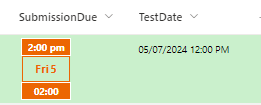
I was working further on this. I think the UTC time adjustment might be useful depending on what one wants to achieve. I was working on a workaround using to toLocaleTimeString (top band of view) and it displays the Aussie time (see Test Date) as +2. I'm in New Zealand. So I think it's working to the locale on my computer because the locale in the group is Australia. (I have yet to schedule time with a colleague in Australia to see what they see!) - Displaying things in people's local time clearly could have its uses. Here's the code but note there's some rubbish in there as I'm trying to keep track of things: { "$schema": "https://developer.microsoft.com/json-schemas/sp/v2/column-formatting.schema.json", "elmType": "div", "style": { "flex-direction": "column", "width": "60px", "margin": "5px", "display": "=if(@currentField,'flex','none')" }, "children": [ { "elmType": "div", "title": "Displays month", "txtContent": "=if(indexOf(toLocaleTimeString(@currentField) + '^', '^') == 10,substring(toLocaleTimeString(@currentField),0,4),substring(toLocaleTimeString(@currentField),0,5)) + ' ' + if(endsWith(toLocaleTimeString(@currentField),'am') == 'true','am','pm')", "description": "=if([$State]=='WA','COB',if([$State]=='NZ',12,if([$State]=='SA','COB',if([$State]=='QLD',0,0))))", "style": { "display": "flex", "justify-content": "center", "align-items": "center", "width": "100%", "height": "20px", "border": "1px solid", "background-color": "#ec6602", "margin-bottom": "-1px" }, "attributes": { "class": "ms-fontColor-white ms-borderColor-themePrimary ms-fontWeight-bold" } }, { "elmType": "div", "description": "centre portion needs to display weekday and date", "style": { "display": "flex", "justify-content": "center", "align-items": "center", "width": "58px", "border": "1px solid", "border-color": "#ec6602", "color": "#ec6602", "height": "30px" }, "children": [ { "elmType": "span", "description": "Displays weekday", "forEach": "weekday in split('0,1,2,3,4,5,6',',')", "style": { "white-space": "nowrap" }, "attributes": { "class": "ms-fontWeight-bold" }, "children": [ { "elmType": "span", "txtContent": "=if([$weekday]=='0','Sat',if([$weekday]=='1','Sun',if([$weekday]=='2','Mon',if([$weekday]=='3','Tue',if([$weekday]=='4','Wed',if([$weekday]=='5','Thu',if([$weekday]=='6','Fri',''))))))", "style": { "padding": "1px", "display": "=if((getMonth(@currentField)+1)>2,if(((getDate(@currentField)+floor(26*(getMonth(@currentField)+1+1)/10)+Number(substring(toString(getYear(@currentField)),2,4))+floor(Number(substring(toString(getYear(@currentField)),2,4))/4)+floor(Number(substring(toString(getYear(@currentField)),0,2))/4)-2*Number(substring(toString(getYear(@currentField)),0,2)))%7)==Number([$weekday]),'','none'),if(((getDate(@currentField)+floor(26*(getMonth(@currentField)+1+12+1)/10)+Number(substring(toString(getYear(@currentField)-1),2,4))+floor(Number(substring(toString(getYear(@currentField)-1),2,4))/4)+floor(Number(substring(toString(getYear(@currentField)-1),0,2))/4)-2*Number(substring(toString(getYear(@currentField)-1),0,2)))%7)==Number([$weekday]),'','none')" } } ] }, { "elmType": "span", "description": "Displays date", "txtContent": "=getDate(@currentField)", "style": { "padding": "1px" } } ], "attributes": { "class": "ms-fontWeight-bold ms-fontSize-14" } }, { "elmType": "div", "description": "Displays time - time zone issue", "children": [ { "elmType": "span", "txtContent": "=padStart(toString(floor(((Number(@currentField)+Number([$UTC])*3600000)%86400000)/3600000)),2,'0')", "options": "hour: 'numeric', dayPeriod: 'short'", "Description": "Intl.DateTimeFormat('en-US',options).format(@currentField)" }, { "elmType": "span", "txtContent": ":" }, { "elmType": "span", "txtContent": "=padStart(toString(floor(((Number(@currentField)+Number([$UTC])*3600000)%86400000)%3600000/60000)),2,'0')" } ], "style": { "display": "flex", "justify-content": "center", "align-items": "center", "width": "100%", "height": "20px", "border": "1px solid", "background-color": "#ec6602", "margin-bottom": "-1px" }, "attributes": { "class": "ms-fontColor-white ms-borderColor-themePrimary ms-fontWeight-bold" } } ] } I'll post anything new that comes to light. Christine325Views0likes0CommentsColumn Format - Time!
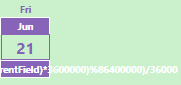
Good Afternoon I'm trying to format a DateTime field with a bit of verve. I got JSON from GitHub but I need to modify as I want to include the time. - The only example that includes what I'm looking for is this: https://github.com/pnp/List-Formatting/tree/master/column-samples/generic-world-time But I can't get it quite to work and I don't understand why. This is what I'm aiming for but the time represented is 21 June - 2:30 pm! I'm 14 hours out (Regional Settings are Australia, UTC + 10) As the original code comes from something that does a time conversion, I thought to take out the bit that adds the conversion factor. I have tried removing "+Number([$UTC]" (and why isn't it screaming at me anyway for including a reference to a non-existing field?), adding 0, multiplying by one ... "elmType": "div", "children": [ { "elmType": "span", "txtContent": "=padStart(toString(floor(((Number(@currentField)+Number([$UTC])*3600000)%86400000)/3600000)),2,'0')" }, { "elmType": "span", "txtContent": ":" }, { "elmType": "span", "txtContent": "=padStart(toString(floor(((Number(@currentField)+Number([$UTC])*3600000)%86400000)%3600000/60000)),2,'0')" } ] They all result in something like this: It's all a foreign language to me but I've worked out: padStart pads the string at the beginning with 0 to a length of 2 - won't actually need that for the hour, happy with 1:30 pm Number I'm guessing turns the date time string into a number which we can then manipulate floor does some rounding, not sure why that's needed toString turns it back into a string for display, I imagine But I don't understand why it would need the UTC calculation. And I think it's the UTC calculation that messes with my times. If anybody understands this or can point me to some documentation that will help me understand, I would appreciate it. Thanks Christine653Views0likes1CommentStruggle to format JSON formatting
Good Morning I'm using this beautiful Gantt formatting from GitHub but I'm struggling to modify it. - To be clear, I'm trying to create a view similar to an Excel sheet because people can't cope with too much change at a time! This is what it looks like. I want to change two things and neither works. That's a reflection of my JSON knowledge more than anything else. I want to remove the inline edit function. And I don't want to show this at all when another field has a value in it. This is the code: { "$schema": "https://developer.microsoft.com/json-schemas/sp/v2/column-formatting.schema.json", "elmType": "div", "children": [ { "elmType": "div", "style": { "display": "flex", "flex-direction": "row", "width": "100%", "align-items": "center" }, "children": [ { "elmType": "div", "style": { "display": "flex", "flex-direction": "column", "width": "100%", "margin-bottom": "3px" }, "children": [ { "elmType": "div", "style": { "display": "flex", "justify-content": "space-between", "width": "100%", "white-space": "nowrap" }, "attributes": { "class": "ms-fontSize-xs" }, "children": [ { "elmType": "div", "style": { "display": "flex", "flex-direction": "row-reverse" }, "children": [ { "elmType": "div", "txtContent": "=if(loopIndex('_startdate')>1,'','/')+[$_startdate]", "forEach": "_startdate in split(substring(@currentField,indexOf(@currentField,'(')+1,indexOf(@currentField,'_')),'-')" } ] }, { "elmType": "div", "style": { "display": "flex", "flex-direction": "row-reverse" }, "children": [ { "elmType": "div", "txtContent": "=if(loopIndex('_enddate')>1,'','/')+[$_enddate]", "forEach": "_enddate in split(substring(@currentField,indexOf(@currentField,'_')+1,indexOf(@currentField,')')),'-')" } ] } ] }, { "elmType": "div", "style": { "width": "100%", "border": "1px solid", "height": "13px", "position": "relative", "overflow": "hidden" }, "children": [ { "elmType": "div", "style": { "position": "absolute", "height": "100%", "width": "=((Number(Date(substring(@currentField,indexOf(@currentField,'^')+1,indexOf(@currentField,'('))))-Number(Date(substring(@currentField,0,indexOf(@currentField,'^'))))+86400000)/(Number(Date(substring(@currentField,indexOf(@currentField,'_')+1,indexOf(@currentField,')'))))-Number(Date(substring(@currentField,indexOf(@currentField,'(')+1,indexOf(@currentField,'_'))))+86400000))*100+'%'", "left": "=((Number(Date(substring(@currentField,0,indexOf(@currentField,'^'))))-Number(Date(substring(@currentField,indexOf(@currentField,'(')+1,indexOf(@currentField,'_')))))/(Number(Date(substring(@currentField,indexOf(@currentField,'_')+1,indexOf(@currentField,')'))))-Number(Date(substring(@currentField,indexOf(@currentField,'(')+1,indexOf(@currentField,'_'))))+86400000))*100+'%'" }, "attributes": { "class": "ms-bgColor-themePrimary", "title": "=[$Start.displayValue]+' ~ '+[$End.displayValue]" } }, { "elmType": "div", "style": { "position": "absolute", "height": "100%", "width": "=(86400000/(Number(Date(substring(@currentField,indexOf(@currentField,'_')+1,indexOf(@currentField,')'))))-Number(Date(substring(@currentField,indexOf(@currentField,'(')+1,indexOf(@currentField,'_'))))+86400000))*100+'%'", "left": "=((Number(@now)-(60*60*1000*12)-Number(Date(substring(@currentField,indexOf(@currentField,'(')+1,indexOf(@currentField,'_')))))/(Number(Date(substring(@currentField,indexOf(@currentField,'_')+1,indexOf(@currentField,')'))))-Number(Date(substring(@currentField,indexOf(@currentField,'(')+1,indexOf(@currentField,'_'))))+86400000))*100+'%'", "display": "flex", "justify-content": "center", "align-items": "center" }, "children": [ { "elmType": "div", "style": { "width": "100%", "min-width": "5px", "height": "100%" }, "attributes": { "class": "ms-bgColor-sharedRed10", "title": "Now" } } ] } ] } ] }, { "elmType": "div", "style": { "padding": "10px", "margin-left": "5px", "cursor": "pointer", "border-radius": "50%" }, "attributes": { "iconName": "Edit", "class": "ms-bgColor-themeLighter--hover" }, "customCardProps": { "openOnEvent": "click", "directionalHint": "topCenter", "isBeakVisible": true, "formatter": { "elmType": "div", "style": { "display": "flex", "flex-direction": "column", "padding": "10px 15px" }, "children": [ { "elmType": "div", "style": { "display": "flex", "flex-direction": "row", "align-items": "center" }, "children": [ { "elmType": "div", "inlineEditField": "[$Start]", "style": { "border": "1px solid", "padding": "5px 10px", "border-radius": "3px", "display": "flex", "align-items": "center", "margin": "5px" }, "children": [ { "elmType": "span", "txtContent": "[$Start.displayValue]" }, { "elmType": "span", "style": { "margin-left": "8px" }, "attributes": { "iconName": "Edit" } } ] }, { "elmType": "div", "txtContent": "~", "style": { "margin": "5px" } }, { "elmType": "div", "inlineEditField": "[$End]", "style": { "border": "1px solid", "padding": "5px 10px", "border-radius": "3px", "display": "flex", "align-items": "center", "margin": "5px" }, "children": [ { "elmType": "span", "txtContent": "[$End.displayValue]" }, { "elmType": "span", "style": { "margin-left": "8px" }, "attributes": { "iconName": "Edit" } } ] } ] }, { "elmType": "div", "txtContent": "If you changed the date manually instead of using the calendar, press [Enter] after changing the date.", "style": { "max-width": "300px", "text-align": "center" }, "attributes": { "class": "ms-fontSize-s" } } ] } } } ] } ] } I would appreciate any suggestions. Whatever I have taken out so far hasn't changed a thing. Thanks, ChristineSolved901Views0likes2CommentsRe: Calculated Columns and Filters
luis-ribeiro I need 3 filters and a view is limited to 2. Which means I need a helper column. I've worked it out, the formula was incorrect. The -1 is not required. =IF(AND(OR(Status="Active",Status="Future"),Company="SHS")=1,"True","FALSE") This works: =IF(AND(OR(Status="Active",Status="Future"),Company="SHS"),"True","FALSE")1.2KViews0likes2CommentsCalculated Columns and Filters
Good Afternoon I have to add complexity to a staff list I'm keeping as there's a another company in the mix now. I used to have a display "Active" that simply showed everybody with the Status Active or Future. Now I also want to limit that view to just one company. I've added a helper column but whatever I try, it doesn't work. AND(OR(Status="Active",Status="Future"),Company="SHS" - results in Yes or No displayed in the list as intended. But if I filter by Yes, Sharepoint indicates it filters to 1 but nothing shows. If I try to change the formula to an IF formula to give me a better way to filter, =IF(AND(OR(Status="Active",Status="Future"),Company="SHS")=1,"True","FALSE") will only display FALSE. Despite the condition essentially is the same as above, suddenly the result is totally different. Trying to filter on the first formula result doesn't work, i.e. doesn't display content Using this formula within another formula also doesn't work Where is the logic here? Any alternative suggestions? Thanks, ChristineSolved1.5KViews0likes4CommentsRe: Conditional Formatting based on empty Date column
RobElliott Sorry, must be my wording. I have been trying to avoid learning SharePoint .. I thought 'item' was an entry, i.e. the line. Vs. column which is a field? So when I said I'm trying to format the item, I meant I'm trying to format the line. Trying to speak SharePoint and obviously failing.21KViews0likes2CommentsRe: Conditional Formatting based on empty Date column
ganeshsanap As I have multiple conditional formats, I need to put your code into what was generated. I made the read bit Date is not some date but it generates an awful lot of code compared to your string. (I know from VBA that a well-structured code is easier to read but JSON seems to go a bit over the top! It's no longer well structured, it's blown up.) And quite frankly, I can't make head or tail of the code. There's no if that I can see. Can I incorporate your code string in this? { "operator": ":", "operands": [ { "operator": "==", "operands": [ { "operator": "Date()", "operands": [ { "operator": "toDateString()", "operands": [ { "operator": "Date()", "operands": [ "[$EnteredPhoenix]" ] } ] } ] }, { "operator": "Date()", "operands": [ { "operator": "toDateString()", "operands": [ { "operator": "Date()", "operands": [ "Sun Jan 01 2012" ] } ] } ] } ] }, "sp-css-backgroundColor-BgPeach sp-css-color-PeachFont",21KViews0likes0CommentsConditional Formatting based on empty Date column
Good Morning I have a SharePoint list and I want to apply conditional formatting if an item hasn't been submitted, in which case a Date field will be empty. I have applied other formatting based on whether a column contains data by simply picking the column, 'is equal to' or 'is not equal to' and then leave the last field blank. But that doesn't seem to work with a Date field. I've also tried to put the condition as 'Column' 'is not equal to' '1/1/1990' - in the hope that picking a date long ago, nothing will match but this doesn't work either. I have other conditions so I didn't really want to go to JSON. I don't know enough to work out how to put 3 conditions together! Is there any way to conditionally format based on the empty Date value? Thanks, Christine24KViews0likes11CommentsDownload Data from External Source
Good Afternoon I'm trying to build an asset database in PowerApps to automate a compliance requirement. Currently, we use an external database to manage the tools. And while it's easy enough to download the basic data for the tools, the website also contains images and documents. The pictures are a nice to have but the documents are a compliance requirement. So my question is, once built, can I populate the underlying data from this external source and can Power Automate pull down the documents and images as well? - Or will I have to manually download each document and upload into our local system? Thanks, Christine649Views0likes0Comments


Recent Blog Articles
No content to show