User Profile

vcima1210
Copper Contributor
Joined Mar 18, 2020


User Widgets
Recent Discussions
How to disable voicemail in Teams?
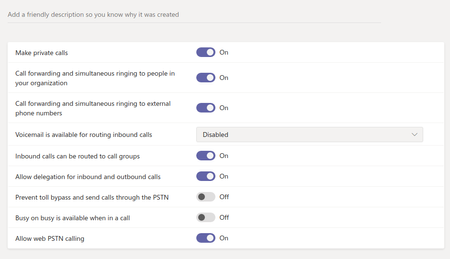
Hi, I'm trying to disable the voicemail function in our Teams, but after several changes is still active. My first attempt was using the admin: The second try was with PowerShell: PS C:\WINDOWS\system32> Import-Module "C:\Program Files\Common Files\Skype for Business Online\Modules\SkypeOnlineConnector\SkypeOnlineConnector.psd1" PS C:\WINDOWS\system32> Import-Module SkypeOnlineConnector PS C:\WINDOWS\system32> $userCredential = Get-Credential PS C:\WINDOWS\system32> $sfbSession = New-CsOnlineSession -Credential $userCredential -OverrideAdminDomain "http://devzapiens.onmicrosoft.com/" PS C:\WINDOWS\system32> Import-PSSession $sfbSession ModuleType Version Name ExportedCommands ---------- ------- ---- ---------------- Script 1.0 tmp_meci30o2.kkl {Clear-CsOnlineTelephoneNumberReservation, ConvertTo-JsonForPSWS, Disabl... PS C:\WINDOWS\system32> Get-CsTeamsCallingPolicy Identity : Global Description : AllowPrivateCalling : True AllowWebPSTNCalling : True AllowVoicemail : UserOverride AllowCallGroups : True AllowDelegation : True AllowCallForwardingToUser : True AllowCallForwardingToPhone : True PreventTollBypass : False BusyOnBusyEnabledType : Disabled MusicOnHoldEnabledType : Enabled SafeTransferEnabled : Disabled PS C:\WINDOWS\system32> Set-CsTeamsCallingPolicy -Identity Global -Allowvoicemail AlwaysDisabled PS C:\WINDOWS\system32> Get-CsTeamsCallingPolicy Identity : Global Description : AllowPrivateCalling : True AllowWebPSTNCalling : True AllowVoicemail : AlwaysDisabled AllowCallGroups : True AllowDelegation : True AllowCallForwardingToUser : True AllowCallForwardingToPhone : True PreventTollBypass : False BusyOnBusyEnabledType : Disabled MusicOnHoldEnabledType : Enabled SafeTransferEnabled : Disabled After these changes, when I try to call a collegue, the voicemail is still enabled. How can I disable this function?54KViews1like6Comments
Recent Blog Articles
No content to show