User Profile

GlebsKozlovskis
Copper Contributor
Joined Mar 09, 2020


User Widgets
Recent Discussions
Extremely easy case, yet I forgot how to solve this problem
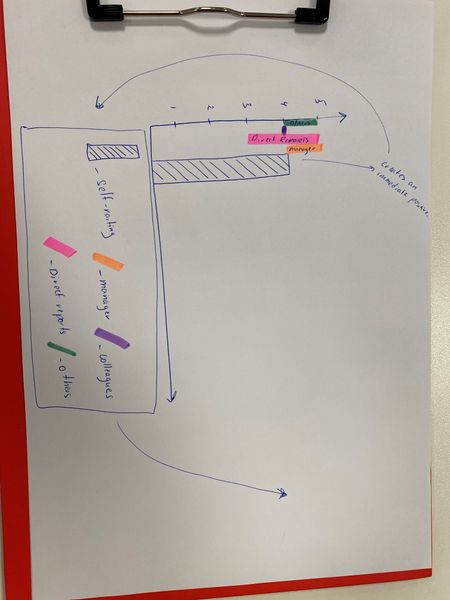
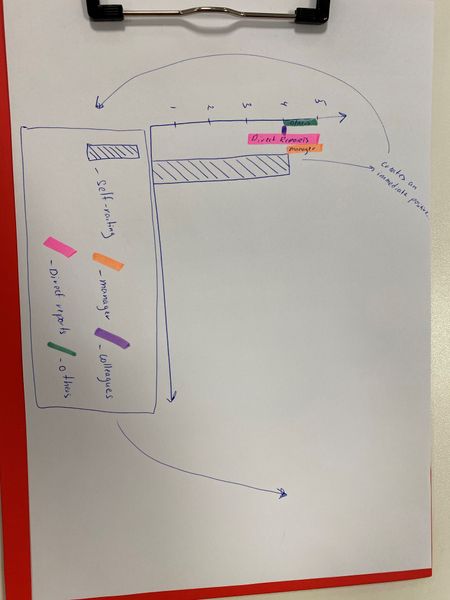
Dear community, I apologize in advance for asking an easy question, yet I do not know, how to formulate it properly in order to find the solution in the internet. The main question is how to illustrate the difference in order to highlight the difference (how to extend the scale from 3 to 5, but just the section 3-5 see pic below)431Views0likes1CommentHow to make a graph with flowing colums (see pic attached)
I want to create such kind of graph and manualy insert data to move and strech (make smaller or bigger) the columns, BUT most of them should be flowing (starting not from 0). On the picture you see main column and 4 sub-columns. In general, there will be 11 main columns and each has 4 sub columns. The question is how to perform it.413Views0likes0CommentsCreating Complicated Graph
Dear community, I have an urgent question regarding excel - since it’s almost the end of the Friday (working week). As for the problem (please, see attached picture and excel file). https://drive.google.com/open?id=1rINWobnEObb83xixHhTI29DtaQRsYKSz Short Description: 1. There is an 360 assessment of 3 people. 2. Each worker has completed survey: what he/she thinks of oneself, what manager thinks, what colleges think etc. 3. The scale is 1-5 and it is very important to show the deviation of answers (if there is such). 4. Unfortunately, I don’t know how to show deviation in excel, so I formatted cells “text typed” to type in deviation (“3-5” for an example). 5. The task is to graphically present answers (see table in excel) as it showed in the picture attached. Unfortunately, my knowledge doesn’t provide me with enough expertise in excel to understand, how to perform it, as well as I haven’t yet found solutions in the internet. That is why, I would really appreciate if you could help me/teach me, how to solve this puzzle.520Views0likes0CommentsRe: Excel active checkbox
Dear Riny_van_Eekelen, thank you for your solution, yet the task is a bit more complicates. Please, feel free to check another forum, where we're actively trying to figure out the situation, which appeared to be even more complicated. https://answers.microsoft.com/en-us/msoffice/forum/msoffice_excel-mso_win10-mso_o365b/excel-active-checkbox/003c8a9f-b391-4914-bef0-3aa2ac34cffb?tm=1583760644301&auth=11.3KViews0likes0CommentsExcel active checkbox
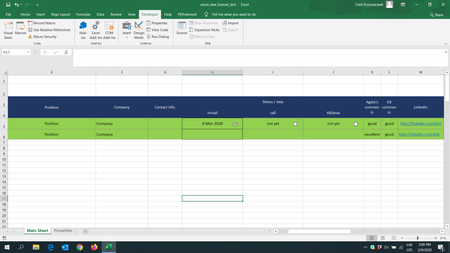
Main idea is: I have a list, where company has to analyse candidates/products etc. There are 3 steps in evaluation: contacting (inmail), phone call (call), and meeting (tikšanas) (see picture below). It is important to keep the dates of contacts and it is important to make it super easy for the end user. I have created 2 sheets: "main" and "properties". I am trying to solve this problem, using the checkbox feature. So i made the formula - if checkbox is enabled - on the "properties" sheet appears the word TRUE on a specific cell, if the cell says TRUE - the today's date appeared on the nearest cell and it is copied to the main sheet (pic2). The problem #1: it is important for me to have the checkbox attached to the cells, so if the size and !position! of the row changes - checkboxes travel together with own cells. I know, that I might use ActiveX controls for this reason, BUT as I mentioned before, I need active checkboxes - so I need to use Form Controls and attach them to respective cells. Problem #2: How to copy settings for the cells for 150 more examples, as if I roll down - i only copy settings for the cell, but not for the checkbox, so I should set up each 150 checkboxes again. I tried my best to explain it. I apologize in advance, if my explanation is too complicated or if I created a very difficult way of making it. Look forward to hearing from you! Thank you!1.4KViews0likes2Comments
Recent Blog Articles
No content to show