charting
1708 Topics
Creating Sankey Diagrams
Hi, Does anyone have any guides for creating Sankey Diagrams in Excel. I deal with the analysis of a reasonably long process which has various customer inputs and outcomes. I am looking for a visual way to show everyone who came into the process, and what happened to each person. Sankey Diagrams seem to fit that bill perfectly. Any help would be appreciated. Thanks T318KViews0likes9Comments
20 YEARS LATER BUT DEFINITELY NOT 20 YEARS GREATER!
I'm so disgusted with you Microsoft. After 20 years of learning how to use Excel moderately well you now force me out of Excel 2003 which you have bastardised so much it's now impossible to use! You've changed it so much it's useless to me! The lack of respect shown for your clients/customers who put in the time to learn how to use it now find ourselves with an unworkable system. This is an absolute disregard and waste of our time. I have wasted this weekend and been so turned off attempting to achieve what I had completed in 2003 Excel which I stayed with due to the decision YOU MADE to 'choke' Excel in accessing and using RAM - without telling us - which decided me to stay with 2003 for 20 years!! Good old faithful! But now your updates have crashed it so that I can no longer use it. I have had to change to 365 which is now the most screwed up convoluted and ridiculous program by comparison that it is a waste of time to have to re-learn a program which I could already use effectively. You might think 365 is a jewel but everyone I know who uses it think it's junk and hates it with a vengeance. Most would happily go back but instead we'll probably just complain and head for Linux instead. They care to have happy users! You don't even answer so I'm even unsure as to why I waste my time except that I am so angry I need to vent my disagreement. My projects are now stymied after 20 years work thanks to your stupidity, ignorance and lack of thought for your world-based users! And your charts, what used to work may as well be written in a foreign language...and WHY! I wish I could let loose and tell what I really think, but I'd have to drop my standards so far that even I would be disgusted by it! Not happy Microsoft! I'D HAPPILY PAY YOU TO STAY AWAY FROM ME AND LEAVE ME WITH MY OLD PROGRAM!580Views1like4Comments
PivotTable regression in Version 2609. Duration fields formatted [h]:mm:ss no longer allow Sum.
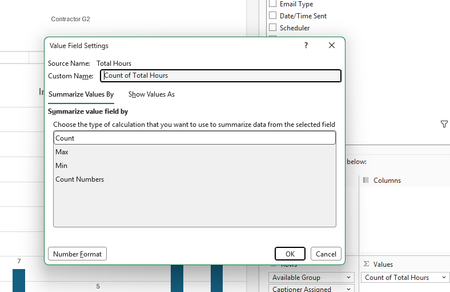
Excel 365 Version 2609 (Build 16.0.20430.20032) appears to have changed PivotTable handling of duration fields formatted as mm:ss. New PivotTables default to Count of Total Hours and Value Field Settings only shows Count, Max, Min, and Count Numbers; Sum is missing. Existing PivotTables using Sum of Total Hours still calculate correctly, even after refresh, but Sum no longer appears in their settings. Numeric helper field =[@[Total Hours]]*24 restores Sum functionality. Appears to be a regression affecting duration fields. I have verified that Excel is treating the data formatted as [h]:mm:ss as numeric and yet still will not allow sums as before.216Views0likes1Comment
How to stop Line Chart from showing zero for a blank cell
I have a series of simple line chart showing historic annual data. In some cases, when the cells are blank, the line is also "blank" - i.e. is not shown. But in other charts, when the cell is blank, the line drops to zero. How do I get the line to simply stay "blank"230Views0likes2CommentsGLSU Excel add-in fails to load after Office update from Version 2607 to 2608
Our Excel add-in, Process Runner GLSU , fails to load after Microsoft Office updates from Version 2607 to Version 2608. This started August 17, 2026 and is actively growing in scope. Error messages: Excel: Cannot run the macro 'onLoad' VBA: System Error &H80004005 (-2147467259). Unspecified error VBA: Compile error in hidden module: ThisWorkbook Has anyone encountered similar issue with their own custom add-on. If yes, any pointers to fix it. We are seeking help on priority. Thanks, Vrushali Pawale, Sr. Manager, Insightsoftware.1.1KViews0likes1Comment
No clustering in clustered bar chart when secondary axis is added
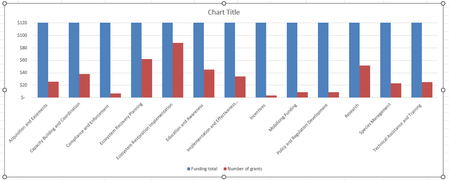
Hi there, I've got a clustered bar chart with two data series, one of which needs a much smaller scale than the other. It looks fine as long as I don't add the secondary axis (see pic). Note that here I've made the y-axis range so small that you can see the second series. Displaying the full range of the first series results in the second series being invisible. Here you can't see the full range of the first series, so this won't work for my purposes. When I add the secondary axis, I get this (see pic) and I don't see any way to avoid it. It seems like it might be a bug. Adjusting the overlap or the gap width doesn't help. Anyone have any suggestions? Thank you!!Solved747Views0likes3CommentsData Triggers
I'm relatively new to spreadsheets and excel. I'm working with a spreadsheet for mileage allocation. The mileage is funded from a single source but allocated to several people. In the spreadsheet, is it possible for the alpha entry in, for instance, column "C" cause the data in column "B" to populate in columns "D", "E". or "F" depending on the entry in column "C"? Example. Can the mileage cash value that's populated in column "B" get sent to a cell in either columns "D", "E", or "F" according to the name inserted in column "C" Entry "John" would cause B to populate D; "Dave" would cause B to populate E and "Jane would cause B to populate F so I can tally each person's share of the mileage without having to re-enter that amount in each of the columns? Any help in this would be appreciated.211Views0likes1CommentUnable to stop values field from calculating in pivot tables
Hello. I’ve created a pivot table where all the other fields are set up correctly. However I am unable to just include data in the “values” without it performing a calculation. Tried multiple times to select “no calculation” but doesn’t seem to work. Device is MacBook Pro. Excel 201610KViews0likes9CommentsWhich postal codes are available on cartogram chart
I want to show some data on the cartogram chart - thousands of records which belong to certain postal codes. Basically this works fine using the cartogram chart. I have a Country row, postal code row and a value row. The problem is that some postal codes are not known (Germany and Austria) but they are found in e.g. USA (even though I do use the country row). This makes the chart impossible to use because instead of Germany I see nearly the whole world. Land PLZ Wert Deutschland 80331 20 Deutschland 80333 20 Deutschland 80335 20 Deutschland 80336 20 Deutschland 80337 20 Deutschland 80339 20 Deutschland 80469 20 Deutschland 80538 20 Deutschland 80539 20 Deutschland 80634 20 Deutschland 80636 20 Deutschland 80637 20 Deutschland 80638 20 Deutschland 80639 20 Deutschland 80686 20 Deutschland 80687 20 Deutschland 80689 20 Deutschland 80796 20 Deutschland 80797 20 Deutschland 80798 20 Deutschland 80799 20 Deutschland 80801 20 Deutschland 80802 20 Deutschland 80803 20 Deutschland 80804 20 Deutschland 80805 20 Deutschland 80807 20 Deutschland 80809 20 Deutschland 80933 20 Deutschland 80935 20 Deutschland 80937 20 Deutschland 80939 20 Deutschland 80992 20 Deutschland 80993 20 Deutschland 80995 20 Deutschland 80997 20 Deutschland 80999 20 Deutschland 81241 2 Deutschland 81243 2 Deutschland 81245 2 The above data works nice - but change the postal code from e.g. 81243 to 81242... Any hint how to either remove not working postal codes or show just Germany/Austria on the cartogram chart?715Views1like2Comments