User Profile

Viz
Brass Contributor
Joined Jan 23, 2020


User Widgets
Recent Discussions
Re: Can I use the LARGE function with MAXIFS?
Can you clarify whether you want to ignore the largest item in the entire data set (irrespective of whether it meets condition or not) or whether you want to get the second largest value that meets the condition? The first one is pretty easy: = Maxifs(Val_Rng, Val_Rng, "<"&Max(Val_Rng), [critieria column2], critieria2 ....) If it is the second case, the if you are using Office 365, life is easy with a filter function: =Large(Filter(Val_Rng, (condition1)*(condition2)*...), 2)3.6KViews0likes1CommentRe: ByRow function produces two different results depending on whether row is range or array
Thanks, Peter. That definitely adds a degree of elegance to the formula. I have been relying too much on Index for looping. I indeed need to do a bit of unlearning and should start working with Map and Take.4.2KViews0likes0CommentsRe: ByRow function produces two different results depending on whether row is range or array
Thanks for the detailed explanation and the solution, Sergei. I am still trying to process your explanation fully. But after reading your explanation to mtarler and his work around with row function, I think I am getting some sense of the problem. I am wondering if ByRow is treating the sequence as matrix instead of a vector when we directly pass it in the function (and therefore the array or array problem). Am I going in the right direction?4.2KViews1like1CommentByRow function produces two different results depending on whether row is range or array
In a nutshell, I am trying to compute average with a combination of ByRow, Index, and Average. I needed a sequence number array for this algorithm. When I put this sequence number in a range and use that range in ByRow function, it works great. But when I use that sequence function directly inside a Let(), it gives me wrong answers. I am sharing the codes I have tried, below: This is the first formula I wrote: =LET( Values, SORTBY(Data[Sensex], Data[DATE]), Sqn, SEQUENCE(ROWS(Values)), BYROW( Sqn, LAMBDA(a, IF( a < 7, "NA", AVERAGE( INDEX(Values, SEQUENCE(7, 1, a - 7 + 1)) ) ) ) ) ) This one produced "a" set of answers. But the answers were slightly incorrect. To figure out where the problem was, all I did was put the sequences in a separate range and use that range in the ByRow function and this time I got perfect results: So, this is the first part to get the sequence of numbers In cell, say E4 =LET( Values, SORTBY(Data[Sensex], Data[DATE]), Sqn, SEQUENCE(ROWS(Values)), Sqn ) And this is the second part, where I use the ByRow function and specify the range as an array In cell, say F4 =LET( Values, SORTBY(Data[S&P BSE Sensex], Data[DATE]), BYROW( E4#, LAMBDA(a, IF( a < 7, "NA", AVERAGE( INDEX(Values, SEQUENCE(7, 1, a - 7 + 1)) ) ) ) ) ) And now I am getting the perfect answer. Is this a bug or am I doing something wrong here: PeterBartholomew1 Craig Hatmaker SergeiBaklan lori_m,6.6KViews0likes24CommentsPerformance issue when two or more tables are included in the same sheet
Is there any known performance issues when there are two or more tables in a same sheet? Whenever I have more than 1 table in the same sheet then system takes a long time to insert rows or columns in those sheets. I try to avoid having multiple tables in one sheet. But from a user experience perspective sometimes when each of the tables are too small, it doesn't make sense to keep them in two separate sheets. If you could share some suggestions or thoughts, it would be great.484Views0likes0CommentsRe: Serious bug with certain decimal numbers: Countifs and Roundup failed
lori_m Thank you for the solution. Especially since Sumproduct doesn't spill, for DA this seems to be the best work around. On a side note, interestingly this problem arises only if the integer part is above 1024. If I try 1023.89142, it seems to work very well. But the moment it crosses 2^10, there is some problem. And again it is happening for 0.89142 but there is no problem for 0.89143 or 0.891415.3KViews0likes1CommentRe: Serious bug with certain decimal numbers: Countifs and Roundup failed
HansVogelaar Thank you, Hans. It almost sorted the problem. But there were still a few numbers that it couldn't fix. As Joe mentioned, there seems to be some inherent problem in certain odd cases. The solution that Sergei gave to use sumproduct in place of Countif fixed the problem.5.5KViews0likes0CommentsRe: Summing - Vlookup and Dates
Tony2021 Hi Tony, actually what is happening that for BOA you have positive entry 1000 on 10-May and negative entry of 3000 on 01-June. The formula I gave takes both the amendments while giving the applicable price for 01-June (so, 1-June price 1000 + 1000 - 3000 = -1000) In your manual calculation, you have ignored the 10-May amendment. Is it that you want only the latest amendment to be considered if there are multiple amendments between two dates?1.3KViews0likes1CommentRe: Serious bug with certain decimal numbers: Countifs and Roundup failed
Thank you for a detailed response, JoeUser2004 and thank you for the alternative solution SergeiBaklan I had a list of end users with various entry times and I had to count how many times an user has done entry up to a given point. So, I wanted to apply this: =Countifs([Time],"<="&[@Time],[User],[@User]) That is when I noticed that for some of the entries I was getting wrong answers. Roundup was more of a workaround I attempted to fix the problem. I didn't realise this issue existed in MS Excel. Thank you for helping me understand the bug.5.6KViews0likes1Comment- 1.4KViews0likes3Comments
Serious bug with certain decimal numbers: Countifs and Roundup failed
I have a file that had time upto the seconds level. Some of these numbers had 99999.. after the fifth decimal digit. And all these numbers seem to throw a major bug. I wanted to find out how many entries were made on or before the current time. Shocking excel returned the answer as zero for those times or numbers with 99 in the sixth decimal point onwards (which is impossible because the time is already in the array). I even tried rounding those numbers to five decimal points but it didn't round. OpenOffice Calc, Google Sheets and Zoho sheets does not seem to create any such trouble. I have attached the file. Any thoughts?Solved7KViews1like21CommentsRe: Lambda Example: Generate Fibonacci series
SergeiBaklan lori_m There may be a better solution but one approach I can think about handling error would be to have Lambda in two layers. I am just putting the pseudo code here, MAIN =Lambda(n, IF(n<>int(n),"Enter integer",FIB(n))) FIB =Lambda(n, ..................) I am new to recursive programming. So, I am not sure if this is the only solution. Perhaps better option exists.15KViews1like4CommentsRe: Lambda Example: Generate Fibonacci series
lori_m Wow! your solution is super elegant! I was initially trying something closer to your first solution but I could not crack the logic to extend the size of array. And the algorithm I used to extend the array made the function very slow. I am still getting my head around your function to understand how the array is getting extended. But thank you very much for sharing these solutions. It was very useful.15KViews1like0CommentsRe: Help with Excel / Word and macros
NoahRaymond Can you share how the input would look like? If you are going to have the card info in a set of rows or columns and if all you need is one single text of all of them with semicolons in between, then you can use the TextJoin function =TextJoin(";",,[Your Range]) Alternatively, if you are already have them as a continous text with space in between and you need to replace the space with semicolon then you can either use find / replace command or use substitute function =Substitute(YourText," ",";")794Views0likes0CommentsLambda Example: Generate Fibonacci series
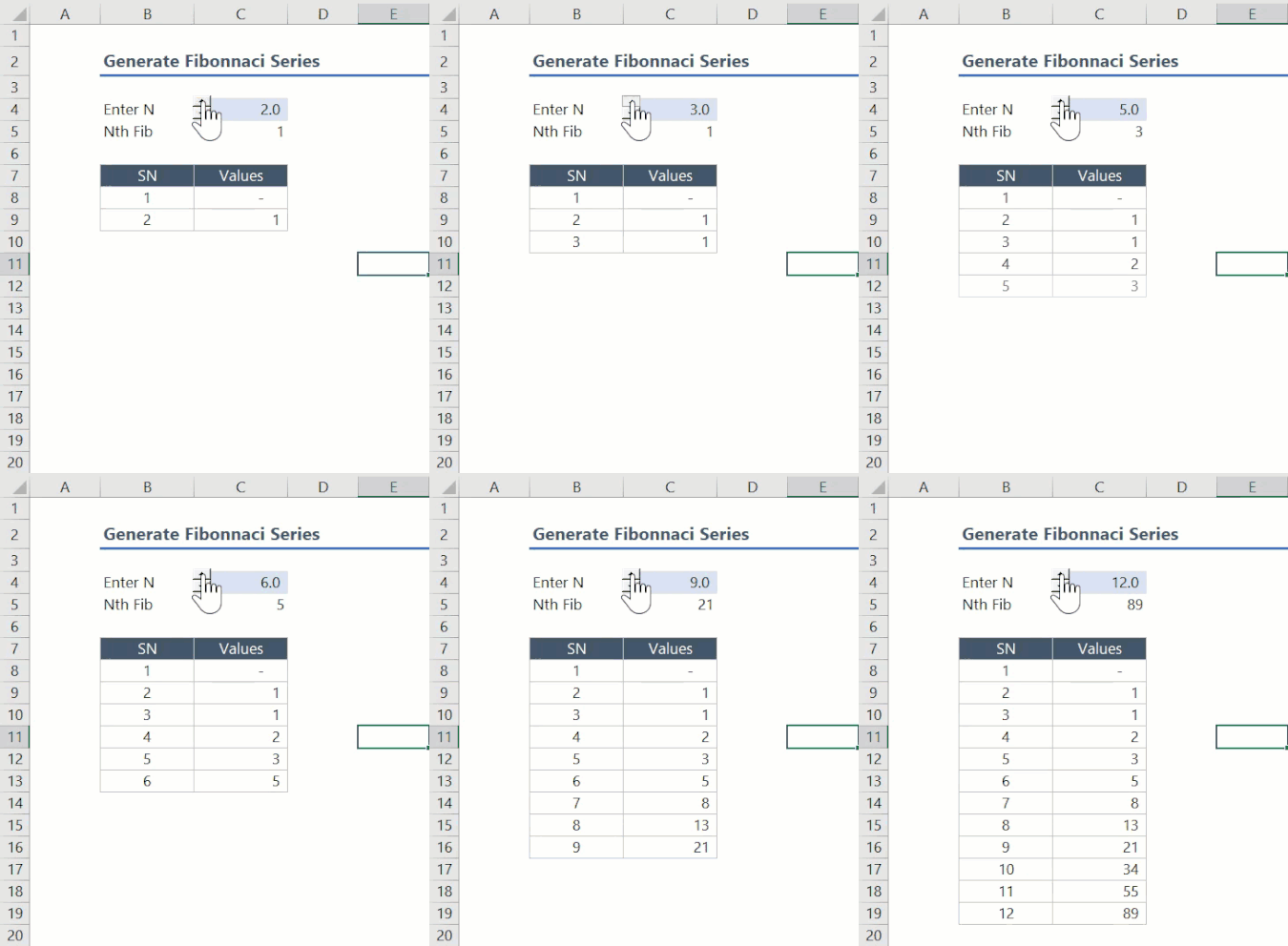
In this post, I would like to explain how I have used Lambda to create a function to generate a Fibonacci series array. This example can also be used to understand how to create an array where the value of an element in the array depends on previous elements in the same array. This function has been created using three function in two layers. The inner layer functions include the following: InFib: This function generates the Nth Fibonacci number InFibSer: This function generates the entire Fibonacci series up to the Nth number The two functions mentioned above require arguments that are complicated and less intuitive. Therefore, we use an outer layer function (FibSeries) that generates the necessary argument and calls the two functions to generate the series. =InFIB 'This function returns nth Fibonacci using tail recursion 'It takes three arguments n, a=0 , b=1 as argument and returns the nth Fibonacci value =LAMBDA(n,a,b,IF(n=1,a,IF(n=2,b,Infib(n-1,b,a+b)))) /* The value for the arguments a and b should be passed as 0 and 1, respectively. */ Example: =InFIB(10,0,1) would generate 34 as the value Our objective, here, is not to obtain a single value but to generate an entire array. However, here is where we have a challenge: While it is easier to manipulate an existing array, it is far more to difficult to create a new array (other than sequence array) or extend an existing array. Therefore, in order to create a Fibonacci series, we are going to pass a dummy array of n values. This array will have 0 as the first element and 1 as the value for all the other elements. The following image portrays the recursive addition process that converts that the initial array into a Fibonacci series. The following code does carries out the process recursively till the maximum value of the array equals the nth Fibonacci value. =INFIBSER 'This inner function takes three arguments and returns a Fibonacci series 'The three arguments are nth Fibonacci value, the initial array and a sequence array (sequential numbers from 1 to n) 'Note, the sequence array can instead be generated inside the function but it may inefficient =Lambda(NthFib, Initval, Sqn, Let( Maxval,Max(Initval), If(Maxval = NthFib, Initval, Let( NewVal,If(Maxval=1,Initval+1*(Sqn>=4), Let( StPos,Match(Maxval,Initval,0)+1, adval,Large(unique(Initval),2), Initval+adval*(Sqn>=StPos) ) ), InFibser(NthFib,NewVal,Sqn) ) ) ) ) In the first iteration, the above function adds one to all the values from the fourth position onwards. For the subsequent iterations it adds the second largest unique value to all values that all 2 places after the position of such second largest value. The above function uses the match function to identify the position pointer. Although the above function can generate the Fibonacci series, as mentioned earlier, it requires arguments that are less intuitive and which requires some set up. Therefore, here we have an outer layer function that requires only one argument, n. It creates the necessary argument to be passed to the inner layer function and calls them. =FIBSERIES 'This outermost function generates an initial array, a sequence array, and nth fibonnaci value 'It then calls the inner functions with these parameters =Lambda(n, Let( Sqn,sequence(n), initval,sign(Sqn-1), Nthfib,Infib(n,0,1), InFibser(Nthfib, Initval, Sqn) ) ) This final function can be used by the user to generate the Fibonacci series by merely passing the number of values required as argument. Hope you found this useful. I would love to know if you think there is a way to improve the algorithm, here. I am especially looking for suggestions that could replace the match / xmatch in the InFibSer function to get the position pointer. Since the positions move sequentially, I believe a mathematical solution may exist. Thank you32KViews1like82CommentsRe: LAMBDA Examples: Distance between two cities
Chris_Gross I have created a Lambda function to generate a Fibonacci series. It is detailed in this link. Lambda Example: Generate Fibonacci series - Microsoft Tech Community Would love to know if there is any way we could improve the algorithm.6.4KViews0likes1CommentRe: Is it possible to Rank repeating strings without repeating same ranks in an Excel Table?
A slightly modified solution I would recommend is here =[@Date]&[@Fruit]& COUNTIFS( INDEX([Fruit],1):[@Fruit], [@Fruit], INDEX([Date],1):[@Date], [@Date]) It pretty much achieves the same thing. But I recommend that we avoid cell referencing while working with Tables. SergeiBaklan3KViews0likes0Comments
Recent Blog Articles
No content to show