Forum Discussion

Summing - Vlookup and Dates
- May 01, 2021
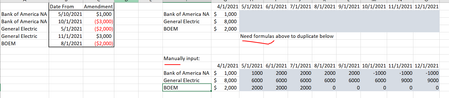
You need to try this:
=$G2 + Sumifs($C$2:$C$4, $B$2:$B$4, "<="&H$1, $A$2:$A$4, $F2)
I have attached the file with the solution. Hope it addresses your need.


- Tony2021May 01, 2021Steel Contributor
Hi Viz,
I might have an issues. Sorry. Appreciate when you have a sec. When I add additional dates to the data set for some reason the sum doesnt appear to be correct anylonger but only if I add dates.
If could kindly check out the attached I would greatly appreciate.thank you...
- VizMay 02, 2021Brass Contributor
Hi Tony, actually what is happening that for BOA you have positive entry 1000 on 10-May and negative entry of 3000 on 01-June. The formula I gave takes both the amendments while giving the applicable price for 01-June (so, 1-June price 1000 + 1000 - 3000 = -1000)
In your manual calculation, you have ignored the 10-May amendment. Is it that you want only the latest amendment to be considered if there are multiple amendments between two dates?
- Tony2021May 02, 2021Steel Contributor
Viz sorry I found out my problem. It might be difficult to explain but in my production file where all of the data resides the date was formated as MMM - yy and there was not a specific day while in the file I posted there was a specific day and I didnt catch that there was a difference in date formats. Sorry for any confusion . This drove me nuts.