User Profile

knowlite
Iron Contributor
Joined Nov 25, 2019


User Widgets
Recent Discussions
Re: Longshot question
Have you tried making the connection to Outlook via Power BI? https://powerbi.microsoft.com/nl-be/blog/analyzing-your-microsoft-exchange-account-data-with-power-query/ I can see in the screenshots that the timestamp is present. After gathering the data you can still export to CSV if that is what you need.444Views1like0CommentsRe: Changing Channel from private
Clinkie As ment.io is third party software, it is their responsability to test and adjust wherever neccesary. Private channels went through private/public testing phases to make sure it works with all platform functionalities, it is however impossible for Microsoft to test all third party add-ons.44KViews0likes0CommentsRe: Outlook login issues with WVD - FSLogix
We are having the same issues that another client experienced on WVD also experiencing on-prem on 2019 RDS. Issue seems to be related to FSLogix in combination with AAD authentication. This week our clients users were unable to open Outlook, when the window did not open, we saw another window was open but not displaying anything. We tested creating the following reg key in the users profile, the issue was resolved: [HKCU\SOFTWARE\Microsoft\Office\16.0\Common\Identity\DisableADALatopWAMOverride] - REG_DWORD "1" When removing the FSLogix profile, issue appeared again. Then we tested: Get-AppxPackage Microsoft.AAD.BrokerPlugin Which returned nothing. After using the following everything started to work again (for this user): Add-AppxPackage -Register "C:\Windows\SystemApps\Microsoft.AAD.BrokerPlugin_cw5n1h2txyewy\Appxmanifest.xml" -DisableDevelopmentMode The logon screen appeared (modern authentication), user logged in and succes! Are we missing any settings in our environment that causes this problem? Our users do not have SSO, users are not synced via AD Connect. It worked perfectly for a while but now it suddenly appeared. Before experiencing this issue, we also had the App Readiness service blocking logins, causing black screens on logon (we could start task manager but nothing was displayed). When we stopped the service "App Readiness", which is set to manual, the session appeared. I know that this may not be related but the Appx registration may be related to the App Readiness (which normally runs only on first logon to a machine per user)?7.4KViews0likes99CommentsRe: Thinclients on shared workspaces
Exactly the same idea as I had: Thinclients managed through Intune, kiosk mode with just the WVD client and go! Unfortunately I was not succesful in doing this... When searching for alternatives I strubled on Igel, which announced having a new release of their os, incorporating the new RDP client developed together with MS. This should work out of the box in a kiosk way. Haven't had time to test this, doing some other projects atm.4.3KViews0likes0CommentsRe: Consistent Thin Client Disconnection from WVD Pool
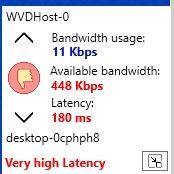
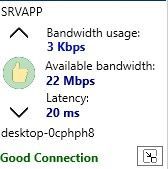
Marco Brouwer Hi Marco, I just tested more on our environment. RDP to APP server running in same vnet bandwidth 20mbit, fast speed, amazing! Then I logged in through Remote desktop app, I ran the tool from Bram Wolfs. This immediately gave a warning, high latency. The only difference is that I am now going through MS RD Gateway infrastructure. This is exactly the issue that our users are experiencing (I even think this is also related to the disconnect issue)6.2KViews0likes47CommentsRe: Consistent Thin Client Disconnection from WVD Pool
They are doing DNS LB so your rdweb endpoint isn't the same as mine,our results will differ. Your resolved IP address is different than mine, however the spikes are also there. Is there a way to resolve the RDGW that the user is using at the time of issues?8.2KViews0likes0CommentsRe: Consistent Thin Client Disconnection from WVD Pool
If i use the following query: Get-RdsDiagnosticActivities -TenantName TenantName -ActivityId ActivityId -Detailed | select-object * -ExpandProperty Errors I get the following errors: ErrorSource : RDGateway ErrorOperation : GatewayConnectionActive ErrorCode : -2146233088 ErrorCodeSymbolic : ConnectionFailedServerDisconnect ErrorMessage : One or more errors occurred. (StartServerConnectionAsync) ErrorInternal : False ReportedBy : RDGateway ErrorSource : RDStack ErrorOperation : ConnectionEstablished ErrorCode : 14 ErrorCodeSymbolic : UnexpectedNetworkDisconnect ErrorMessage : Unexpected network disconnect ErrorInternal : False ReportedBy : RDStack ErrorSource : Client ErrorOperation : ClientGatewayNetworkConnection ErrorCode : 50331694 ErrorCodeSymbolic : PROXY_ERR_NETWORKDOWN ErrorMessage : AutoReconnect due to Network Error ErrorInternal : False ReportedBy : Client18KViews0likes0Comments
Recent Blog Articles
No content to show