User Profile

HaraldRau
Iron Contributor
Joined Jul 26, 2016


User Widgets
Recent Discussions
Re: How to create a Pre-prod environment for Microsoft Purview
I believe you have basically two options: setup a Pre-prod M365 tenant with all the necessary M365 workloads. That's a lot of work and will only make sense, if the teams responsible for the other M365 workloads use it too for their testing purposes. However, I don't think there is a good way of deploying policies from one tenant to another. use the Purview Prod environment and limit the scope of your test policies to a test user group while testing - alternatively set policies into simulation mode before turning them on and evaluate the simulation results. That works fairly well when dealing with DLP and Information Protection policies. Hope that helps.184Views1like0CommentsRe: Incorrect alert information for DLP incidents being displayed
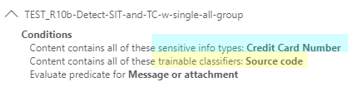
Paul_Doucettedid you get any update on this issue? According to Microsoft support they have fixed the issue in all tenants as of October, but I haven't been able to confirm the fix though. To reproduce it, I set up two simplified rules designed to trigger when an email includes both Source code (trainable classifier) and Credit Card Numbers (SIT). When sending an email containing these elements, both rules are indeed triggered. However, despite being a necessary condition for firing, Rule TEST_R10a, which uses an AND condition between condition groups, fails to return the trainable classifier in the Activity Eplorer (and API), confirming your point of incomplete data in the explorer. So, we are still working with support to get it resolved.77Views1like0CommentsRe: Incorrect alert information for DLP incidents being displayed
Paul_Doucette The issue started on May 14th. Microsoft had reported an issue in the health portal with ID MP793009: Affected services: Purview - Description: The impacted activities are Microsoft Entra group administration activities and user administration activities including, but not limited to, the following, Audit log searches, Data gathered from the Audit Management API, Audit based alerts, ... It was reported to be fixed on May 16th: We've fully reverted the offending service update and we're moving to begin replaying the affected data to remediate the residual impact. However, the information which SIT/TC actually triggered an DLP rule match event has been either missing or incomplete ever since.372Views0likes0CommentsRe: DLP rule match in activity explorer lacks info on detected trainable classifier
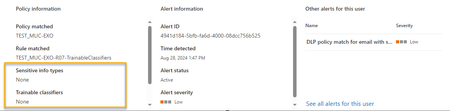
To further analyse this issue, we have activated alerts for the rule that exclusively detects a single built-in trainable classifier. While alerts are getting reported for these DLP policy matches, the detected trainable classifier is not reported back, see screenshot from Purview DLP alerts.471Views0likes0CommentsSensitivity label mismatch email to user - but not to site administrator
We've set up sensitivity labels for both content and containers like groups and sites. When someone uploads a document with a higher priority sensitivity label to a site that has a lower sensitivity label, it's considered a sensitivity mismatch. This mismatch is recorded in the Purview audit log, and by default, an email alert is sent to both the uploader and the site administrator, as outlined in https://learn.microsoft.com/en-us/purview/sensitivity-labels-teams-groups-sites#auditing-sensitivity-label-activities) However, while we are observing "Detected document sensitivity mismatch" events in the audit log and notifications are being sent to the user, notifications to the site administrator or site owner are not being received. Could anyone shed some light on what might be the issue? Thanks!647Views0likes0CommentsDLP rule match in activity explorer lacks info on detected trainable classifier
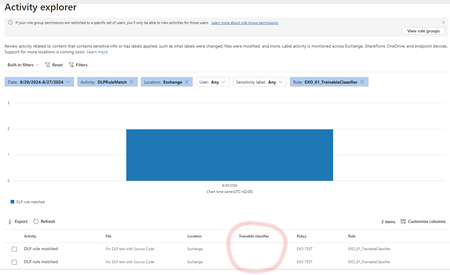
Our DLP policies are designed to trigger based on the condition to contain a built-in trainable classifier, such as Source Code, and are applied to Exchange email for all users. While we have not set up any actions or alerts, we do notify users who have sent the content, which works as expected. These activities are logged in the Purview activity explorer as a DLP policy match. However, we've noticed an issue where the activity explorer, as well as the O365 Management API, do not reveal which trainable classifier was detected. Both the explorer and the API report the event but omit details about the triggering trainable classifier. We can reproduce this issue in two tenants. See the screenshot from Activity Explorer where I have customized the columns to show the detected trainable classifiers. I'm trying to determine if this issue is widespread or specific to our setup. Could anyone verify if they're experiencing the same problem or offer any advice on how to address it? Thanks a ton in advance! Regards, Harald616Views0likes1CommentRe: Default Retention Labels don't work with move/copy of documents
I had opened a premier support ticket which was discussed with the product engineering team. The response I got was: "It was reiterated that getting the inheritance story aligned between the various workloads and scenarios at some point in the future, is on their table. As agreed, I'll send you an email when this feature will be improved and released, later this year."2.8KViews1like1CommentDefault Retention Labels don't work with move/copy of documents
We are investigating the retention label capabilities across Office 365 locations with a number of test cases. We are struggling with this one: When a default retention label is set on SharePoint Online at the library level, we'd expect that new documents in that library will automatically inherit this label. It works fine for documents that are created or uploaded into that library, but it fails to work for documents that are moved or copied into that library from other places, say OneDrive for Business or other sites via modern UI. Copied/moved documents don't inherit the default label from the library, regardless of whether they have already been labeled in the previous location or not. Same is true for folders with a retention label. Works well for new/uploaded docs, fails for move/copied documents. Is it a feature, a bug, a roadmap item?2.9KViews2likes3CommentsRe: External guests in O365 groups have access to people directory and other sites w/o invitation
Thanks, David, for your reply! I understand this setting will remove the search option from the People Picker such that users can't search for people anymore. However, the original concern was more regarding the native SharePoint search - it returns sites, documents, and people as a search result. And the people results list shows the full contact details and other properties of the individuals such that an external guest can perform some intensive research on our internal staff. Is there a way to change this behaviour? Can those people information be restricted to "everyone except external"? Thanks for your great help!3KViews1like0CommentsExternal guests in O365 groups have access to people directory and other sites w/o invitation
We have guest access to Office 365 Groups enabled at tenant level. So group owners can invite people outside the organization to their Office 365 group. The external guest can access the SharePoint site of the group to which he was invited as expected. However, we actually had assumed that these external guest won't get access to sites to which they were NOT invited. But it turned out that with some simple steps external guests get access to the following information that was never intended to be shared with these guests: Browse access to the entire people directory of that tenant (via search) Visitor access to other internal SharePoint sites that were never intended to be shared with these external guests. Some of those sites even provide edit rights on the sites homepage to these guests. Follow these simple steps as external guest to get this unwanted level of access: Open the SharePoint Site of the Group to which you have been invited as external guest A click on "home" in the left hand navigation (sometimes it's called "start") brings you to the site's homepage Start a search with the search field in the upper left corner At the search result page change the scope filter to "all sites" and "all result types" The result page will show lots of websites, documents, and people. For each type you can click on "show all" which will expose even more sites and people Actually the entire corporate people directory can be searched through and contact details of individuals can be accessed This behaviour is not a specific behaviour of one of our site collection or our tenant, it can be reproduced with other tenants and site collections. I happened to be invited as a guest to a group by Microsoft, same behaviour here. I have access to the full people directory of Microsofts production tenant and a number of internal sites that were never meant to be shared with me. Any ideas out there how to security-trim the external user experience to the required level? I.e. provide access exclusively to the site and people to which the group owner had invited?3.3KViews1like4Comments

Recent Blog Articles
No content to show