User Profile

Joseph_Moran
Copper Contributor
Joined Oct 18, 2019


User Widgets
Recent Discussions
Re: I need some simple layman explanation
Respectfully, if you're not a technical person you probably should not be attempting to install a EPM system into SharePoint. This stuff can be inherently quite complex and can't typically be boiled down to a series of simple steps for a layperson. Every action you take when configuring something like this has ramifications that must be considered and understood before implementation otherwise there can be unpleasant consequences, up to and including leaving SharePoint vulnerable to breach. I strongly recommend that you seek support from the product vendor or other qualified assistance to get this product up and running. Most of the questions you are asking are particular to the product you're trying to install, so no one in a general SharePoint forum like this is going to be able to provide you with product-specific advice. With that out of the way, you will definitely want to check with your vendor to make sure this EPM product is still active and viable, as https://learn.microsoft.com/en-us/sharepoint/dev/sp-add-ins/retirement-announcement-for-add-ins Good luck.11Views0likes0CommentsRe: How to get access to Move or Delete e-mail?
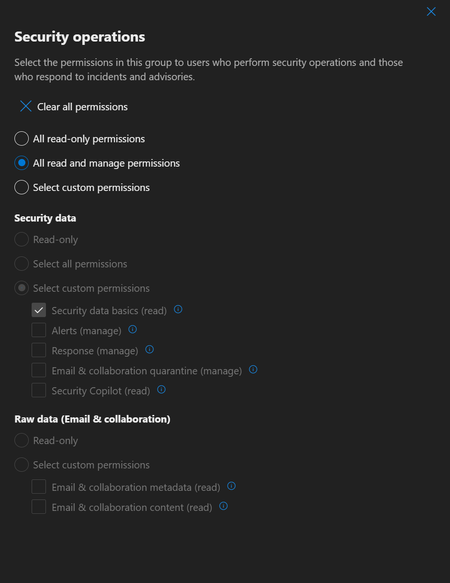
Also, just stumbled across https://learn.microsoft.com/en-us/defender-xdr/custom-permissions-details, so wondering now if this is simply an issue of you don't get access to these permissions in the version of Defender that comes with 365 Business Premium.1.2KViews1like1CommentRe: How to get access to Move or Delete e-mail?
Thank you for your response. Maybe I am missing something, but I have already selected "All read and manage permissions" under Security Operations. Moreover, I don't even have the option you've highlighted-- nor most of the others for that matter. Don't know if this is as a result of some other underlying thing I did not set up correctly...254Views0likes2CommentsHow to get access to Move or Delete e-mail?
So this week I had some phishing e-mails that made it past Defender's filtering and were delivered to user mailboxes. I wanted to pull them back, so I found the relevant message the Defender XDR portal, and clicked on Take Action, but the only option available to me there was Submit to Microsoft for review. All the others, including Move or Delete, which is what I wanted, were grayed out. I'll add that was doing this using my Global Admin account. Did some research and supposedly assigning my account the Data Investigator role or creating a custom role with Search and Purge capability would provide the desired access So I put my account into both of those groups, and I still can't access Move or Delete. Anybody know what I am missing here? I’d be grateful for any information.Multiple problems with Lists lookup columns not behaving as expected
Hi. I am pulling my hair out trying to figure out two problems I’m having with Microsoft Lists, and I’d appreciate it if anyone here can help me. Situation: I have created three source Lists (employees, supervisors, jobs) and-- so far-- one target list. On my target List, I have three lookup columns referencing the aforementioned source Lists. On the surface everything looks fine, but upon closer examination two important features are not working. Problem #1: On the target List the “Employees” column is set to “allow multiple entries”, and although the column does allow multiple selections, only the first selection is actually saved in the List. Problem #2: Also on target List, the lookup columns are set to “Deletions from Source list affect this List=NO”. And yet, if I delete any entries from the source Lists (say, employees who have left the company), they disappear from the target List as well. These two settings seem fairly self-explanatory, so either I am missing something (entirely possible), or the settings simply don’t work as advertised. If anyone has any suggestions on how to fix these problems, I’d be grateful. Thanks.191Views0likes0Comments
Recent Blog Articles
No content to show