User Profile

FFB01
Copper Contributor
Joined Jun 13, 2019


User Widgets
Recent Discussions
For MS SharePoint the authorizing scope sent in URL is not getting honored
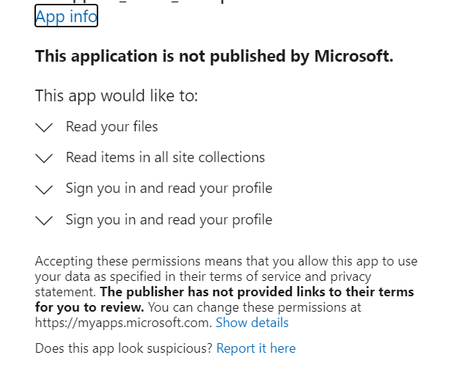
We are trying to give customize access to non-admin user by specifying the scope to either "AllSites.Read" or similar using Rest API request for our MS Sharepoint application. The issue we are facing is, it is not honoring the scope from the URL e.g. https://login.microsoftonline.com/common/oauth2/authorize?response_type=code&client_id=xxxx&redirect_uri=https://www.google.co.in&scope=any_random_string&state=1234567890&prompt=consent here the scope passed is not considered and the API returns 200 status code with scope set to Read (default app level permission). But when the change the scope to any random string, it still shows the same app level permissions. e.g. https://login.microsoftonline.com/common/oauth2/authorize?response_type=code&client_id=xxxx&redirect_uri=https://www.google.co.in&scope=any_random_string&state=1234567890&prompt=consent The permission can only be modified/granted from the administration module at App level.535Views0likes0CommentsWe Need WebAddress URL for Some Sharepoint Lists having BaseTemplate 110, 117 and 118
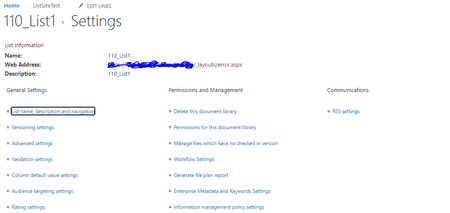
Hi, In our Sharepoint Site, There are lists for which Base Template values are 110, 117 and 118. On List Setting page, we are getting WebAddress field value as: /_layouts/error.aspx Kindly help us to open such kind of lists, or any default URL template that can be used for the same559Views0likes0CommentsGetting 'Something went wrong' while opening 'wfpub' list of sharepoint
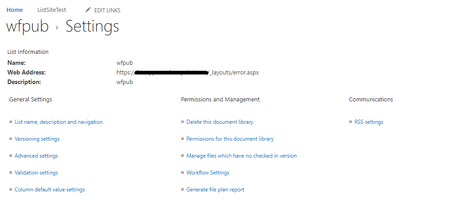
We are trying to get the WebSource URL for 'wfpub' list. We did hit List Setting Page using URL : https://ibmappcon.sharepoint.com/_layouts/15/listedit.aspx?List=79461b6c-d4df-4d94-a022-50dd32cc8ced But getting /_layouts/error.aspx' as WebAddress for this list. We are trying to open wfpub list , but we are getting below error: Same error is getting for following lists: 1. Sharing Links 2. appfiles 3. appdata I have followed the instructions https://docs.microsoft.com/en-us/sharepoint/troubleshoot/sites/page-not-use-valid-page-lauout But not able to find above lists in Pages List. Can we get the template URL pattern for these lists?619Views0likes0CommentsIs there any approach to get WebAddress of List using SharePoint RestAPI?
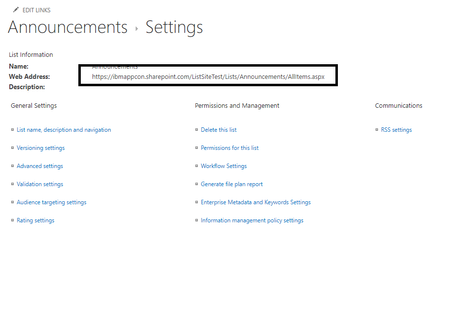
We are looking for an Rest API to get the "Web Address" of the List using SharePoint Rest API We have tried the two approaches as listed in https://sharepoint.stackexchange.com/questions/271304/what-is-the-url-for-a-custom-list-with-only-listid We did not get the proper URL. But is there any other approach to get the WebAddress as :425Views0likes0CommentsIs it possible to add custom fields in metadata for site and lists of MS Share Point?
We have a requirement to associate custom metadata while creating site or lists. We tried exploring the SharePoint documentation and were able to add this for List items, folders and files but did not find any reference of it for Site or Lists. Could you please let us know if this is possible to add custom metadata while create a new site and new List1.9KViews0likes3CommentsHow to download rendered content of *.aspx SitePage using SharePoint Online Rest API
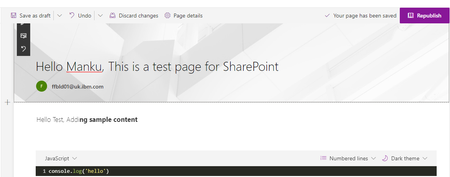
Hi We are trying to download rendered content of SitePages ( relativeURL: /SitePages/fileName.aspx) But we are getting non rendered content; For e.g.,: This is sample SitePage: Following content is what we received when try to download this file: We need proper rendered content of aspx file <%@ Page language="C#" Inherits="Microsoft.SharePoint.WebControls.ClientSidePage, Microsoft.SharePoint, Version=16.0.0.0, Culture=neutral, PublicKeyToken=71e9bce111e9429c" %><%@ Register Tagprefix="SharePoint" Namespace="Microsoft.SharePoint.WebControls" Assembly="Microsoft.SharePoint, Version=16.0.0.0, Culture=neutral, PublicKeyToken=71e9bce111e9429c" %> <html xmlns:mso="urn:schemas-microsoft-com:office:office" xmlns:msdt="uuid:C2F41010-65B3-11d1-A29F-00AA00C14882"><head> <!--[if gte mso 9]><SharePoint:CTFieldRefs runat=server Prefix="mso:" FieldList="FileLeafRef,ClientSideApplicationId,PageLayoutType,CanvasContent1,BannerImageUrl,BannerImageOffset,PromotedState,FirstPublishedDate,LayoutWebpartsContent,_TopicHeader,_SPSitePageFlags"><xml> <mso:CustomDocumentProperties> <mso:PageLayoutType msdt:dt="string">Article</mso:PageLayoutType> <mso:_SPSitePageFlags msdt:dt="string"></mso:_SPSitePageFlags> <mso:CanvasContent1 msdt:dt="string"><div><div data-sp-canvascontrol="" data-sp-canvasdataversion="1.0" data-sp-controldata="&#123;&quot;controlType&quot;&#58;4,&quot;id&quot;&#58;&quot;48fd2e0a-d158-4113-b236-eeb4be0270d2&quot;,&quot;position&quot;&#58;&#123;&quot;zoneIndex&quot;&#58;1,&quot;sectionIndex&quot;&#58;1,&quot;controlIndex&quot;&#58;1,&quot;layoutIndex&quot;&#58;1&#125;,&quot;emphasis&quot;&#58;&#123;&#125;&#125;"><div data-sp-rte=""><p>Hello Test, Addi<strong>ng sample content</strong></p></div></div><div data-sp-canvascontrol="" data-sp-canvasdataversion="1.0" data-sp-controldata="&#123;&quot;controlType&quot;&#58;3,&quot;id&quot;&#58;&quot;61d0a799-c797-49db-a4cd-ae169c8755f6&quot;,&quot;position&quot;&#58;&#123;&quot;zoneIndex&quot;&#58;1,&quot;sectionIndex&quot;&#58;1,&quot;controlIndex&quot;&#58;2,&quot;layoutIndex&quot;&#58;1&#125;,&quot;webPartId&quot;&#58;&quot;7b317bca-c919-4982-af2f-8399173e5a1e&quot;,&quot;emphasis&quot;&#58;&#123;&#125;,&quot;reservedHeight&quot;&#58;64,&quot;reservedWidth&quot;&#58;832,&quot;addedFromPersistedData&quot;&#58;true&#125;"><div data-sp-webpart="" data-sp-webpartdataversion="2.0" data-sp-webpartdata="&#123;&quot;id&quot;&#58;&quot;7b317bca-c919-4982-af2f-8399173e5a1e&quot;,&quot;instanceId&quot;&#58;&quot;61d0a799-c797-49db-a4cd-ae169c8755f6&quot;,&quot;title&quot;&#58;&quot;Code Snippet&quot;,&quot;description&quot;&#58;&quot;Add a Code Snippet to the page&quot;,&quot;serverProcessedContent&quot;&#58;&#123;&quot;htmlStrings&quot;&#58;&#123;&quot;html&quot;&#58;&quot;&lt;div class=\&quot;CodeMirror cm-s-monokai CodeMirror-wrap\&quot;&gt;&lt;div style=\&quot;overflow&#58; hidden; position&#58; relative; width&#58; 3px; height&#58; 0px; top&#58; 3.9931px; left&#58; 186.997px;\&quot;&gt;&lt;/div&gt;&lt;div class=\&quot;CodeMirror-vscrollbar\&quot; tabindex=\&quot;-1\&quot; cm-not-content=\&quot;true\&quot;&gt;&lt;div style=\&quot;min-width&#58; 1px; height&#58; 0px;\&quot;&gt;&lt;/div&gt;&lt;/div&gt;&lt;div class=\&quot;CodeMirror-hscrollbar\&quot; tabindex=\&quot;-1\&quot; cm-not-content=\&quot;true\&quot;&gt;&lt;div style=\&quot;height&#58; 100%; min-height&#58; 1px; width&#58; 0px;\&quot;&gt;&lt;/div&gt;&lt;/div&gt;&lt;div class=\&quot;CodeMirror-scrollbar-filler\&quot; cm-not-content=\&quot;true\&quot;&gt;&lt;/div&gt;&lt;div class=\&quot;CodeMirror-gutter-filler\&quot; cm-not-content=\&quot;true\&quot;&gt;&lt;/div&gt;&lt;div class=\&quot;CodeMirror-scroll\&quot; tabindex=\&quot;-1\&quot;&gt;&lt;div class=\&quot;CodeMirror-sizer\&quot; style=\&quot;margin-left&#58; 29px; margin-bottom&#58; -19px; border-right-width&#58; 11px; min-height&#58; 24px; padding-right&#58; 0px; padding-bottom&#58; 0px;\&quot;&gt;&lt;div style=\&quot;position&#58; relative; top&#58; 0px;\&quot;&gt;&lt;div class=\&quot;CodeMirror-lines\&quot; role=\&quot;presentation\&quot;&gt;&lt;div role=\&quot;presentation\&quot; style=\&quot;position&#58; relative; outline&#58; none;\&quot;&gt;&lt;div class=\&quot;CodeMirror-measure\&quot;&gt;&lt;pre&gt;&lt;span&gt;xxxxxxxxxx&lt;/span&gt;&lt;/pre&gt;&lt;div class=\&quot;CodeMirror-linenumber CodeMirror-gutter-elt\&quot;&gt;&lt;div&gt;1&lt;/div&gt;&lt;/div&gt;&lt;/div&gt;&lt;div class=\&quot;CodeMirror-measure\&quot;&gt;&lt;/div&gt;&lt;div style=\&quot;position&#58; relative; z-index&#58; 1;\&quot;&gt;&lt;/div&gt;&lt;div class=\&quot;CodeMirror-cursors\&quot; style=\&quot;\&quot;&gt;&lt;div class=\&quot;CodeMirror-cursor\&quot; style=\&quot;left&#58; 158.003px; top&#58; 0px; height&#58; 16.6667px;\&quot;&gt;&amp;nbsp;&lt;/div&gt;&lt;/div&gt;&lt;div class=\&quot;CodeMirror-code\&quot; role=\&quot;presentation\&quot;&gt;&lt;div style=\&quot;position&#58; relative;\&quot;&gt;&lt;div class=\&quot;CodeMirror-gutter-wrapper\&quot; style=\&quot;left&#58; -28.993px;\&quot;&gt;&lt;div class=\&quot;CodeMirror-linenumber CodeMirror-gutter-elt\&quot; style=\&quot;left&#58; 0px; width&#58; 21px;\&quot;&gt;1&lt;/div&gt;&lt;/div&gt;&lt;pre class=\&quot; CodeMirror-line \&quot; role=\&quot;presentation\&quot;&gt;&lt;span role=\&quot;presentation\&quot; style=\&quot;padding-right&#58; 0.1px;\&quot;&gt;&lt;span class=\&quot;cm-variable\&quot;&gt;console&lt;/span&gt;.&lt;span class=\&quot;cm-property\&quot;&gt;log&lt;/span&gt;(&lt;span class=\&quot;cm-string\&quot;&gt;'hello'&lt;/span&gt;)&lt;/span&gt;&lt;/pre&gt;&lt;/div&gt;&lt;/div&gt;&lt;/div&gt;&lt;/div&gt;&lt;/div&gt;&lt;/div&gt;&lt;div style=\&quot;position&#58; absolute; height&#58; 11px; width&#58; 1px; border-bottom&#58; 0px solid transparent; top&#58; 24px;\&quot;&gt;&lt;/div&gt;&lt;div class=\&quot;CodeMirror-gutters\&quot; style=\&quot;height&#58; 35px; left&#58; 0.00695801px;\&quot;&gt;&lt;div class=\&quot;CodeMirror-gutter CodeMirror-linenumbers\&quot; style=\&quot;width&#58; 29px;\&quot;&gt;&lt;/div&gt;&lt;/div&gt;&lt;/div&gt;&lt;/div&gt;&quot;&#125;,&quot;searchablePlainTexts&quot;&#58;&#123;&quot;code&quot;&#58;&quot;console.log('hello')&quot;&#125;,&quot;imageSources&quot;&#58;&#123;&#125;,&quot;links&quot;&#58;&#123;&#125;&#125;,&quot;dataVersion&quot;&#58;&quot;2.0&quot;,&quot;properties&quot;&#58;&#123;&quot;language&quot;&#58;&quot;JavaScript&quot;,&quot;lineNumbers&quot;&#58;true,&quot;lineWrapping&quot;&#58;true,&quot;theme&quot;&#58;&quot;Monokai&quot;&#125;&#125;"><div data-sp-componentid="">7b317bca-c919-4982-af2f-8399173e5a1e</div><div data-sp-htmlproperties=""><div data-sp-prop-name="html"><div class="CodeMirror cm-s-monokai CodeMirror-wrap"><div style="overflow&#58;hidden;position&#58;relative;width&#58;3px;height&#58;0px;top&#58;3.9931px;left&#58;186.997px;"></div><div class="CodeMirror-vscrollbar" tabindex="-1"><div style="min-width&#58;1px;height&#58;0px;"></div></div><div class="CodeMirror-hscrollbar" tabindex="-1"><div style="height&#58;100%;min-height&#58;1px;width&#58;0px;"></div></div><div class="CodeMirror-scrollbar-filler"></div><div class="CodeMirror-gutter-filler"></div><div class="CodeMirror-scroll" tabindex="-1"><div class="CodeMirror-sizer" style="margin-left&#58;29px;margin-bottom&#58;-19px;border-right-width&#58;11px;min-height&#58;24px;padding-right&#58;0px;padding-bottom&#58;0px;"><div style="position&#58;relative;top&#58;0px;"><div class="CodeMirror-lines" role="presentation"><div role="presentation" style="position&#58;relative;outline&#58;none;"><div class="CodeMirror-measure"><pre><span>xxxxxxxxxx</span></pre><div class="CodeMirror-linenumber CodeMirror-gutter-elt"><div>1</div></div></div><div class="CodeMirror-measure"></div><div style="position&#58;relative;z-index&#58;1;"></div><div class="CodeMirror-cursors" style=""><div class="CodeMirror-cursor" style="left&#58;158.003px;top&#58;0px;height&#58;16.6667px;">&#160;</div></div><div class="CodeMirror-code" role="presentation"><div style="position&#58;relative;"><div class="CodeMirror-gutter-wrapper" style="left&#58;-28.993px;"><div class="CodeMirror-linenumber CodeMirror-gutter-elt" style="left&#58;0px;width&#58;21px;">1</div></div><pre class=" CodeMirror-line " role="presentation"><span role="presentation" style="padding-right&#58;0.1px;"><span class="cm-variable">console</span>.<span class="cm-property">log</span>(<span class="cm-string">'hello'</span>)</span></pre></div></div></div></div></div></div><div style="position&#58;absolute;height&#58;11px;width&#58;1px;border-bottom&#58;0px solid transparent;top&#58;24px;"></div><div class="CodeMirror-gutters" style="height&#58;35px;left&#58;0.00695801px;"><div class="CodeMirror-gutter CodeMirror-linenumbers" style="width&#58;29px;"></div></div></div></div></div><div data-sp-prop-name="code" data-sp-searchableplaintext="true">console.log('hello')</div></div></div></div><div data-sp-canvascontrol="" data-sp-canvasdataversion="1.0" data-sp-controldata="&#123;&quot;controlType&quot;&#58;0,&quot;pageSettingsSlice&quot;&#58;&#123;&quot;isDefaultDescription&quot;&#58;true,&quot;isDefaultThumbnail&quot;&#58;true&#125;&#125;"></div></div></mso:CanvasContent1> <mso:ContentTypeId msdt:dt="string">0x0101009D1CB255DA76424F860D91F20E6C41180024D6431AFAB9504E8EFE18E04387B9B1</mso:ContentTypeId> <mso:ClientSideApplicationId msdt:dt="string">b6917cb1-93a0-4b97-a84d-7cf49975d4ec</mso:ClientSideApplicationId> <mso:PromotedState msdt:dt="string">0</mso:PromotedState> <mso:_TopicHeader msdt:dt="string"></mso:_TopicHeader> <mso:BannerImageUrl msdt:dt="string"></mso:BannerImageUrl> <mso:LayoutWebpartsContent msdt:dt="string"><div><div data-sp-canvascontrol="" data-sp-canvasdataversion="1.4" data-sp-controldata="&#123;&quot;id&quot;&#58;&quot;cbe7b0a9-3504-44dd-a3a3-0e5cacd07788&quot;,&quot;instanceId&quot;&#58;&quot;cbe7b0a9-3504-44dd-a3a3-0e5cacd07788&quot;,&quot;title&quot;&#58;&quot;Title area&quot;,&quot;description&quot;&#58;&quot;Title Region Description&quot;,&quot;serverProcessedContent&quot;&#58;&#123;&quot;htmlStrings&quot;&#58;&#123;&#125;,&quot;searchablePlainTexts&quot;&#58;&#123;&#125;,&quot;imageSources&quot;&#58;&#123;&#125;,&quot;links&quot;&#58;&#123;&#125;&#125;,&quot;dataVersion&quot;&#58;&quot;1.4&quot;,&quot;properties&quot;&#58;&#123;&quot;title&quot;&#58;&quot;Hello Manku, This is a test page for SharePoint issue 595&quot;,&quot;imageSourceType&quot;&#58;4,&quot;layoutType&quot;&#58;&quot;FullWidthImage&quot;,&quot;textAlignment&quot;&#58;&quot;Left&quot;,&quot;showTopicHeader&quot;&#58;false,&quot;showPublishDate&quot;&#58;false,&quot;topicHeader&quot;&#58;&quot;&quot;,&quot;authors&quot;&#58;[&#123;&quot;id&quot;&#58;&quot;i&#58;0#.f|membership|ffbld01@ibmappcon.onmicrosoft.com&quot;,&quot;upn&quot;&#58;&quot;ffbld01@ibmappcon.onmicrosoft.com&quot;,&quot;name&quot;&#58;&quot;ffbld01@uk.ibm.com&quot;,&quot;role&quot;&#58;&quot;&quot;&#125;],&quot;authorByline&quot;&#58;[&quot;i&#58;0#.f|membership|&quot;]&#125;&#125;"></div></div></mso:LayoutWebpartsContent> <mso:_AuthorByline msdt:dt="string">13;#i:0#.f|membership|ffbld01@ibmappcon.onmicrosoft.com</mso:_AuthorByline> <mso:display_urn_x003a_schemas-microsoft-com_x003a_office_x003a_office_x0023__AuthorByline msdt:dt="string">ffbld01@uk.ibm.com</mso:display_urn_x003a_schemas-microsoft-com_x003a_office_x003a_office_x0023__AuthorByline> </mso:CustomDocumentProperties> </xml></SharePoint:CTFieldRefs><![endif]--> <title>Hello Manku, This is a test page for SharePoint issue 595</title></head>4.9KViews0likes3CommentsSharePoint — GetXRequestDigest call is failing with 403
We are trying to connect Sharepoint online instance using SAML Authentication. We are trying to create site using Rest API. As we are using SAML authentication , we need to use /contextinfo to obtain request digest. This was working absolutely fine , but not sure why it is throwing error 403 now. Following is the request sample : URL: https://yourdomain.sharepoint.com/_api/contextinfo, headers: { Cookie: rtFa=xxxx;FedAuth=xxx; Origin: yourdomain.sharepoint.com } -2147024891, System.UnauthorizedAccessExceptionAccess denied. You do not have permission to perform this action or access this resource.949Views0likes0Comments
Recent Blog Articles
No content to show