User Profile

latonita
Copper Contributor
Joined May 16, 2019


User Widgets
Recent Discussions
Personal app notification
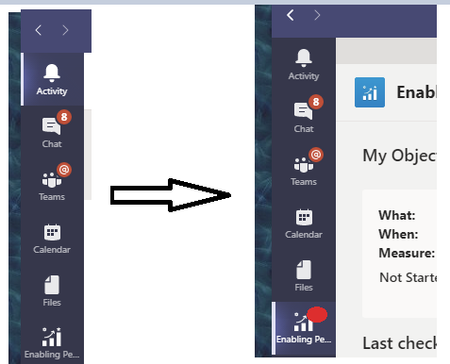
Hi We've made Personal app to track employee goals. Web app style. App is added to everyone's Teams app to left bar. We would like to attract person attention at some point when he is not using an app. Similar to chat/teams red dots. Scenario is the following: - employee entered his goals and due dates - employee not using the app - some server side scheduled task checks due dates and if needed - attracts attention of employee sending notification to teams - employee sees notification/red dot on app icon and clicks it to open app I'm not sure how we can implement that without adding tab with chat bot. Anyone?1.2KViews1like1CommentLive event resources - as a producer i cant see video and reports
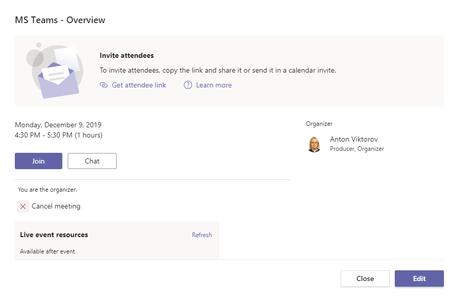
Hi. We are moving to Teams. Today I tried to make a Live Event and run it by myself with 100 people joined. Now I cant understand how can I download video to put it on Stream. 4 hours passed since meeting is over. Attendees can open link and see video, but I, as producer/organizer, can't find how to download it. Here is what I see in meeting options. Thank you2.6KViews1like2CommentsRe: This content cannot be displayed in a frame
Thanks Damien, this is not a mobile app for sure. Just sharepoint online with forms webapp + form which saves name. Not clear why webapp not picking up authorization somehow and redirects to login.microsoftonline.com which doesnt allow embedding. What we also noticed, that in Firefox it works okay, but Chrome/Safari give that error. Anton8.6KViews0likes1CommentRe: This content cannot be displayed in a frame
We have same issue. Marketing dept created form, embedded it on the sharepoint page and sent out to whole organization. As a result - half of organization can see form, half - not. Form is not anonymous, so it requires user to be logged in to record his name. This what we see in console: Refused to display <a href="https://login.microsoftonline.com/common/oauth2/authorize?client_id=00000002-0000-0ff1-ce00-000000000000&redirect_uri=https%3a%2f%2foutlook.office365.com%2fowa%2f&resource=00000002-0000-0ff1-ce00-000000000000&response_mode=form_post&response_type=code+id_token&scope=openid&msafed=0&client-request-id=xxx&protectedtoken=true&nonce=xxx&state=xxx’" target="_blank">https://login.microsoftonline.com/common/oauth2/authorize?client_id=00000002-0000-0ff1-ce00-000000000000&redirect_uri=https%3a%2f%2foutlook.office365.com%2fowa%2f&resource=00000002-0000-0ff1-ce00-000000000000&response_mode=form_post&response_type=code+id_token&scope=openid&msafed=0&client-request-id=xxx&protectedtoken=true&nonce=xxx&state=xxx’</a> in a frame because it set ‘X-Frame-Options’ to ‘deny’. Any ideas?8.6KViews0likes0Comments
Recent Blog Articles
No content to show