User Profile

SteveMorley
Brass Contributor
Joined Apr 03, 2019


User Widgets
Recent Discussions
Re: Using SharePoint List Fields in 2 List
Pn1995Another way, which I found by accident. Create a second list, called something meaningful. Create two columns "site name" and "location". Fill in the values with Quick Edit. Go back to your original list, and use lookup fields pointing to this new list. I like Site Columns a lot, but if there are going to lots of additions to the drop downs, you can assign someone else to update this list, and they don't have to be Site Owners.1.8KViews0likes3CommentsSharePoint calculated field equivalent for AVERAGEIF
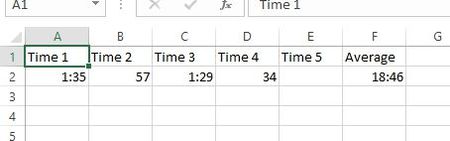
Hi everyone, I have list of columns 1-16 that I would like to average. Some of columns are empty and when I use the AVERAGE function it divides by 16 because of my formula. =AVERAGEA(VALUE([Repeat 1]),VALUE([Repeat 2])...,VALUE([Repeat 16])) I got a suggestion to try the ISERROR function to ignore the blanks/0's but it calculates the same way. =SUM( IF( ISNUMBER( VALUE(Column1) ), VALUE(Column1), 0 ), IF( ISNUMBER( VALUE(Column2) ), VALUE(Column2), 0 ), IF( ISNUMBER( VALUE(Column3) ), VALUE(Column3), 0 ), IF( ISNUMBER( VALUE(Column4) ), VALUE(Column4), 0 ), IF( ISNUMBER( VALUE(Column5) ), VALUE(Column5), 0 ), IF( ISNUMBER( VALUE(Column6) ), VALUE(Column6), 0 ) ) / ( IF( ISERROR(Column1 / 1), 0, 1 ) + IF( ISERROR(Column2 / 1), 0, 1 ) + IF( ISERROR(Column3 / 1), 0, 1 ) + IF( ISERROR(Column4 / 1), 0, 1 ) + IF( ISERROR(Column5 / 1), 0, 1 ) + IF( ISERROR(Column6 / 1), 0, 1 ) ) Any help would be appreciated.1.3KViews0likes0Comments
Recent Blog Articles
No content to show