User Profile

NastaraN
Copper Contributor
Joined Apr 12, 2023


User Widgets
Recent Discussions
Re: Effects of a term store item change
christinepayton Hi Christine & Shawn, I have a relevant question, please help me if you have the answer. I am trying to use the term store for the my "Project name", and some similar data. I use this metadata in most of the documents saved in my library. The plan is to modify the term store every year , when the new project updates and delete the closed projects from the list, archive the documents in another library. Will the documents still keep the "Project Name" which has been removed from the term store? Will the column still show the metadata for the searchability purposes? Thanks,1.6KViews0likes2CommentsEffective Strategies for Managing Metadata Across SharePoint Libraries when updating column value
Hello SharePoint Community, I've recently implemented SharePoint as our department's record management system for projects. Within our project SharePoint site, various documents and items in the site library and list contain essential metadata such as "project manager" and "project name." At the end of the year, we plan to archive these project documents and items in a designated archive library and list. As part of this process, we also intend to update the "project name" column with the list of projects for the upcoming year. To ensure we don't miss any crucial metadata information in the files during this transition, what considerations should we take into account? My main concern is that we won't be able to add to the "Project Name" column every year and need to keep it updated with the "Active Projects" list. So, what will happen to the archived project documents that contain the "project name" metadata when its value is not in the "Project Name" column anymore? What would be the best solution to prevent the loss of metadata in this archival process? Looking forward to your insights and expertise. Thank you!315Views0likes0CommentsNeed Help Adding Customized Footer and Revision Control to Microsoft Forms for Controlled Documents
Hello, I have a situation where only the blank form is considered a controlled document, not every response or filled form. Currently, I keep most of my controlled documents in SharePoint Document Management System (DMS), where I use settings like Document Number, version control, and adding the latest revision and revision date as a label in the footer, going through an approval flow. I also want to keep the form documents in the DMS, while also benefitting from the features of Microsoft Forms. To achieve this, I need a solution to address the following concerns: Adding a customized footer to my form. Finding a solution for revision control. Obtaining a copy of the form in PDF format or something similar that I can add to my DMS and include the metadata in my SharePoint DMS. I would appreciate any help you can provide with these concerns. Thank you.945Views0likes2CommentsRe: Default Value for SharePoint List based on the Folder Hierarchy
Hi David, Good catch. I meant at SharePoint List not site. I edited my question now. I work in the Project Management Office, I arranged folders for project based on the fiscal year, project name, and then 3 levels of folder hierarchy for project records like financial, communication, legal,... documents. In the my Document library, I set the "Column Default Value Setting" to auto populate the metadata based on the folder name, each column of metadata represents one of the folders hierarchy. I wanted to do the same arrangement for my list. The purpose of the list is to keep the picture, short notes for different projects and its main purpose is to provide regular update of the projects. I hope it is clear. Thanks, Nastaran3.7KViews0likes3CommentsDefault Value for SharePoint List based on the Folder Hierarchy
Hi, I arranged default value for my SharePoint Document Library based on the folder hierarchy, it means that my metadata will auto populate based on the folder that I generate the document in. I need the same setting for my SharePoint List. Is there any way to do that? Thanks, Nastaran4.1KViews0likes6CommentsRe: How to use Version in a calculated column?
I have four separate columns for: Document Number, document Title, Version and Approved Date. My file naming convention requires all of these columns together, so I want to generate a separate calculated column to concatenate all these 4 columns together. However Version and Approved date are not accessible for calculated column. I would appreciate it if you can help on resolving it. Thanks,4.2KViews0likes0CommentsRe: How to use Version in a calculated column?
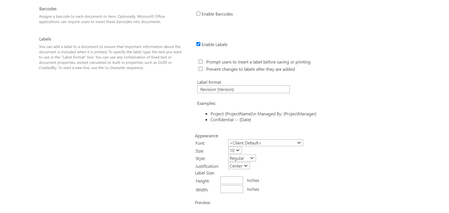
kalpeshvaghela Thanks for your help, appreciate it! It works and added as a separate column named Label. Still I cannot use "label" column which includes my Revision info, for a calculated column. Also in my file properties , the label shows like below for me. Is there anything that I need to change? Thanks, Nastaran4.5KViews0likes2CommentsRe: How to use Version in a calculated column?
Hi kalpeshvaghela , Thanks for your reply. I tried to follow the steps, however no column is added to my library. I tried to use it for version as an example. As I understand this method will add the version (or any other column) to the printed file. I am looking to copy it in a separate line, my intention is to use the version in my file name convention and this way I can use it in a calculated column which will be the file name. Thanks, Nastaran4.5KViews0likes4CommentsHow to use Version in a calculated column?
Hi, I want to use the version number in a calculated metadata column, however, it doesn’t show up in the list. I am trying to make a calculated column for the file name in SharePoint Document Library, to Concatenate “Document Number & Title & version & approved date”. I would appreciate if you could help on it. Thanks,Solved5.1KViews0likes6CommentsAuto-populate custom Word Properties to SharePoint Metadata
Hi, I added a Document Number as a custom property in my word file. I want to auto populate the Document Number in the SharePoint Properties when I uploaded a file. It is easily possible for my Document Title, since the title is a basic field in word properties also there is an existing columns in SharePoint for Title, but I couldn't auto populate my document Number. I would appreciate if anyone could help on it. Thanks, Nastaran676Views0likes0Comments

Recent Blog Articles
No content to show