User Profile

TheStig1989
Copper Contributor
Joined Mar 13, 2023


User Widgets
Recent Discussions
Hilarious word experience
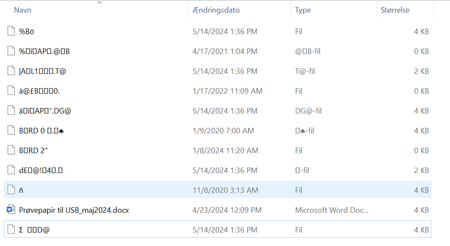
Hello Microsoft. I have a usb stick - and somehow the word on the usb stick, got corrupted. Look at this : The word document is corrupted - it brings up this error when im trying. The paper was supposed to be printed out, and giving to the teacher. I have tried multiple guides on how to helping it. But it seems most of them dont work, because the word document was saved on a usb stick. The best solutions I found was : https://answers.microsoft.com/en-us/msoffice/forum/all/corrupted-word-documents-from-editing-on-usb/6ff92864-f432-42eb-84ec-01ecbf4d048b But thats a solution requiring to send it to him. I have spent around 45 minutes now, because its exam paper - but i simply can not figure out how to save it. Also the anwers to the exam is around 22 to 24 kb, so it ain't much. I feel like all those weird "files" is my word document split up in multiple pieces. There are nothing I can do with those files. If you count them together its around 28 kb - so no doubt thats the originally file splitted to a million pieces. I also tried repairing online - but without success.476Views0likes1CommentOpening pdf in edge. It automatically save
Hello Community A lot of my coworkers open pdf's in microsoft edge. They use templates they open in edge, and use a touch screen to write stuff in it when they are teaching students. When you close it, it usually ask if you want to save the pdf or close without saving. However at one specific coworker, it automatically save the pdf. It does not ask if you want to save the PDF. What can I do? Fun fact: It says here : https://answers.microsoft.com/en-us/microsoftedge/forum/all/autosave-edits-to-pdf-in-edge/86f458b9-523b-4c3a-b9a4-edbcb7c1248a that there are no auto save. But my coworker prove this theory wrong. I already tried the following steps as writting in this guide : https://www.ihaveapc.com/2022/02/how-to-enable-edge-autosave-for-pdf-files/ I tried to reset everything in microsoft edge. I cant recreate his issue on my own PC. When I close edge, it just automatically close it without saving. I have to click save before it saves it. I have been searching for over 5 hours to find an answer. The most commen issue i meet is "How to Make Microsoft Edge Download PDFs and Not Open Them" which is not related to my issue.1.7KViews0likes0CommentsRe: Teams saying session expired
While i understand your reply, why would it do it when i turn on my pc, and instantly says session expired? 😞 It have never done it the last 2 years of me support this company. I wonder if there was any recent change to it from microsofts side. Yes I checked the sharepoint Administration. I found a guide that said : Login to SharePoint Online Admin Center Click on “Policies” >> Access Control >> Idle session Sign-out Turn-On the Idle session timeout and set other configuration parameters accordingly It is said to Off. Also followed a guide from learn.microsoft.com and it says : Turn on Idle session timeout You must be a member of the Global admin, Security admin, Application admin, or Cloud Application admin roles to see the idle session timeout setting. In the Microsoft 365 admin center, select Org Settings -> Security & privacy tab and select Idle session timeout. On the Idle Session Timeout select the toggle to turn it on. You can choose a default setting or choose your own custom time. It'll take a few minutes before idle session is turned on in your organization. It is also said to off. So non of that helped 😞 It also only happens in lesson plan. Not in any other files.5.1KViews0likes1CommentTeams saying session expired
Hi Forum I hope somebody can help me. We are an organisation which teaches people from foreign countries in danish. All of the teachers are using Microsoft 365 A3 for Faculty. They create classroms in teams, where they invite their students, so they can put up tasks, reminders ect. However the teachers and I have started recieve "your session have expired, you need to update the page to continue". It is only when we are in Lesson plan (sorry i do not know the correct term in english). You can see it in the picture above. "lektionsplan" 1) We are using Microsoft Teams Version 1.6.00.44.72 (64-bit). Last updated 13/3-2023. (yes I did try to update teams) 2) I tried to change timezone on sharepoint - to match our computers (+1 copenhagen). 3) I tried to remove all crendtials on windows, that had anything to do with microsoft 4) Logged in and out of my office, without it helping 5) Uninstalled and reinstalled the application 6) I also checked the Idle session Timeout - it is NOT enabled. 7) Also tried to go to the word document through the teams webapplication, where it also says "session expired" (picture to show where it is on a team site, but picture taken from sharepoint) So now im stuck. Any suggestions?5.8KViews0likes3Comments

Recent Blog Articles
No content to show