User Profile

SyntaxBearror
MCT
Joined Aug 11, 2018


User Widgets
Recent Discussions
Re: Outlook Not Syncing to Google
This particular error would suggest that Google has blocked the account for potentially malicious activity, so they would be the ones to resolve this particular error. Are you able to send from the gmail website? You may also want to check the activity on your account and change your password.760Views0likes0CommentsRe: Defender Exploit Guard and Application Guard
Before you embark on the journey with Application Guard and Exploit Guard, compare the existing security controls the customer may have with their existing security tools. Overlap can cause issues with performance or stop the tools from working properly all together. Generally, when employing any type of new security control, you will want to do a small test or pilot group for each department to know if it would benefit them. They may use certain applications, plugins, or features that would break when these rules are enforced. If during your test, you find it is beneficial and doesn't negatively impact the user, then expand from there. Also keep in mind any type of Allow / Block type functionality usually requires a high amount of initial setup and maintenance, which may not be financially viable for the customer. Exploit Guard is a more generalized protection feature that seeks to reduce the systems attack surface, and identify suspicious behavior. However, the settings may impact application functionality and compatibility if not properly configured. It's best to run the settings you want to try in Audit mode first, then see the results from there. You may find it works well, or that lots of customization will be needed. More details here: https://docs.microsoft.com/en-us/mem/configmgr/protect/deploy-use/create-deploy-exploit-guard-policy Application Guard on the other hand creates a sandbox around certain applications and limits how data can move in and out the sandboxes. In my experience, I found this functionality didn't work well for many use cases just because of how users work. So for this, it would be best for you to run a test scenario. Start with one setting at a time, and understand if it limits anything, or makes sense to configure. Under the Microsoft Docs for Application Guard you can find details on how to setup a test scenario. Make sure the clients systems meet the minimum requirements as well! https://docs.microsoft.com/en-us/windows/security/threat-protection/microsoft-defender-application-guard/md-app-guard-overview Hope this helps, and good luck!3.1KViews1like0CommentsContact Sync Option Missing After Recent Updates on Android Devices
Recently our Android users are reporting that they are unable to toggle "sync contacts" in Outlook mobile. The option appears on initial setup, but after "Device Administrator" turns on, the option is no longer listed. The same for sync calendar. Toggling the option for users to change the setting has no impact. Users don't see it. So, my option is only to force all users to sync contacts, or none. The same goes for calendar. If I attempt a managed device profile just to auto configure mail, but try and use the managed apps profile to configure sync options, there is no change. If I remove the managed apps profile for Outlook on the device, re-enroll the device, then contact and calendar sync work. Though, you will still be unable to toggle the setting as a user. Anyone else find the same issue?2.8KViews0likes0CommentsOutlook Mobile Limited Search Functionality
Our users have recently started complaining that in using the search functionality in Outlook Mobile, they are unable to get results that they would on the desktop app when it comes to contacts. Specifically if they are searching for a contact whose details would be in the company field, or the details fields, they get zero results in Outlook Mobile. It seems to only be searching the display name. I'm not entirely sure if this just started happening, or has always been a thing, but we're getting reports. It seems odd that the experience for search wouldn't work the same. Is there something we need to do on our end, or is this a limitation / issue with Outlook mobile?928Views0likes1CommentRe: From WFH WTF? to WFH FTW!
These are some good points! I find myself taking more breaks now that I am settling into WFH everyday, and I feel better overall. So maybe it's something I'm going to push for once "stay at home" orders lapse. I'd like to change to doing exercise or something different with my commute time I used to have. Just has to get warmer. Chicago keeps going 60 to 30 then back to 60. Eep! I suspect it may be easier to change routines after a period of time passes.3.1KViews1like0CommentsRe: sending payslips securely
dawnsnap You'll want to send these emails using the Azure Rights Management feature of your Microsoft 365 account to secure these emails. The way you are trying to encrypt now would require you to have a certificate for each user in order for them to be able to read the emails. Here are additional details on how this works: https://docs.microsoft.com/en-us/microsoft-365/compliance/email-encryption?view=o365-worldwide Do you know if you have access to this by chance?2KViews1like0CommentsSecuring Ourselves While Working From Home
As many of us transition to working from home for the first time, or for a prolonged time due to the COVID-19 epidemic, it can be easy to forget some of the basics when it comes to working from home. So I figured I'd write down some of them I had in mind. Feel free to contribute your thoughts or other idea's that can be added to this! For Everyone… Stay Vigilant. Scammers are doing what they can to try and trick us during these uncertain times. These scams can come through emails, through messages, or even mobile applications. So be sure to vet your incoming requests to make sure they are coming from legitimate senders and the request doesn't seem unusual. It never hurts to verify a request through other methods to be safe. As we increase in the use of teleworking tools, be sure to check any web addresses you type before browsing to them. Many web meeting and similar remote tools often have domain mis-spellings registered that could be malicious and if you aren't careful enough, you could get tricked. Help your IT department or provider by reporting malicious or suspicious emails so that it helps protect your organization. I know you may think "They have this, I don't need to report it" but that leads to these attacks being successful since IT isn't immediately aware of them to take action. It's always best to report, even if it's something we've seen before. For information regarding COVID-19, be sure to stick to sites like CDC.gov in the US or your countries official Disease / Health service, official news organizations, or your local health department. If you are looking for the infection map, be sure you're searching for the "John Hopkins COVID-19 Tracker" to avoid fake sites. Their official COVID-19 site is at https://coronavirus.jhu.edu/ . Unplug or block webcams when not in use. In case you may be doing work in less than usual attire, it's probably a good idea to have a blocker on your webcam so you don't accidently appear as many tools turn it on without notice. Another reason to do so is to avoid anyone malicious who may tap into your webcam to get information. Avoid overworking. You may be thinking, why is a security person talking about overworking? We know from a risk management standpoint that the longer someone works can lead to mistakes which can make themselves or their organizations vulnerable. It's also not good for physical or mental health. It can be far easier to work earlier and later without realizing it or to forget to take a break when working from home, so make sure you take breaks, and specify start / stop times if you can. Shore up your personal security. Use this time as an opportunity to change your passwords, update any security settings, and setting up 2FA on any accounts you don't have it on yet. If your employer offers 2FA functionality, enable it! Microsoft Authenticator can be a useful tool on your mobile device to register and maintain 2FA tokens, and it can be backed up to your OneDrive. Avoid untrusted networks or open networks. Be sure you are not performing sensitive work on an untrusted or open network such as the ones you find in coffee shops or the unsecured one from your neighbor. You never know who may be listening into that traffic. If you are working in public, on sensitive data, or sharing the same work area with someone else who may not work the same employer or job, then invest in a privacy screen. This helps avoid unintentional sharing of confidential or private information no matter where you are. Specifically for the IT Administrator or Security Engineer… Keep watch on your edge devices. We're talking your firewalls and routers. Depending on how your users are connecting, they can be putting pressure on the performance of your equipment, and all the extra connections may be drowning out your security tools. If your SIEM product limits you in events / sec, you may want to seek a different solution so you don't miss any malicious activity. If your equipment is running high on CPU or memory, you may want to determine if you can reduce the connection requirements until you can upgrade your gear. Review your remote access strategies. Users who are reliant on VPN or remote firewalls can take significant resources that you may not be able to support long term to maintain performance of your systems. Consider if some of your users can perform their work with limited access or able to connect for a few minutes each day versus a full day. As always, consider your security tools and ensure they can support being disconnected and still receive updates. Limiting those who have to be connected their entire work day can help reduce any performance impact but can also reduce your risk of malware propagation in cases where employees are connecting non-reviewed or unprotected devices. Consider the Queries. What I mean by this, is how is DNS being handled on your remote worker's devices? Whether they are using their own or a corporate device, if it does not auto-connect to VPN services, it may be a good idea to deploy new DNS settings to help avoid users accidently accessing malicious websites. There are both paid and free services that do this. Providers like Google DNS and Quad9 can provide some layer of protection. If you have a security solution that offers web filtering, use this as well for a more multi-layered approach to your protection. Jared Spataro, CVP for Microsoft 365 also recently wrote the Top 9 ways Microsoft IT is enabling remote work for its employees, which also has some good points, some of which align with what I mentioned. Check that out here: https://www.microsoft.com/en-us/microsoft-365/blog/2020/03/12/top-9-ways-microsoft-it-enabling-remote-work-employees/ Ann Johnson, CVP for the Cybersecurity Solutions Group in Microsoft also wrote some guidance for those who are CISOs or directors which I also recommend as great reading for senior IT level and directors: https://www.microsoft.com/security/blog/2020/03/12/support-working-from-home-securely/ So what are your thoughts? Anything you'd do different? Any security challenges you've found since increasing WFH as a frontline worker, knowledge worker, or IT professional? Sound off!2.7KViews6likes1CommentRe: Remote working and what it takes
Our organization tends to have an inconsistent policy around working from home that seems to be on a per-manager basis. We have a lot of managers who feel you have to dress a certain way or be present to be productive. They also are unfortunately often the ones who micromanage their teams. Meanwhile, others allow it, but the effort to include those WFH can be a challenge since you are not as visible and meetings often forget about those not there. These are some great tips overall. I think what I would include in that list is that leaders need to remain mindful that all of their team is included when some are in the office, and others are not and that decisions that were once group exercises don't accidently become silo's.6.4KViews2likes4CommentsKeeping Our Mental State Healthy in Remote Work Situations
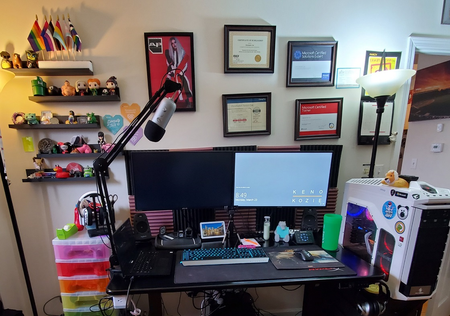
Working from home can definitely be a challenge for those of us used to social interaction around the office, reading body language to understand communication, or who suffer from depression or anxiety disorders. For me, I've done my best to make sure my desk space is setup to be ready for work and to keep clutter to a minimum. I still do my normal daily routine sans jumping on the train to get my brain prepped. I feel like I'm more productive given the ability to focus better without the distractions of an open workspaces, and I move around and take breaks more often which is better for overall health. I'm trying to increase my outside time as well to keep my mind more active and to just change scenery some. I do notice communication is still a challenge, especially when some are WFH and others aren't, and decisions seems to be made without bringing you into them which can feel a bit isolating and demotivating. For someone with anxiety disorder, it's great fuel for the panic that can brew. I've found myself leaning on my #textabletribe and social media friends more to keep more in perspective and try to avoid that spiral. What has everyone else's experience been, and any ways they've overcome their struggles in moving to a work from home structure?769Views1like1Comment
Recent Blog Articles
No content to show