User Profile

jams_k8
Copper Contributor
Joined Jan 12, 2023


User Widgets
Recent Discussions
Logic app boolean is being automatically set as True
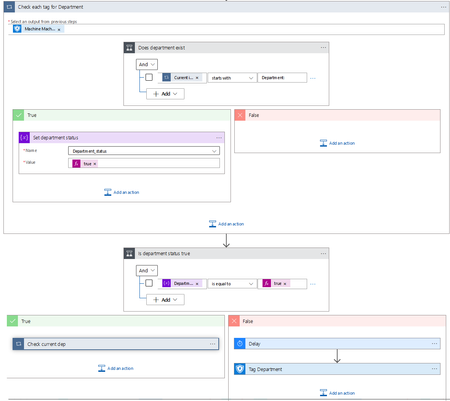
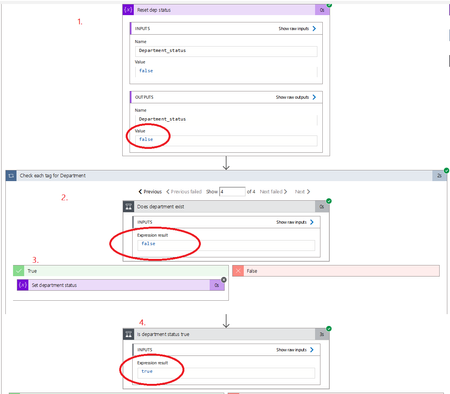
Hi, I am having a strange issue in my logic app and was wondering if anyone had any ideas about what is going on. The goal of my logic app is to add machine tags to our devices for Department, Subdepartment, and Role and in the step in the screenshot, I want to iterate through the current machine tags and check if it already has the tag in question and if it does, check if its up to date + update it and if it does not have the tag, add it. I have a boolean variable to determine if the tag is present or not and have it reset it to false by default for every iteration This is a condition that iterates through the tags and checks if it there is a tag that starts with "Department:" If the tag does, the status variable will be marked as true Lastly, based on the status, it will determine what tagging action to take. However, in step 2 and 3 the status never gets set to True, but says it is True in step 4 These are the current tags for the device in the run in the screenshot. Subdepartment and Role exist, but not Department.3.3KViews0likes3CommentsRe: KQL "not in watchlist" not working
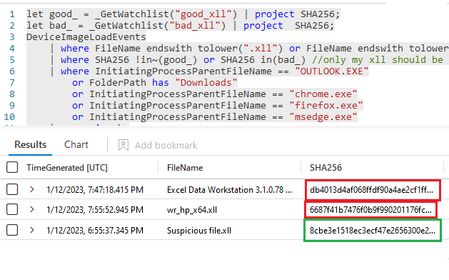
Clive_Watson Hi, I tried adding your suggestions but it is still displaying the items included in the watchlist. I've attached a screenshot of my actual query and the watchlist I am using and as you can see, the resulting SHA256s are exact matches to that of the workbook. Suspicious file.xll is my test file that is being properly reported, but I can't seem to figure out why the SHA256s in the workbook are still being displayed2.6KViews0likes0CommentsKQL "not in watchlist" not working
Hi, I am trying to create a query that will display SHA256 hashes of .XLL files that are known as malicious or unknown hashes, while ignoring known good hashes. I have created 2 watchlists, "good" and "bad" containing known good SHA256 hashes and known bad and my query uses the following logic: let good_ = _GetWatchlist("good_xll") | project SHA256; let bad_ = _GetWatchlist("bad_xll") | project SHA256; DeviceImageLoadEvents | where FileName endswith ".xll" | where SHA256 !in(good_) or SHA256 in(bad_) There should only be 1 result appearing because I created my own malicious test .xll file but instead, it shows up along with 1 or 2 other .xlls with hashes that are part of the "good" watchlist. I have tested various methods and the only thing that ended up working was to manually create a list of strings within the query like: where SHA256 !in("hash1", "hash2", "hash3", etc...) Thanks in advance and any suggestions of what I may be doing wrong?3KViews0likes2Comments
Recent Blog Articles
No content to show