playbooks
175 Topics
The Hidden Reason Your Sentinel Playbook Won't Show Up in Automation Rules (It's Not RBAC)
If a Logic App using the native Microsoft Sentinel incident trigger doesn't show up in the "Run playbook" picker of an Automation Rule — even though permissions, region, and connection are all correct — check the internal action name of the trigger in the JSON code view. If the Logic App was created while the Azure portal was set to a non-English language, the designer may generate a localized action name instead of the expected Microsoft_Sentinel_incident, and the playbook won't be picked up. Environment Microsoft Sentinel (Log Analytics workspace) Logic Apps (Consumption plan) Trigger: native Microsoft Sentinel connector, "Incident" trigger (/incident-creation path) Authentication: system-assigned Managed Identity Same subscription, resource group, and region as the Sentinel workspace Problem Two Logic Apps, both triggered by the native Microsoft Sentinel incident trigger, both using a system-assigned managed identity with the Microsoft Sentinel Responder role granted on the workspace. Same subscription, same resource group, same region. Only one of the two appeared in the "Run playbook" dropdown when configuring an Automation Rule in Sentinel. The other was simply absent — no error message, no warning, nothing in the run history to explain it. Investigation The usual suspects were checked and ruled out one by one: API connection health — one azuresentinel connection was indeed in an "Error" state, but it turned out not to be the one referenced by the affected trigger. Managed identity RBAC — the Microsoft Sentinel Responder role was correctly assigned to the Logic App's managed identity on the Sentinel workspace. User's own RBAC/PIM role — the Logic App Contributor role (required for the account configuring the Automation Rule to even see the resource) was active via PIM at the time of testing. Region/subscription/resource group — identical for both Logic Apps. Trigger type — both used the native "Incident in Microsoft Sentinel" trigger added through the visual designer, not a generic HTTP trigger or a deprecated connector. Every documented requirement was met. The playbook was still invisible. Root Cause Comparing the raw JSON (Logic app > Development tools > Code view) revealed the actual difference. Working Logic App (visible in the picker): "triggers": { "Microsoft_Sentinel_incident": { "type": "ApiConnectionWebhook", "inputs": { "body": { "callback_url": "@{listCallbackUrl()}" }, "path": "/incident-creation" } } } Broken Logic App (invisible in the picker): "triggers": { "Incident_dans_Microsoft_Sentinel": { "type": "ApiConnectionWebhook", "inputs": { "body": { "callback_url": "@listCallbackUrl()" }, "path": "/incident-creation" } } } The connector type and the path (/incident-creation) are identical. The one meaningful structural difference is the trigger's action name: Microsoft_Sentinel_incident versus Incident_dans_Microsoft_Sentinel. The second Logic App's trigger had been added while the Azure portal was set to French. The designer generated a localized action name instead of the canonical English one. Everything points to Sentinel's playbook discovery mechanism scanning Logic App definitions for that exact canonical action name (Microsoft_Sentinel_incident) to identify a resource as a valid Sentinel playbook — rather than relying solely on the connector type or the webhook path, as one would reasonably expect. Fix Renaming the trigger's action key in the JSON to the canonical name was enough: "triggers": { "Microsoft_Sentinel_incident": { ... } } No permission, connection, or region change was required — only this rename. Takeaways The Sentinel Automation Rule playbook picker appears to depend on the exact trigger action name, not just its type or functional behavior — a dependency that isn't documented anywhere in the official Microsoft docs as of this writing. The Azure portal's display language at the time a trigger is added has a direct impact on that Logic App's compatibility with Sentinel Automation Rules. A playbook can be fully functional (running without errors when triggered manually or through an older automation mechanism) while still being invisible in the newer Automation Rule selector — which makes this particular issue easy to miss, since nothing explicitly flags it. Recommendations Temporarily switch the Azure portal to English (Portal settings > Language and region) before adding a Sentinel trigger to a Logic App, if your team usually works in another language. If an existing Logic App won't show up despite an otherwise correct configuration, check the trigger's action name in the JSON code view first — it's a 30-second check that can save hours of RBAC/connection troubleshooting. Document this in your internal runbooks if your team works in a localized portal — this kind of detail is easy to lose and can cost significant troubleshooting time down the line. Has anyone else run into similar localization-related quirks in Sentinel or Logic Apps? Would be curious to hear about other cases in the comments.183Views0likes0CommentsThe Hidden Reason Your Sentinel Playbook Won't Show Up in Automation Rules (It's Not RBAC)
If a Logic App using the native Microsoft Sentinel incident trigger doesn't show up in the "Run playbook" picker of an Automation Rule — even though permissions, region, and connection are all correct — check the internal action name of the trigger in the JSON code view. If the Logic App was created while the Azure portal was set to a non-English language, the designer may generate a localized action name instead of the expected Microsoft_Sentinel_incident, and the playbook won't be picked up. Environment Microsoft Sentinel (Log Analytics workspace) Logic Apps (Consumption plan) Trigger: native Microsoft Sentinel connector, "Incident" trigger (/incident-creation path) Authentication: system-assigned Managed Identity Same subscription, resource group, and region as the Sentinel workspace Problem Two Logic Apps, both triggered by the native Microsoft Sentinel incident trigger, both using a system-assigned managed identity with the Microsoft Sentinel Responder role granted on the workspace. Same subscription, same resource group, same region. Only one of the two appeared in the "Run playbook" dropdown when configuring an Automation Rule in Sentinel. The other was simply absent — no error message, no warning, nothing in the run history to explain it. Investigation The usual suspects were checked and ruled out one by one: API connection health — one azuresentinel connection was indeed in an "Error" state, but it turned out not to be the one referenced by the affected trigger. Managed identity RBAC — the Microsoft Sentinel Responder role was correctly assigned to the Logic App's managed identity on the Sentinel workspace. User's own RBAC/PIM role — the Logic App Contributor role (required for the account configuring the Automation Rule to even see the resource) was active via PIM at the time of testing. Region/subscription/resource group — identical for both Logic Apps. Trigger type — both used the native "Incident in Microsoft Sentinel" trigger added through the visual designer, not a generic HTTP trigger or a deprecated connector. Every documented requirement was met. The playbook was still invisible. Root Cause Comparing the raw JSON (Logic app > Development tools > Code view) revealed the actual difference. Working Logic App (visible in the picker): "triggers": { "Microsoft_Sentinel_incident": { "type": "ApiConnectionWebhook", "inputs": { "body": { "callback_url": "@{listCallbackUrl()}" }, "path": "/incident-creation" } } } Broken Logic App (invisible in the picker): "triggers": { "Incident_dans_Microsoft_Sentinel": { "type": "ApiConnectionWebhook", "inputs": { "body": { "callback_url": "@listCallbackUrl()" }, "path": "/incident-creation" } } } The connector type and the path (/incident-creation) are200Views0likes0CommentsSentinel Foundry - MCP Server (Github Community Release)
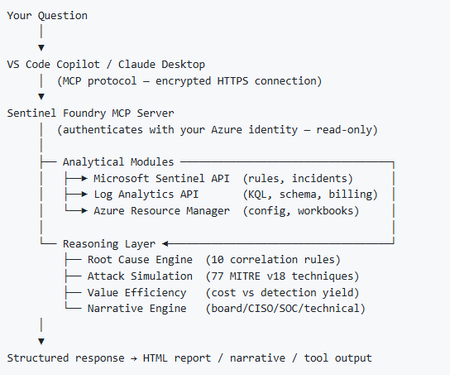
I’ve been cooking something that a lot of people in SOC have been struggling with — especially on the engineering side of Microsoft Sentinel. Thanks to the Microsoft Security team for shaping the capabilities of Sentinel even better with Sentinel Data Lake & Modern SecOps. Today’s the day I can finally share it. Note: This is not an official Microsoft product, but it is designed to make the Sentinel Build even better (complement) with much more intelligence. 🚀 Sentinel Foundry is now in public preview with 43 tools. (Sentinel Foundry - MCP Server) It’s an MCP server built to act like the brain of a strong Sentinel engineer — helping make building, improving, and operating Sentinel far more practical, faster, and honestly more enjoyable. For a lot of teams, the challenge is not understanding what Sentinel can do. The hard part is the engineering work around it: -> Deciding what data should actually be ingested -> Building a clean, scalable Sentinel foundation -> Writing useful detections instead of noisy ones -> Balancing security value with cost -> Turning ideas into deployable engineering outputs That is exactly why I built Sentinel Foundry to help communities grow stronger. It helps with the real engineering tasks behind Sentinel — from architecture thinking to detection design, deployment planning, ingestion strategy, automation ideas, and many of the workflows outlined in the GitHub project. How does it work? Here’s one of the flagship prompts I ran with it: “Give me a complete security posture report for our workspace. Score each pillar and tell me what to prioritise.” And within seconds, it produced a structured engineering blueprint that would normally take a lot longer to pull together manually. You can see the example prompts here in what it can do: https://github.com/prabhukiranveesam/Sentinel-Foundry#what-can-it-do I want building Sentinel to feel less like repetitive engineering overhead — and more like real security engineering that is fast, creative, and enjoyable. If you work with Sentinel as a SOC L2 analyst, engineer, detection engineer, consultant, or architect, I’d genuinely love for you to try it and tell me what you think. 🔗 Public Preview: https://github.com/prabhukiranveesam/Sentinel-Foundry This is just the start of an AI era — and I’m excited to keep shaping it with more powerful features over the coming days. This is very easy to set up and will be available to all of you at no cost during this month as part of the public preview, and your feedback is extremely valuable to shape this as a powerful solution.1.1KViews0likes2Comments
Pending Approval/Provisioning for Microsoft Defender XDR Lab/Trial Environment
Hello Microsoft Community Team, On June 26, 2026, our organization applied for a Microsoft 365 Developer Environment / Free Trial to support evaluation of the Microsoft Defender XDR Lab environment. To date, the environment has not been provisioned, and we have not received any status updates or confirmation. Impact: Current Status: We are currently utilizing our production environment to test project capabilities, which poses risks and limitations. Future Intent: Our organization plans to transition to a full, paid Business/Enterprise purchase immediately upon proving the platform’s benefits. Urgency: This delay is stalling our evaluation phase. We urgently need this environment onboarded and activated so we can proceed with deployment tests and subsequent procurement. Request: Please review the status of our registration and expedite the onboarding/provisioning of this developer environment. Thank you for your prompt assistance.379Views0likes1Comment
Sentinel SOAR migration to Unified portal: what broke? anyone evaluated the AI playbook generator?
I want to open a conversation specifically focused on the automation and SOAR side of the migration, because this is the area where problems most commonly surface after onboarding rather than during it. A quick orientation: the Unified portal introduces a specific constraint that catches teams by surprise. Alert-triggered automation for alerts created by Microsoft Defender XDR is not available in the Defender portal. The main use case for alert-triggered automation in this context is responding to alerts from analytics rules where incident creation is disabled. If you had alert-triggered playbooks firing on Defender XDR signals, those need to be re-evaluated against the incident trigger model. This is documented by Microsoft, but it is easy to miss in the volume of migration guidance. The automation failure mode I have seen most consistently: automation rules built around incident title conditions. The Defender XDR correlation engine assigns its own incident names, so any condition keyed to "if incident title contains X" stops matching without throwing an error. The rule is still active, the automation is still enabled, and everything looks fine until someone notices a class of enrichment or response has gone quiet. Microsoft's recommendation is to use Analytic rule name as the condition instead. There is also a firm near-term deadline separate from the March 2027 portal retirement: queries and automation need to be updated by July 1, 2026 for standardised account entity naming. The Name field will consistently hold only the UPN prefix from that date. Any automation comparing AccountName against a full UPN will break. A few specific questions for practitioners: When you onboarded or reviewed your automation post-onboarding, what broke silently versus what produced a visible error? Silent failures are the dangerous ones and sharing specific patterns would be genuinely useful for the community. Has anyone evaluated the new AI playbook generator in the Defender portal? It requires Security Copilot with SCUs available and generates Python-based automation coauthored with Cline in an embedded VS Code environment. Interested in real-world comparisons against existing Logic Apps workflows for the same use case. For those who have migrated alert-triggered playbooks to automation rule invocation: did you find edge cases in the migration, particularly around playbooks used by multiple analytics rules simultaneously? Writing this up as Part 4 of the migration series. Sharing the article link once it is live for anyone who wants the full detail.448Views0likes2CommentsWhat’s new in Microsoft Sentinel: RSAC 2026
Security is entering a new era, one defined by explosive data growth, increasingly sophisticated threats, and the rise of AI-enabled operations. To keep pace, security teams need an AI-powered approach to collect, reason over, and act on security data at scale. At RSA Conference 2026 (RSAC), we’re unveiling the next wave of Sentinel innovations designed to help organizations move faster, see deeper, and defend smarter with AI-ready tools. These updates include AI-driven playbooks that accelerate SOC automation, Granular Delegated Admin Privileges (GDAP) and granular role-based access controls (RBAC) that let you scale your SOC, accelerated data onboarding through new connectors, and data federation that enables analysis in place without duplication. Together, they give teams greater clarity, control, and speed. Come see us at RSAC to view these innovations in action. Hear from Sentinel leaders during our exclusive Microsoft Pre-Day, then visit Microsoft booth #5744 for demos, theater sessions, and conversations with Sentinel experts. Read on to explore what’s new. See you at RSAC! Sentinel feature innovations: Sentinel SIEM Sentinel data lake Sentinel graph Sentinel MCP Threat Intelligence Microsoft Security Store Sentinel promotions Sentinel SIEM Playbook generator [Now in public preview] The Sentinel playbook generator delivers a new era of automation capabilities. You can vibe code complex automations, integrate with different tools to ensure timely and compliant workflows throughout your SOC and feel confident in the results with built in testing and documentation. Customers and partners are already seeing benefit from this innovation. “The playbook generator gives security engineers the flexibility and speed of AI-assisted coding while delivering the deterministic outcomes that enterprise security operations require. It's the best of both worlds, and it lives natively in Defender where the engineers already work.” – Jaime Guimera Coll | Security and AI Architect | BlueVoyant Learn more about playbook generator. SIEM migration experience [General availability now] The Sentinel SIEM migration experience helps you plan and execute SIEM migrations through a guided, in-product workflow. You can upload Splunk or QRadar exports to generate recommendations for best‑fit Sentinel analytics rules and required data connectors, then assess migration scope, validate detection coverage, and migrate from Splunk or QRadar to Sentinel in phases while tracking progress. “The tool helps turn a Splunk to Sentinel migration into a practical decision process. It gives clear visibility into which detections are relevant, how they align to real security use cases, and where it makes sense to enable or prioritize coverage—especially with cost and data sources in mind.” – Deniz Mutlu | Director | Swiss Post Cybersecurity Ltd Learn more about SIEM migration experience. GDAP, unified RBAC, and row-level RBAC for Sentinel [Public preview, April 1] As Sentinel environments grow for enterprises, MSSPs, hyperscalers, and partners operating across shared or multiple environments, the challenge becomes managing access control efficiently and consistently at scale. Sentinel’s expanded permissions and access capabilities are designed to meet these needs. Granular Delegated Admin Privileges (GDAP) lets you streamline management across multiple governed tenants using your primary account, based on existing GDAP relationships. Unified RBAC allows you to opt in to managing permissions for Sentinel workspaces through a single pane of glass, configuring and enforcing access across Sentinel experiences in the analytics tier and data lake in the Defender portal. This simplifies administration and improves operational efficiency by reducing the number of permission models you need to manage. Row-level RBAC scoping within tables enables precise, scoped access to data in the Sentinel data lake. Multiple SOC teams can operate independently within a shared Sentinel environment, querying only the data they are authorized to see, without separating workspaces or introducing complex data flow changes. Consistent, reusable scope definitions ensure permissions are applied uniformly across tables and experiences, while maintaining strong security boundaries. To learn more, read our technical deep dives on RBAC and GDAP. Sentinel data lake Sentinel data federation [Public preview, April 1] Sentinel data federation lets you analyze security data in place without copying or duplicating your data. Powered by Microsoft Fabric, you can now federate data from Fabric, Azure Data Lake Storage (ADLS), and Azure Databricks into Sentinel data lake. Federated data appears alongside native Sentinel data, so you can use familiar tools like KQL hunting, notebooks, and custom graphs to correlate signals and investigate across your entire digital estate, all while preserving governance and compliance. You can start analyzing data in place and progressively ingest data into Sentinel for deeper security insights, advanced automation, and AI-powered defense at scale. You are billed only when you run analytics on federated data using existing Sentinel data lake query and advanced insights meters. les for unified investigation and hunting Sentinel cost estimation tool [Public Preview, April 9] The new Sentinel cost estimation tool offers all Microsoft customers and partners a guided, meter-level cost estimation experience that makes pricing transparent and predictable. A built-in three-year cost projection lets you model data growth and ramp-up over time, anticipate spend, and avoid surprises. Get transparent estimates into spend as you scale your security operations. All other customers can continue to use the Azure calculator for Sentinel pricing estimates. See the Sentinel pricing page for more information. Sentinel data connectors A365 connector [Public preview, May 5] Bring AI agent telemetry into the Sentinel data lake to investigate agent behavior, tool usage, prompts, reasoning and execution using hunting, graph, and MCP workflows. GitHub audit log connector using API polling [General availability, March 6] Ingest GitHub enterprise audit logs into Sentinel to monitor user and administrator activity, detect risky changes, and investigate security events across your development environment. Google Kubernetes Engine (GKE) connector [General availability, March 6] Collect Google Kubernetes Engine (GKE) audit and workload logs in Sentinel to monitor cluster activity, analyze workload behavior, and detect security threats across Kubernetes environments. Microsoft Entra and Azure Resource Graph (ARG) connector enhancements [Public preview, April 15] Enable new Entra assets (EntraDevices, EntraOrgContacts) and ARG assets (ARGRoleDefinitions) in existing asset connectors, expanding inventory coverage and powering richer, built‑in graph experiences for greater visibility. With over 350 Sentinel data connectors, customers achieve broad visibility into complex digital environments and can expand their security operations effectively. “Microsoft Sentinel data lake forms the core of our agentic SOC. By unifying large volumes of Microsoft and third-party data, enabling graph-based analysis, and supporting MCP-driven workflows, it allows us to investigate faster, at lower cost, and with greater confidence.” – Øyvind Bergerud | Head of Security Operations | Storebrand Learn more about Sentinel data connectors. Sentinel connector builder agent using Sentinel Visual Studio Code extension [Public preview, March 31] Build Sentinel data connectors in minutes instead of weeks using the AI‑assisted Connector Builder agent in Visual Studio Code. This low‑code experience guides developers and ISVs end-to-end, automatically generating schemas, deployment assets, connector UI, secure secret handling, and polling logic. Built‑in validation surfaces issues early, so you can validate event logs before deployment and ingestion. Example prompt in GitHub Copilot Chat: @sentinel-connector-builder Create a new connector for OpenAI audit logs using https://api.openai.com/v1/organization/audit_logs Get started with custom connectors and learn more in our blog. Data filtering and splitting [Public preview, March 30] As security teams ingest more data, the challenge shifts from scale to relevance. With filtering and splitting now built into the Defender portal, teams can shape data before it lands in Sentinel, without switching tools or managing custom JSON files. Define simple KQL‑based transformations directly in the UI to filter low‑value events and intelligently route data, making ingestion optimization faster, more intuitive, and easier to manage at scale. Filtering at ingest time allows you to remove low-value or benign events to reduce noise, cut unnecessary processing, and ensure that high-signal data drives detections and investigations. Splitting enables intelligent routing of data between the analytics tier and the data lake tier based on relevance and usage. Together, these two capabilities help you balance cost and performance while scaling data ingestion sustainably as your digital estate grows. Create workbook reports directly from the data lake [Public preview, April 1] Sentinel workbooks can now directly run on the data lake using KQL, enabling you to visualize and monitor security data straight from the data lake. By selecting the data lake as the workbook data source, you can now create trend analysis and executive reporting. Sentinel graph Custom graphs [Public preview, April 1] Custom graphs let you build tailored security graphs tuned to your unique security scenarios using data from Sentinel data lake as well as non-Microsoft sources. With custom graph, powered by Fabric, you can build, query, and visualize connected data, uncover hidden patterns and attack paths, and help surface risks that are hard to detect when data is analyzed in isolation. These graphs provide the knowledge context that enables AI-powered agent experiences to work more effectively, speeding investigations, revealing blast radius, and helping you move from noisy, disconnected alerts to confident decisions at scale. In the words of our preview customers: “We ingested our Databricks management-plane telemetry into the Sentinel data lake and built a custom security graph. Without writing a single detection rule, the graph surfaced unusual patterns of activity and overprivileged access that we escalated for investigation. We didn't know what we were looking for, the graph surfaced the risk for us by revealing anomalous activity patterns and unusual access combinations driven by relationships, not alerts.” – SVP, Security Solutions | Financial Services organization Custom graph API usage for creating graph and querying graph will be billed starting April 1, 2026, according to the Sentinel graph meter. Creating custom graph Using the Sentinel VS Code extension, you can generate graphs to validate hunting hypotheses, such as understanding attack paths and blast radius of a phishing campaign, reconstructing multi‑step attack chains, and identifying structurally unusual or high‑risk behavior, making it accessible to your team and AI agents. Once persisted via a schedule job, you can access these custom graphs from the ready-to-use section in the graph experience in the Defender portal. Graphs experience in the Microsoft Defender portal After creating your custom graphs, you can access them in the graphs section of the Defender portal under Sentinel. From there, you’ll be able to perform interactive graph-based investigations, such as using a graph built for phishing analysis to help you quickly evaluate the impact of a recent incident, profile the attacker, and trace its paths across Microsoft telemetry and third-party data. The new graph experience lets you run Graph Query Language (GQL) queries, view the graph schema, visualize the graph, view graph results in tabular format, and interactively travers the graph to the next hop with a simple click. Sentinel MCP Sentinel MCP entity analyzer [General availability, April 1] Entity analyzer provides reasoned, out-of-the-box risk assessments that help you quickly understand whether a URL or user identity represents potential malicious activity. The capability analyzes data across modalities including threat intelligence, prevalence, and organizational context to generate clear, explainable verdicts you can trust. Entity analyzer integrates easily with your agents through Sentinel MCP server connections to first-party and third-party AI runtime platforms, or with your SOAR workflows through Logic Apps. The entity analyzer is also a trusted foundation for the Defender Triage Agent and delivers more accurate alert classifications and deeper investigative reasoning. This removes the need to manually engineer evaluation logic and creates trust for analysts and AI agents to act with higher accuracy and confidence. Learn more about entity analyzer and in our blog here. Entity analyzer will be billed starting April 1, 2026, based on Security Compute Units (SCU) consumption. Learn more about MCP billing. Sentinel MCP graph tool collection [Public preview, May 20] Graph tool collection helps you visualize and explore relationships between identities and device assets, threats and activities signals ingested by data connectors and alerted by analytic rules. The tool provides a clear graph view that highlights dependencies and configuration gaps, which makes it easier to understand how content interacts across your environment. This helps security teams assess coverage, optimize content deployment, and identify areas that may need tuning or additional data sources, all from a single, interactive workspace. Executing graph queries via the MCP tools will trigger the graph meter. Claude MCP connector [Public preview, April 1] Anthropic Claude can connect to Sentinel through a custom MCP connector, giving you AI-assisted analysis across your Sentinel environment. Microsoft provides step-by-step guidance for configuring a custom connector in Claude that securely connects to a Sentinel MCP server. With this connection you can summarize incidents, investigate alerts, and reason over security signals while keeping data inside Microsoft's security boundary. Access to large language models (LLMs) is managed through Microsoft authentication and role-based controls, supporting faster triage and investigation workflows while maintaining compliance and visibility. Threat Intelligence CVEs of interest in the Threat Intelligence Briefing Agent [Public preview in April] The Threat Intelligence Briefing Agent delivers curated intelligence based on your organization’s configuration, preferences, and unique industry and geographic needs. CVEs of interest which highlights vulnerabilities actively discussed across the security landscape and assesses their potential impact on your environment, delivering more timely threat intelligence insights. The agent automatically incorporates internet exposure data powered by the Sentinel platform to surface threats targeting technologies exposed in your organization. Together, these enhancements help you focus faster on the threats that matter most, without manual investigation. Microsoft Security Store Security Store embedded in Entra [General availability, March 23] As identity environments grow more complex, teams need to move faster and extend Entra with trusted third‑party capabilities that address operational, compliance, and risk challenges. The Security Store embedded directly into Entra lets you discover and adopt Entra‑ready agents and solutions in your workflow. You can extend Entra with identity‑focused agents that surface privileged access risk, identity posture gaps, network access insights, and overall identity health, turning identity data into clear recommendations and reports teams can use immediately. You can also enhance Entra with Verified ID and External ID integrations that strengthen identity verification, streamline account recovery, and reduce fraud across workforce, consumer, and external identities. Security Store embedded in Microsoft Purview [General availability, March 31] Extending data security across the digital estate requires visibility and enforcement into new data sources and risk surfaces, often requiring a partnered approach. The Security Store embedded directly into Purview lets you discover and evaluate integrated solutions inside your data security workflows. Relevant partner capabilities surface alongside context, making it easier to strengthen data protection, address regulatory requirements, and respond to risk without disrupting existing processes. You can quickly assess which solutions align to data security scenarios, especially with respect to securing AI use, and how they can leverage established classifiers, policies, and investigation workflows in Purview. Keeping integration discovery in‑flow and purchases centralized through the Security Store means you move faster from evaluation to deployment, reducing friction and maintaining a secure, consistent transaction experience. Security Store Advisor [General availability, March 23] Security teams today face growing complexity and choice. Teams often know the security outcome they need, whether that's strengthening identity protection, improving ransomware resilience, or reducing insider risk, but lack a clear, efficient way to determine which solutions will help them get there. Security Store Advisor provides a guided, natural-language discovery experience that shifts security evaluation from product‑centric browsing to outcome‑driven decision‑making. You can describe your goal in plain language, and the Advisor surfaces the most relevant Microsoft and partner agents, solutions, and services available in the Security Store, without requiring deep product knowledge. This approach simplifies discovery, reduces time spent navigating catalogs and documentation, and helps you understand how individual capabilities fit together to deliver meaningful security outcomes. Sentinel promotions Extending signups for promotional 50 GB commitment tier [Through June 2026] The Sentinel promotional 50 GB commitment tier offers small and mid-sized organizations a cost-effective entry point into Sentinel. Sign up for the 50 GB commitment tier until June 30, 2026, and maintain the promotional rate until March 31, 2027. This promotion is available globally with regional variations in pricing and accessible through EA, CSP, and Direct channels. Visit the Sentinel pricing page for details and to get started. Sentinel RSAC 2026 sessions All week – Sentinel product demos, Microsoft Booth #5744 Mon Mar 23, 3:55 PM – RSAC 2026 main stage Keynote with CVP Vasu Jakkal [KEY-M10W] Ambient and autonomous security: Building trust in the agentic AI era Tue Mar 24, 10:30 AM – Live Q&A session, Microsoft booth #5744 and online Ask me anything with Microsoft Security SMEs and real practitioners Tue Mar 24, 11 AM – Sentinel data lake theater session, Microsoft booth #5744 From signals to insights: How Microsoft Sentinel data lake powers modern security operations Tue Mar 24, 2 PM – Sentinel SIEM theater session, Microsoft booth #5744 Vibe-coding SecOps automations with the Sentinel playbook generator Wed Mar 25, 12 PM – Executive event at Palace Hotel with Threat Protection GM Scott Woodgate The AI risk equation: Visibility, control, and threat acceleration Wed Mar 25, 1:30 PM – Sentinel graph theater session, Microsoft booth #5744 Bringing knowledge-driven context to security with Microsoft Sentinel graph Wed Mar 25, 5 PM – MISA theater session, Microsoft booth #5744 Cut SIEM costs without reducing protection: A Sentinel data lake case study Thu Mar 26, 1 PM – Security Store theater session, Microsoft booth #5744 What's next for Security Store: Expanding in portal and smarter discovery All week – 1:1 meetings with Microsoft security experts Meet with Microsoft Defender and Sentinel SIEM and Defender Security Operations Additional resources Sentinel data lake video playlist Explore the full capabilities of Sentinel data lake as a unified, AI-ready security platform that is deeply integrated into the Defender portal Sentinel data lake FAQ blog Get answers to many of the questions we’ve heard from our customers and partners on Sentinel data lake and billing AI‑powered SIEM migration experience ninja training Walk through the SIEM migration experience, see how it maps detections, surfaces connector requirements, and supports phased migration decisions SIEM migration experience documentation Learn how the SIEM migration experience analyzes your exports, maps detections and connectors, and recommends prioritized coverage Accenture collaborates with Microsoft to bring agentic security and business resilience to the front lines of cyber defense Stay connected Check back each month for the latest innovations, updates, and events to ensure you’re getting the most out of Sentinel. We’ll see you in the next edition!12KViews6likes0CommentsMicrosoft Sentinel MCP Entity Analyzer: Explainable risk analysis for URLs and identities
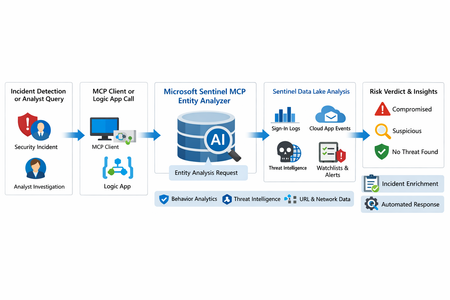
What makes this release important is not just that it adds another AI feature to Sentinel. It changes the implementation model for enrichment and triage. Instead of building and maintaining a chain of custom playbooks, KQL lookups, threat intel checks, and entity correlation logic, SOC teams can call a single analyzer that returns a reasoned verdict and supporting evidence. Microsoft positions the analyzer as available through Sentinel MCP server connections for agent platforms and through Logic Apps for SOAR workflows, which makes it useful both for interactive investigations and for automated response pipelines. Why this matters First, it formalizes Entity Analyzer as a production feature rather than a preview experiment. Second, it introduces a real cost model, which means organizations now need to govern usage instead of treating it as a free enrichment helper. Third, Microsoft’s documentation is now detailed enough to support repeatable implementation patterns, including prerequisites, limits, required tables, Logic Apps deployment, and cost behavior. From a SOC engineering perspective, Entity Analyzer is interesting because it focuses on explainability. Microsoft describes the feature as generating clear, explainable verdicts for URLs and user identities by analyzing multiple modalities, including threat intelligence, prevalence, and organizational context. That is a much stronger operational model than simple point-enrichment because it aims to return an assessment that analysts can act on, not just more raw evidence What Entity Analyzer actually does The Entity Analyzer tools are described as AI-powered tools that analyze data in the Microsoft Sentinel data lake and provide a verdict plus detailed insights on URLs, domains, and user entities. Microsoft explicitly says these tools help eliminate the need for manual data collection and complex integrations usually required for investigation and enrichment hat positioning is important. In practice, many SOC teams have built enrichment playbooks that fetch sign-in history, query TI feeds, inspect click data, read watchlists, and collect relevant alerts. Those workflows work, but they create maintenance overhead and produce inconsistent analyst experiences. Entity Analyzer centralizes that reasoning layer. For user entities, Microsoft’s preview architecture explains that the analyzer retrieves sign-in logs, security alerts, behavior analytics, cloud app events, identity information, and Microsoft Threat Intelligence, then correlates those signals and applies AI-based reasoning to produce a verdict. Microsoft lists verdict examples such as Compromised, Suspicious activity found, and No evidence of compromise, and also warns that AI-generated content may be incorrect and should be checked for accuracy. That warning matters. The right way to think about Entity Analyzer is not “automatic truth,” but “high-value, explainable triage acceleration.” It should reduce analyst effort and improve consistency, while still fitting into human review and response policy. Under the hood: the implementation model Technically, Entity Analyzer is delivered through the Microsoft Sentinel MCP data exploration tool collection. Microsoft documents that entity analysis is asynchronous: you start analysis, receive an identifier, and then poll for results. The docs note that analysis may take a few minutes and that the retrieval step may need to be run more than once if the internal timeout is not enough for long operations. That design has two immediate implications for implementers. First, this is not a lightweight synchronous enrichment call you should drop carelessly into every automation branch. Second, any production workflow should include retry logic, timeouts, and concurrency controls. If you ignore that, you will create fragile playbooks and unnecessary SCU burn. The supported access path for the data exploration collection requires Microsoft Sentinel data lake and one of the supported MCP-capable platforms. Microsoft also states that access to the tools is supported for identities with at least Security Administrator, Security Operator, or Security Reader. The data exploration collection is hosted at the Sentinel MCP endpoint, and the same documentation notes additional Entity Analyzer roles related to Security Copilot usage. The prerequisite many teams will miss The most important prerequisite is easy to overlook: Microsoft Sentinel data lake is required. This is more than a licensing footnote. It directly affects data quality, analyzer usefulness, and rollout success. If your organization has not onboarded the right tables into the data lake, Entity Analyzer will either fail or return reduced-confidence output. For user analysis, the following tables are required to ensure accuracy: AlertEvidence, SigninLogs, CloudAppEvents, and IdentityInfo. also notes that IdentityInfo depends on Defender for Identity, Defender for Cloud Apps, or Defender for Endpoint P2 licensing. The analyzer works best with AADNonInteractiveUserSignInLogs and BehaviorAnalytics as well. For URL analysis, the analyzer works best with EmailUrlInfo, UrlClickEvents, ThreatIntelIndicators, Watchlist, and DeviceNetworkEvents. If those tables are missing, the analyzer returns a disclaimer identifying the missing sources A practical architecture view An incident, hunting workflow, or analyst identifies a high-interest URL or user. A Sentinel MCP client or Logic App calls Entity Analyzer. Entity Analyzer queries relevant Sentinel data lake sources and correlates the findings. AI reasoning produces a verdict, evidence narrative, and recommendations. The result is returned to the analyst, incident record, or automation workflow for next-step action. This model is especially valuable because it collapses a multi-query, multi-tool investigation pattern into a single explainable decisioning step. Where it fits in real Sentinel operations Entity Analyzer is not a replacement for analytics rules, UEBA, or threat intelligence. It is a force multiplier for them. For identity triage, it fits naturally after incidents triggered by sign-in anomaly detections, UEBA signals, or Defender alerts because it already consumes sign-in logs, cloud app events, and behavior analytics as core evidence sources. For URL triage, it complements phishing and click-investigation workflows because it uses TI, URL activity, watchlists, and device/network context. Implementation path 1: MCP clients and security agents Microsoft states that Entity Analyzer integrates with agents through Sentinel MCP server connections to first-party and third-party AI runtime platforms. In practice, this makes it attractive for analyst copilots, engineering-side investigation agents, and guided triage experiences The benefit of this model is speed. A security engineer or analyst can invoke the analyzer directly from an MCP-capable client without building a custom orchestration layer. The tradeoff is governance: once you make the tool widely accessible, you need a clear policy for who can run it, when it should be used, and how results are validated before action is taken. Implementation path 2: Logic Apps and SOAR playbooks For SOC teams, Logic Apps is likely the most immediately useful deployment model. Microsoft documents an entity analyzer action inside the Microsoft Sentinel MCP tools connector and provides the required parameters for adding it to an existing logic app. These include: Workspace ID Look Back Days Properties payload for either URL or User The documented payloads are straightforward: { "entityType": "Url", "url": "[URL]" } And { "entityType": "User", "userId": "[Microsoft Entra object ID or User Principal Name]" } Also states that the connector supports Microsoft Entra ID, service principals, and managed identities, and that the Logic App identity requires Security Reader to operate. This makes playbook integration a strong pattern for incident enrichment. A high-severity incident can trigger a playbook, extract entities, invoke Entity Analyzer, and post the verdict back to the incident as a comment or decision artifact. The concurrency lesson most people will learn the hard way Unusually direct guidance on concurrency: to avoid timeouts and threshold issues, turn on Concurrency control in Logic Apps loops and start with a degree of parallelism of . The data exploration doc repeats the same guidance, stating that running multiple instances at once can increase latency and recommending starting with a maximum of five concurrent analyses. This is a strong indicator that the correct implementation pattern is selective analysis, not blanket analysis. Do not analyze every entity in every incident. Analyze the entities that matter most: external URLs in phishing or delivery chains accounts tied to high-confidence alerts entities associated with high-severity or high-impact incidents suspicious users with multiple correlated signals That keeps latency, quota pressure, and SCU consumption under control. KQL still matters Entity Analyzer does not eliminate KQL. It changes where KQL adds value. Before running the analyzer, KQL is still useful for scoping and selecting the right entities. After the analyzer returns, KQL is useful for validation, deeper hunting, and building custom evidence views around the analyzer’s verdict. For example, a simple sign-in baseline for a target user: let TargetUpn = "email address removed for privacy reasons"; SigninLogs | where TimeGenerated between (ago(7d) .. now()) | where UserPrincipalName == TargetUpn | summarize Total=count(), Failures=countif(ResultType != "0"), Successes=countif(ResultType == "0"), DistinctIPs=dcount(IPAddress), Apps=make_set(AppDisplayName, 20) by bin(TimeGenerated, 1d) | order by TimeGenerated desc And a lightweight URL prevalence check: let TargetUrl = "omicron-obl.com"; UrlClickEvents | where TimeGenerated between (ago(7d) .. now()) | search TargetUrl | take 50 Cost, billing, and governance GA is where technical excitement meets budget reality. Microsoft’s Sentinel billing documentation says there is no extra cost for the MCP server interface itself. However, for Entity Analyzer, customers are charged for the SCUs used for AI reasoning and also for the KQL queries executed against the Microsoft Sentinel data lake. Microsoft further states that existing Security Copilot entitlements apply The April 2026 “What’s new” entry also explicitly says that starting April 1, 2026, customers are charged for the SCUs required when using Entity Analyzer. That means every rollout should include a governance plan: define who can invoke the analyzer decide when playbooks are allowed to call it monitor SCU consumption limit unnecessary repeat runs preserve results in incident records so you do not rerun the same analysis within a short period Microsoft’s MCP billing documentation also defines service limits: 200 total runs per hour, 500 total runs per day, and around 15 concurrent runs every five minutes, with analysis results available for one hour. Those are not just product limits. They are design requirements. Limitations you should state clearly The analyze_user_entity supports a maximum time window of seven days and only works for users with a Microsoft Entra object ID. On-premises Active Directory-only users are not supported for user analysis. Microsoft also says Entity Analyzer results expire after one hour and that the tool collection currently supports English prompts only. Recommended rollout pattern If I were implementing this in a production SOC, I would phase it like this: Start with a narrow set of high-value use cases, such as suspicious user identities and phishing-related URLs. Confirm that the required tables are present in the data lake. Deploy a Logic App enrichment pattern for incident-triggered analysis. Add concurrency control and retry logic. Persist returned verdicts into incident comments or case notes. Then review SCU usage and analyst value before expanding coverage.1.3KViews8likes0CommentsRSAC 2026: New Microsoft Sentinel Connectors Announcement
Microsoft Sentinel helps organizations detect, investigate, and respond to security threats across increasingly complex environments. With the rollout of the Microsoft Sentinel data lake in the fall, and the App Assure-backed Sentinel promise that supports it, customers now have access to long-term, cost-effective storage for security telemetry, creating a solid foundation for emerging Agentic AI experiences. Since our last announcement at Ignite 2025, the Microsoft Sentinel connector ecosystem has expanded rapidly, reflecting continued investment from software development partners building for our shared customers. These connectors bring diverse security signals together, enabling correlation at scale and delivering richer investigation context across the Sentinel platform. Below is a snapshot of Microsoft Sentinel connectors newly available or recently enhanced since our last announcement, highlighting the breadth of partner solutions contributing data into, and extending the value of, the Microsoft Sentinel ecosystem. New and notable integrations Acronis Cyber Protect Cloud Acronis Cyber Protect Cloud integrates with Microsoft Sentinel to bring data protection and security telemetry into a centralized SOC view. The connector streams alerts, events, and activity data - spanning backup, endpoint protection, and workload security - into Microsoft Sentinel for correlation with other signals. This integration helps security teams investigate ransomware and data-centric threats more effectively, leverage built-in hunting queries and detection rules, and improve visibility across managed environments without adding operational complexity. Anvilogic Anvilogic integrates with Microsoft Sentinel to help security teams operationalize detection engineering at scale. The connector streams Anvilogic alerts into Microsoft Sentinel, giving SOC analysts centralized visibility into high-fidelity detections and faster context for investigation and triage. By unifying detection workflows, reducing alert noise, and improving prioritization, this integration supports more efficient threat detection and response while helping teams extend coverage across evolving attack techniques. BigID BigID integrates with Microsoft Sentinel to extend data security posture management (DSPM) insights into security operations workflows. The solution brings visibility into sensitive, regulated, and critical data across cloud, SaaS, and on‑premises environments, helping security teams understand where high‑risk data resides and how it may be exposed. By incorporating data‑centric risk context into Sentinel, this integration supports more informed investigation and prioritization, enabling organizations to reduce data‑related risk and align security operations with data protection and compliance objectives. Commvault Cloud Commvault Cloud integrates with Microsoft Sentinel to bring data protection and cyber‑resilience telemetry into security operations workflows. The connector ingests security‑relevant signals from Commvault Cloud—such as backup anomalies, malware and ransomware indicators, and other threat‑related events—into Sentinel, enabling centralized detection, investigation, and automated response. By correlating backup intelligence with broader Sentinel telemetry, this integration helps security teams reduce blind spots, validate the scope of incidents, and improve coordination between security and recovery operations. CyberArk Audit CyberArk Audit integrates with Microsoft Sentinel to centralize visibility into privileged identity and access activity. By streaming detailed audit logs - covering system events, user actions, and administrative activity - into Microsoft Sentinel, security teams can correlate identity-driven risks with broader security telemetry. This integration supports faster investigations, improved monitoring of privileged access, and more effective incident response through automated workflows and enriched context for SOC analysts. Cyera Cyera integrates with Microsoft Sentinel to extend AI-native data security posture management into security operations. The connector brings Cyera’s data context and actionable intelligence across multi-cloud, on-premises, and SaaS environments into Microsoft Sentinel, helping teams understand where sensitive data resides and how it is accessed, exposed, and used. Built on Sentinel’s modern framework, the integration feeds context-rich data risk signals into the Sentinel data lake, enabling more informed threat hunting, automation, and decision-making around data, user, and AI-related risk. TacitRed CrowdStrike IOC Automation Data443 TacitRed CS IOC Automation integrates with Microsoft Sentinel to streamline the operationalization of compromised credential intelligence. The solution uses Sentinel playbooks to automatically push TacitRed indicators of compromise into CrowdStrike via Sentinel playbooks, helping security teams turn identity-based threat intelligence into action. By automating IOC handling and reducing manual effort, this integration supports faster response to credential exposure and strengthens protection against account-driven attacks across the environment. TacitRed SentinelOne IOC Automation Data443 TacitRed SentinelOne IOC Automation integrates with Microsoft Sentinel to help operationalize identity-focused threat intelligence at the endpoint layer. The solution uses Sentinel playbooks to automatically consume TacitRed indicators and push curated indicators into SentinelOne via Sentinel playbooks and API-based enforcement, enabling faster enforcement of high-risk IOCs without manual handling. By automating the flow of compromised credential intelligence from Sentinel into EDR, this integration supports quicker response to identity-driven attacks and improves coordination between threat intelligence and endpoint protection workflows. TacitRed Threat Intelligence Data443 TacitRed Threat Intelligence integrates with Microsoft Sentinel to provide enhanced visibility into identity-based risks, including compromised credentials and high-risk user exposure. The solution ingests curated TacitRed intelligence directly into Sentinel, enriching incidents with context that helps SOC teams identify credential-driven threats earlier in the attack lifecycle. With built-in analytics, workbooks, and hunting queries, this integration supports proactive identity threat detection, faster triage, and more informed response across the SOC. Cyren Threat Intelligence Cyren Threat Intelligence integrates with Microsoft Sentinel to enhance detection of network-based threats using curated IP reputation and malware URL intelligence. The connector ingests Cyren threat feeds into Sentinel using the Codeless Connector Framework (CCF), transforming raw indicators into actionable insights, dashboards, and enriched investigations. By adding context to suspicious traffic and phishing infrastructure, this integration helps SOC teams improve alert accuracy, accelerate triage, and make more confident response decisions across their environments. TacitRed Defender Threat Intelligence Data443 TacitRed Defender Threat Intelligence integrates with Microsoft Sentinel to surface early indicators of credential exposure and identity-driven risk. The solution automatically ingests compromised credential intelligence from TacitRed into Sentinel and can support synchronization of validated indicators with Microsoft Defender Threat Intelligence through Sentinel workflows, helping SOC teams detect account compromise before abuse occurs. By enriching Sentinel incidents with actionable identity context, this integration supports faster triage, proactive remediation, and stronger protection against credential-based attacks. Datawiza Access Proxy (DAP) Datawiza Access Proxy integrates with Microsoft Sentinel to provide centralized visibility into application access and authentication activity. By streaming access and MFA logs from Datawiza into Sentinel, security teams can correlate identity and session-level events with broader security telemetry. This integration supports detection of anomalous access patterns, faster investigation through session traceability, and more effective response using Sentinel automation, helping organizations strengthen Zero Trust controls and meet auditing and compliance requirements. Endace Endace integrates with Microsoft Sentinel to provide deep network visibility by providing always-on, packet-level evidence. The connector enables one-click pivoting from Sentinel alerts directly to recorded packet data captured by EndaceProbes. This helps SOC and NetOps teams reconstruct events and validate threats with confidence. By combining Sentinel’s AI-driven analytics with Endace’s always-on, full-packet capture across on-premises, hybrid, and cloud environments, this integration supports faster investigations, improved forensic accuracy, and more decisive incident response. Feedly Feedly integrates with Microsoft Sentinel to ingest curated threat intelligence directly into security operations workflows. The connector automatically imports Indicators of Compromise (IoCs) from Feedly Team Boards and folders into Sentinel, enriching detections and investigations with context from the original intelligence articles. By bringing analyst‑curated threat intelligence into Sentinel in a structured, automated way, this integration helps security teams stay current on emerging threats and reduce the manual effort required to operationalize external intelligence. Gigamon Gigamon integrates with Microsoft Sentinel through a new connector that provides access to Gigamon Application Metadata Intelligence (AMI), delivering high-fidelity network-derived telemetry with rich application metadata from inspected traffic directly into Sentinel. This added context helps security teams detect suspicious activity, encrypted threats, and lateral movement faster and with greater precision. By enriching analytics without requiring full packet ingestion, organizations can reduce noise, manage SIEM costs, and extend visibility across hybrid cloud infrastructure. Halcyon Halcyon integrates with Microsoft Sentinel to provide purpose-built ransomware detection and automated containment across the Microsoft security ecosystem. The connector surfaces Halcyon ransomware alerts directly within Sentinel, enabling SOC teams to correlate ransomware behavior with Microsoft Defender and broader Microsoft telemetry. By supporting Sentinel analytics and automation workflows, this integration helps organizations detect ransomware earlier, investigate faster using native Sentinel tools, and isolate affected endpoints to prevent lateral spread and reinfection. Illumio The Illumio platform identifies and contains threats across hybrid multi-cloud environments. By integrating AI-driven insights with Microsoft Sentinel and Microsoft Graph, Illumio Insights enables SOC analysts to visualize attack paths, prioritize high-risk activity, and investigate threats with greater precision. Illumio Segmentation secures critical assets, workloads, and devices and then publishes segmentation policy back into Microsoft Sentinel to ensure compliance monitoring. Joe Sandbox Joe Sandbox integrates with Microsoft Sentinel to enrich incidents with dynamic malware and URL analysis. The connector ingests Joe Sandbox threat intelligence and automatically detonates suspicious files and URLs associated with Sentinel incidents, returning behavioral and contextual analysis results directly into investigation workflows. By adding sandbox-driven insights to indicators, alerts, and incident comments, this integration helps SOC teams validate threats faster, reduce false positives, and improve response decisions using deeper visibility into malicious behavior. Keeper Security The Keeper Security integration with Microsoft Sentinel brings advanced password and secrets management telemetry into your SIEM environment. By streaming audit logs and privileged access events from Keeper into Sentinel, security teams gain centralized visibility into credential usage and potential misuse. The connector supports custom queries and automated playbooks, helping organizations accelerate investigations, enforce Zero Trust principles, and strengthen identity security across hybrid environments. Lookout Mobile Threat Defense (MTD) Lookout Mobile Threat Defense integrates with Microsoft Sentinel to extend SOC visibility to mobile endpoints across Android, iOS, and Chrome OS. The connector streams device, threat, and audit telemetry from Lookout into Sentinel, enabling security teams to correlate mobile risk signals such as phishing, malicious apps, and device compromise, with broader enterprise security data. By incorporating mobile threat intelligence into Sentinel analytics, dashboards, and alerts, this integration helps organizations detect mobile driven attacks earlier and strengthen protection for an increasingly mobile workforce. Miro Miro integrates with Microsoft Sentinel to provide centralized visibility into collaboration activity across Miro workspaces. The connector ingests organization-wide audit logs and content activity logs into Sentinel, enabling security teams to monitor authentication events, administrative actions, and content changes alongside other enterprise signals. By bringing Miro collaboration telemetry into Sentinel analytics and dashboards, this integration helps organizations detect suspicious access patterns, support compliance and eDiscovery needs, and maintain stronger oversight of collaborative environments without disrupting productivity. Obsidian Activity Threat The Obsidian Threat and Activity Feed for Microsoft Sentinel delivers deep visibility into SaaS and AI applications, helping security teams detect account compromise and insider threats. By streaming user behavior and configuration data into Sentinel, organizations can correlate application risks with enterprise telemetry for faster investigations. Prebuilt analytics and dashboards enable proactive monitoring, while automated playbooks simplify response workflows, strengthening security posture across critical cloud apps. OneTrust for Purview DSPM OneTrust integrates with Microsoft Sentinel to bring privacy, compliance, and data governance signals into security operations workflows. The connector enriches Sentinel with privacy relevant events and risk indicators from OneTrust, helping organizations detect sensitive data exposure, oversharing, and compliance risks across cloud and non-Microsoft data sources. By unifying privacy intelligence with Sentinel analytics and automation, this integration enables security and privacy teams to respond more quickly to data risk events and support responsible data use and AI-ready governance. Pathlock Pathlock integrates with Microsoft Sentinel to bring SAP-specific threat detection and response signals into centralized security operations. The connector forwards security-relevant SAP events into Sentinel, enabling SOC teams to correlate SAP activity with broader enterprise telemetry and investigate threats using familiar SIEM workflows. By enriching Sentinel with SAP security context and focused detection logic, this integration helps organizations improve visibility into SAP landscapes, reduce noise, and accelerate detection and response for risks affecting critical business systems. Quokka Q-scout Quokka Q-scout integrates with Microsoft Sentinel to centralize mobile application risk intelligence across Microsoft Intune-managed devices. The connector automatically ingests app inventories from Intune, analyzes them using Quokka’s mobile app vetting engines, and streams security, privacy, and compliance risk findings into Sentinel. By surfacing app-level risks through Sentinel analytics and alerts, this integration helps security teams identify malicious or high-risk mobile apps, prioritize remediation, and strengthen mobile security posture without deploying agents or disrupting users. Semperis Lightning Semperis Lightning integrates with Microsoft Sentinel to deliver deep visibility into identity‑centric risk across Active Directory and Microsoft Entra environments. The connector ingests identity security telemetry such as indicators of exposure, Tier 0 assets, and attack path insights into Sentinel, enabling security teams to correlate identity risks with broader security signals. By bringing rich identity context into Sentinel analytics, hunting, and investigations, this integration helps organizations detect, prioritize, and respond to identity‑driven attacks more effectively across hybrid identity infrastructures. Synqly Synqly integrates with Microsoft Sentinel to simplify and scale security integrations through a unified API approach. The connector enables organizations and security vendors to establish a bi‑directional connection with Sentinel without relying on brittle, point‑to‑point integrations. By abstracting common integration challenges such as authentication handling, retries, and schema changes, Synqly helps teams orchestrate security data flows into and out of Sentinel more reliably, supporting faster onboarding of new data sources and more maintainable integrations at scale. Versasec vSEC:CMS Versasec vSEC:CMS integrates with Microsoft Sentinel to provide centralized visibility into credential lifecycle and system health events. The connector securely streams vSEC:CMS and vSEC:CLOUD alerts and status data into Sentinel using the Codeless Connector Framework (CCF), transforming credential management activity into correlation-ready security signals. By bringing smart card, token, and passkey management telemetry into Sentinel, this integration helps security teams monitor authentication infrastructure health, investigate credential-related incidents, and unify identity security operations within their SIEM workflows. VirtualMetric DataStream VirtualMetric DataStream integrates with Microsoft Sentinel to optimize how security telemetry is collected, normalized, and routed across the Microsoft security ecosystem. Acting as a high-performance telemetry pipeline, DataStream intelligently filters and enriches logs, sending high-value security data to Sentinel while routing less-critical data to Sentinel data lake or Azure Blob Storage for cost-effective retention. By reducing noise upstream and standardizing logs to Sentinel ready schemas, this integration helps organizations control ingestion costs, improve detection quality, and streamline threat hunting and compliance workflows. VMRay VMRay integrates with Microsoft Sentinel to enrich SIEM and SOAR workflows with automated sandbox analysis and high-fidelity, behavior-based threat intelligence. The connector enables suspicious files and phishing URLs to be submitted directly from Sentinel to VMRay for dynamic analysis, while validated, high-confidence indicators of compromise (IOCs) are streamed back into Sentinel’s Threat Intelligence repository for correlation and detection. By adding detailed attack-chain visibility and enriched incident context, this integration helps SOC teams reduce investigation time, improve detection accuracy, and strengthen automated response workflows across Sentinel environments. XBOW XBOW integrates with Microsoft Sentinel to bring autonomous penetration testing insights directly into security operations workflows. The connector ingests automated penetration test findings from the XBOW platform into Sentinel, enabling security teams to analyze validated exploit activity alongside alerts, incidents, and other security telemetry. By correlating offensive testing results with Sentinel detections, this integration helps organizations identify monitoring gaps, validate detection coverage, and strengthen defensive controls using real‑world, continuously generated attack evidence. Zero Networks Segment Audit Zero Networks Segment integrates with Microsoft Sentinel to provide visibility into micro-segmentation and access-control activity across the network. The connector can collect audit logs or activities from Zero Networks Segment, enabling security teams to monitor policy changes, administrative actions, and access events related to MFA-based network segmentation. By bringing segmentation audit telemetry into Sentinel, this integration supports compliance monitoring, investigation of suspicious changes, and faster detection of attempts to bypass lateral-movement controls within enterprise environments. Zscaler Internet Access (ZIA) Zscaler Internet Access integrates with Microsoft Sentinel to centralize cloud security telemetry from web and firewall traffic. The connector enables ZIA logs to be ingested into Sentinel, allowing security teams to correlate Zscaler Internet Access signals with other enterprise data for improved threat detection, investigation, and response. By bringing ZIA web, firewall, and security events into Sentinel analytics and hunting workflows, this integration helps organizations gain broader visibility into internet-based threats and strengthen Zero Trust security operations. In addition to these solutions from our third-party partners, we are also excited to announce the following connector published by the Microsoft Sentinel team: GitHub Enterprise Audit Logs Microsoft’s Sentinel Promise For Customers Every connector in the Microsoft Sentinel ecosystem is built to work out of the box. In the unlikely event a customer encounters any issue with a connector, the App Assure team stands ready to assist. For Software Developers Software partners in need of assistance in creating or updating a Sentinel solution can also leverage Microsoft’s Sentinel Promise to support our shared customers. For developers seeking to build agentic experiences utilizing Sentinel data lake, we are excited to announce the launch of our Sentinel Advisory Service to guide developers across their Sentinel journey. Customers and developers alike can reach out to us via our intake form. Learn More Microsoft Sentinel data lake Microsoft Sentinel data lake: Unify signals, cut costs, and power agentic AI Introducing Microsoft Sentinel data lake What is Microsoft Sentinel data lake Unlocking Developer Innovation with Microsoft Sentinel data lake Microsoft Sentinel Codeless Connector Framework (CCF) Create a codeless connector for Microsoft Sentinel Public Preview Announcement: Microsoft Sentinel CCF Push What’s New in Microsoft Sentinel Monthly Blog Microsoft App Assure App Assure home page App Assure services App Assure blog App Assure Request Assistance Form App Assure Sentinel Advisory Services announcement App Assure’s promise: Migrate to Sentinel with confidence App Assure’s Sentinel promise now extends to Microsoft Sentinel data lake Ignite 2025 new Microsoft Sentinel connectors announcement Microsoft Security Microsoft’s Secure Future Initiative Microsoft Unified SecOps Editor's Note - April 7th, 2026: This blog was updated to include connector descriptions for BigID, Commvault, Semperis, and XBOW.2.4KViews0likes0Comments
Ingest IOC from Google Threat Intelligence into Sentinel
Hi all, I'm string to ingest IOCs from Google Threat Intelligence into Sentinel. I follow the guide at gtidocs.virutotal.com/docs/gti4sentinel-guide API KEY is correct. PS: I'm using standard free public API (created in Viru Total) Managed Identitity has been configured using the correct role. When I run the Logic APP, I received an HTTP error 403 "code": "ForbiddenError", "message": "You are not authorized to perform the requested operation" What's the problem ?? Regards, HA328Views0likes1CommentAccelerate Agent Development: Hacks for Building with Microsoft Sentinel data lake
As a Senior Product Manager | Developer Architect on the App Assure team working to bring Microsoft Sentinel and Security Copilot solutions to market, I interact with many ISVs building agents on Microsoft Sentinel data lake for the first time. I’ve written this article to walk you through one possible approach for agent development – the process I use when building sample agents internally at Microsoft. If you have questions about this, or other methods for building your agent, App Assure offers guidance through our Sentinel Advisory Service. Throughout this post, I include screenshots and examples from Gigamon’s Security Posture Insight Agent. This article assumes you have: An existing SaaS or security product with accessible telemetry. A small ISV team (2–3 engineers + 1 PM). Focus on a single high value scenario for the first agent. The Composite Application Model (What You Are Building) When I begin designing an agent, I think end-to-end, from data ingestion requirements through agentic logic, following the Composite application model. The Composite Application Model consists of five layers: Data Sources – Your product’s raw security, audit, or operational data. Ingestion – Getting that data into Microsoft Sentinel. Sentinel data lake & Microsoft Graph – Normalization, storage, and correlation. Agent – Reasoning logic that queries data and produces outcomes. End User – Security Copilot or SaaS experiences that invoke the agent. This separation allows for evolving data ingestion and agent logic simultaneously. It also helps avoid downstream surprises that require going back and rearchitecting the entire solution. Optional Prerequisite You are enrolled in the ISV Success Program, so you can earn Azure Credits to provision Security Compute Units (SCUs) for Security Copilot Agents. Phase 1: Data Ingestion Design & Implementation Choose Your Ingestion Strategy The first choice I face when designing an agent is how the data is going to flow into my Sentinel workspace. Below I document two primary methods for ingestion. Option A: Codeless Connector Framework (CCF) This is the best option for ISVs with REST APIs. To build a CCF solution, reference our documentation for getting started. Option B: CCF Push (Public Preview) In this instance, an ISV pushes events directly to Sentinel via a CCF Push connector. Our MS Learn documentation is a great place to get started using this method. Additional Note: In the event you find that CCF does not support your needs, reach out to App Assure so we can capture your requirements for future consideration. Azure Functions remains an option if you’ve documented your CCF feature needs. Phase 2: Onboard to Microsoft Sentinel data lake Once my data is flowing into Sentinel, I onboard a single Sentinel workspace to data lake. This is a one-time action and cannot be repeated for additional workspaces. Onboarding Steps Go to the Defender portal. Follow the Sentinel Data lake onboarding instructions. Validate that tables are visible in the lake. See Running KQL Queries in data lake for additional information. Phase 3: Build and Test the Agent in Microsoft Foundry Once my data is successfully ingested into data lake, I begin the agent development process. There are multiple ways to build agents depending on your needs and tooling preferences. For this example, I chose Microsoft Foundry because it fit my needs for real-time logging, cost efficiency, and greater control. 1. Create a Microsoft Foundry Instance Foundry is used as a tool for your development environment. Reference our QuickStart guide for setting up your Foundry instance. Required Permissions: Security Reader (Entra or Subscription) Azure AI Developer at the resource group After setup, click Create Agent. 2. Design the Agent A strong first agent: Solves one narrow security problem. Has deterministic outputs. Uses explicit instructions, not vague prompts. Example agent responsibilities: To query Sentinel data lake (Sentinel data exploration tool). To summarize recent incidents. To correlate ISVs specific signals with Sentinel alerts and other ISV tables (Sentinel data exploration tool). 3. Implement Agent Instructions Well-designed agent instructions should include: Role definition ("You are a security investigation agent…"). Data sources it can access. Step by step reasoning rules. Output format expectations. Sample Instructions can be found here: Agent Instructions 4. Configure the Microsoft Model Context Protocol (MCP) tooling for your agent For your agent to query, summarize and correlate all the data your connector has sent to data lake, take the following steps: Select Tools, and under Catalog, type Sentinel, and then select Microsoft Sentinel Data Exploration. For more information about the data exploration tool collection in MCP server, see our documentation. I always test repeatedly with real data until outputs are consistent. For more information on testing and validating the agent, please reference our documentation. Phase 4: Migrate the Agent to Security Copilot Once the agent works in Foundry, I migrate it to Security Copilot. To do this: Copy the full instruction set from Foundry Provision a SCU for your Security Copilot workspace. For instructions, please reference this documentation. Make note of this process as you will be charged per hour per SCU Once you are done testing you will need to deprovision the capacity to prevent additional charges Open Security Copilot and use Create From Scratch Agent Builder as outlined here. Add Sentinel data exploration MCP tools (these are the same instructions from the Foundry agent in the previous step). For more information on linking the Sentinel MCP tools, please refer to this article. Paste and adapt instructions. At this stage, I always validate the following: Agent Permissions – I have confirmed the agent has the necessary permissions to interact with the MCP tool and read data from your data lake instance. Agent Performance – I have confirmed a successful interaction with measured latency and benchmark results. This step intentionally avoids reimplementation. I am reusing proven logic. Phase 5: Execute, Validate, and Publish After setting up my agent, I navigate to the Agents tab to manually trigger the agent. For more information on testing an agent you can refer to this article. Now that the agent has been executed successfully, I download the agent Manifest file from the environment so that it can be packaged. Click View code on the Agent under the Build tab as outlined in this documentation. Publishing to the Microsoft Security Store If I were publishing my agent to the Microsoft Security Store, these are the steps I would follow: Finalize ingestion reliability. Document required permissions. Define supported scenarios clearly. Package agent instructions and guidance (by following these instructions). Summary Based on my experience developing Security Copilot agents on Microsoft Sentinel data lake, this playbook provides a practical, repeatable framework for ISVs to accelerate their agent development and delivery while maintaining high standards of quality. This foundation enables rapid iteration—future agents can often be built in days, not weeks, by reusing the same ingestion and data lake setup. When starting on your own agent development journey, keep the following in mind: To limit initial scope. To reuse Microsoft managed infrastructure. To separate ingestion from intelligence. What Success Looks Like At the end of this development process, you will have the following: A Microsoft Sentinel data connector live in Content Hub (or in process) that provides a data ingestion path. Data visible in data lake. A tested agent running in Security Copilot. Clear documentation for customers. A key success factor I look for is clarity over completeness. A focused agent is far more likely to be adopted. Need help? If you have any issues as you work to develop your agent, please reach out to the App Assure team for support via our Sentinel Advisory Service . Or if you have any other tips, please comment below, I’d love to hear your feedback.874Views2likes0Comments