User Profile

RichLusk
Iron Contributor
Joined May 22, 2018


User Widgets
Recent Discussions
Re: Unable to remove Developer Preview and only have Public Preview
StevenC365 thank you for the confirmation. Lastly, any idea why I can't create a Shared Channel when I'm on Public Preview and I have Shared Channels enabled in the Teams Default Policy in the Admin Center? I also enabled B2B Direct Connect in Azure AD.3.3KViews2likes0CommentsRe: Unable to remove Developer Preview and only have Public Preview
StevenC365 Thank you for the quick reply and answer. The reason I asked is because when I have Public Preview enabled the option to create an Org-Wide Team no longer appears. When I turn off Public Preview I can create Org-Wide Teams. Any idea why? I thought maybe the Developer Preview was causing it so that's why I asked.3.5KViews0likes2CommentsUnable to remove Developer Preview and only have Public Preview
I enabled Public Preview in the Teams Admin Center but for some reason when I go to Teams > About it says I have Developer Preview enabled and Public Preview enabled. I clicked Developer Preview hoping it would remove it but it also removed Public Preview. According to this https://docs.microsoft.com/en-us/microsoftteams/platform/concepts/build-and-test/prepare-your-o365-tenant#enable-custom-teams-apps-and-turn-on-custom-app-uploading in order to enable Dev Preview the ability to upload custom apps needs to enabled in Teams apps > Setup Policies > Global. I checked that and mine is not enabled. So why do I get Dev Preview? I just want Public Preview so any idea how to remove Developer Preview?3.6KViews2likes6CommentsTyposquatting security feature missing on some PCs and not others with the same build
I've noticed that the Typosquatting security feature is missing on some PCs but not others. All Edge versions are 98 or higher. What causes some to have this feature and others not to? Has anyone else noticed this?498Views0likes0CommentsIssue: Additional profiles use the first profile's login credentials
I just did a clean install of Windows 11 on my laptop. I used my Microsoft work account for my first Edge profile with no problems there. I then added a second profile using a Microsoft work account from another tenant but the profile's icon is the same as my first one and when I go to http://www.office.com it uses the first profile's login. Any ideas what can be causing additional profiles to not use the credentials I gave it? I've deleted the second profile and tried again several times with the same result.498Views0likes0CommentsRe: Now in Teams Public Preview: Default file open setting for office files
Yes, you are correct that in Teams Settings it only shows Teams or Browser as the options for default. The option for Desktop does appear in Settings if you first go to any Office file in Teams and click the More options (...) > Open and then select "Change default". "Desktop app" should appear as an option and click that. Now the default is set to Desktop and will now appear in the Teams Settings. I believe there's a bug that is causing the Desktop option to not appear in Teams' Settings unless the above steps are taken.Restore Deleted Favorites?? Where are Favorites Stored??
Is it possible to restore/recover Edge Favorites that were deleted from a profile that is synced to a Microsoft 365 Business Premium account? Where are the Edge Favorites stored for a Microsoft 365 Business Premium account?1.4KViews0likes0CommentsRe: Edge and FLoC - Is FLoC disabled in Edge?? What is the Edge Team's stance on this?
Thank you for that link Henno_Keers. Good information. With WordPress blocking it on their websites that's a huge statement against FLoC as WordPress is involved with a major portion of websites. I'm hopeful Microsoft will block FLoC on Edge. If not I'll have to seriously consider using Brave and being an MSP switch all my clients PCs to Brave. Again, if anyone would like to check if their browser has enabled FLoC you can go to https://amifloced.org/.2.9KViews0likes0CommentsEdge and FLoC - Is FLoC disabled in Edge?? What is the Edge Team's stance on this?
I've been reading about Google's proposal to implement FLoC in Chrome which is basically a bad attempt to replace third party cookies with something that is worse at tracking and privacy. The web browser Brave has https://brave.com/why-brave-disables-floc/ that FLoC has been removed in their nightly builds and the stable build will have it removed this week. I went to the Electronic Frontier Foundation's https://amifloced.org/ website that checks your browser to check to see if it has a FLoC ID. It said my Edge browser does not have FLoC enabled. That's good but will it in the future? What is the Edge Team's stance on FLoC? Will Edge join Brave and be free of Google's FLoC in chrome browsers? Greatly appreciate a response from the Edge Team on this. Thank you!4.9KViews7likes7CommentsRe: Error when installing the Power Apps site as a web app
Thank you HotCakeX for confirming that. Yes I submitted feedback as well. I agree with you that Edge uses the wrong URL for the web app. Interesting. I wonder if web apps only use the root of a URL and ignores anything after a forward slash?2.6KViews0likes8CommentsError when installing the Power Apps site as a web app
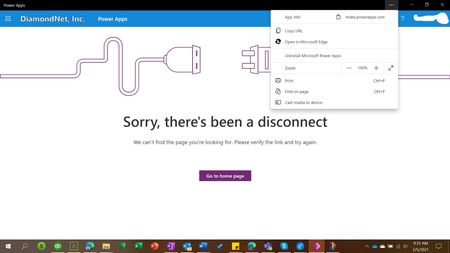
I would like to install the Power Apps site as a web app which I can successfully. However, when I close the web app and open it I get the error you see below. Same thing happens if I pin the site to Windows Start and I open it from there. I noticed that when the site is opened as a web app or from the pinned shortcut it opens https://make.powerapps.com/index.html but when I go to http://www.office.com and choose Power Apps from the list of apps the address is https://make.powerapps.com/environments/Default-bunch/home. INote: I didn't include the actual "code stuff". So when I put that address into InPrivate Edge it brings up the M365 login. That means the web app is not re-directing to login which brings up the error page. Anyone know if this is a known issue?Solved3KViews0likes10CommentsRe: Unable to open PDFs in Acrobat Reader when clicking Open File
Deleted Thank you for the reply. 1. Version 84.0.522.63 (Official build) (64-bit) 2. Yes I submitted feedback but only received acknowledgement that it was received. 3. Where is the "Always Open" option that you are referring to? If you are referring to clicking the three dots and choosing "Always Open" for Adobe Acrobat that option does not exist. Even though I have removed and reinstalled both Edge and Adobe Acrobat Reader.1.3KViews1like1CommentUnable to open PDFs in Acrobat Reader when clicking Open File
When a PDF is downloaded and I click open file it opens in Edge instead of Adobe Acrobat Reader. Adobe Acrobat is set as the default PDF and I can also double-click any PDF in File Explorer and it opens in Adobe Acrobat. I also clicked on the [ ... ] to the right of the Open file link and the option is not there to select Always open with Adobe Acrobat Reader. I have removed and re-installed Adobe Acrobat Reader as well as Edge and that does not resolve the issue. Any one else have this issue?1.4KViews0likes3CommentsRe: Missing Password Monitor in Edge Dev 84.0.502.0
Deleted Thank you for the reply. Thank you for confirming that Password Monitor was on the What's New page as well. I thought there for a minute I was seeing things! LOL! 🙂 Password Monitor is a great feature and very helpful. Looking forward to it's arrival. Will it be possible to manually scan the passwords I already have in the password list?1.5KViews1like1Comment
Recent Blog Articles
No content to show