User Profile

SannekeVisser
Copper Contributor
Joined Jul 26, 2022


User Widgets
Recent Discussions
Re: Get latest status on an overview sheet
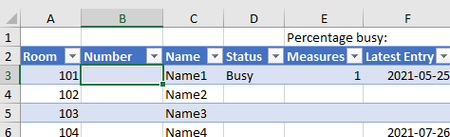
HansVogelaar Thanks a lot! A next question: I want a number in the selected cell. The number is a representation of the Status. The correspending number can be found in another table: Then with the number I want to be able to calculate what percentage is busy, and in the overview tab I want a row with pictograms (red(#2), yellow(#1), green(#0). When I try to do it now, it doesn't work. I use this formula: =SEARCH([@Status];Table3[Status];Table3[Code]) But it gives me the wrong code back, so I'm not sure where it goes wrong. This is what I have now: https://1drv.ms/x/s!AoVAAPcVWxf-heN4IYJxjTMSg4m5ew?e=bhfrYG1.7KViews0likes1CommentGet latest status on an overview sheet
Hey guys! I hope someone can help me out. I'm creating a table where I want excel to retrieve the latest information from another table. I have an overview worksheet where I want excel to show the latest updates out of the entry worksheet. This is the entry worksheet: This is the overview worksheet: So I'm now trying to create a formula for the C, D and E row. They have to retrieve the latest entry about a certain room of the table on the Entry tab. So it has to filter for room and for the latest entry date and then copy the information. I'm pretty stuck here. Can someone help out how I can reach that sort of automation? I'm looking forward to any help 🙂Solved1.9KViews0likes3Comments

Recent Blog Articles
No content to show