User Profile

Sochito
Brass Contributor
Joined May 05, 2018


User Widgets
Recent Discussions
Role of End User Team after Defender for Endpoint Rollout
Our Company is using SentinelOne (S1) as AV/EDR currently. SOC team had the full access of S1 environment. We have just started the pilot of Defender for Endpoint (MDE). Now the toolset contains Intune as well. May I know what is the best way to handle the administration because End User Team has the access of Intune? How others are handling this situation?131Views0likes1CommentRe: Defender of Endpoint on Comanaged Laptop
Thank you Michelariis, now the device is managed by Intune but behaviour is still the same. Endpoint Protection, device management workloads are moved to Intune for a pilot collection and the machines are member of that collection. Policy forced several Times behaviour is still the same Please share the location of of Device control logs98Views0likes0CommentsDefender of Endpoint on Comanaged Laptop
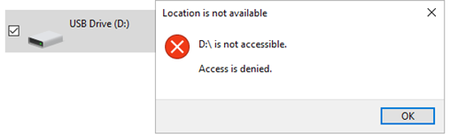
We are testing device control feature of Microsoft Defender for Endpoint (MDE). Onboarded a laptop to MDE only (not enrolled to Intune) - created two policies in Defender portal Attack Surface reduction - Device Control - this policy could never be successfully applied on the machine (Reason - https://eur01.safelinks.protection.outlook.com/?url=https%3A%2F%2Flearn.microsoft.com%2Fen-us%2Fmem%2Fintune%2Fprotect%2Fmde-security-integration%23windows&data=05%7C02%7Csseth1%40partner.jaguarlandrover.com%7Cc1eb100c05f84c2a685208dd33b733a4%7C4c087f801e074f729e41d7d9748d0f4c%7C0%7C0%7C638723584147546665%7CUnknown%7CTWFpbGZsb3d8eyJFbXB0eU1hcGkiOnRydWUsIlYiOiIwLjAuMDAwMCIsIlAiOiJXaW4zMiIsIkFOIjoiTWFpbCIsIldUIjoyfQ%3D%3D%7C0%7C%7C%7C&sdata=SH6sUNpTzk279WlHIPve9geieXYf5h6256SFwEA%2BxQA%3D&reserved=0 suggests that Device Control profile is visible in the Defender portal but isn't supported for devices managed only by Microsoft Defender through the Microsoft Defender security settings management scenario. This profile is supported only for devices managed by Intune.) AV - this policy successfully deployed and I could see the deployed config on the machine Onboarded to MDE and co-managed (Intune, SCCM) - Configured Endpoint protection workload to be managed by Intune. Created Attack surface reduction Device control policy in Intune portal - policy deployed successfully on the laptop. Connected the USB on the device it showed the following Left the device connected, after few hours, I could see the capacity, used storage of the USB, clicking continue and entering admin credentials also wont allow the access of the USB. Left the device connected overnight, and next Morning, I could double click on the drive and access the content, it directly allowed me the read-write access of the USB. Unplugged and re-plugged the USB, then it shows USB is not accessible I am not able to understand this inconsistent behaviour, please suggest if I am doing something wrong. Also, instead of Access is denied messaged, can we display a message like "As per the corporate policy, you cant access the removable devices." when the user tries to access a USB. Please help.273Views0likes3CommentsUSB type C storage device restriction
Hi All, I am new to Defender for Endpoint, I need to understand. Can all features of Defender for Endpoint be used without Intune? Can Defender for Endpoint restrict/block USB type C storage devices? Can Defender for Endpoint Allow a machine to access any USB device based on Vendor ID/Hardware ID? Can Defender for Endpoint Allow a USB device to be accessible from any machine or a group of machine?58Views0likes0CommentsRe: Block Sensitive Data Upload to External SharePoint Online Tenants
Hi Dean, I tried to create a policy and can see the option for allowed/blocked Service domains. If I add the following two to allowed service domains, will it mean that sensitive documents will be allowed to uploaded to these two portals and except these two they wont be able to upload to other Sharepoint domains? techs.sharepoint.com village.sharepoint.com250Views0likes1CommentCloud Discovery Dashboard not updating
We successfully integrated the MDCA with Zscaler on 10th Sep 10 AM. From that Time until 11th Sep 9:08 PM, data was getting updated in the console but after that it is showing Updated on Sep 11, 2024, 9:08 PM. Under Governance log - last parse Cloud discovery log shows success at 11/9/2024, 21:07:51. There is nothing in pending or failed state. Automatic log upload (under settings) shows 362 uploaded logs, last data received 11 Sep 2024, Modified date 13 Sep 2024. Please suggest why Dashboard is not updating.SolvedWhich License for Microsoft Purview Information Protection Client?
May I know which License is required to use Microsoft Purview Information Protection Client in Enterprise? Is there a Microsoft Document available to confirm that? How would the external Users be able to access the document protected by this client? Are there any drawbacks of using this Client?1.5KViews0likes5Comments
Recent Blog Articles
No content to show