User Profile

jwenzCHUBB
Copper Contributor
Joined Apr 28, 2022


User Widgets
Recent Discussions
Re: Excel Pivot Table Column
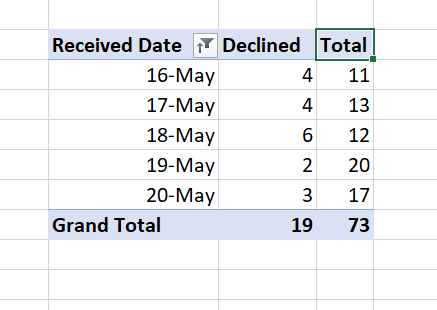
Thanks, I'm an amateur with this. Can you help more specifically? The total is calculated by the sum of rows existing under the same received date, Using the example above: On May 16th, there were 11 total items created and 4 of them were declined. Thus 7 is the number I would like to have in another column. The reason being is I plan to automate an email that sends out the pivot table and although it is quite easy to do the math, my boss is asking otherwise. I can add a column to the table the pivot table is pulling from if this might help? Thanks for the help and suggestions as always!1.2KViews0likes1CommentExcel Pivot Table Column
Hello all, Is there a way to make my own column in a pivot table? I'll provide the existing table for reference: I would like to make a column that simply outputs the difference between "Declined" and "Total" I know I can make a column next to it that easily does this but if the column can somehow exist within the existing table, that will be of great help. Thank you!1.4KViews0likes3CommentsTable to Table help
Hi all, I have a project I need help with. I have two tables. They each have one column in common - that is the Name column. The rows are not in the same order. Now in Table A, there is a column called Declined and it is marked with "Yes" or "No" I want to be able to add this Declined column's information to Table B without going through each row (There are about 500) Therefore, I need to match the Project Name in Table B and Table A, then lookup the status of the Declined column ("Yes" or "No") in Table A and be able to input that into a new column in Table B. Thanks for your time and help!Solved1.4KViews0likes2CommentsRe: Excel Loops to find Integers in a Sequence
Yes, very good point. HOWEVER the data is being populated into the cells via a Microsoft Forms entry and therefore will show up as this string in the cell B4. I used power automate and it's being sent to Planner Tasks and if I just had 5 10 15, the formatting would be off. HOWEVER now that I'm typing this, maybe I will just input the "$" "m" into the planner task and do what you're saying on individual form entries.... Thanks for the new perspective haha. I'll work on that but if anyone does want to provide how to do it, that'd be a cool learning experience.1.4KViews0likes0CommentsExcel Loops to find Integers in a Sequence
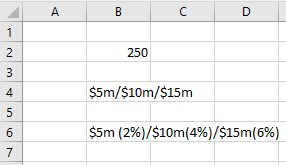
Hello Helpful People, I need to apply an excel formula to a string of data. Here is a screenshot of what I am working with: In the sheet, Cell B2 will be automatically input as well as cell B4 in the exact format shown above. I am hoping to create a formula that produces what is seen in cell B6 as opposed to doing the percentage calculations and typing it out every time. I need to loop through B4, find the different integers that are separated by the $m/ characters and then be able to do the simple division and concatenate the text as seen in B6. Anyway this is possible will be greatly appreciated and save me tons of time. Thanks so much! -JW1.5KViews0likes3CommentsCreate a Chart from number of items per day
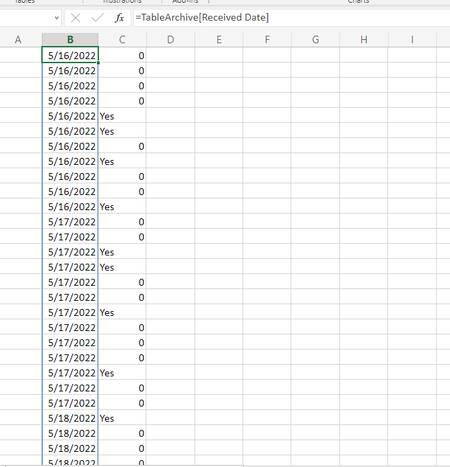
I have a table that is updated daily depending on active projects. There are - on average- 10 new projects a day. I would like to create a chart that shows off the daily volume of new projects. Please see screenshot below. In column B, I am spilling the Received Date and in Column C, I am spilling a Yes or No associated with if we accepted the project. It would be great to possibly create a Stacked Column Chart in which each value would be amount of projects each day, and the Column was split and showed how many were accepted and, on the other hand, how many were denied. I appreciate your time. Thanks!Solved9.3KViews0likes1Comment
Recent Blog Articles
No content to show