User Profile

Play_box
Copper Contributor
Joined Mar 09, 2022


User Widgets
Recent Discussions
Exchange Connectors and Basic Authentication
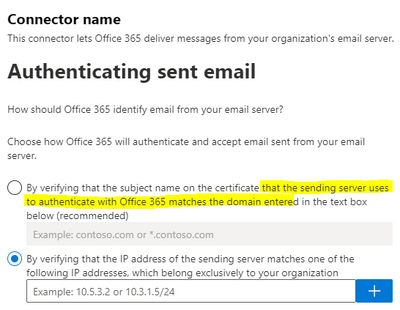
Hello all, My office has an older Konica Minolta Printer Scanner Bizhub and it appears to only support SMTP email configuration. With the deprecation of Basic Auth (and SMTP.) I am trying to find a solution for the email feature for the device. Would an Exchange Connector still allow the emails to flow if its validating the sending IP address range? I specifically asked about the IP range because the recommended "Certificate method" actually mentions User Authentication in the brief description where IP range does not. Obviously IP range is not ideal for risk of spoofing an IP... but it would nice to have an option in hand. Other suggestions for getting around device limitations for modern auth. are welcome.2.3KViews0likes1CommentExchange Outlook Settings Cloud Save
Hello all! Need some assistance in understanding the "Store my Outlook Settings in the cloud". I've tried the google search and didn't find quite was I was looking for. I have had two users recently report odd issues in their Windows Outlook clients (Office365 Business). Two users reported outbound emails getting stuck in the outbox and the other also reported Sent emails not being sent to the Sent folder. After searching I found the configurations for these in the Outlook client but could nots save the settings. Ref: Cloud Save Setting: Outlook > File > Options > General > Cloud Storage Options Sent Email Folder: Outlook > File > Options > Mail > Save Messages Outbound emails Setting: Outlook > File > Options > Advanced > Send and Receive Found a post saying to disable the Cloud Storage Options and then I was able to set them locally. My Question is, is there a method to review/update the Cloud Settings as an Admin. My guess it might be Exchange PowerShell only (doubt there is a UI for it). I can't explain why the change happened; but clearly something went wrong with the cloud settings user profile. I would like to get ahead of this issue before more users are impacted. Mostly want to review the cloud settings for each user(s), and update the settings to standardize the deployments. If there is not a PowerShell get/update cmdlet what is the best way to update these settings? I'm afraid to re-enable the feature and wipe out the local configuration. In theory the cloud save seems like a good idea to standardize deployments, I would hate to disable it. That said, does anyone know a method to disable the feature for the organization? Thank you Richard8.3KViews1like4Comments
Recent Blog Articles
No content to show