User Profile

Kevin_Burchell
Copper Contributor
Joined Nov 16, 2021


User Widgets
Recent Discussions
Re: Find and replace apostrophe
Hi, thank you. I have made some progress. I have used the formula to create the new data below the original data (if is very difficult as I have 1400 cases). However, when I try to copy the new data into where the old data was (or delete the old data cells and shift up), everything disappears and I have to start again. I need to do this so that the new data is in amongst the rest of the original data that I want to keep. Can you tell me a way to use the Find and Replace function to do this. Is there something I can put in Find that will do this for me. It seems so simple. Thanks for your help, sorry to take up your time. Thanks Kevin12KViews0likes2CommentsRe: Find and replace apostrophe
Hi OliverScheurich Thank you. You are operating at a level that is way beyond me! Can I ask: in =IF(ISTEXT(A2),1,A2) I can see that you specify A2 but I am wondering how you are specifying F12. Does that make sense? BTW, I do not have any cells with numbers in them, only cells with text. Cheers Kevin13KViews0likes4CommentsRe: Find and replace apostrophe
Hi again, could I ask a follow-up question. I have a bunch of cells with text in (different text in different columns) (and some without) and I would like to change all the cells with text in to 1. Can I easily specify 'find any text' and replace with 1? Thank you.16KViews0likes6CommentsRe: Find and replace apostrophe
Hi there, thank you. Yes, I know how to use Find and Replace. However, the apostrophe that I type into the Find box is not recognised as the same as the apostrophe that is in the data. So I get the Cannot find a match window. I am not sure that the wildcards will help with this. Any other ideas? Thank you for responding.15KViews0likes0CommentsFind and replace apostrophe
I am trying to use find and replace but the version of the apostrophe that is in the data (I need to get rid of that to do tests) is not recognised by the apostrophe that you type into the Find box. Does anyone know a solution to this challenge? Thank you.Solved18KViews0likes11CommentsDownloading to Excel
Hi everyone, in my Form survey, I have some questions that have multiple answers and more than one can be selected (standard stuff). When I download my data to Excel, the multiple answers to each question all get dumped in the same column, which makes it very hard to count and analyse them. Does anyone know how to get the different answers to automatically show in different columns in the excel download? Thank you.521Views0likes0CommentsRe: Bar charts switch order
Hi Riny Thank you. Forgive me, I am confused. You say format the categories in reverse but you have formatted them (in the spreadsheet) in the right order. Also, I cannot get the chart properties to show. In one of my charts, I have now used 'categories in reverse order' in Chart elements-Format axes to get the categories to reverse. However, I cannot see how to reverse the values. Anyway, thanks for your help, all the best Kevin840Views0likes2CommentsBar charts switch order
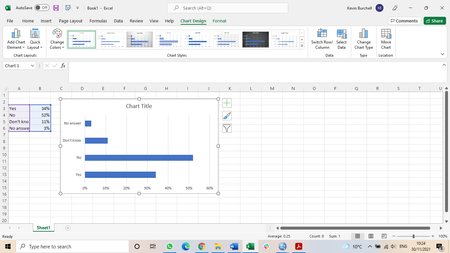
Hi everyone I wonder if someone can help with this challenge that has bugged me for a long time. I make a lot of bar charts in Excel. However, when I set up the data in a spreadsheet, the order of the categories is always reversed in the bar chart. You can see this in the screenshot. Can anyone tell me how to avoid this? Thank you! Kevin917Views0likes4Comments
Recent Blog Articles
No content to show