User Profile

Jas0211
Copper Contributor
Joined Nov 02, 2021


User Widgets
Recent Discussions
Re: SharePoint Online Language Functionality
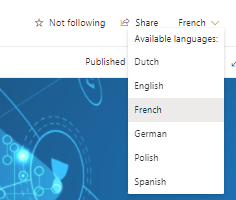
MartinLaplante Thanks for your quick response Martin. I think you're helping us to get to the bottom of this, but I'm not sure you understood what we're doing - sorry if I didn't explain it clearly. Pages have been migrated into SP Online The logged in user has a default language of English We visit a page "page A" from a link in Excel - this page is the German translation of a page with multiple translations and a base language of English. Checking to the top right dropdown (but not changing it) I confirm I have German set there. The German "Page A" has links on it, in a quick links web part - the links navigate to the base English page. What should happen is that after clicking the link on "Page A" to go to "page B" , you end up on the German version of the following page. You get to the French version instead. French is now shown in the dropdown (without you doing anything). If we do something slightly different it resolves itself [Start the same] We visit a page "page A" from a link in Excel - this page is the German translation of a page with multiple translations and a base language of English. Checking to the top right dropdown (but not changing it) I confirm I have German set there. [change from here] Now we use the dropdown and click on the English version of "Page A", then click on a link, it navigates me to the English version of "Page B" which is correct. Go back to the German "Page A" Click on the link on "Page A" to go to "page B" , this time you get to the correct German version. So we think it might be related to the cookie that you mention? Somehow it's not being set correctly. Please can you suggest how we could resolve this issue?2.7KViews0likes2CommentsSharePoint Online Language Functionality
Hi I am working on a migration project with a site in multiple languages. A French Site page contains Quick links. If you click on a quick link, it should navigate to another French page but instead it is going to a English version of the page. The French version of the page is available but SharePoint is not picking it up. If I use the dropdown to navigate to another language and click on the quick link again, the language functionality resets and is working correctly, E.g Spanish page quick link navigates to another Spanish page. Therefore it is only the first time I access any language page that I am facing this problem. I have tried to reset the default language of the User but this has not resolved the issue. The URL for these language site pages are being accessed from a excel list, does this potentially affect the functionality?3.1KViews0likes4CommentsM365 group-disable permissions for group Members to add other members
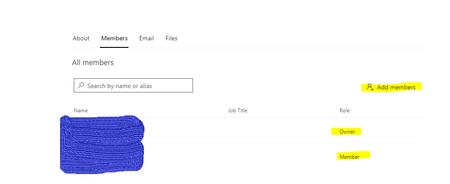
Hi, I created a M365 private group in the admin center. In outlook, if I open the group, in the 'Members' tab, both group Owners and group Members have permissions to add new members. Is there a way I can restrict the permissions so that only owners can add new members?1.5KViews1like3CommentsHub to Hub association in SharePoint online
Hi, I have 2 different hub sites and I have applied the new Hub-to Hub association. The roadmap Feature ID is 85613. On the News Web Part on one of the Hub sites, I have selected the 'All sites in the hub' for the News Source. However, the news from the second hub site does not appear in the News Web Part. Furthermore, the Filter functionality for the managed property is not being applied at all. Is it possible to filter news from different hubs if the new hub-to hub association has been applied?1.2KViews0likes1Comment
Recent Blog Articles
No content to show