User Profile

josvds
Brass Contributor
Joined Sep 22, 2021


User Widgets
Recent Discussions
Re: OneDrive On-Demand issues Server 2019 with FsLogix
Thanks a lot, this made me dive deeper inside the registry setting, after adding the missing registry settings compared to the other server, seams to resolve the issue. Within "HKEY_LOCAL_MACHINE\SOFTWARE\Microsoft\Windows NT\CurrentVersion\Notifications\Data" we were missing 4 entries. After copying these, it seamt to work. Ref: https://borncity.com/win/2020/08/04/windows-10-2004-onedrive-issue-no-access-after-upgrade/ Besides this, we also executed the steps below which helped as well. - Stopped OneDrive - Removed %localappdata%\Microsoft\OneDrive\settings\Business1\global.ini - Started OneDrive5.1KViews0likes0CommentsRe: Issue OneDrive OnDemand terminal, fslogix
Hi.. Thanks for the response, we found out that our issue was related to registry keys missing. See https://techcommunity.microsoft.com/t5/onedrive/onedrive-on-demand-issues-server-2019-with-fslogix/m-p/3900949#M11228. Besides this we noticed also that we sometimes have issues if the `%localappdata%\Microsoft\OneDrive\settings\Business1\global.ini` is containing incorrect information. After stopping OneDrive, removing this file, starting OneDrive, we resolved also this issue. Perhaps this helps?2.3KViews0likes1CommentOneDrive On-Demand issues Server 2019 with FsLogix
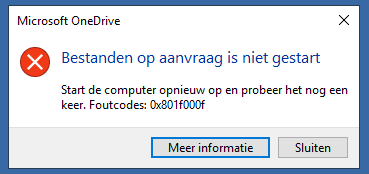
We are using Windows Server 2019 (1809 17763.4737) RDSH Pool's with FsLogix (2.9.8440.42104) since a couple of weeks. We are now trying to enroll OneDrive, so we can start migrating the data. But we are experiencing issues with OneDrive and specially the on-demand functionality. Some servers it shows up, some it doesn't. Today, we even got the error below: The page of Microsoft shows the engilish version https://support.microsoft.com/nl-nl/office/files-on-demand-fout-bij-het-openen-van-een-onedrive-alleen-onlinebestand-09c63bfd-1bc8-4029-9989-afc8ab24f9d1 Based on https://www.kapilarya.com/fix-onedrive-cannot-connect-to-windows we found that there is a discrepancy between the servers. Most of the servers have this registry key, but this one with issues, doesn't. reg query "HKLM\Software\Microsoft\Windows NT\CurrentVersion\Notifications\Data" /v 41960B29A3BC0C75 So we have tried to execute Fltmc attach cldflt C: but then we are getting this Attach failed with error: 0x801f0013 Kan het opgegeven filter niet vinden. Anyone some sugestions?Solved5KViews0likes2CommentsHow do Windows updates work out of the box?
We are curious how the Windows update is working out of the box. Because what is required to setup and what will work out of the box? We see inside MEM updates like W10/W11, Feature updates, Quality updates and Driver updates. For example: - I have bought a new Windows Professional machine, will this out of the box already automatically keep installing all updates? - I connect this device to a clean Microsoft Tenant with Intune, there is nothing configured regarding these updates. Will it then still automatically update all these things? - I configure a Update Ring, but do not configure features, quality nor driver policies. Will it now still update all features, quality updates and drivers for this system or will it not? - When configuring a feature policy, will the device then be forced to update to this version and still install newer versions, or will this device stop at this feature update?652Views0likes0CommentsRe: Unknown Win32 Error code: 0x86000011
We figured out that the user we used (administrator of the tenant) didn't had a Intune license. When switching to another user which has a Business Premiun licenses made the issues go away. The error description didn't really help me figure this out, but found this on a page of Rudy Ooms. But now, after a couple of reboots, we are running into a 0x80072f76 error. Inside the event log its shown as MDM Session: OMA-DM server message parsing failed. Result: (Unknown Win32 Error code: 0x80072f76)..7.8KViews0likes1CommentUnknown Win32 Error code: 0x86000011
We are having a problem with one device inside a tenant of our customer. This device is fully updated to the latest version W11 22H2. We are trying to push changed to the firewall policy, but this device doesn't recieve them. Inside the log Microsoft-Windows-DeviceManagement-Enterprise-Diagnostics-Provider/Admin we see several errors: - MDM ConfigurationManager: Command failure status. Configuraton Source ID: (B44EB90D-E2ED-4673-B098-C5D3F1943D80), Enrollment Type: (MDMDeviceWithAAD), CSP Name: (DeviceStatus), Command Type: (Clear: first phase of Delete), CSP URI: (./Vendor/MSFT/DeviceStatus/Antispyware/Status), Result: (Unknown Win32 Error code: 0x86000011). - MDM ConfigurationManager: Command failure status. Configuraton Source ID: (B44EB90D-E2ED-4673-B098-C5D3F1943D80), Enrollment Type: (MDMDeviceWithAAD), CSP Name: (DeviceStatus), Command Type: (Clear: first phase of Delete), CSP URI: (./Vendor/MSFT/DeviceStatus/Antivirus/Status), Result: (Unknown Win32 Error code: 0x86000011). - MDM ConfigurationManager: Command failure status. Configuraton Source ID: (B44EB90D-E2ED-4673-B098-C5D3F1943D80), Enrollment Type: (MDMDeviceWithAAD), CSP Name: (DeviceStatus), Command Type: (Clear: first phase of Delete), CSP URI: (./Vendor/MSFT/DeviceStatus/TPM/SpecificationVersion), Result: (Unknown Win32 Error code: 0x86000011). - MDM ConfigurationManager: Command failure status. Configuraton Source ID: (B44EB90D-E2ED-4673-B098-C5D3F1943D80), Enrollment Type: (MDMDeviceWithAAD), CSP Name: (DeviceStatus), Command Type: (Clear: first phase of Delete), CSP URI: (./Vendor/MSFT/DeviceStatus/Firewall/Status), Result: (Unknown Win32 Error code: 0x86000011). - MDM ConfigurationManager: Command failure status. Configuraton Source ID: (B44EB90D-E2ED-4673-B098-C5D3F1943D80), Enrollment Type: (MDMDeviceWithAAD), CSP Name: (TenantLockdown), Command Type: (Clear: first phase of Delete), CSP URI: (./Vendor/MSFT/TenantLockdown/RequireNetworkInOOBE), Result: (Unknown Win32 Error code: 0x86000011). - MDM ConfigurationManager: Command failure status. Configuraton Source ID: (B44EB90D-E2ED-4673-B098-C5D3F1943D80), Enrollment Type: (MDMDeviceWithAAD), CSP Name: (DMClient), Command Type: (Clear: first phase of Delete), CSP URI: (./Device/Vendor/MSFT/DMClient/Provider/MS DM Server/FirstSyncStatus/SkipUserStatusPage), Result: (Unknown Win32 Error code: 0x86000011). We cannot find what the cause of these errors are.Solved6.8KViews1like2CommentsRe: AppReadiness Service and Black Screen
We have tried this, but for us this didn't help. We are using Windows 2019 with RD-Broker and RDSH servers and FsLogix. When writing this, we tried https://msendpointmgr.com/2021/06/17/fslogix-slow-sign-in-fix/ and this worked for us for a second, we only deleted the Notifications key, then it worked fast, when we created the key again it was slow again. So really strange, we stil haven't found a well working solution. We are now between 30-60 seconds logon time.15KViews0likes0CommentsRe: Intune compliance issues Windows 11 22H2
To bad, for me this didn't work either. But what we do notice is when we disable "System Management Command" inside the BIOS (underneath Security) then this device fixes at least its error regarding "Require Secure Boot to be enabled on the device". Perhaps "Require BitLocker" takes a bit more time. But one of the devices had this disabled and became compliant. Its worth checking perhaps.9.1KViews0likes1CommentRe: Intune compliance issues Windows 11 22H2
We have played around (so time consuming issue) with different updates. So one of the devices was reinstalled with a new Windows drive by USB. One was updated with adding the latest quality update inside MEM. One was updated to the preview build of MS. Now we see that one with the preview seems to become compliant. When looking at the difference in updates, we see KB5022360. We found https://blogs.windows.com/windows-insider/2023/01/17/releasing-windows-11-build-22621-1192-to-the-release-preview-channel/ with : We fixed an issue that affected certain systems that had firmware Trusted Platform Modules. (TPM). This issue stopped you from using AutoPilot to set up those systems. So perhaps this preview will fix the issue, so trying this on one more device.9.4KViews0likes0CommentsRe: Intune compliance issues Windows 11 22H2
rahuljindal Thanks for your response. Not sure what you meen by `bitlocker management events`, but looking at `BitLocker-API` events inside event viewer, I see this: --- BitLocker Drive Encryption recovery information for volume C: was backed up successfully to your Azure AD. --- BitLocker Drive Encryption recovery information for volume C: was backed up successfully to your Azure AD. --- A trusted WIM file has been added for volume C:. -- BitLocker resealed boot settings to the TPM for volume C:. -- Regarding the MSInfo question, it shows Enabled.9.4KViews0likes2CommentsIntune compliance issues Windows 11 22H2
We have unboxed several new "HP ProBook 450 G9" devices and connected them to MDM with AutoPilot. We installed these devices and they should be marked compliant based on the settings we have applied to other devices as well. But these devices are all having the same issue with compliance, because they get "Require BitLocker" and "Require Secure Boot" failed. We have installed all updates, we upgraded these devices to W11 22H2. We have checked but the disk is encrypted and we also checked the steps written on this page https://learn.microsoft.com/en-us/troubleshoot/mem/intune/device-protection/secure-boot-enabled-device-shows-not-compliant. "manage-bde -protectors -get C:" returns TPM: PCR Validation Profile: 7, 11 "Get-Tpm" returns TpmPresent : True TpmReady : True TpmEnabled : True TpmActivated : True TpmOwned : True RestartPending : False ManufacturerVersion : 7.2.3.0 ManufacturerVersionFull20 : 7.2.3.0 "Get-BitLockerVolume -MountPoint C" returns VolumeType Mount CapacityGB VolumeStatus Encryption KeyProtector AutoUnlock Protection Point Percentage Enabled Status ---------- ----- ---------- ------------ ---------- ------------ ---------- ---------- OperatingSystem C: 237,29 FullyEncrypted 100 {RecoveryPassword, Tpm} On "Confirm-SecureBootUEFI" returns True What can we do to fix this?31KViews0likes93Comments


Recent Blog Articles
No content to show