User Profile

devReever
Copper Contributor
Joined Sep 14, 2021


User Widgets
Recent Discussions
Re: In-dialog box not showing on IOS devices
Hi Prasad_Das-MSFT, We fixed the issue. const replyActivity = MessageFactory.text('Hi'); // this could be an adaptive card instead replyActivity.channelData = { notification: { alertInMeeting: true, externalResourceUrl: 'https://teams.microsoft.com/l/bubble/APP_ID?url=<url>&height=<height>&width=<width>&title=<title>&completionBotId=BOT_APP_ID’ } }; await context.sendActivity(replyActivity); We were replacing the title (line 5) in the externalResourceUrl by the name of the class that was corresponding to the meeting. And the name had spaces in it so it wasn't showing the bubble on IOS devices but in others it was. Thanks for your help again and hope it will help if anybody get the same issue like us.2.8KViews0likes0CommentsRe: In-dialog box not showing on IOS devices
Prasad_Das-MSFT We tested the application during a meeting and the application showed no bubble or in-meeting dialog. When we push any agenda it shows on the chat section only but nothing in the meeting. We tried it also on the android device and desktop and the same things happen. What is supposed to be the behavior of the application? And here's the details of my Teams application on IOS. Thanks!2.8KViews0likes2CommentsRe: In-dialog box not showing on IOS devices
Prasad_Das-MSFT I just tested the demo app you sent me. I'm not sure what's the version details you want me to share you exactly but here's some screenshots of me using the bot in my iPhone. Let me know if you need more infos and which ones please. Thanks for your help,2.9KViews0likes4CommentsRe: In-dialog box not showing on IOS devices
adapter.continueConversation(ref, async(turnContext) => { const replyActivity = MessageFactory.text('The professor sent the signature requested.'); replyActivity.channelData = { notification: { alertInMeeting: true, externalResourceUrl: `https://teams.microsoft.com/l/bubble/${_config.botTeams.APP_ID}?url=${url}&height=600&width=500&title=${course.NAME}` } } await turnContext.sendActivity(replyActivity); }); This is the code we're using to send the bubble to microsoft so they can show it to every devices. If it can help2.9KViews0likes6CommentsRe: In-dialog box not showing on IOS devices
Hi Prasad, with the application made by Microsoft like polls the in-meeting dialog box works fined on both mobile devices. But can you try by using an custom application like us. The in-meeting dialog shows only on android device and not on IOS device.2.9KViews0likes7CommentsIn-dialog box not showing on IOS devices
Hi, We're facing an issue in the custom application we're creating. The application is supposed to work only during the meeting for classes to get the attendance of each student and professor of the meeting. The professor has in the side pannel a button to send the dialog box in the meeting to let everybody present in the meeting to sign their attendance. The dialog box is showing on every device (desktop/web/android) except on IOS device. Does anybody already had this issue and know how to fix it or can help us? Thanks for your help,SolvedConfigurable tab not showing on mobile
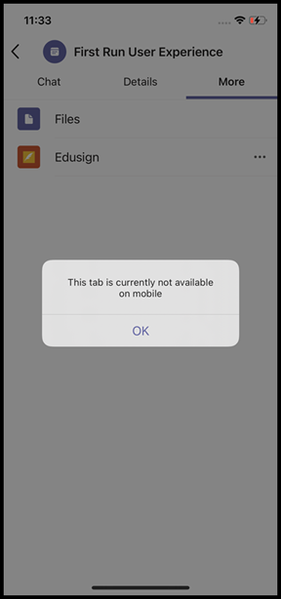
Hi, We're creating a custom app in Teams. We have a configurable tab that isn't showing on mobile device except when we put the "team" scope in the manifest for the "configurableTabs". Except our application isn't meant to be used on teams but only in meetings. If we don't have the "team" scope and only the "groupchat" as it is what the app is based for, the application is showing in the meeting but when we click on it Teams shows us an error that say this: Anybody got an idea on how can we fix this error? The "team" scope ain't a problem for us but it seems to be a problem for the Microsoft App submissions. Thanks for your help803Views1like0Comments
Recent Blog Articles
No content to show