User Profile

TheDub
Iron Contributor
Joined Aug 18, 2021


User Widgets
Recent Discussions
How - and when - does the accumulator of SCAN get reset?
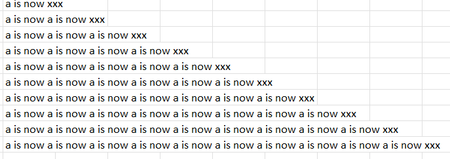
This was inspired https://www.linkedin.com/posts/global-excel-summit_fill-blanks-with-value-from-above-activity-7279702477438955520-EysR?utm_source=share&utm_medium=member_desktop; I figure that this is a better forum to discuss the issue I would like to raise. In a nutshell, the assignment discussed there was to fill the blanks in a "gappy" column by repeating each visible value enough times to populate the empty cells beneath each visible value until the next visible value is reached and then continue repeating using that next value. The answer (as modified by PeterBartholomew1) in that discussion was: =SCAN("", names, LAMBDA(accumulator, current, IF(current <> "", current, accumulator))) In my attached file, "names" refers to the list of names in A1:A10 (that is, including the otherwise blank A10). A couple of things I don't understand: First (and probably simpler) is the function of the initial value of the accumulator. Whether it's "" or "xxx" (which I used in the attached file) the output stays the same. So why is the accumulator necessary to begin with? Or does it imply that - for that particular purpose - SCAN is not the right approach? Second, whether the initial accumulator value is "" or "xxx", it somehow gets reset as we go down the column and its value becomes equal to the value of the most recent visible row cell; it doesn't "accumulate" - which to my (obviously over-simplistic) mind would imply some sort of concatenation of all previously visible row cells. To demonstrate, I changed the formula to just =SCAN("xxx",names,LAMBDA(a,c,"a is now "&a)) and the output became In this case, there is some form of "accumulation" - but even that doesn't take the form I would expect. As the title says: how and when does the accumulator gets reset? That's an issue I ran into in various other scenarios so I would like to understand it once and for all, if possible...Solved376Views0likes5CommentsRe: Another Issue with previous row/column references
I'm still digesting your and djclements' second answer, but in the interim If it makes anyone feel better about this, it took be an age to develop it and rederiving it from scratch would still be challenging. I'll take that to feel better!808Views1like0CommentsRe: Another Issue with previous row/column references
First - to Harun24HR: thanks for the answer; seems djclements beat you by about 10 minutes (and added something I'll get back to below) so he should get the credit for best response. Second - to myself: a strong and loud for not thinking about SCAN(); hopefully this won't happen again (but I doubt it...) Third - to djclements: thanks for you answer. Yes, I was indeed thinking about the next step: using the answer (once I have it) dynically over a number of rows with different starting values; I just usually like to ask about one issue at the time in order to keep it in focus. But now that you brought that up - yes, that works too (and thanks again). I have to say, though, that I hate that Excel makes us use crutches like TEXTJOIN()/TEXTSPLIT() (and their cousin from a different grandmother - FILTERXML()....) just to avoid the dreaded array-of-array issue. It would interesting to see if @Peter Bartholomew could unleash his thunks on this (although I'm not sure I entirely - or partially - understand them either). Which brings us to the next interesting variation on this: in your answer the reference row/the array being SCANned is always Row 1. What if we wanted to make that dynamic as well, so that each row scans the row immediately above it (or even, perish the thought, the Nth row about it)? Is that going to be an array-or-arrays-of-arrays problem ?904Views0likes3CommentsAnother Issue with previous row/column references
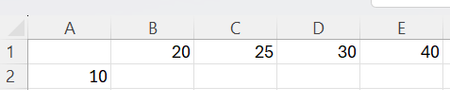
This is a (simpler, I believe) variant of referring to PREVIOUS rows/columns issue but I still can't get my head around it: Given this: I want to insert in B2 a dynamic function which will show in each cell (B2:E2) the Row 1 value of the current column minus (or plus or whatever) the Row 2 value in the immediately preceding column, resulting, in this case, in 10 15 15 25 Using the bleeding edge version of 365.Solved1.3KViews0likes6CommentsRe: Creating a Sliding Commission Scale in Excel
... there is an important point that modern Excel supports problem solving which is far closer to programming than it is to traditional spreadsheet authoring on the grid. Entirely agree - though I'm still now sure what this will do the future of Excel and its massive number of users. Will they change their approach to problem solving or just drop out? To solve the new problem, I first Curried the Commissionλ function Yes, tomorrow morning when my colleagues come back from their (US) Memorial Day weekend I'll try to explain this one to them and see where that takes me1.8KViews0likes0CommentsRe: Creating a Sliding Commission Scale in Excel
Not to hijack the question, but PeterBartholomew1, here's a fun (to me at least) question - how would you modify your COMMISSION function to work in reverse: given a final commission (460, for example) find the sale amount (3000)?2.5KViews0likes3CommentsRe: Referring to PREVIOUS rows only within BYROW() (or any other function)
Good morning all and sorry for the delay. I was trying out the solutions - both to really understand them and to see how they work with real world data. I accepted PeterBartholomew1 first reply, since it was the first and used the same idea for the second situation (as did OliverScheurich in his). Some observations - the basic approach seems to be (i) clone the existing array, (ii) push it down (I'm using old-style stack push/pop terminology here...) by adding a 0 on top, and (iii) lop off the bottom of the new stack. You up with the with two arrays/stacks - with the 2nd shifted down one position from the first. Good solution and it works. But like other situations with modern day Excel, it feels more like a workaround. In real life, I have to use it twice - once to determine the max() of the previous rows of one column and once again to determine the running total of the previous rows of another. Then make adjustments to eliminate potential undesired results (negative numbers, for example). I won't bore everyone with the details but at the end, after a lot of tinkering, it works but looks ugly. (As an aside, I tried to see how this would be resolved with python - that solutions seems a little cleaner (and in the process learned about "float('-inf')" which was entirely new to me). If I have the time and brain power, I'll try to use it with a python-in-Excel approach and, if successful, post it here for everyone's edification!). Final note - although not substantively similar, this experience had, for me, the same feel as the one generated by the trials and tribulations with the "array-of-arrays" quagmire. The powers-that-be behind Excel really need to do something about the look-and-feel of these solutions. Unlike, say, python, where you're rarely (if ever) expected to share the source code with others, Excel has a strong social aspect to it - you usually need to share the "source code" internally and sometimes externally; it's hard to believe I can explain this to anyone else (even if fairly Excel-savvy); they'll either have to take my word for it, or demand that it be redone "the old fashioned way". OK, I'm off the soapbox. Thanks everyone for your suggestions.1.9KViews0likes2CommentsReferring to PREVIOUS rows only within BYROW() (or any other function)
Apologies if this has been addressed previously, but I couldn’t find an answer. I believe the issue is the same for both situations below – which is the reason why I didn’t post two separate questions. Situation 1: you have a column of numerical values; for each row in the column, you need to determine if the current row is higher( lower) than values in all previous rows. Use case - if the current row is a new MAX()/MIN(), one action is taken (see next situation), otherwise nothing. Example: Current Value Expected Output 10 New Max! <---this being the 1st row, it’s a new max by definition 8 Same Old 9 Same Old 12 New Max! 11 Same Old Situation 2: you have two numerical columns. In Column 1 (by operation of other parts of the sheet), you will have either a 0 (zero) or a value which is higher than the sum/running total of all previous Column 2 values. The function needs to output a Column 2 value for the current row which is either 0 (if the current Column 1 row value is 0) or the current Column 1 value less the running total of all previous Column 2 values. Use case – say sales commissions are only paid when a new high sales figure is achieved (see Situation 1). If triggered, the commission amount (determined elsewhere) – less (i.e., after credit for) all previous commissions paid – is now payable; otherwise – the current commission amount is 0. Example: Current Value Expected Output 10 10 <---this being the 1st row, it’s a new high by definition 0 0 0 0 12 2 15 3 Both can obviously be achieved “manually” but I’m looking for a dynamic function (most recent version of Excel Insiders/beta). The data can be either in a range or table (whichever makes the function “cleaner”), but should allow the user to either add a row, or delete an existing row, without affecting the integrity of the calculation.Solved2.9KViews0likes10CommentsRe: A generalised Lambda helper function that return arrays of arrays using bisection.
I may well be running round in circles I can only imagine what you brain must feel like in your skull... I have written a BYCOL version that works will minimal modifications Can you please share that too? I would argue that if you successfully covered BYROW and BYCOL, you have covered 70%-80% of the array-of-arrays cases (at least in my limited experience) and made a major contribution to our mental health and welfare.9.8KViews0likes13CommentsRe: A generalised Lambda helper function that return arrays of arrays using bisection.
I must be dense (or my brain may have been scrambled by trying to wrap itself around the concept of thunks for so long) but let ask a simple question. You say: "it is intended to non-problem specific and hence reusable. ...the user provides a Lambda function that performs the required calculation as if BYROW would return the result.." So let's say I have range of three one-column rows each containing a first and last name, comma separated ("Elvis,Presley", for example). Trying =BYROW(range,LAMBDA(row,TEXTSPLIT(row,","))) results in your classic #CALC! and the admonition that "nested arrays are not supported". What do I need to modify in your attached workbook so as to get the desired output (a 2X3 array)? As you mention, this is not a specific request for help. In an ideal world (short of Excel resolving the array-of-arrays issue natively), I would have a black box into which I would feed the relevant array, the attack approach (by row, by column), the function to apply (TEXTSPLIT(), in this example) and the argument(s) required by that specific function (a delimiter, in this example) - and have the box spit out the correct outcome; something like: =blackbox(range,byrow,textsplit,",") One can only hope, right?9.9KViews0likes20CommentsRe: On the bleeding edge with “eta reduced lambda” functions
I guess I wasn't as close to the bleeding edge as I thought! When I posted the question, I was at Version 2401; after seeing your answer, I checked for updates, updated and - with Version 2402 - it now works! Thanks, Patrick!2.3KViews0likes1CommentOn the bleeding edge with “eta reduced lambda” functions
Buried in the announcement about New aggregation functions is a reference to “eta reduced lambda functions"; if in the Old Days we had to write: =BYCOL(C3:F6,LAMBDA(x,SUM(x)) we can now just use: =BYCOL(C3:F6,SUM) So far so good. This is really a great improvement in both writing and readability. Being curious, I wanted to see how it works in a named Lambda function. In the Old Days, I would use this: OldLam = LAMBDA(myrange, BYCOL( myrange, LAMBDA(col, SUM(col)) ) ); But trying to use the new eta lambda style, like this: NewLam = LAMBDA(myrange, BYCOL( myrange, SUM) ) ; doesn't work. I understand this is all beta, etc., but am I doing something wrong or is it a "feature"?Solved3.1KViews1like5CommentsRe: Sum With Multiple Arrays
Sorry for being late to the game... This is probably not really a formula question as much as trying to understand the logic behind your desired result: It seems the result is "double dipping", that is - it's giving credit for the same vehicle to more than one city. If you take February, for example - only 400 vehicles were manufactured that month ($C$4:$C$6). On the other hand, your desired result shows 700 vehicles for that month (($C$10:$C$12). Is that intentional?2.3KViews0likes2CommentsRe: SUMIFS not working with blanks.
I see; I didn't understand that My intentions when writing the formula were ... (ii) to include blanks as if they were 0%. With that being said, I must confess I still don't understand why using {"<99%","<>0"} brings C up to 43 units... And totally unrelated - happy new year! Thanks for your contributions to this forum - I learned a lot from them (among other things, that I still have a lot to learn).2.7KViews0likes0CommentsRe: Find one or more scattered cells in a range
So it was a brain freeze after all - and TEXTJOIN() was the answer. It feels a little hacky - I thought there would be some magic function to pinpoint a particular cell in an array if that cell meets/doesn't meet certain conditions, but I guess Excel isn't there yet... But it does work - and thanks!1.8KViews0likes1Comment
Recent Blog Articles
No content to show