Forum Discussion

SUMIFS not working with blanks.
- Dec 23, 2022
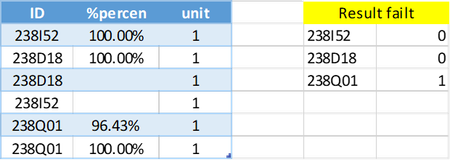
If you run 2021 or 365, in H17:
=SUM((Table1[ID]=G17)*(Table1[%percen]<99%))With other versions, to avoid validating the above as an array formula (Ctrl+Shift+Enter on Windows), in I17:
=SUMPRODUCT(--(Table1[ID]=G17), --(Table1[%percen]<99%))


My intentions when writing the formula were
(i) to base it on the SUMIFS function
(ii) to include blanks as if they were 0%.
That might or might not be the OP's requirement, but that was how I read it.
As for "the bizarre requirement that we surround the logical conditions with quote marks, why is the correct answer correct?", I too found the idea of presenting a logical condition as text somewhat strange and was not greatly attracted to the syntax originally. The key is to recognise that the text criterion value combines with a range in the previous argument to give a formula which the Excel calc. engine then evaluates.
An advantage of this is that each criterion value is evaluated individually, making it possible to calculate an array of results. An extreme example of this is
= COUNTIFS(list, list)
which returns a count for each item within the list.
Criterion values such as "", "=", "<>", "<", ">" read somewhat oddly but, in each case, one is comparing contents of the range against the null string. By convention, the null string appears to come between numbers and non-numeric characters.

I see; I didn't understand that
My intentions when writing the formula were
...
(ii) to include blanks as if they were 0%.
With that being said, I must confess I still don't understand why using
{"<99%","<>0"}
brings C up to 43 units...
And totally unrelated - happy new year! Thanks for your contributions to this forum - I learned a lot from them (among other things, that I still have a lot to learn).