User Profile

CGCal
Copper Contributor
Joined Jul 18, 2021


User Widgets
Recent Discussions
Re: Compliant issues with some Poly TC8 in Intunes
Finally Solved this. For anyone with similar issues, here is the solution that worked for us. Downgrade the Poly OS to a version prior the AOSP update like 4.5.1 using a custom url by Poly(HP). Afterwards, turn on AOSP in the Provider setting of the X30/50 and then let TAC do the final update to the latest version. the TC8 will also be updated. Afterwards, verify the Intune versions on TAC and sign in via Device Code.369Views0likes0CommentsCompliant issues with some Poly TC8 in Intunes
Hi, We have a couple of Poly X30/50 with their companion TC8 consoles. Now with the AOSP update finally available for these Poly Devices, I can see that some Poly devices are getting the updates, however, 2 TC8 suddenly stopped working and wont sign in nor pair with the X30 devices anymore The consoles keeps asking to sign in, but after the whole siging in process it'll fail and kicks me back to the sign in screen. On Intune admin portal, I can see that the device is being added but immediately unregistered and deleted due to non-compliant. But how is this possible when all the other TC8 devices are compliant. All Rooms accounts have Rooms Pro license. I called Microsoft Support and they are still investigating. But I have found some differences between the other TC8 that are working. The Authenticator and Microsoft Intune software versions are different. On the TC8 that are working the versions are Authenticator 6.2505.3166 and Intune 25.02.1. On the non working TC8 , it's Authenticator 6.2410.7269 and Intune 24.09.1. But on the TAC, there is NO updates available! Even if I set the update ring to Validation or switch to General then back, no updates are triggered. Factory-reset both devices also didnt solve the issue. Anyone also experiencing this issue?561Views0likes1CommentRe: Quick Steps in Shared Mailboxes New Outlook
Hi Rinspon , May I know which Outlook version you are using? Because does not have the option to choose an account when configuring the quick steps. I am using version 1.2025.527.300 (Production) and on the Targeted Release channel.482Views0likes0CommentsQuick Steps in Shared Mailboxes New Outlook
Hi all, Shared Mailboxes can finally be added as a seperate account and I was hoping that quick steps will work as before in the classic outlook. But that does not seem to be the case, anybody knows if it's even possible anymore in the new outlook or am I missing a toggle option?762Views0likes3CommentsPlanner due date dont get red highlight?
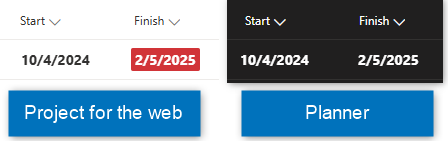
Microsoft is pushing hard to switch people over from Projects to Planner (on the web versions). But basic things like the due date highlighting is not visible on Planner. Am I missing an option somewhere? I am using both from the browser. Even on Teams client, it doesn't show the red highlighting. Not even on light mode. On the My Task, it shows, so it's likely a bug?63Views0likes0Comments
Recent Blog Articles
No content to show